
ToucanToco/weaverbird
ToucanToco/weaverbird has 107 GitHub stars and 16 forks. GitHot measured 0 stars in 24 hours and 0 in 7 days. Last checked 2026-11-14 07:14 UTC. Last push 2026-11-04.
实测星标增长
- 24小时
- 0
- 7天
- 0
- 15天
- 正在收集历史
- 1个月
- 正在收集历史
各周期内的星标净变化,周期相互重叠,并非每日新增。缺失的测量保持空白。星标代表关注度,不代表软件质量。
关于
A visual data pipeline builder with various backends
数据README.md
原文 Weaverbird
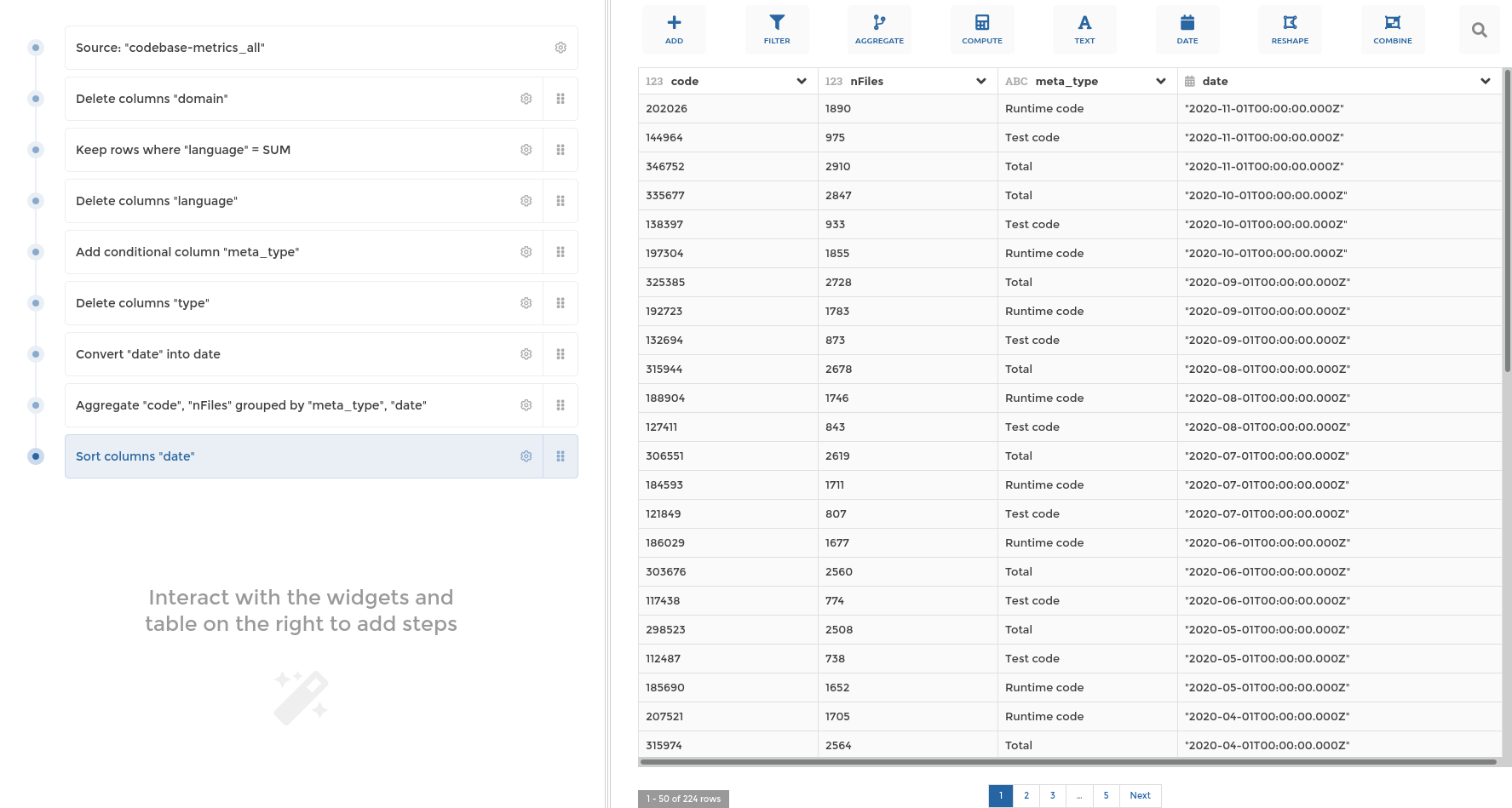
Weaverbird is Toucan Toco's data pipelines toolkit, it contains :
- a pipeline Data Model, currently supporting more than 40 transformation steps
- a friendly User Interface for building those pipelines without writing any code, made with TypeScript, VueJS & VueX
- a set of BackEnds to use those pipelines :
- the MongoDB Translator that generate Mongo Queries, written in TypeScript
- the Pandas Executor that compute the result using Pandas dataframes, written in Python
- the Snowflake SQL translator, written in Python
For in depth user & technical documentation, have a look at weaverbird.toucantoco.dev
or at the documentation's source files in the docs directory.
Badges
UI


Server


Project setup
yarn install
See Dockerfile for supported node version
Compiles target library
yarn build-bundle
This will generate an importable JS weaverbird library in the dist directory.
Important note: While we do our best to embrace semantic versioning, we do not guarantee full backward compatibility until version 1.0.0 is released.
Run your tests
The basic command to run all tests is:
yarn test
Lints and fixes files
yarn format:fix
yarn lint --fix
Build the API documentation
yarn build-doc
This will run typedoc on the src/ directory and
generate the corresponding documentation in the dist/docs directory.
Build and run the documentation website
The web documentation is powered by Jekyll.
All sources can be found in the docs folder.
To build and run the documentation with docker:
cd docs/
docker buildx build -t weaverbird-jekyll .
docker container run --rm -p 4000:4000 -v $PWD:/jekyll weaverbird-jekyll
Once the docs are be built, they'll be available on http://localhost:4000. Any change to a .md source
file will trigger a rebuild.
Enrich it!
put your
.mdfile into thedocsfolder. You can add a folder as well to better organization
into your
.mdfile don't forget to declare this at the beginning of the file :
---
title: your title doc name
permalink: /docs/your-page-doc-name/
---
to finish to get your page into the doc navigation you have to add it in `_data/docs.yml``
example :
- title: Technical documentation
  docs:
  - steps
  - stepforms
  - your-page-doc-name
Run the storybook
Storybook uses the bundled lib, so all showcased components must be in the public API.
yarn storybook
This will run storybook, displaying the stories (use cases) of UI components.
Stories are defined in the stories/ directory.
Publication
This library is published on npm under the name weaverbird automatically each time a release is created in GitHub.
Create a release (frontend)
Define new version using semantic versioning
Create a new local branch
release/X.Y.Zfrom masterex:
release/0.20.0Update the
versionproperty inpackage.jsonand insonar-project.propertiesCheck differences between last release and current and fill
CHANGELOG.mdwith updatesDelete the
##changestitle at start of theCHANGELOG.mdif providedAdd the date and version at start of
CHANGELOG.mdfollowing this convention[X.Y.Z] - YYYY-MM-DDex:
[0.20.0] - 2020-08-03
Commit changes with version number
ex:
v0.20.0Push branch
Create a pull request into master from your branch
When pull request is merged, create a release with the version number in tag version and title (no description needed)
ex:
v0.20.0Hit the release "publish release" button (this will automatically create a tag and trigger the package publication )
Create a release (backend)
Create a new local branch
chore/bump-server-version-x-x-xEdit
server/pyproject.toml& increment the version in[tool.poetry]sectionPush branch
Create a pull request into master from your branch
Once the PR is approved & merged in master publish the release in Pypi with
make build&make upload
Usage as library
Without any module bundler
<!-- Import styles -->
<link rel="stylesheet" href="weaverbird/dist/weaverbird.umd.min.js" />

<!-- Import scripts -->
<script src="vue.js"></script>
<script src="weaverbird/dist/weaverbird.umd.min.js"></script>
With an ES module bundler (typically webpack, vite or rollup)
import { Pipeline } from "weaverbird";
By default, the CommonJS module is imported. If you prefer the ES module version, import
dist/weaverbird.esm.js.
API
Modules
See the documentation generated in dist/docs directory
探索相关项目
ibis-project/ibis
the portable Python dataframe library
6,701 星标dbeaver/dbeaver
免费的通用数据库工具和 SQL 客户端
52,433 星标theseus-rs/rsql
Command line SQL interface for relational databases and common data file formats
459 星标rdagumampan/yuniql
Free and open source schema versioning and database migration made natively with .NET/6. NEW THIS MAY 2022! v1.3.15 released!
430 星标