
v-iashin/video_features
v-iashin/video_features has 661 GitHub stars and 112 forks. Star changes are not measured yet. Last checked 2026-11-14 05:23 UTC. Last push 2026-02-01.
측정된 스타 증가
- in 24h
- 기록 수집 중
- in 7 days
- 기록 수집 중
- in 15 days
- 기록 수집 중
- in 1 month
- 기록 수집 중
서로 겹치는 기간의 순증가량이며 일별 합계가 아닙니다. 측정값이 없으면 비워 둡니다. 스타는 관심도를 나타내며 품질을 보장하지 않습니다.
소개
Extract video features from raw videos using multiple GPUs. We support RAFT flow frames as well as S3D, I3D, R(2+1)D, VGGish, CLIP, and TIMM models.
머신러닝README.md
OriginalVideo Features
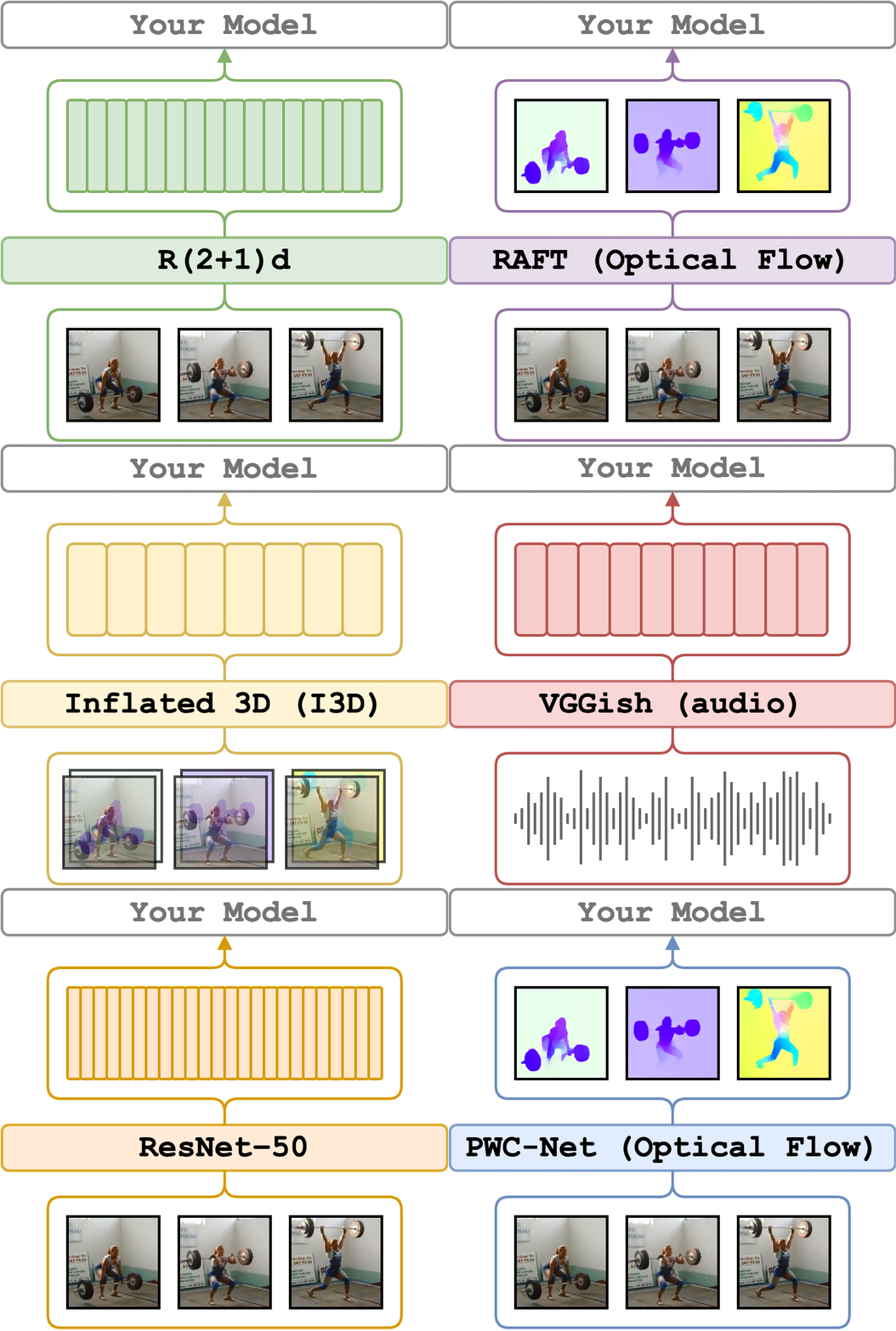
video_features allows you to extract features from video clips.
It supports a variety of extractors and modalities,
i.e. visual appearance, optical flow, and audio.
See more details in Documentation.
Supported Models
Action Recognition
Sound Recognition
Optical Flow
Frame-wise Features
- All models from TIMM e.g. ViT, ConvNeXt, EVA, Swin, DINO (ImageNet, LAION, etc)
- CLIP
- ResNet-18,34,50,101,152 (ImageNet)
Quick Start

or run with conda locally:
# clone the repo and change the working directory
git clone https://github.com/v-iashin/video_features.git
cd video_features

# install environment
conda env create -f conda_env.yml

# load the environment
conda activate video_features

# extract r(2+1)d features for the sample videos
# (defaults to printing; use on_extraction=save_numpy or save_h5 or save_pickle to save to disk)
python main.py \
    feature_type=r21d \
    device="cuda:0" \
    video_paths="[./sample/v_ZNVhz7ctTq0.mp4, ./sample/v_GGSY1Qvo990.mp4]"

# if you have many GPUs, just run this command from another terminal with another device
# device can also be "cpu"
If you are more comfortable with Docker, there is a Docker image with a pre-installed environment that supports all models. Check out the Docker support. documentation page.
Multi-GPU and Multi-Node Setups
With video_features, it is easy to parallelize feature extraction among many GPUs.
It is enough to start the script in another terminal with another GPU (or even the same one)
pointing to the same output folder and input video paths.
The script will check if the features already exist and skip them.
It will also try to load the feature file to check if it is corrupted (i.e. not openable).
This approach allows you to continue feature extraction if the previous script failed for some reason.
If you have an access to a GPU cluster with shared disk space you may scale extraction with as many GPUs as you can by creating several single-GPU jobs with the same command.
Since each time the script is run the list of input files is shuffled, you don't need to worry that workers will be processing the same video. On a rare occasion when the collision happens, the script will rewrite previously extracted features.
Input
The inputs are paths to video files. Paths can be passed as a list of paths to videos or as a text file formatted with a single path per line.
Output
Output is defined by the on_extraction argument; by default it prints the features to the command line.
Possible values of output are ['print', 'save_numpy', 'save_pickle', 'save_h5'].
save_numpy/save_pickle: Saves the features in theoutput_pathfolder with the same name as the input video file but with the.npyor.pklextension.save_h5: Saves features into a single HDF5 file per device in theoutput_path(e.g.video_features_cuda0.h5) with video path as keys (//\\replaced by_). Structure:file.h5 / video_key (group) / feature_name (rgb, flow, fps etc). Useutils.py/inspect_h5()to explore the content.
Used in
Please, let me know if you found this repo useful for your projects or papers.
Acknowledgements
- @Kamino666: added CLIP model as well as Windows and CPU support (and many other useful things).
- @ohjho: added support of 37-layer R(2+1)d favors.
- @borijang: for solving bugs with file names, I3D checkpoint loading enhancement and code style improvements.
- @bjuncek: for helping with timm models and offline discussion.
- @VivekNarula7: for adding support for
.h5output format.
Citation
If you find this project useful in your research, please consider cite:
@misc{videofeatures2020,
  title = {Video Features},
  author = {Vladimir Iashin and other contributors},
  year = {2020},
  howpublished = {\url{https://github.com/v-iashin/video_features}},
}
관련 프로젝트 살펴보기
tensorflow/tensorflow
모두를 위한 오픈소스 머신러닝 프레임워크
201,592 스타huggingface/transformers
🤗 Transformers: 텍스트, 비전, 오디오, 멀티모달 분야의 최첨단 머신러닝 모델을 위한 모델 정의 프레임워크로, 추론과 학습을 모두 지원합니다.
168,955 스타AUTOMATIC1111/stable-diffusion-webui
Stable Diffusion 웹 UI
165,307 스타Comfy-Org/ComfyUI
그래프와 노드로 구성된 인터페이스를 갖춘, 가장 강력하고 모듈성이 뛰어난 확산 모델 GUI, API, 백엔드입니다. 세계에서 가장 빠른 로컬 추론 엔진입니다.
146,721 스타