
ruhyadi/YOLO3D
소개
YOLO 3D Object Detection for Autonomous Driving Vehicle
머신러닝측정된 스타 증가
- in 24h
- 0
- in 7 days
- 0
- in 15 days
- 기록 수집 중
- in 1 month
- 기록 수집 중
서로 겹치는 기간의 순증가량이며 일별 합계가 아닙니다. 측정값이 없으면 비워 둡니다. 스타는 관심도를 나타내며 품질을 보장하지 않습니다.
README.md
OriginalYOLO For 3D Object Detection
Note
I have created a new repository of improvements of YOLO3D wrapped in pytorch lightning and more various object detector backbones, currently on development. Please check ruhyadi/yolo3d-lightning.
Unofficial implementation of Mousavian et al in their paper 3D Bounding Box Estimation Using Deep Learning and Geometry. YOLO3D uses a different approach, as the detector uses YOLOv5 which previously used Faster-RCNN, and Regressor uses ResNet18/VGG11 which was previously VGG19.
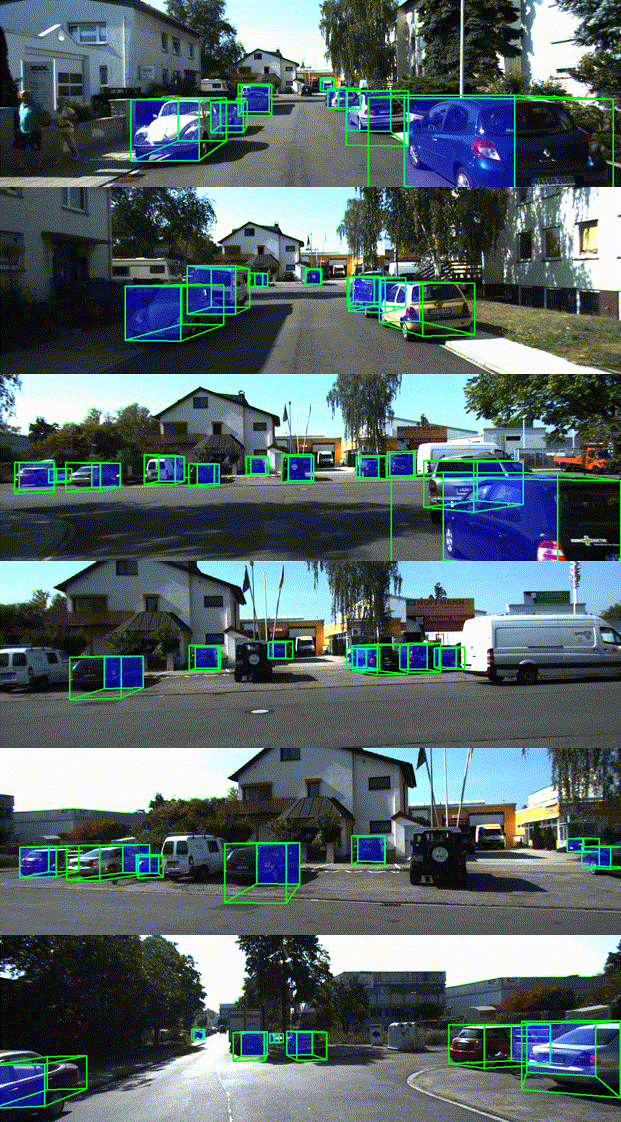
Installation
For installation you can use virtual environment like anaconda or using docker image. For anaconda follow:
Ananconda Virtual Env
Create conda environment
conda create -n yolo3d python=3.8 numpy
Install PyTorch and torchvision version 1.8 above. If your GPU doesn't support it, please follow Nelson Liu blogs.
pip install torch==1.8.1 torcvision==0.9.1
Last, install requirements
pip install -r requirements.txt
Docker Engine
Docker engine is easy way to install all you need. Pull docker image from repository:
docker pull ruhyadi/yolo3d:latest
run docker container from docker image with
cd ${YOLO3D_DIR}
./runDocker.sh
You will get in to docker container interactive terminal. You can run inference code or flask app, follow code below.
Download Pretrained Weights
In order to run inference code or resuming training, you can download pretrained ResNet18 or VGG11 model. I have train model with 10 epoch each. You can download model with resnet18 or vgg11 for --weights arguments.
cd ${YOLO3D_DIR}/weights
python get_weights.py --weights resnet18
Inference
For inference with pretrained model you can run code below. It can be run in conda env or docker container.
python inference.py \
    --weights yolov5s.pt \
    --source eval/image_2 \
    --reg_weights weights/resnet18.pkl \
    --model_select resnet18 \
    --output_path runs/ \
    --show_result --save_result
Inference can be run on Colab Notebook, please visit this link.
Training
YOLO3D model can be train with PyTorch or PyTorch Lightning. In order to train you need API KEY for comet.ml (visualize your training loss/accuracy). Follow comet.ml documentation to get API key.
python train.py \
    --epochs 10 \
    --batch_size 32 \
    --num_workers 2 \
    --save_epoch 5 \
    --train_path ./dataset/KITTI/training \
    --model_path ./weights \
    --select_model resnet18 \
    --api_key xxx
In order train with pytorch lightning run code below:
!python train_lightning.py \
    --train_path dataset/KITTI/training \
    --checkpoint_path weights/checkpoints \
    --model_select resnet18 \
    --epochs 10 \
    --batch_size 32 \
    --num_workers 2 \
    --gpu 1 \
    --val_split 0.1 \
    --model_path weights \
    --api_key xxx
Reference
@misc{mousavian20173d,
      title={3D Bounding Box Estimation Using Deep Learning and Geometry},
      author={Arsalan Mousavian and Dragomir Anguelov and John Flynn and Jana Kosecka},
      year={2017},
      eprint={1612.00496},
      archivePrefix={arXiv},
      primaryClass={cs.CV}
}
관련 프로젝트 살펴보기
불러오는 중…