
open-edge-platform/dlstreamer
소개
Deep Learning Streamer(DL Streamer) Pipeline Framework는 GStreamer* 멀티미디어 프레임워크를 기반으로 하는 오픈 소스 스트리밍 미디어 분석 프레임워크로, 클라우드 또는 엣지에서 복잡한 미디어 분석 파이프라인을 구축할 수 있습니다.
머신러닝측정된 스타 증가
- in 24h
- 0
- in 7 days
- -1
- in 15 days
- 기록 수집 중
- in 1 month
- 기록 수집 중
서로 겹치는 기간의 순증가량이며 일별 합계가 아닙니다. 측정값이 없으면 비워 둡니다. 스타는 관심도를 나타내며 품질을 보장하지 않습니다.
README.md
Original[!NOTE] The
mainbranch is under active development and may be unstable. For production use, please pick a stable version from the Releases page.
Deep Learning Streamer (DL Streamer)
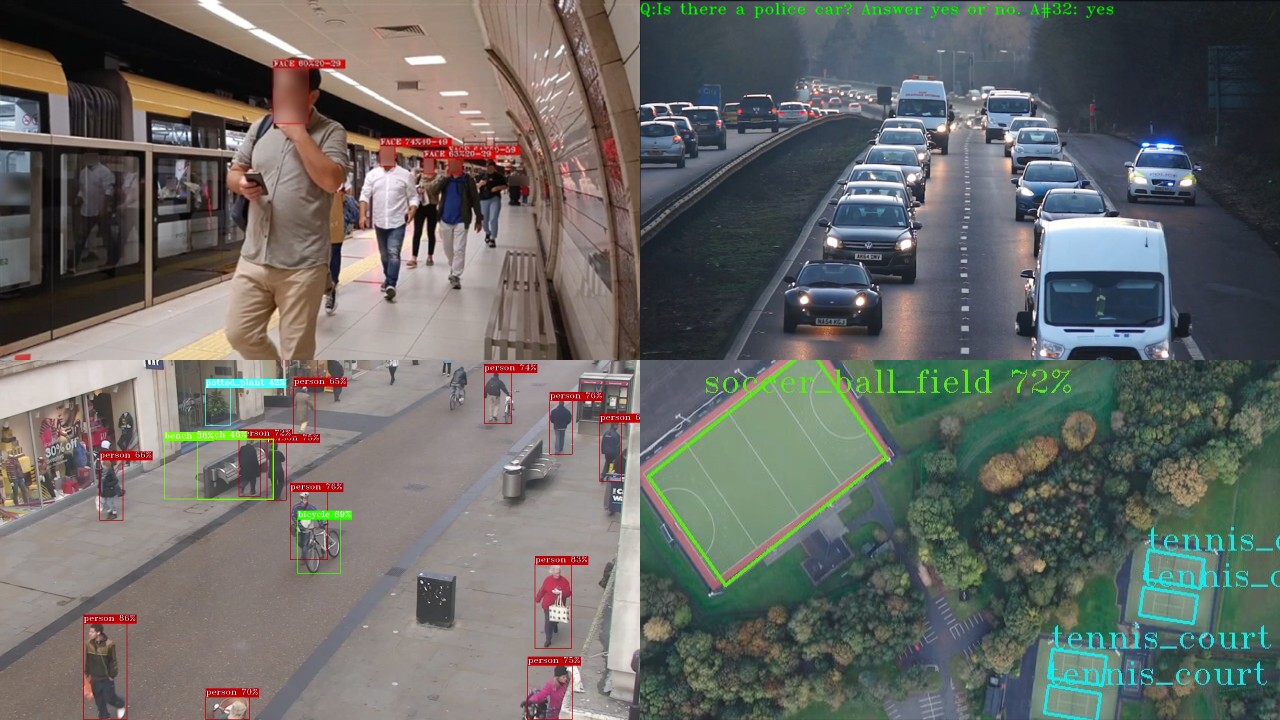
Hardware-accelerated video analytics pipelines — CPU, GPU and NPU, from a single line of code to production-grade edge AI







Get Started • Run Your Pipeline • Samples • Elements • Documentation • Contributing
What is DL Streamer?
DL Streamer is an open-source media analytics framework built on GStreamer. It lets you build video and audio intelligence pipelines — from a simple object detection command line to a multi-stream, multi-sensor production deployment, all with minimal code.
- Powered by OpenVINO™ for optimized inference on Intel CPU, GPU, and NPU.
- Pipelines are described as simple strings (or Python/C++ code) and executed with full hardware acceleration.
- Ships with 30+ ready-to-run samples covering detection, classification, tracking, VLMs, LiDAR and more.
- Part of the Intel Open Edge Platform.
Why DL Streamer?
| Benefit | Details |
|---|---|
| One-line pipelines | Build a working detection pipeline in a single gst-launch-1.0 command |
| Hardware acceleration | Targets CPU, GPU, and NPU on Intel platforms from a single codebase |
| VLM & GenAI ready | Run Vision-Language Models (MiniCPM-V, CLIP, Whisper) in a GStreamer pipeline |
| GstAnalytics compliance | Supports the GStreamer industry metadata standard for interoperability with other GStreamer-based tools |
| Messaging integration | Publish inference results directly to MQTT or Kafka with built-in elements — no extra code required |
| Python-first extensibility | Add custom logic as Python callbacks or full Python GStreamer elements — no C++ required |
| Multi-stream, multi-sensor | Mux/demux dozens of RTSP streams, LiDAR frames, and radar point clouds in one process |
| Geti™, Ultralytics & HuggingFace support | Deploy models from Geti™ Studio, Ultralytics, Hugging Face, or any ONNX/OpenVINO IR model directly |

Quick Start - Installation
Step 1 — Install GPU/NPU drivers (required for Docker and native install)
cd ~
wget https://raw.githubusercontent.com/open-edge-platform/dlstreamer/main/scripts/DLS_install_prerequisites.sh
chmod +x DLS_install_prerequisites.sh
./DLS_install_prerequisites.sh
This script detects your Intel GPU/NPU, installs the correct drivers for Ubuntu 22.04 or 24.04, and adds your user to the required groups. Use
--reinstall-npu-driver=yesto force-reinstall the NPU driver. Run./DLS_install_prerequisites.sh --helpfor all options.
Step 2 — Install DL Streamer
Option A — Docker (recommended, zero setup):
# Run once on the host to allow X11 forwarding from containers
xhost +local:docker

docker run -it --rm \
  --device /dev/dri \
  --group-add $(stat -c "%g" /dev/dri/render*) \
  -e DISPLAY=$DISPLAY \
  -e XDG_RUNTIME_DIR=/tmp \
  -v /tmp/.X11-unix:/tmp/.X11-unix \
  intel/dlstreamer:latest
To use the NPU, also add
--device /dev/accel --group-add $(stat -c "%g" /dev/accel/accel*)to thedocker runcommand.
Option B — Native install (Ubuntu 24.04):
sudo -E wget -O- https://apt.repos.intel.com/intel-gpg-keys/GPG-PUB-KEY-INTEL-SW-PRODUCTS.PUB | gpg --dearmor | sudo tee /usr/share/keyrings/intel-gpg-archive-keyring.gpg > /dev/null
sudo -E wget -O- https://apt.repos.intel.com/edgeai/dlstreamer/GPG-PUB-KEY-INTEL-DLS.gpg | sudo tee /usr/share/keyrings/dls-archive-keyring.gpg > /dev/null
echo "deb [signed-by=/usr/share/keyrings/dls-archive-keyring.gpg] https://apt.repos.intel.com/edgeai/dlstreamer/ubuntu24 ubuntu24 main" | sudo tee /etc/apt/sources.list.d/intel-dlstreamer.list
sudo bash -c 'echo "deb [signed-by=/usr/share/keyrings/intel-gpg-archive-keyring.gpg] https://apt.repos.intel.com/openvino ubuntu24 main" | sudo tee /etc/apt/sources.list.d/intel-openvino.list'
sudo apt update && sudo apt-get install -y intel-dlstreamer
Full installation guide: Install Guide for Ubuntu | Windows
Quick Start - Run Your Pipeline
Step 1 — Set up models and environment (inside the container or on a native install):
cd ~
curl -LsSf https://astral.sh/uv/install.sh | sh
uv venv .dls-venv && source .dls-venv/bin/activate
uv pip install -r /opt/intel/dlstreamer/scripts/download_models/requirements_download_ultralytics_models.txt
python3 /opt/intel/dlstreamer/scripts/download_models/download_ultralytics_models.py \
  --model yolo11n.pt \
  --outdir ~/models/yolo11n \
  --int8 \
  --data coco128.yaml
source /opt/intel/dlstreamer/scripts/setup_dls_env.sh
For INT8 export, --data selects the dataset YAML used for calibration. If omitted, Ultralytics uses its default dataset.
Step 2 — Run the pipeline. Change device=GPU to device=CPU or device=NPU — no other code changes needed.
gst-launch-1.0 \
  urisourcebin buffer-size=4096 uri=https://videos.pexels.com/video-files/1192116/1192116-sd_640_360_30fps.mp4 ! \
  decodebin3 ! \
  gvadetect model=~/models/yolo11n/yolo11n.xml device=GPU ! \
  queue ! \
  gvawatermark ! \
  gvafpscounter ! \
  videoconvert ! autovideosink sync=false
Output to JSON (works everywhere, including headless Docker):
gst-launch-1.0 \
  urisourcebin buffer-size=4096 uri=https://videos.pexels.com/video-files/1192116/1192116-sd_640_360_30fps.mp4 ! \
  decodebin3 ! \
  gvadetect model=~/models/yolo11n/yolo11n.xml device=GPU ! \
  queue ! \
  gvafpscounter ! \
  gvametaconvert format=json ! \
  gvametapublish file-format=json-lines file-path=output.json ! fakesink async=false
Python API
Create a file detect.py:
import gi
gi.require_version("Gst", "1.0")
from gi.repository import Gst
import os

Gst.init([])

video_url = "https://videos.pexels.com/video-files/1192116/1192116-sd_640_360_30fps.mp4"
model = os.path.expanduser("~/models/yolo11n/yolo11n.xml")
pipeline = Gst.parse_launch(f"""
    urisourcebin buffer-size=4096 uri={video_url} !
    decodebin3 !
    gvadetect model={model} device=GPU !
    queue !
    gvafpscounter !
    gvametaconvert format=json !
    gvametapublish file-format=json-lines file-path=output_from_python.json ! fakesink async=false
""")

pipeline.set_state(Gst.State.PLAYING)
bus = pipeline.get_bus()
bus.timed_pop_filtered(Gst.CLOCK_TIME_NONE, Gst.MessageType.EOS | Gst.MessageType.ERROR)
pipeline.set_state(Gst.State.NULL)
Then run it and wait for results:
python3 detect.py
# Detection results are written to output_from_python.json as the pipeline processes frames
# Each line is a JSON object with detected objects, labels, and bounding boxes
cat output_from_python.json
If any Python dependencies are missing, refer to the Python dependencies install guide.
DL Streamer Elements
| Category | Key Elements |
|---|---|
| Inference | gvadetect · gvaclassify · gvainference · gvagenai · gvaaudiotranscribe |
| Analytics | gvatrack · gvaanalytics · gvastreammux / gvastreamdemux · gvamotiondetect |
| Output | gvawatermark · gvametaconvert · gvametapublish · gvafpscounter |
| 3D / Sensors | g3dlidarparse · g3dinference · g3dradarprocess |
Samples
30+ samples across Python, C++, and gst-launch command lines:
| Category | Samples |
|---|---|
| Detection | YOLO detection, Face detection + classification, Depth estimation |
| Segmentation & Pose | Instance segmentation, Human pose estimation |
| Tracking | Vehicle & pedestrian tracking, Vehicle counter with tripwires |
| VLM / GenAI | VLM video summarization, VLM alerts, VLM self-checkout |
| Multi-stream | Multi-camera deployment, Stream mux/demux |
| 3D Sensors | LiDAR parsing, PointPillars 3D detection, Radar processing |
| Integration | ONVIF camera discovery, Geti™ model deployment, Metadata to MQTT/Kafka |
| Python extensibility | Custom Python GStreamer elements, Smart NVR with recording |
Supported Platforms
| Hardware | CPU | GPU | NPU |
|---|---|---|---|
| Intel Core Ultra series 1–3 (Meteor / Lunar / Arrow / Panther Lake) | ✅ | ✅ | ✅ |
| Intel Arc discrete GPU (Alchemist, Battlemage) | — | ✅ | — |
| 11th–13th Gen Intel Core | ✅ | ✅ | — |
Operating systems: Ubuntu 22.04 / 24.04, Windows 11.
Documentation
| Resource | Link |
|---|---|
| Overview | Overview |
| Elements Reference | Elements Reference |
| Supported Models | Supported Models |
| Developer Guide | Developer Guide |
| API Reference | API Reference |
| Metadata Guide | Metadata Guide |
| Video Tutorials | YouTube Playlist |
Contributing
We welcome contributions! Please read CONTRIBUTING.md and follow the Code Style Guide.
For security issues, see SECURITY.md.
License
DL Streamer is licensed under the MIT License.
Intel, the Intel logo, OpenVINO, OpenVINO logo, Intel Geti, Intel Core, Intel Arc, and Intel Iris are trademarks of Intel Corporation or its subsidiaries. GStreamer is a trademark of the GStreamer project.
관련 프로젝트 살펴보기
불러오는 중…