
milaan9/Machine_Learning_Algorithms_from_Scratch
milaan9/Machine_Learning_Algorithms_from_Scratch has 203 GitHub stars and 180 forks. Star changes are not measured yet. Last checked 2026-11-15 16:49 UTC. Last push 2022-12-09.
측정된 스타 증가
- in 24h
- 기록 수집 중
- in 7 days
- 기록 수집 중
- in 15 days
- 기록 수집 중
- in 1 month
- 기록 수집 중
서로 겹치는 기간의 순증가량이며 일별 합계가 아닙니다. 측정값이 없으면 비워 둡니다. 스타는 관심도를 나타내며 품질을 보장하지 않습니다.
소개
This repository explores the variety of techniques and algorithms commonly used in machine learning and the implementation in MATLAB and PYTHON.
머신러닝README.md
Original



Python_Machine_Learning_Algorithms_from_Scratch
Introduction 👋
This repository explores the variety of techniques anf alorithm commonly used in machine learning and the implementation in MATLAB and PYTHON.
Table of contents 📋
Alogrithm used are :
- Decision Trees and Random Forest Classifier
- Naive Bayes Classifier
- Gaussian Naive Bayes Calssifier
- Mixture Of Gaussians using EM Algorithm
- Neural Network
- Singular Value Decomposition
- Principal Component Analysis
- Fitting the data to a 1D Gaussian
- Fitting the data to a 2D Gaussian
- K Nearest Neighbours
- Linear Regression
- Logistic Regression
- K-Mean Clustering
- Value-Iteration-Method
- Dynamic Time Warping
- Error Function and Regularisation
These are online read-only versions. However you can Run ▶ all the codes online by clicking here ➞
- Recommendation for ML Enthusiasts: Machine Learning A-Z™: Hands-On Python & R In Data Science
Frequently asked questions ❔
How can I thank you for writing and sharing this tutorial? 🌷
You can 

Go here if you aren't here already and click ➞ ✰ Star and ⵖ Fork button in the top right corner. You will be asked to create a GitHub account if you don't already have one.
How can I read this tutorial without an Internet connection? 
Go
hereand click the big green ➞Codebutton in the top right of the page, then click ➞Download ZIP.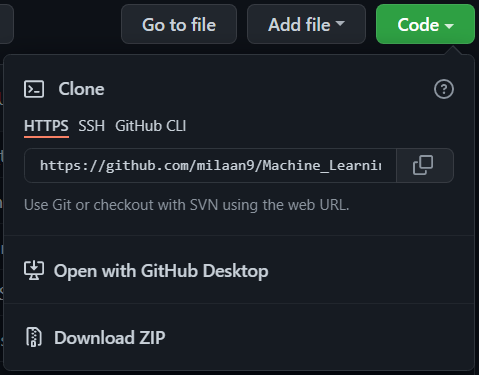
Extract the ZIP and open it. Unfortunately I don't have any more specific instructions because how exactly this is done depends on which operating system you run.
Launch ipython notebook from the folder which contains the notebooks. Open each one of them
Kernel > Restart & Clear Output
This will clear all the outputs and now you can understand each statement and learn interactively.
If you have git and you know how to use it, you can also clone the repository instead of downloading a zip and extracting it. An advantage with doing it this way is that you don't need to download the whole tutorial again to get the latest version of it, all you need to do is to pull with git and run ipython notebook again.
Authors ✍️
I'm Dr. Milaan Parmar and I have written this tutorial. If you think you can add/correct/edit and enhance this tutorial you are most welcome🙏
See github's contributors page for details.
If you have trouble with this tutorial please tell me about it by Create an issue on GitHub. and I'll make this tutorial better. This is probably the best choice if you had trouble following the tutorial, and something in it should be explained better. You will be asked to create a GitHub account if you don't already have one.
If you like this tutorial, please give it a ⭐ star.
Licence 📜
You may use this tutorial freely at your own risk. See LICENSE. Copyright (c) 2020 Dr. Milan Parmar