
mc2-project/mc2 has 302 GitHub stars and 42 forks. GitHot measured -1 stars in 24 hours, -1 in 7 days, and -1 in 15 days. Last checked 2026-11-10 04:43 UTC. Last push 2023-03-29.
A Platform for Secure Analytics and Machine Learning
측정된 스타 증가
- in 24h
- -1
- in 7 days
- -1
- in 15 days
- -1
- in 1 month
- 기록 수집 중
서로 겹치는 기간의 순증가량이며 일별 합계가 아닙니다. 측정값이 없으면 비워 둡니다. 스타는 관심도를 나타내며 품질을 보장하지 않습니다.
README.md
Original

A Platform for Secure Analytics and Machine Learning





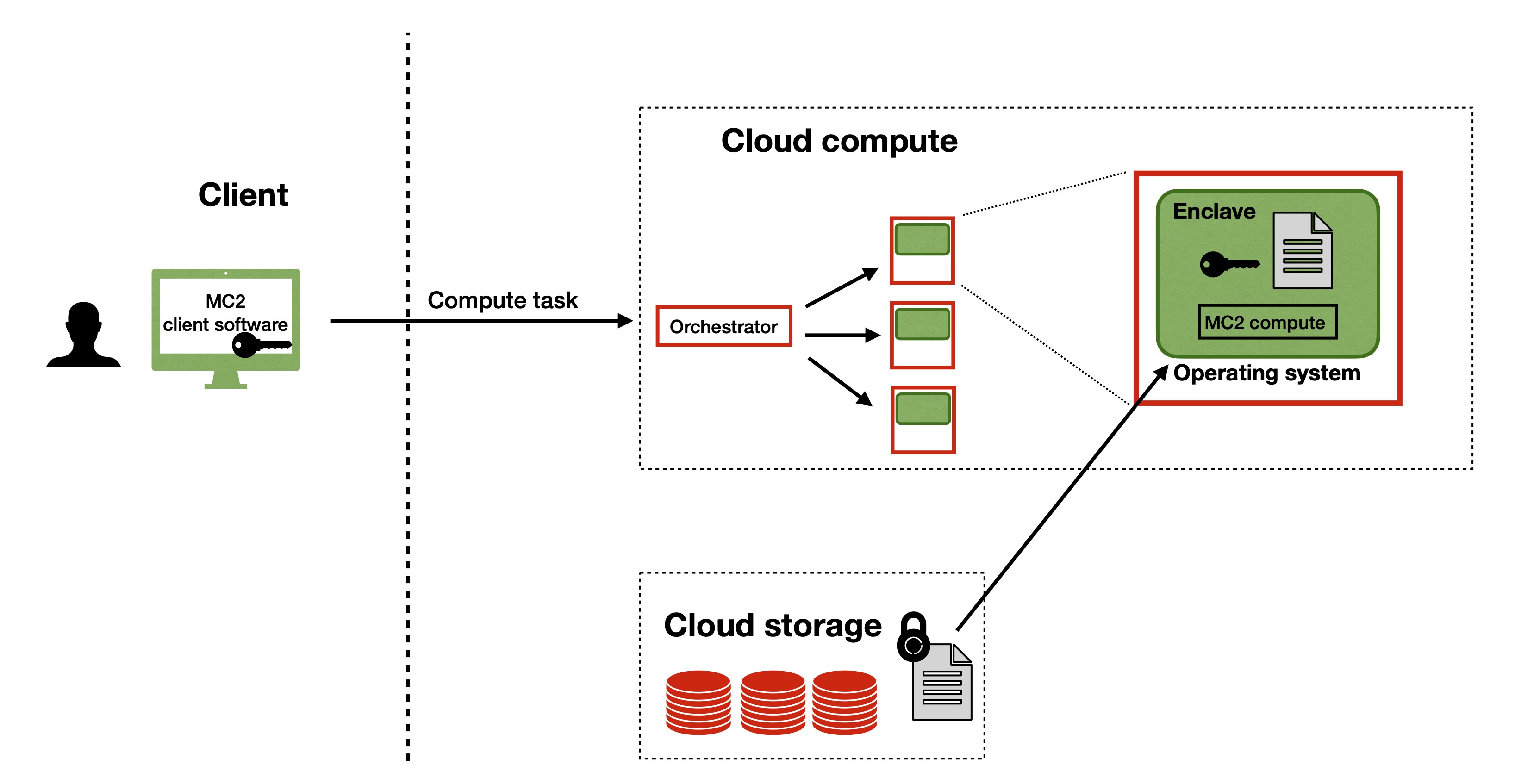
Born out of research in the UC Berkeley RISE Lab, MC2 is a platform for running secure analytics and machine learning on encrypted data. With MC2, users can outsource their confidential data workloads to the cloud, while ensuring that the data is never exposed unencrypted to the cloud provider. MC2 also enables secure collaboration -- multiple data owners can use the platform to jointly analyze their collective data, without revealing their individual data to each other.
MC2 provides the following secure computation services:
- Opaque SQL: Encrypted data analytics on Spark SQL using hardware enclaves
- Secure XGBoost: Collaborative XGBoost training and inference on encrypted data using hardware enclaves
The MC2 project also includes exploratory research prototypes that develop new cryptographic techniques for secure computation. Please visit the individual project pages for more information:
- Cerebro: A general purpose Python DSL for learning with secure multiparty computation.
- Delphi: Secure inference for deep neural networks.
- Muse: Secure inference resilient to malicious clients.
- Federated XGBoost: Collaborative XGBoost in the federated setting
For more information on MC2, visit our website.
This repository contains the source code for the MC2 client, which enables users to easily interface with MC2 services deployed remotely in the cloud. Currently, the client supports remote deployments of Opaque SQL only. Support for Secure XGBoost is coming soon. To run an end-to-end MC2 workflow:
- Launch Opaque SQL in the cloud (instructions to do so can be found in the respective repositories)
- Use the MC2 client to encrypt data locally, transfer it to the cloud VMs, run scripts specifying the desired computation, and retrieve and view encrypted results.
Table of Contents
Installation
To quickly play with MC2 Client and Opaque SQL, you can use the provided Dockerfile to build a container (takes ~7 min) with all MC2 Client and Opaque SQL dependencies. Alternatively, you can pull a pre-built Docker image instead of building one. To do either, you must have Docker installed.
The container will have the contents of this mc2 directory at /mc2/client, and Opaque SQL will be at /mc2/opaque-sql
For ease of use, we recommend that you create a directory within your host mc2 directory that will serve as your playground, and then mount your playground directory to the Docker container. Mounting will ensure that changes you make in your playground directory outside the container will be reflected inside the container, and vice versa. If you're bringing your own data, you can either copy your data over to your playground directory, or separately mount your data directory to the container.
Installation via building an image
# Clone the `mc2-project/mc2 repo`
git clone https://github.com/mc2-project/mc2.git

# Build a Docker image called `mc2_img`
docker build -t mc2_img .

# Run the container, mounting your playground to the container, and open a shell into the container
docker run -it -v </absolute/path/to/mc2/playground>:/mc2/client/playground mc2_img /bin/bash
Installation via pulling an image
If you prefer to pull the image instead, you can pull a pre-built image (~3 GB) from Docker Hub.
# Clone the `mc2-project/mc2 repo`
git clone https://github.com/mc2-project/mc2.git

# Pull the mc2_img from Docker Hub
docker pull mc2project/mc2_img:v0.1.3

# Run the container, mounting your playground to the container, and open a shell into the container
docker run -it -v </absolute/path/to/mc2/playground>:/mc2/client/playground mc2_img /bin/bash
Installation via build from source
Alternatively, if you'd like to install MC2 Client directly on your host, follow these instructions.
Quickstart
This quickstart will give you a flavor of using MC2 with Opaque SQL, and can be entirely done locally with Docker if desired. You will use MC2 Client to encrypt some data, transfer the encrypted data to a remote machine, run an Opaque SQL job on the encrypted data on the remote machine, and retrieve and decrypt the job's encrypted results. To run everything securely, you can choose to spin up Opaque SQL on Azure VMs with SGX-support. Alternatively, to get a flavor of MC2 without having to use Azure, you can use the deployment of Opaque SQL in the Docker container.
MC2 Client provides a command line interface that enables you to remotely interact with MC2 compute services. The CLI relies on a configuration file that you should modify before each step in this quickstart to tell MC2 Client what exactly you want to do. An example of the configuration file is here.
The dataset we'll be using in this quickstart is a medical dataset containing patient records. Here's a couple of sample records for reference.
Age,BMI,Glucose,Insulin,HOMA,Leptin,Adiponectin,Resistin,MCP.1,Classification
48,23.5,70,2.707,0.467408667,8.8071,9.7024,7.99585,417.114,1
83,20.69049454,92,3.115,0.706897333,8.8438,5.429285,4.06405,468.786,1
82,23.12467037,91,4.498,1.009651067,17.9393,22.43204,9.27715,554.697,1
If you get stuck at any point while running the quickstart, feel free to ping us on Slack.
Docker Quickstart
If you'd like to try everything out locally, you can do so within the Docker container you built in the installation section.
In the container, copy the contents of the
quickstartdirectory to your mountedplaygrounddirectory to ensure that your changes inside the container get reflected on your host. Then, configure MC2 Client with your configuration file.# From the /mc2/client directory cp -r quickstart/* playground mc2 configure $(pwd)/playground/config.yamlGenerate a keypair and a symmetric key that MC2 Client will use to encrypt your data. Specify your username and output paths in the
usersection of the configuration file. Then, generate the keys.mc2 initStart Opaque SQL, a MC2 service for secure SQL analytics.
mc2 startPrepare your data for computation by encrypting and uploading it. This step uses the keys you generated in step 2 to encrypt your data. Note that "uploading" here means copying because we have a local deployment.
mc2 uploadRun the provided Opaque SQL quickstart script, to be executed by MC2. The script can be found here, and performs a filter operation over our data -- the results will contain records of all patients who are younger than 30 years old. Results are encrypted by MC2 before being saved, and can only be decrypted with the key you used to encrypt your data in the previous step.
mc2 runOnce computation has finished, you can retrieve your encrypted results and decrypt them. Results are saved in the
results/directory. You can view the results by looking atresults/opaque_sql_result.decmc2 download
Azure Quickstart
You can also choose to run this quickstart with enclave-enabled VMs on the cloud with Azure Confidential Computing. Unlike the Docker quickstart, in this quickstart you'll first launch enclave-enabled VMs on Azure using MC2 before uploading data and runing computation.
Start off in the container you built in the installation section. In the container, copy the contents of the
quickstartdirectory to your mounted "playground" directory to ensure that your changes inside the container get reflected on your host. Otherwise, no need to do anything. Then, configure MC2 Client with your configuration file.# From the /mc2/client directory cp -r quickstart/* playground mc2 configure $(pwd)/playground/config.yamlGenerate a keypair and a symmetric key that MC2 Client will use to encrypt your data. Specify your username and output paths in the
usersection of the configuration file. Then, generate the keys.mc2 initNext, launch the machines and resources you'll be using for computation. This step does not exist in the Docker quickstart. MC2 Client provides an interface to launch resources on Azure (and sets up the machines with necessary dependencies). Take a look at the
launchsection of the configuration file -- you'll need to specify the path to your Azure configuration file, which is a YAML file that details the names and types of various resources you will launch.Next, log in to Azure through the command line and set your subscription ID. Here are instructions on how to find your subscription ID.
az login
az account set -s <YOUR_SUBSCRIPTION_ID>
Once you've done that, launch the resources.
mc2 launchStart Opaque SQL, a MC2 service for secure SQL analytics.
mc2 startPrepare your data for computation by encrypting and uploading it. This step uses the keys you generated in step 2 to encrypt your data. Note that "uploading" here means copying because we have a local deployment.
mc2 uploadRun the provided Opaque SQL quickstart script, to be executed by MC2. The script can be found here, and performs a filter operation over our data -- the results will contain records of all patients who are younger than 30 years old. Results are encrypted by MC2 before being saved, and can only be decrypted with the key you used to encrypt your data in the previous step.
mc2 runOnce computation has finished, you can retrieve your encrypted results and decrypt them. Results are saved in the
results/directory. You can view the results by looking atresults/opaque_sql_result.decmc2 downloadOnce you've finished using your Azure resources, you can use MC2 Client to terminate them. You can specify which resources to terminate in the
teardownsection of the configuration.mc2 teardown
Documentation
For more thorough documentation MC2 Client and Opaque SQL, please visit:
Contact
Join our Slack, open a GitHub issue, or send a message to [email protected].
관련 프로젝트 살펴보기
trimstray/the-book-of-secret-knowledge
영감을 주는 목록, 매뉴얼, 치트시트, 블로그, 팁, 원라이너, CLI/웹 도구 등을 모은 컬렉션.
257,250 스타Hack-with-Github/Awesome-Hacking
해커, 펜테스터, 보안 연구자를 위한 다양한 Awesome 목록 모음.
125,103 스타swisskyrepo/PayloadsAllTheThings
웹 애플리케이션 보안과 모의 침투 테스트/CTF에 유용한 페이로드 및 우회 방법 목록.
82,542 스타caddyserver/caddy
빠르고 확장 가능한 멀티플랫폼 HTTP/1-2-3 웹 서버이며, 자동 HTTPS를 지원합니다
78,935 스타