
machaao/llama-net
machaao/llama-net has 27 GitHub stars and 0 forks. GitHot measured 0 stars in 24 hours and +1 in 7 days. Last checked 2026-11-20 21:40 UTC. Last push 2026-09-30.
What you can do
- No-Model Mode — Start your node instantly, download models later via the Web UI
- Hot Reload — Switch models without restarting your node — download, select, done
- OpenAI-Compatible API — Drop-in replacement for any OpenAI client
- Free Public URLs — Automatic Cloudflare tunnels, zero config
측정된 스타 증가
- in 24h
- 0
- in 7 days
- +1
- in 15 days
- 기록 수집 중
- in 1 month
- 기록 수집 중
서로 겹치는 기간의 순증가량이며 일별 합계가 아닙니다. 측정값이 없으면 비워 둡니다. 스타는 관심도를 나타내며 품질을 보장하지 않습니다.
소개
Turn any Mac or GPU into an OpenAI-compatible inference node. One-command setup, automatic HTTPS, model management, and distributed request routing.
머신러닝README.md
OriginalLlamaNet - Free OpenAI-Compatible API from Your Mac/GPU | Local LLM GGUF Server






Turn your idle Mac or GPU into a free public AI API. Local GGUF LLM server with OpenAI-compatible /v1/chat/completions, public HTTPS URL in 60s. Ollama alternative with sharing built-in.
Your Mac is idle 18 hours a day. Let it do something useful.
LlamaNet is a free, open-source local LLM inference server powered by llama.cpp. Run Mistral, Llama 3, Qwen, Phi, Gemma, DeepSeek-R1 GGUF models on Mac Apple Silicon, NVIDIA GPU, or CPU — then share via Cloudflare tunnel with zero config.
One command. 60 seconds. Zero config.
Get a public URL. Run your own models. Let friends, apps, or AI agents use your machine.
curl -sSL https://llamanet.app/install.sh | sh
llamanet run hf.co/mlabonne/Meta-Llama-3.1-8B-Instruct-abliterated-GGUF:Q4_K_M
That's it. Your Mac is now an AI server.
Contents
- Why?
- Quick Start
- How It Works
- Features
- Ollama vs LM Studio vs LlamaNet
- Multi-Model Pool
- Recommended Models by Tier
- Architecture
- Web UI
- Run on a GPU Cloud Provider
- FAQ
Why?
- Your hardware is underutilized. Apple Silicon has a Neural Engine, 16-core GPU, and unified memory — and most of the time it's rendering Finder windows.
- AI APIs are expensive. GPT-4 costs $30/M tokens. You can run an equivalent model on your Mac for the cost of electricity.
- Open-source models are good enough. Mistral, Qwen, Llama, Gemma — they run locally, they're fast, and they're free.
- Sharing is the hard part. LlamaNet handles that: tunnels, routing, discovery, load balancing. You just run the model.
Quick Start
Install (One Command)
# macOS / Linux
curl -sSL https://llamanet.app/install.sh | sh

# Windows (PowerShell)
irm https://llamanet.app/install.ps1 | iex
The installer:
- Detects or installs Python 3.9+
- Creates an isolated venv at
~/.llamanet/venv - Installs LlamaNet and llama-cpp-python
- Creates a
llamanetCLI launcher and Desktop shortcut - Auto-joins the public network at llamanet.app
Then run:
llamanet
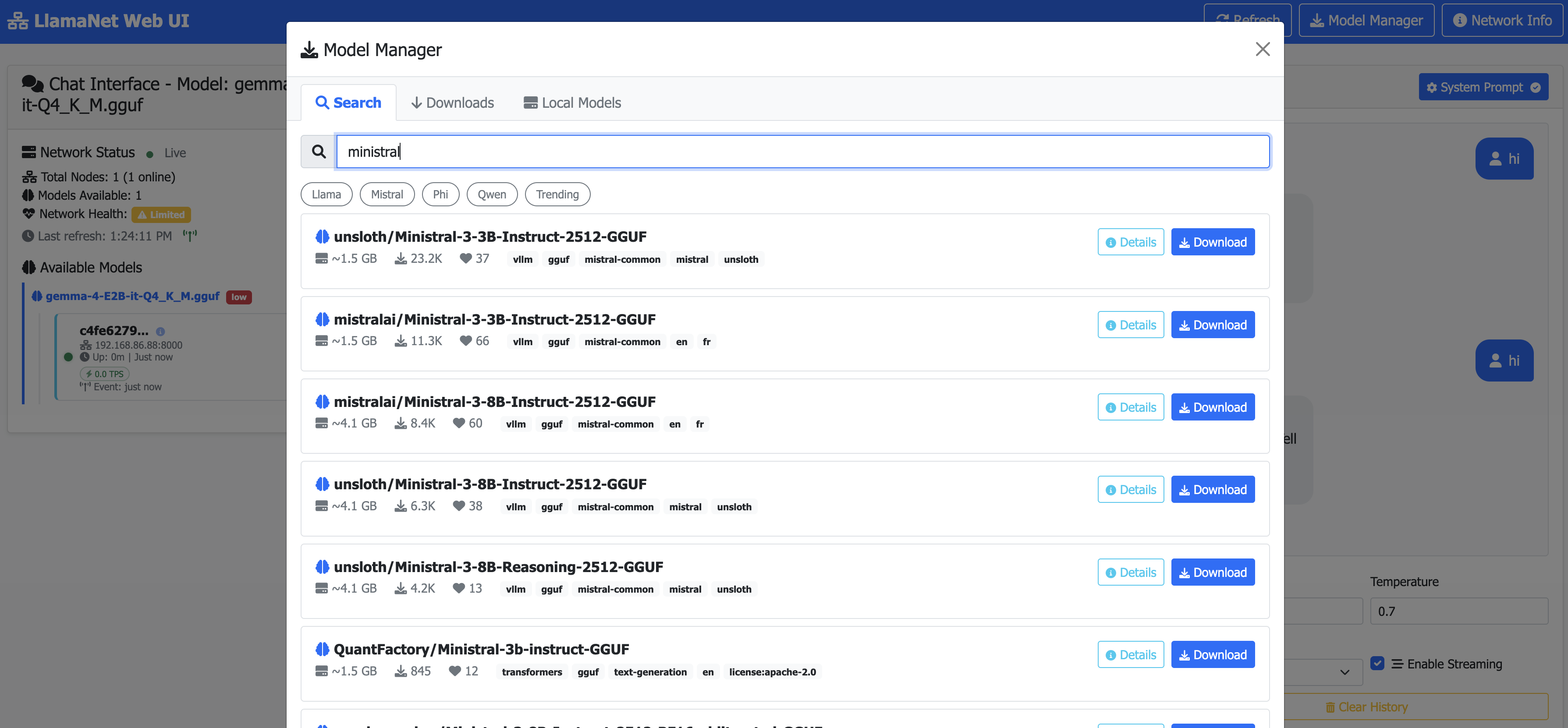
- Open http://localhost:8000 — the Model Manager opens automatically
- Search for a GGUF model (e.g.
qwen,llama,mistral) - Click Download — progress streams in real time
- Click Use — the model hot-loads and your node joins the network
You can also pre-load a model at startup:
llamanet run hf.co/mlabonne/Meta-Llama-3.1-8B-Instruct-abliterated-GGUF:Q4_K_M
Or install via PyPI:
pip install llamanet
llamanet run hf.co/mlabonne/Meta-Llama-3.1-8B-Instruct-abliterated-GGUF:Q4_K_M
Models can be switched at any time via the Web UI without restarting the node.
Uninstall
# macOS / Linux
curl -sSL https://llamanet.app/uninstall.sh | sh

# Windows (PowerShell)
irm https://llamanet.app/uninstall.ps1 | iex
API Consumer — Use the Network
import openai

client = openai.OpenAI(
    base_url="https://llamanet.app/v1",
    api_key="your-api-key"
)

response = client.chat.completions.create(
    model="Meta-Llama-3.1-8B-Instruct",
    messages=[{"role": "user", "content": "Hello!"}]
)

print(response.choices[0].message.content)
Get a free API key at llamanet.app.
How It Works
You                                  Your friend
───                                  ───────────
llamanet run \                        client = openai.OpenAI(
  hf.co/user/Model:Q4_K_M             base_url="https://llamanet.app/v1",
                                       api_key="ln-xxx"
       │                             )
       ▼                                 │
┌─────────────────────────────────────────────┐
│           llamanet.app (Gateway)             │
│                                              │
│  Node Registry · Request Router · Auth       │
│  Real-time SSE · Model Discovery             │
└─────────────────────────────────────────────┘
- You run the one-liner installer →
llamanet→ node auto-joinsllamanet.app - You download a model via the Web UI Model Manager
- Your node gets a Cloudflare tunnel URL (public, HTTPS) — zero config
- Anyone calls
llamanet.app/v1/chat/completionswith an API key - Gateway routes to the best available node
No Docker. No Kubernetes. No port forwarding. Just a tunnel and a registry.
Features
- No-Model Mode — Start your node instantly, download models later via the Web UI
- Hot Reload — Switch models without restarting your node — download, select, done
- OpenAI-Compatible API — Drop-in replacement for any OpenAI client
- Free Public URLs — Automatic Cloudflare tunnels, zero config
- Web UI — Built-in model manager, chat interface, and network dashboard at
localhost:8000 - Model Manager — Search Hugging Face, download GGUF models with real-time progress, switch models without restarting
- Model Discovery — Search and connect to models across the network
- Reasoning Support — DeepSeek-R1, Qwen reasoning models with streaming reasoning content
- Gateway Routing — Central gateway with automatic node discovery and load balancing
- Real-time Network — SSE-powered live updates for node status, model availability, and metrics
- GPU Auto-detect — NVIDIA, Apple Silicon, CPU fallback
Ollama vs LM Studio vs LlamaNet - Best Local LLM Server & Ollama Alternative
| Ollama | LM Studio | Jan / LocalAI / llama.cpp server | LlamaNet | |
|---|---|---|---|---|
| Local GGUF inference | yes | yes | yes | yes |
OpenAI-compatible API (/v1/chat/completions) |
yes | yes | partial | yes |
| Public URL in 60s | no | no | no | yes - Cloudflare tunnel |
| Model manager in browser | no | yes | no | yes - search Hugging Face, download, hot-reload |
| Multi-model pool | no | no | no | yes - LRU, instant switch |
| Reasoning models (DeepSeek-R1, Qwen, GPT-OSS streaming) | partial | partial | partial | yes |
| Run on Mac Apple Silicon (Metal) | yes | yes | varies | yes - Metal auto-detect |
Multi-Model Pool
LlamaNet supports loading multiple models simultaneously in a pool with automatic LRU (Least Recently Used) eviction. This lets you:
- Instant model switching — switch between loaded models without reload time
- Memory-aware capacity — auto-detects how many models fit in your RAM/VRAM
- LRU eviction — when pool is full, the least recently used model is evicted to make room
Configuration
| Variable | Default | Description |
|---|---|---|
MAX_MODELS |
0 (auto) |
Max models in memory (0 = auto-detect from RAM) |
MEMORY_BUDGET_GB |
0 (auto) |
Max RAM for models (0 = auto-detect) |
How It Works
- First model loads normally on startup (or via Web UI)
- Loading a second model adds it to the pool (if capacity allows)
- When pool is full, the least recently used model is evicted
- Switching between pool models is instant — no reload overlay
- Pool state persists across restarts via
~/.llamanet/pool_history.json
Supported Models - Llama 3, Mistral, Qwen, Phi, Gemma, DeepSeek-R1
Works with any GGUF file from Hugging Face: Llama 3.2, Llama 3.1 8B, Mistral 7B, Qwen 2.5 4B / 14B / 32B, Phi-4 Mini, Gemma 3 12B, DeepSeek-R1 Distill 32B, GPT-OSS 20B. Search by name in the Web UI Model Manager.
Recommended Models by Tier
| Tier | Model | Size (Q4_K_M) | Min RAM | Best For |
|---|---|---|---|---|
| Tiny | Phi-4 Mini | ~1.5 GB | 8 GB | Quick tasks, edge devices, fast iteration |
| Fast | Qwen 4B | ~2.5 GB | 8 GB | Daily driver — fast responses, solid quality |
| Fast | Llama 3.1 8B Instruct (abliterated) | ~4.7 GB | 16 GB | Daily driver — fast, uncensored, strong quality |
| Versatile | Gemma 3 12B | ~7 GB | 24 GB | General-purpose, multilingual, strong reasoning |
| Coding | Qwen 14B | ~8 GB | 32 GB | Code generation, technical tasks |
| Premium | GPT-OSS 20B | ~12 GB | 32 GB | High-quality general-purpose inference |
| High Quality | Qwen 35B-A3B | ~20 GB | 48 GB | Expert-level reasoning, long-form generation |
| Reasoning | DeepSeek-R1 Distill 32B | ~18 GB | 48 GB | Chain-of-thought reasoning, math, analysis |
Which Tier Fits Your Hardware?
| Your Hardware | Recommended Tiers | Notes |
|---|---|---|
| Mac M1/M2 8GB | Tiny, Fast | Use Q4_K_M quantization |
| Mac M1/M2 Pro 16GB | Tiny → Fast | Fast tier runs great on Pro chips |
| Mac M3/M4 Pro 18GB+ | Tiny → Versatile | Gemma 3 12B runs well on Pro chips |
| Mac M2/M3 Max 32GB+ | All tiers | Max chips handle even the largest models |
| Mac M2 Ultra 64GB+ | All tiers | No compromises — run anything |
| NVIDIA 8GB VRAM | Tiny, Fast | RTX 3070, 4060, etc. |
| NVIDIA 12GB VRAM | Tiny → Versatile | RTX 3060 12GB, 4070 |
| NVIDIA 24GB VRAM | Tiny → Premium | RTX 3090, 4090 |
| NVIDIA 48GB+ VRAM | All tiers | A6000, A100, multi-GPU setups |
Architecture
LlamaNet uses a gateway-centric, tunnel-only architecture:
- Gateway (
llamanet.app) — Central registry, authentication, request routing - Inference Nodes — GPU owners running models behind Cloudflare tunnels
- Tunnel URLs — Every node has a public HTTPS URL. No IP:port addressing.
All peer discovery and communication goes through the gateway. There is no peer-to-peer networking, DHT, or distributed hash table. This keeps the system simple, reliable, and NAT-friendly.
Running Your Own Gateway
You can run a private gateway for your organization or team. The gateway is a lightweight FastAPI server that handles node registration, authentication, request routing, and real-time SSE updates.
1. Set Up Supabase
The gateway requires a Supabase project for persistence:
- Create a free project at supabase.com
- Run the schema from
sql/schema.sqlin the SQL Editor - Enable Google OAuth in Authentication → Providers (optional)
2. Configure Environment Variables
| Variable | Required | Description |
|---|---|---|
SUPABASE_URL |
✅ | Your Supabase project URL |
SUPABASE_SECRET_KEY |
✅ | Supabase service role secret key |
SUPABASE_PUBLISHABLE_KEY |
— | Supabase anon/publishable key |
PORT |
— | Gateway port (default: 8000) |
LLAMANET_DAILY_TOKEN_BUDGET |
— | Daily token limit per API key (default: 500000) |
LLAMANET_HOURLY_COMPUTE_BUDGET |
— | Hourly compute units per API key (default: 10000) |
LLAMANET_MAX_KEY_CONCURRENT |
— | Max concurrent requests per API key (default: 3) |
CF_API_TOKEN |
— | Cloudflare API token (for managed tunnels) |
CF_ACCOUNT_ID |
— | Cloudflare account ID |
CF_ZONE_ID |
— | Cloudflare DNS zone ID |
CF_TUNNEL_DOMAIN |
— | Domain for managed tunnels (default: llamanet.app) |
3. Start the Gateway
# Set environment variables
export SUPABASE_URL="https://your-project.supabase.co"
export SUPABASE_SECRET_KEY="your-service-role-key"

# Start gateway
LLAMANET_MODE=landing sh start-app.sh
4. Connect Nodes to Your Gateway
# On inference nodes, point to your gateway
llamanet run hf.co/user/Model:Q4_K_M --bootstrap-peers https://your-gateway.com
Quality Gate
The gateway includes a configurable quality gate that validates nodes at registration time. All thresholds default to disabled — set environment variables to enable:
| Variable | Default | Description |
|---|---|---|
LLAMANET_REQUIRE_GPU |
false |
Reject nodes without GPU acceleration |
LLAMANET_REQUIRE_TUNNEL |
false |
Reject nodes without a tunnel URL |
LLAMANET_EXCLUDE_HARDWARE |
— | Comma-separated hardware patterns to reject (e.g. intel-mac,cpu-only) |
LLAMANET_MAX_TTFT |
0 |
Maximum time-to-first-token in seconds (0 = disabled) |
LLAMANET_MAX_LATENCY |
0 |
Maximum latency in seconds (0 = disabled) |
LLAMANET_MIN_TPS |
0 |
Minimum tokens-per-second (0 = disabled) |
Quality gate operates in two phases:
- Hardware check — Instant, no network call (platform, GPU, tunnel URL)
- Performance check — Uses self-reported native probe metrics from the inference node
Web UI
Every inference node serves a built-in web UI at http://localhost:8000:
- Model Manager — Search Hugging Face for GGUF models, download with real-time progress, switch models without restarting. Opens automatically when no model is loaded.
- Chat Interface — Talk to your model with streaming responses and markdown rendering
- Network Dashboard — See all connected nodes, models, and real-time metrics via SSE
- System Prompt — Configure custom system prompts with presets
The typical workflow is: start your node → open the Web UI → download a model → chat. Switching models is instant — no restart required.
No-Model Mode: When started without a model, the node launches in router-only mode. It can still forward requests to other nodes on the network. Use the Model Manager to download and hot-load a model when ready.
URL Formats
These formats work with ./start-app.sh run and the Web UI Model Manager:
hf.co/user/model                 # Latest
hf.co/user/model:Q4_K_M         # With quantization
user/model:Q4_K_M               # Short format
The Model Manager also accepts plain search queries — just type a model name and browse results.
Cloudflare Tunnels
A tunnel URL is required to join the LlamaNet network. The --tunnel flag handles everything automatically.
Quick Tunnel (No Account Needed)
sh start-app.sh run hf.co/mlabonne/Meta-Llama-3.1-8B-Instruct-abliterated-GGUF:Q4_K_M --tunnel
Generates a temporary URL that changes on restart. No Cloudflare account needed.
Named Tunnel (Persistent URL, Free Account)
cloudflared tunnel login
cloudflared tunnel create bootstrap
cloudflared tunnel route dns bootstrap bootstrap.llamanet.app
sh start-app.sh run hf.co/mlabonne/Meta-Llama-3.1-8B-Instruct-abliterated-GGUF:Q4_K_M --tunnel
The URL persists across restarts.
Environment Variables
Inference Node
| Variable | Default | Description |
|---|---|---|
MODEL_PATH |
— | Path to GGUF model file |
PORT |
8000 |
HTTP API port |
HOST |
0.0.0.0 |
Bind address |
N_GPU_LAYERS |
-1 |
GPU layers (-1 = all, 0 = CPU only) |
N_CTX |
0 |
Context window in tokens (0 = auto-detect from model) |
N_BATCH |
256 |
Batch size in tokens |
N_UBATCH |
512 |
Physical micro-batch size in tokens |
N_PARALLEL |
1 |
Number of parallel slots |
N_THREADS |
0 |
CPU threads for generation (0 = auto) |
N_THREADS_BATCH |
0 |
CPU threads for prefill (0 = auto) |
FLASH_ATTN |
false |
Enable FlashAttention |
CACHE_TYPE_K |
f16 |
KV cache key type: f16, q8_0, q4_0 |
CACHE_TYPE_V |
f16 |
KV cache value type: f16, q8_0, q4_0 |
MAX_MODELS |
0 |
Max models in pool (0 = auto-detect from RAM) |
MEMORY_BUDGET_GB |
0 |
Max RAM for models (0 = auto-detect) |
BOOTSTRAP_PEERS |
https://llamanet.app |
Gateway URL (auto-set by installer) |
PUBLIC_IP |
— | Override public IP detection |
LLAMANET_TUNNEL_URL |
— | Override tunnel URL |
NODE_ID |
— | Override auto-generated node ID |
VERBOSE |
false |
Enable verbose llama-cpp-python logging |
Gateway
| Variable | Default | Description |
|---|---|---|
SUPABASE_URL |
— | Supabase project URL (required) |
SUPABASE_SECRET_KEY |
— | Supabase service role key (required) |
SUPABASE_PUBLISHABLE_KEY |
— | Supabase anon key |
LLAMANET_DAILY_TOKEN_BUDGET |
500000 |
Daily token limit per API key |
LLAMANET_HOURLY_COMPUTE_BUDGET |
10000 |
Hourly compute units per API key |
LLAMANET_MAX_KEY_CONCURRENT |
3 |
Max concurrent requests per API key |
LLAMANET_REQUIRE_GPU |
false |
Quality gate: require GPU |
LLAMANET_REQUIRE_TUNNEL |
false |
Quality gate: require tunnel URL |
LLAMANET_EXCLUDE_HARDWARE |
— | Quality gate: excluded hardware patterns |
LLAMANET_MAX_TTFT |
0 |
Quality gate: max TTFT in seconds |
LLAMANET_MAX_LATENCY |
0 |
Quality gate: max latency in seconds |
LLAMANET_MIN_TPS |
0 |
Quality gate: min tokens per second |
Token Budget & Rate Limiting
The gateway enforces several rate limits and budgets to ensure fair usage:
| Limit | Default | Scope |
|---|---|---|
| Daily token budget | 500,000 tokens | Per API key (resets midnight UTC) |
| Hourly compute budget | 10,000 units | Per API key |
| Concurrent requests | 3 | Per API key |
| API RPM | 60 | Per API key |
| Global RPM | 500 | All keys combined |
Compute units are estimated based on model size and max_tokens:
- Small models (≤3B): 1× multiplier
- Medium models (7-8B): 2× multiplier
- Large models (13-20B): 4-6× multiplier
- Very large models (≥35B): 8× multiplier
Check your usage at /auth/token-usage (requires authentication).
API Reference
Inference Node (local)
| Endpoint | Method | Description |
|---|---|---|
/v1/chat/completions |
POST | Chat completion (streaming supported) |
/v1/completions |
POST | Text completion (streaming supported) |
/v1/models |
GET | List all models in the pool |
/v1/models/network |
GET | List local models with node metadata |
/models/search |
GET | Search Hugging Face for GGUF models |
/models/details/{repo_id} |
GET | Get model details including GGUF files |
/models/download |
POST | Start downloading a model |
/models/download/status |
GET | SSE stream for download progress |
/models/download/{id} |
DELETE | Cancel an active download |
/models/local |
GET | List locally cached models |
/models/local/{id} |
DELETE | Delete a local model |
/models/select |
POST | Switch or load a model (pool or replace mode) |
/models/pool |
GET | Current pool status |
/models/pool/evict |
POST | Manually evict a model from the pool |
/models/pool/capacity |
GET | Pool capacity info |
/models/statistics |
GET | Local model statistics |
/models/system-info |
GET | Hardware specs for client-side filtering |
/events/network |
GET | SSE stream for real-time network events |
/health |
GET | Health check |
/status |
GET | Node status and metrics |
/info |
GET | Node configuration info |
/tunnel/status |
GET | Tunnel status and URL |
Gateway (llamanet.app)
| Endpoint | Method | Description |
|---|---|---|
/v1/chat/completions |
POST | Route chat completion to best node (requires API key) |
/v1/completions |
POST | Route completion to best node (requires API key) |
/v1/models |
GET | List all available models (requires API key) |
/api/models |
GET | Public model listing |
/api/models/{slug} |
GET | Get nodes for a specific model |
/api/network/stats |
GET | Network statistics |
/events/network |
GET | SSE stream for network events |
/auth/google |
GET | Google OAuth login |
/auth/me |
GET | Current authenticated user |
/auth/api-keys |
GET | List user's API keys |
/auth/api-keys |
POST | Create a new API key |
/auth/api-keys/{id} |
DELETE | Revoke an API key |
/auth/token-usage |
GET | Today's token usage for user's API keys |
/health |
GET | Gateway health check |
Setup
macOS
Apple Silicon (M1/M2/M3/M4) — full GPU acceleration via Metal, no extra steps:
# One-liner install (recommended)
curl -sSL https://llamanet.app/install.sh | sh
llamanet run hf.co/mlabonne/Meta-Llama-3.1-8B-Instruct-abliterated-GGUF:Q4_K_M
Or install from source:
git clone https://github.com/machaao/llama-net.git
cd llama-net
pip install -r requirements-inference.txt
sh start-app.sh run hf.co/mlabonne/Meta-Llama-3.1-8B-Instruct-abliterated-GGUF:Q4_K_M --tunnel --bootstrap-peers https://llamanet.app
Intel Macs — Metal shaders in llama-cpp-python 0.3.x are incompatible with Intel GPUs.
LlamaNet auto-detects Intel Macs and disables Metal at startup (CPU-only mode). No manual configuration needed.
If you need to force it manually:
export LLAMA_NO_METAL=1
llamanet
You can also pass --no-gpu to the inference node directly:
python -m inference_node.server --no-gpu --tunnel --bootstrap-peers https://llamanet.app
Linux
Works on any Linux distro with Python 3.9+. For NVIDIA GPUs, ensure drivers and CUDA are installed:
# One-liner install (recommended)
curl -sSL https://llamanet.app/install.sh | sh
llamanet run hf.co/mlabonne/Meta-Llama-3.1-8B-Instruct-abliterated-GGUF:Q4_K_M
Or install from source:
git clone https://github.com/machaao/llama-net.git
cd llama-net
pip install -r requirements-inference.txt
sh start-app.sh run hf.co/mlabonne/Meta-Llama-3.1-8B-Instruct-abliterated-GGUF:Q4_K_M --tunnel --bootstrap-peers https://llamanet.app
For CPU-only or non-NVIDIA setups:
N_GPU_LAYERS=0 llamanet
Windows
Works on Windows 10/11 with Python 3.9+. For NVIDIA GPUs, ensure drivers and CUDA are installed:
# One-liner install (recommended)
irm https://llamanet.app/install.ps1 | iex
llamanet run hf.co/mlabonne/Meta-Llama-3.1-8B-Instruct-abliterated-GGUF:Q4_K_M
Or install from source:
git clone https://github.com/machaao/llama-net.git
cd llama-net
pip install -r requirements-inference.txt
start-app.bat run hf.co/mlabonne/Meta-Llama-3.1-8B-Instruct-abliterated-GGUF:Q4_K_M --tunnel --bootstrap-peers https://llamanet.app
For CPU-only mode:
set N_GPU_LAYERS=0
start-app.bat --tunnel --bootstrap-peers https://llamanet.app
Notes:
- Use
start-app.batinstead ofsh start-app.shon Windows - Python must be in your PATH (install from python.org with "Add to PATH" checked)
cloudflaredfor tunnels can be downloaded from https://developers.cloudflare.com/cloudflare-one/connections/connect-apps/install-and-setup/
Cloud / Remote Operators
Run a node on any VPS or cloud instance (AWS, GCP, Azure, Hetzner, etc.):
curl -sSL https://llamanet.app/install.sh | sh
llamanet run hf.co/mlabonne/Meta-Llama-3.1-8B-Instruct-abliterated-GGUF:Q4_K_M
GPU instances: Install NVIDIA drivers + CUDA toolkit before running. The node auto-detects GPU availability.
CPU instances: Set N_GPU_LAYERS=0 or use --no-gpu. Smaller models (≤3B parameters) work well on CPU.
Persistent tunnel: For a stable URL across restarts, set up a named Cloudflare tunnel:
cloudflared tunnel login
cloudflared tunnel create my-node
cloudflared tunnel route dns my-node node.mydomain.com
llamanet run hf.co/mlabonne/Meta-Llama-3.1-8B-Instruct-abliterated-GGUF:Q4_K_M --tunnel
Run on a GPU Cloud Provider (No Hardware Needed)
Don't have a GPU? Rent one by the hour and run LlamaNet in 2 minutes.
RunPod (Recommended)
- Go to runpod.io and create an account
- Click Deploy → Custom → paste Docker image:
machaao/llamanet:latest - Select a GPU (see sizing table below)
- Set Environment Variables:
MODEL_URL=hf.co/mlabonne/Meta-Llama-3.1-8B-Instruct-abliterated-GGUF:Q4_K_M
- Expose Port 8000 (TCP)
- Click Deploy
- Open the proxy URL — Web UI loads automatically
- Your node joins the
llamanet.appnetwork
| GPU | VRAM | Recommended Models | ~Cost/hr |
|---|---|---|---|
| RTX 4060 | 8 GB | Phi-4 Mini, Qwen 4B | ~$0.20 |
| RTX 4090 | 24 GB | Llama 3.1 8B, Gemma 12B, Qwen 14B | ~$0.44 |
| A100 80GB | 80 GB | Qwen 35B, DeepSeek-R1 32B | ~$1.64 |
Environment Variables:
| Variable | Default | Description |
|---|---|---|
MODEL_URL |
(empty) | HuggingFace model URL (e.g. hf.co/user/Model:Q4_K_M) |
ENABLE_TUNNEL |
true |
Join public llamanet.app network |
N_GPU_LAYERS |
-1 |
GPU layers (-1 = all) |
N_CTX |
4096 |
Context window in tokens |
BOOTSTRAP_PEERS |
https://llamanet.app |
Gateway URL |
vast.ai
- Go to vast.ai and create an account
- Search for GPU rentals → click Rent on a machine
- Set Docker Image:
machaao/llamanet:latest - Set Environment Variables (same as RunPod above)
- Set Port Mapping:
8000 - Launch — Web UI available at the instance proxy URL
Docker Hub
The image is published at machaao/llamanet:latest:
# Run locally with GPU
docker run --gpus all -p 8000:8000 \
  -e MODEL_URL="hf.co/mlabonne/Meta-Llama-3.1-8B-Instruct-abliterated-GGUF:Q4_K_M" \
  machaao/llamanet:latest

# Run without GPU (CPU only)
docker run -p 8000:8000 \
  -e MODEL_URL="hf.co/mlabonne/Meta-Llama-3.1-8B-Instruct-abliterated-GGUF:Q4_K_M" \
  -e N_GPU_LAYERS=0 \
  machaao/llamanet:latest
Note: The MACHAAO cloud platform handles containerization automatically — a
Dockerfileis not required for cloud deployment. Usestart-app.shas the entrypoint and deploy via the/deploycommand.
Build & Push Your Own Image
git clone https://github.com/machaao/llama-net.git
cd llama-net
docker build -t yourusername/llamanet:latest .
docker push yourusername/llamanet:latest
Operating Your Own Rig
For dedicated GPU machines (desktop, workstation, or server):
Install with one command:
curl -sSL https://llamanet.app/install.sh | shStart with a model:
llamanet run hf.co/mlabonne/Meta-Llama-3.1-8B-Instruct-abliterated-GGUF:Q4_K_MOr start empty and download via Web UI:
llamanetOpen
http://localhost:8000→ Model Manager → search → download → chat.Switch models at any time via the Web UI without restarting.
Tips:
- Use
--ctx-sizeto control context window (default: 4096) - Use
--gpu-layers -1to offload all layers to GPU (default) - Use
--gpu-layers Nto split between GPU and CPU for large models - The node auto-generates a persistent ID stored in
~/.llamanet_node_id - The node auto-joins the public network at
llamanet.app(override with--bootstrap-peers)
FAQ
How to run LLM on Mac for free?
curl -sSL https://llamanet.app/install.sh | sh then llamanet run hf.co/mlabonne/Meta-Llama-3.1-8B-Instruct-abliterated-GGUF:Q4_K_M. Open http://localhost:8000.
How to get a free OpenAI API?
Run LlamaNet, get public URL via tunnel, call /v1/chat/completions with any OpenAI client. Or use https://llamanet.app/v1 with free API key.
How to share local LLM publicly?
Start with --tunnel. Node gets HTTPS URL, joins llamanet.app gateway. No port forwarding.
Is it an Ollama alternative? Yes for local GGUF + OpenAI API, plus built-in sharing, browser model manager, and multi-model pool.
Can I run Llama 3 / Mistral / Qwen locally on Apple Silicon?
Yes. LlamaNet uses llama.cpp with Metal acceleration. Download any GGUF quantization (Q4_K_M recommended) via the Model Manager and chat at http://localhost:8000.
Do I need a GPU or Docker or port forwarding? No. Runs on Mac CPU, Apple Silicon GPU, NVIDIA CUDA, or plain CPU. No Docker, no Kubernetes, no port forwarding — tunnel provides public HTTPS URL.
Built On
LlamaNet is built on top of these open-source projects:
- llama.cpp — Fast LLM inference in C/C++ with Apple Metal, CUDA, and CPU support. The core engine that runs all GGUF models.
- llama-cpp-python — Python bindings for llama.cpp with OpenAI-compatible API support.
- FastAPI — High-performance Python web framework for the API server.
- Cloudflare Tunnels — Automatic public HTTPS URLs for every node.
- Supabase — Backend for gateway authentication, node registry, and API keys.
- Hugging Face — Model discovery and GGUF file hosting.
Requirements
- Python 3.9+
- GGUF format models
- 4GB+ RAM (depends on model size)
cloudflared(auto-installed by the installer andstart-app.shon macOS/Linux)- llama.cpp — C/C++ inference engine that powers all GGUF model execution via llama-cpp-python