
julvo/reloading
소개
실행 중인 Python 코드를 상태를 잃지 않고 변경할 수 있습니다.
머신러닝측정된 스타 증가
- in 24h
- 0
- in 7 days
- 0
- in 15 days
- -1
- in 1 month
- 기록 수집 중
서로 겹치는 기간의 순증가량이며 일별 합계가 아닙니다. 측정값이 없으면 비워 둡니다. 스타는 관심도를 나타내며 품질을 보장하지 않습니다.
README.md
Originalreloading

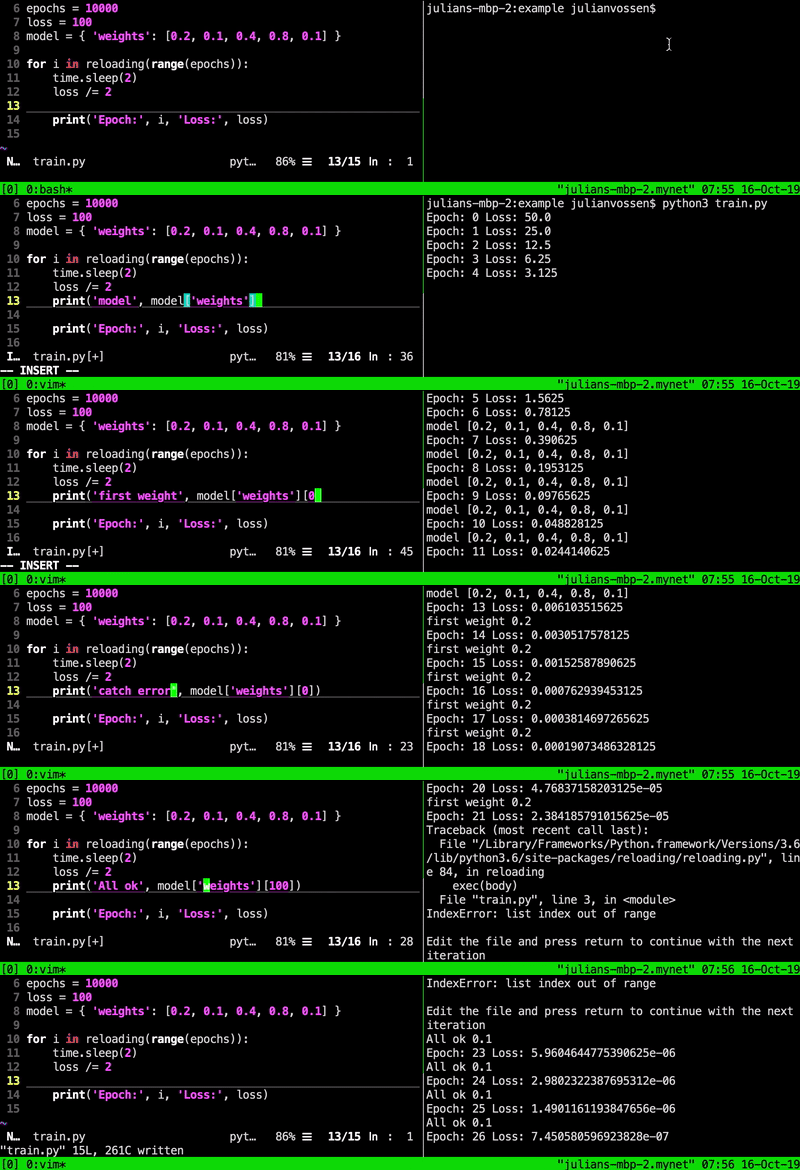
A Python utility to reload a loop body from source on each iteration without losing state
Useful for editing source code during training of deep learning models. This lets you e.g. add logging, print statistics or save the model without restarting the training and, therefore, without losing the training progress.
Install
pip install reloading
Usage
To reload the body of a for loop from source before each iteration, simply
wrap the iterator with reloading, e.g.
from reloading import reloading

for i in reloading(range(10)):
    # this code will be reloaded before each iteration
    print(i)
To reload a function from source before each execution, decorate the function
definition with @reloading, e.g.
from reloading import reloading

@reloading
def some_function():
    # this code will be reloaded before each invocation
    pass
Additional Options
Pass the keyword argument every to reload only on every n-th invocation or iteration. E.g.
for i in reloading(range(1000), every=10):
    # this code will only be reloaded before every 10th iteration
    # this can help to speed-up tight loops
    pass

@reloading(every=10)
def some_function():
    # this code with only be reloaded before every 10th invocation
    pass
Pass forever=True instead of an iterable to create an endless reloading loop, e.g.
for i in reloading(forever=True):
    # this code will loop forever and reload from source before each iteration
    pass
Examples
Here are the short snippets of how to use reloading with your favourite library. For complete examples, check out the examples folder.
PyTorch
for epoch in reloading(range(NB_EPOCHS)):
    # the code inside this outer loop will be reloaded before each epoch

    for images, targets in dataloader:
        optimiser.zero_grad()
        predictions = model(images)
        loss = F.cross_entropy(predictions, targets)
        loss.backward()
        optimiser.step()
Here is a full PyTorch example.
fastai
@reloading
def update_learner(learner):
    # this function will be reloaded from source before each epoch so that you
    # can make changes to the learner while the training is running
    pass

class LearnerUpdater(LearnerCallback):
    def on_epoch_begin(self, **kwargs):
        update_learner(self.learn)

path = untar_data(URLs.MNIST_SAMPLE)
data = ImageDataBunch.from_folder(path)
learn = cnn_learner(data, models.resnet18, metrics=accuracy,
                    callback_fns=[LearnerUpdater])
learn.fit(10)
Here is a full fastai example.
Keras
@reloading
def update_model(model):
    # this function will be reloaded from source before each epoch so that you
    # can make changes to the model while the training is running using
    # K.set_value()
    pass

class ModelUpdater(Callback):
    def on_epoch_begin(self, epoch, logs=None):
        update_model(self.model)

model = Sequential()
model.add(Dense(64, activation='relu', input_dim=20))
model.add(Dense(10, activation='softmax'))

sgd = SGD(lr=0.01, decay=1e-6, momentum=0.9, nesterov=True)
model.compile(loss='categorical_crossentropy',
              optimizer=sgd,
              metrics=['accuracy'])

model.fit(x_train, y_train,
          epochs=200,
          batch_size=128,
          callbacks=[ModelUpdater()])
Here is a full Keras example.
TensorFlow
for epoch in reloading(range(NB_EPOCHS)):
    # the code inside this outer loop will be reloaded from source
    # before each epoch so that you can change it during training

    train_loss.reset_states()
    train_accuracy.reset_states()
    test_loss.reset_states()
    test_accuracy.reset_states()

    for images, labels in tqdm(train_ds):
      train_step(images, labels)

    for test_images, test_labels in tqdm(test_ds):
      test_step(test_images, test_labels)
Here is a full TensorFlow example.
Testing
Make sure you have python and python3 available in your path, then run:
$ python3 reloading/test_reloading.py
관련 프로젝트 살펴보기
불러오는 중…