
gao-lab/GLUE
gao-lab/GLUE has 488 GitHub stars and 73 forks. Star changes are not measured yet. Last checked 2026-11-12 20:06 UTC. Last push 2026-11-03.
Graph-linked unified embedding for single-cell multi-omics data integration
측정된 스타 증가
- in 24h
- 기록 수집 중
- in 7 days
- 기록 수집 중
- in 15 days
- 기록 수집 중
- in 1 month
- 기록 수집 중
서로 겹치는 기간의 순증가량이며 일별 합계가 아닙니다. 측정값이 없으면 비워 둡니다. 스타는 관심도를 나타내며 품질을 보장하지 않습니다.
README.md
OriginalGLUE (Graph-Linked Unified Embedding)




Graph-linked unified embedding for single-cell multi-omics data integration
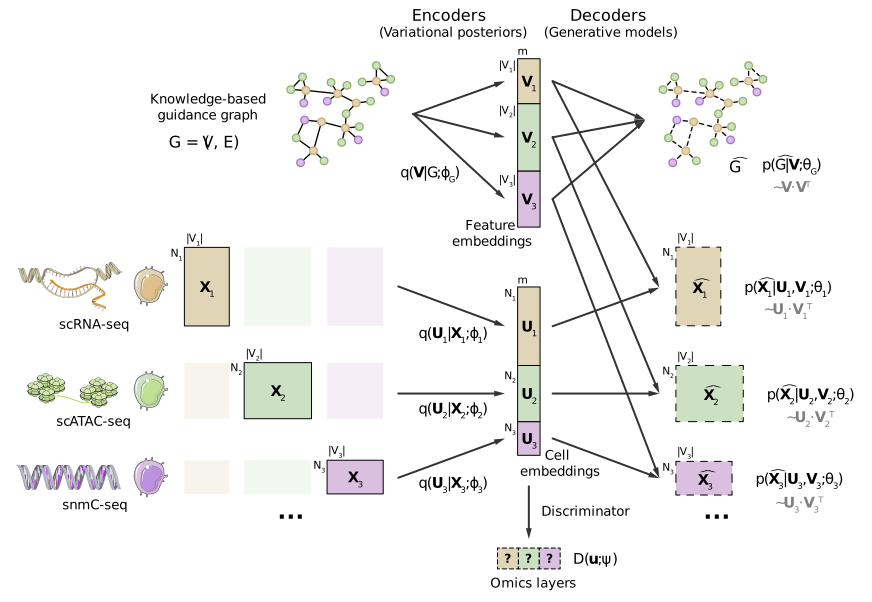
For more details, please check out our publication.
Directory structure
.
├── scglue                  # Main Python package
├── data                    # Data files
├── evaluation              # Method evaluation pipelines
├── experiments             # Experiments and case studies
├── tests                   # Unit tests for the Python package
├── docs                    # Documentation files
├── custom                  # Customized third-party packages
├── packrat                 # Reproducible R environment via packrat
├── env.yaml                # Reproducible Python environment via conda
├── pyproject.toml          # Python package metadata
├── LICENSE
└── README.md
Installation
The scglue package can be installed via conda using one of the following commands:
conda install -c conda-forge -c bioconda scglue  # CPU only
conda install -c conda-forge -c bioconda scglue pytorch-gpu  # With GPU support
Or, it can also be installed via pip:
pip install scglue
Installing within a conda environment is recommended.
Usage
Please checkout the documentations and tutorials at scglue.readthedocs.io.
A Chinese version is also available here.
Development
Install scglue in editable form via flit (first install flit via conda or pip if not installed already):
flit install -s
Run unit tests:
pytest --cov="scglue" --cov-report="term-missing" tests [--cpu-only]
Build documentation:
sphinx-build -b gettext docs docs/_build/gettext
sphinx-intl update -p docs/_build/gettext -l zh_CN -d docs/locale
sphinx-build -b html -D language=en docs docs/_build/html/en  # English version
sphinx-build -b html -D language=zh_CN docs docs/_build/html/zh_CN  # Chinese version
Reproduce results
Checkout the repository to v0.2.0:
git checkout tags/v0.2.0Create a local conda environment using the
env.yamlfile, and then install scglue:conda env create -p conda -f env.yaml && conda activate ./conda flit install -sSet up a project-specific R environment:
packrat::restore()  # Packrat should be automatically installed if not available.
install.packages("data/download/Saunders-2018/DropSeq.util_2.0.tar.gz", repos = NULL)
install.packages("custom/Seurat_4.0.2.tar.gz", lib = "packrat/custom", repos = NULL)
R 4.0.2 was used during the project, but any version above 4.0.0 should be compatible.
Follow instructions in
datato prepare the necessary data.Follow instructions in
evaluationfor method evaluation.Follow instructions in
experimentsfor case studies.
관련 프로젝트 살펴보기
tensorflow/tensorflow
모두를 위한 오픈소스 머신러닝 프레임워크
201,584 스타huggingface/transformers
🤗 Transformers: 텍스트, 비전, 오디오, 멀티모달 분야의 최첨단 머신러닝 모델을 위한 모델 정의 프레임워크로, 추론과 학습을 모두 지원합니다.
168,917 스타AUTOMATIC1111/stable-diffusion-webui
Stable Diffusion 웹 UI
165,300 스타Comfy-Org/ComfyUI
그래프와 노드로 구성된 인터페이스를 갖춘, 가장 강력하고 모듈성이 뛰어난 확산 모델 GUI, API, 백엔드입니다. 세계에서 가장 빠른 로컬 추론 엔진입니다.
146,472 스타