
arunponnusamy/object-detection-opencv
소개
OpenCV와 Python을 사용한 YOLO 객체 감지.
머신러닝측정된 스타 증가
- in 24h
- 0
- in 7 days
- 0
- in 15 days
- -2
- in 1 month
- 기록 수집 중
서로 겹치는 기간의 순증가량이며 일별 합계가 아닙니다. 측정값이 없으면 비워 둡니다. 스타는 관심도를 나타내며 품질을 보장하지 않습니다.
README.md
OriginalObject detection using deep learning with OpenCV and Python
OpenCV dnn module supports running inference on pre-trained deep learning models from popular frameworks like Caffe, Torch and TensorFlow.
When it comes to object detection, popular detection frameworks are
- YOLO
- SSD
- Faster R-CNN
Support for running YOLO/DarkNet has been added to OpenCV dnn module recently.
Dependencies
- opencv
- numpy
pip install numpy opencv-python
Note: Compatability with Python 2.x is not officially tested.
YOLO (You Only Look Once)
Download the pre-trained YOLO v3 weights file from this link and place it in the current directory or you can directly download to the current directory in terminal using
$ wget https://pjreddie.com/media/files/yolov3.weights
Provided all the files are in the current directory, below command will apply object detection on the input image dog.jpg.
$ python yolo_opencv.py --image dog.jpg --config yolov3.cfg --weights yolov3.weights --classes yolov3.txt
Command format
$ python yolo_opencv.py --image /path/to/input/image --config /path/to/config/file --weights /path/to/weights/file --classes /path/to/classes/file
Checkout the blog post to learn more.
sample output :
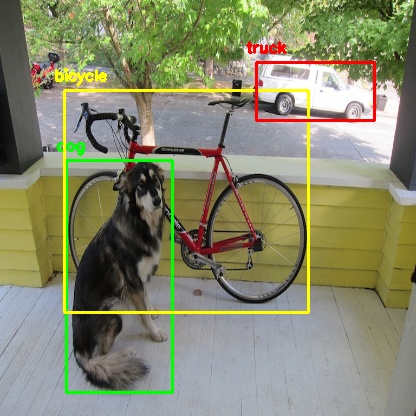
Checkout the object detection implementation available in cvlib which enables detecting common objects in the context through a single function call detect_common_objects().
(SSD and Faster R-CNN examples will be added soon)
관련 프로젝트 살펴보기
불러오는 중…