
Zielon/MICA
Zielon/MICA has 665 GitHub stars and 97 forks. GitHot measured -1 stars in 24 hours. Last checked 2026-11-13 22:37 UTC. Last push 2025-03-17.
측정된 스타 증가
- in 24h
- -1
- in 7 days
- 기록 수집 중
- in 15 days
- 기록 수집 중
- in 1 month
- 기록 수집 중
서로 겹치는 기간의 순증가량이며 일별 합계가 아닙니다. 측정값이 없으면 비워 둡니다. 스타는 관심도를 나타내며 품질을 보장하지 않습니다.
소개
MICA - Towards Metrical Reconstruction of Human Faces [ECCV2022]
머신러닝README.md
OriginalMICA - Towards Metrical Reconstruction of Human Faces
Wojciech Zielonka, Timo Bolkart, Justus Thies
Max Planck Institute for Intelligent Systems, Tübingen, Germany
Video Paper Project Website Face Tracker Dataset Supplemental Email
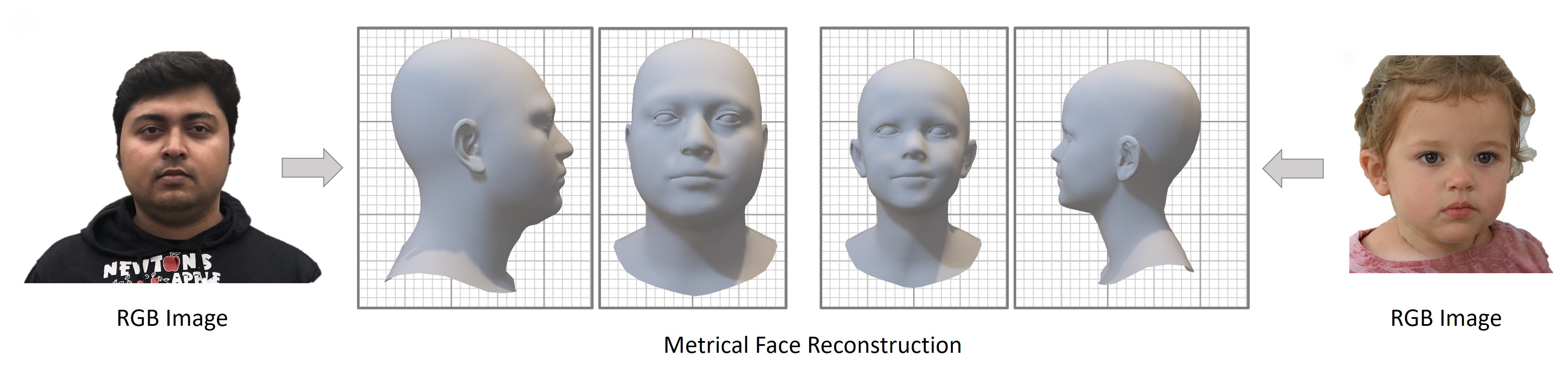 Official Repository for ECCV 2022 paper Towards Metrical Reconstruction of Human Faces
Installation
After cloning the repository please install the environment by using attached conda environment.yml file with the command
conda env create -f environment.yml. Additionally, the FLAME2020 model is needed. To obtain it please create an account at the website download the model and place it in the /data/pretrained/FLAME2020/ folder.
You can also simply run the install.sh script:
git clone https://github.com/Zielon/MICA.git
cd MICA
./install.sh
you will be asked to provide {flame_user} and {flame_password} for your FLAME account in order to access the file server.
Pre-trained Models
If you decide to not use the installation script, the pretrained model can be found under the link. After downloading, please place it in the /data/pretrained/mica.tar location. Additionally, you will need to provide models for inisghtface:
then you need to unzip them and place in ~/.insightface/models/. The install.sh script does it for you.
How To Use
To use MICA you can simply run the demo.py file. It will process all the images from demo/input/ folder and create the output destination for each subject with .ply mesh, rendered image, and .npy FLAME parameters.
Dataset and Training
The MICA dataset consists of eight smaller datasets for about 2300 subjects under a common FLAME topology. Read more information about how to obtain and use it under the link. To train MICA the images from all eight datasets are needed. The repository contains scripts how to generate the Arcface input images as well as the complete list of all the images used for the training. More information can be found here.
When you train from scratch for Arcface model initialization please download Glint360K and specify the path to it in the config as cfg.model.arcface_pretrained_model.
Testing
The testing was done using two datasets, Stirling and NoW. In the model folder you can find the corresponding scripts to run testing routine, which generates the meshes. To calculate the NoW challenge error you can use the following repository.
Citation
If you use this project in your research please cite MICA:
@proceedings{zielonka22mica,
  author = {Zielonka, Wojciech and Bolkart, Timo and Thies, Justus},
  title = {Towards Metrical Reconstruction of Human Faces},
  journal = {European Conference on Computer Vision},
  year = {2022}
}
관련 프로젝트 살펴보기
tensorflow/tensorflow
모두를 위한 오픈소스 머신러닝 프레임워크
201,593 스타huggingface/transformers
🤗 Transformers: 텍스트, 비전, 오디오, 멀티모달 분야의 최첨단 머신러닝 모델을 위한 모델 정의 프레임워크로, 추론과 학습을 모두 지원합니다.
168,950 스타AUTOMATIC1111/stable-diffusion-webui
Stable Diffusion 웹 UI
165,305 스타Comfy-Org/ComfyUI
그래프와 노드로 구성된 인터페이스를 갖춘, 가장 강력하고 모듈성이 뛰어난 확산 모델 GUI, API, 백엔드입니다. 세계에서 가장 빠른 로컬 추론 엔진입니다.
146,687 스타