
Hironsan/bertsearch
Hironsan/bertsearch has 898 GitHub stars and 197 forks. GitHot measured 0 stars in 24 hours. Last checked 2026-11-18 13:42 UTC. Last push 2023-05-01.
측정된 스타 증가
- in 24h
- 0
- in 7 days
- 기록 수집 중
- in 15 days
- 기록 수집 중
- in 1 month
- 기록 수집 중
서로 겹치는 기간의 순증가량이며 일별 합계가 아닙니다. 측정값이 없으면 비워 둡니다. 스타는 관심도를 나타내며 품질을 보장하지 않습니다.
소개
Elasticsearch with BERT for advanced document search.
머신러닝README.md
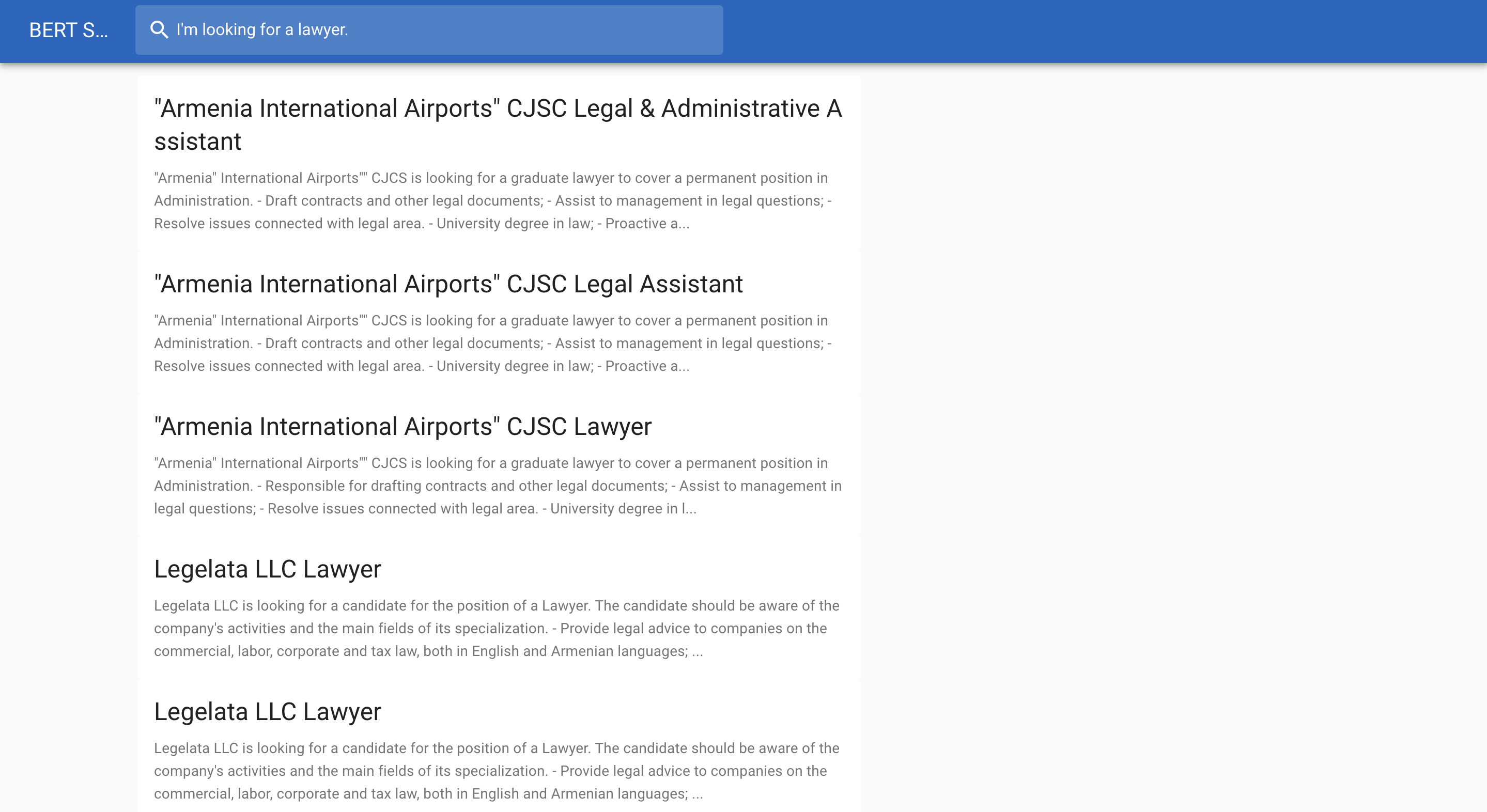
OriginalElasticsearch meets BERT
Below is a job search example:
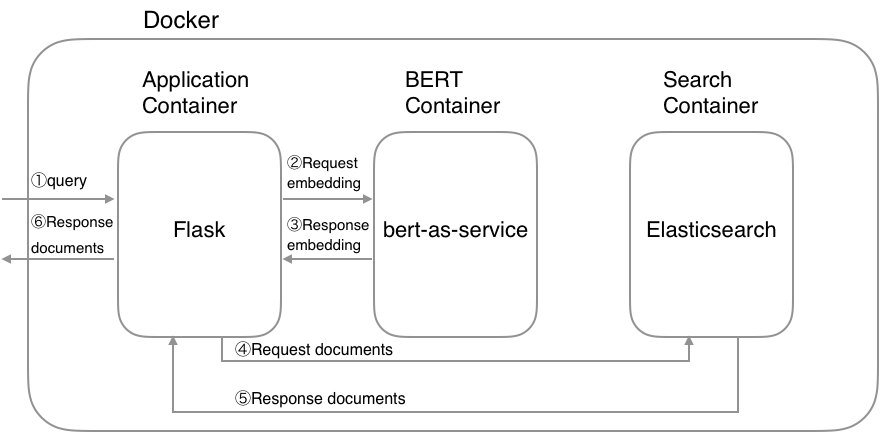
System architecture
Requirements
- Docker
- Docker Compose >= 1.22.0
Getting Started
1. Download a pretrained BERT model
List of released pretrained BERT models (click to expand...)
| BERT-Base, Uncased | 12-layer, 768-hidden, 12-heads, 110M parameters |
| BERT-Large, Uncased | 24-layer, 1024-hidden, 16-heads, 340M parameters |
| BERT-Base, Cased | 12-layer, 768-hidden, 12-heads , 110M parameters |
| BERT-Large, Cased | 24-layer, 1024-hidden, 16-heads, 340M parameters |
| BERT-Base, Multilingual Cased (New) | 104 languages, 12-layer, 768-hidden, 12-heads, 110M parameters |
| BERT-Base, Multilingual Cased (Old) | 102 languages, 12-layer, 768-hidden, 12-heads, 110M parameters |
| BERT-Base, Chinese | Chinese Simplified and Traditional, 12-layer, 768-hidden, 12-heads, 110M parameters |
$ wget https://storage.googleapis.com/bert_models/2018_10_18/cased_L-12_H-768_A-12.zip
$ unzip cased_L-12_H-768_A-12.zip
2. Set environment variables
You need to set a pretrained BERT model and Elasticsearch's index name as environment variables:
$ export PATH_MODEL=./cased_L-12_H-768_A-12
$ export INDEX_NAME=jobsearch
3. Run Docker containers
$ docker-compose up
CAUTION: If possible, assign high memory(more than 8GB) to Docker's memory configuration because BERT container needs high memory.
4. Create index
You can use the create index API to add a new index to an Elasticsearch cluster. When creating an index, you can specify the following:
- Settings for the index
- Mappings for fields in the index
- Index aliases
For example, if you want to create jobsearch index with title, text and text_vector fields, you can create the index by the following command:
$ python example/create_index.py --index_file=example/index.json --index_name=jobsearch
# index.json
{
  "settings": {
    "number_of_shards": 2,
    "number_of_replicas": 1
  },
  "mappings": {
    "dynamic": "true",
    "_source": {
      "enabled": "true"
    },
    "properties": {
      "title": {
        "type": "text"
      },
      "text": {
        "type": "text"
      },
      "text_vector": {
        "type": "dense_vector",
        "dims": 768
      }
    }
  }
}
CAUTION: The dims value of text_vector must need to match the dims of a pretrained BERT model.
5. Create documents
Once you created an index, you’re ready to index some document. The point here is to convert your document into a vector using BERT. The resulting vector is stored in the text_vector field. Let`s convert your data into a JSON document:
$ python example/create_documents.py --data=example/example.csv --index_name=jobsearch
# example/example.csv
"Title","Description"
"Saleswoman","lorem ipsum"
"Software Developer","lorem ipsum"
"Chief Financial Officer","lorem ipsum"
"General Manager","lorem ipsum"
"Network Administrator","lorem ipsum"
After finishing the script, you can get a JSON document like follows:
# documents.jsonl
{"_op_type": "index", "_index": "jobsearch", "text": "lorem ipsum", "title": "Saleswoman", "text_vector": [...]}
{"_op_type": "index", "_index": "jobsearch", "text": "lorem ipsum", "title": "Software Developer", "text_vector": [...]}
{"_op_type": "index", "_index": "jobsearch", "text": "lorem ipsum", "title": "Chief Financial Officer", "text_vector": [...]}
...
6. Index documents
After converting your data into a JSON, you can adds a JSON document to the specified index and makes it searchable.
$ python example/index_documents.py
7. Open browser
Go to http://127.0.0.1:5000.