
HendrikStrobelt/LSTMVis
HendrikStrobelt/LSTMVis has 1,268 GitHub stars and 259 forks. GitHot measured 0 stars in 24 hours and -1 in 7 days. Last checked 2026-11-12 01:51 UTC. Last push 2021-11-19.
Visualization Toolbox for Long Short Term Memory networks (LSTMs)
측정된 스타 증가
- in 24h
- 0
- in 7 days
- -1
- in 15 days
- 업데이트 지연
- in 1 month
- 업데이트 지연
서로 겹치는 기간의 순증가량이며 일별 합계가 아닙니다. 측정값이 없으면 비워 둡니다. 스타는 관심도를 나타내며 품질을 보장하지 않습니다.
README.md
Original Visual Analysis for State Changes in RNNs
More information about LSTMVis, an introduction video, and the link to the live demo can be found at lstm.seas.harvard.edu
Also check out our new work on Sequence-to-Sequence models on github or the live demo at http://seq2seq-vis.io/
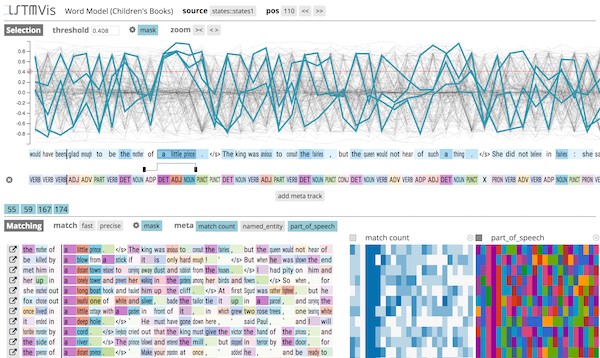
Changes in V2.1
- update to Python 3.7++ (thanks to @nneophyt)
Changes in V2
- new design and server-backend
- discrete zooming for hidden-state track
- added annotation tracks for meta-data and prediction
- added training and extraction workflow for tensorflow
- client is now ES6 and D3v4
- some performance enhancements on client side
- Added Keras tutorial here (thanks to Mohammadreza Ebrahimi)
Install
Please use python 3.7 or later to install LSTMVis.
Clone the repository:
git clone https://github.com/HendrikStrobelt/LSTMVis.git; cd LSTMVis
Install python (server-side) requirements using pip:
python -m venv  venv3
source venv3/bin/activate
pip install -r requirements.txt
Download & Unzip example dataset(s) into <LSTMVis>/data/05childbook:
Children Book - Gutenberg - 2.2 GB
Parens Dataset - 10k small - 0.03 GB
start server:
source venv3/bin/activate
python lstm_server.py -dir <datadir>
For the example dataset, use python lstm_server.py -dir data
open browser at http://localhost:8888 - eh voila !
Adding Your Own Data
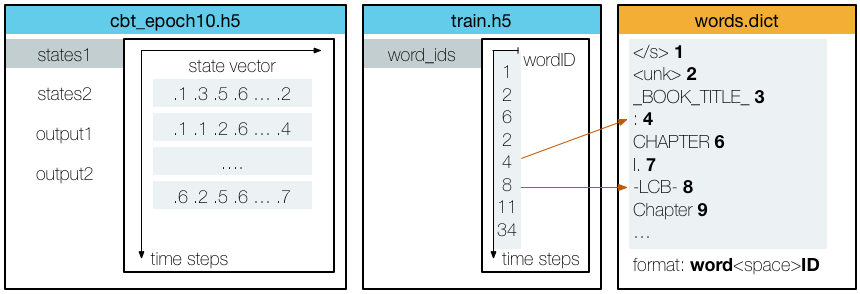
If you want to train your own data first, please read the Training document. If you have your own data at hand, adding it to LSTMVis is very easy. You only need three files:
- HDF5 file containing the state vectors for each time step (e.g.
states.hdf5) - HDF5 file containing a word ID for each time step (e.g.
train.hdf5)* - Dict file containing the mapping from word ID to word (e.g.
train.dict)*
A schematic representation of the data:
*If you don't have these files yet, but a space-separated .txt file of your training data instead, check out our text conversion tool
Data Directory
LSTMVis parses all subdirectories of <datadir> for config files lstm.yml.
A typical <datadir> might look like this:
<datadir>
├── paren  		        <--- project directory
│   ├── lstm.yml 		<--- config file
│   ├── states.hdf5 	        <--- states for each time step
│   ├── train.hdf5 		<--- word ID for each time step
│   └── train.dict 		<--- mapping word ID -> word
├── fun ..
Config File
a simple example of an lstm.yml is:
name: children books  # project name
description: children book texts from the Gutenberg project # little description

files: # assign files to reference name
  states: states.hdf5 # HDF5 files have to end with .h5 or .hdf5 !!!
  train: train.hdf5 # word ids of training set
  words: train.dict # dict files have to end with .dict !!

word_sequence: # defines the word sequence
  file: train # HDF5 file
  path: word_ids # path to table in HDF5
  dict_file: words # dictionary to map IDs from HDF5 to words

states: # section to define which states of your model you want to look at
  file: states # HDF5 files containing the state for each position
  types: [
        {type: state, layer: 1, path: states1}, # type={state, output}, layer=[1..x], path = HDF5 path
        {type: state, layer: 2, path: states2},
        {type: output, layer: 2, path: output2}
  ]
Intrigued ? Here is more..
Check out our documents about:
- details about configuring the states file input
- adding annotation files for result heatmaps
- training a model with torch
- NEW !!! training a model with tensorflow (link)
- tools that make your life easier
Credits
LSTMVis is a collaborative project of Hendrik Strobelt, Sebastian Gehrmann, Bernd Huber, Hanspeter Pfister, and Alexander M. Rush at Harvard SEAS.
관련 프로젝트 살펴보기
tensorflow/tensorflow
모두를 위한 오픈소스 머신러닝 프레임워크
201,505 스타huggingface/transformers
🤗 Transformers: 텍스트, 비전, 오디오, 멀티모달 분야의 최첨단 머신러닝 모델을 위한 모델 정의 프레임워크로, 추론과 학습을 모두 지원합니다.
168,815 스타AUTOMATIC1111/stable-diffusion-webui
Stable Diffusion 웹 UI
165,300 스타Comfy-Org/ComfyUI
그래프와 노드로 구성된 인터페이스를 갖춘, 가장 강력하고 모듈성이 뛰어난 확산 모델 GUI, API, 백엔드입니다. 세계에서 가장 빠른 로컬 추론 엔진입니다.
146,472 스타