
xataio/pgstream
xataio/pgstream has 1,215 GitHub stars and 94 forks. GitHot measured +1 stars in 24 hours and +7 in 7 days. Last checked 2026-11-14 01:04 UTC. Last push 2026-10-30.
可以做什么
- Schema change tracking and replication of DDL changes
- Elasticsearch/OpenSearch
- Initial and on demand PostgreSQL snapshots (for when you don't need continuous replication)
- Column value transformations (anonymise your data on the go!)
实测星标增长
- 24小时
- +1
- 7天
- +7
- 15天
- 正在收集历史
- 1个月
- 正在收集历史
各周期内的星标净变化,周期相互重叠,并非每日新增。缺失的测量保持空白。星标代表关注度,不代表软件质量。
关于
PostgreSQL replication with DDL changes
数据README.md
原文








pgstream - Postgres replication with DDL changes
pgstream is an open source CDC command-line tool and library that offers Postgres replication support with DDL changes to any provided target.
Features
- Schema change tracking and replication of DDL changes
- Support for multiple out of the box targets
- Elasticsearch/OpenSearch
- Webhooks
- PostgreSQL
- Initial and on demand PostgreSQL snapshots (for when you don't need continuous replication)
- Column value transformations (anonymise your data on the go!)
- Modular deployment configuration, only requires Postgres
- Kafka support with schema based partitioning
- Extendable support for custom targets
Table of Contents
Usage
pgstream can be used via the readily available CLI or as a library. For detailed information about the CLI usage, check out the dedicated CLI documentation section.
CLI Installation
# Download the latest release
curl -L https://github.com/xataio/pgstream/releases/latest/download/pgstream.linux.amd64 -o pgstream
chmod +x pgstream
sudo mv pgstream /usr/local/bin/

# Or use go install
go install github.com/xataio/pgstream@latest

# Or build from source
git clone https://github.com/xataio/pgstream.git
cd pgstream
go build -o pgstream ./cmd

# Or install via homebrew on macOS or Linux
brew tap xataio/pgstream
brew install pgstream
Environment setup
If you have an environment available, with at least Postgres and whichever resources you're planning on running, then you can skip this step. Otherwise, a docker setup is available in this repository with profiles that selectively start Postgres, Kafka and OpenSearch.
To run all profiles:
docker-compose -f build/docker/docker-compose.yml up
If you only want to run PostgreSQL to PostgreSQL pgstream replication you can use the pg2pg profile:
docker-compose -f build/docker/docker-compose.yml --profile pg2pg up
You can also run multiple profiles. For example to start two PostgreSQL instances and Kafka:
docker-compose -f build/docker/docker-compose.yml --profile pg2pg --profile kafka up
List of supported docker profiles:
- pg2pg
- pg2os
- pg2webhook
- kafka
Configuration
Pgstream source and target need to be configured appropriately before the commands can be run. This can be done:
- Using the relevant CLI flags for each command
- Using a yaml configuration file
- Using environment variables (.env file supported)
Check the configuration documentation for more information about the configuration options, or check the CLI documentation for details on the available flags. Additionally, you can find sample files for both .env and .yaml here.
If you want to configure column transformations, leveraging greenmask, neosync and go-masker open source integrations, as well as custom transformers, check the transformation rules configuration for more details, along with the list of available transformers.
Run pgstream
Replication mode
Run will start streaming data from the configured source into the configured target. By passing the --init flag to the run command, pgstream will initialise the pgstream state in the source Postgres database before starting replication. It will:
- Create a
pgstreamschema - Create tables/functions/triggers to keep track of schema changes for DDL replication (see Tracking schema changes for more details)
- Create a replication slot
Initialisation is required for pgstream replication. It can alternatively be performed by running the pgstream init command separately before pgstream run. Check out the CLI documentation for more details.
Example running pgstream replication from Postgres -> OpenSearch:
# using the environment configuration file
pgstream run -c docs/examples/pg2os.env --init --log-level trace
# using the yaml configuration file
pgstream run -c docs/examples/pg2os.yaml --init --log-level info
# using the CLI flags
pgstream run --source postgres --source-url "postgres://postgres:postgres@localhost:5432?sslmode=disable" --target opensearch --target-url "http://admin:admin@localhost:9200" --init
Example running pgstream with Postgres -> Kafka, and in a separate terminal, Kafka->OpenSearch:
# using the environment configuration file
pgstream run -c docs/examples/pg2kafka.env --init --log-level trace
# using the yaml configuration file
pgstream run -c docs/examples/pg2kafka.yaml --init --log-level info
# using the CLI flags
pgstream run --source postgres --source-url "postgres://postgres:postgres@localhost:5432?sslmode=disable" --target kafka --target-url "localhost:9092" --init
# using the environment configuration file
pgstream run -c docs/examples/kafka2os.env --init --log-level trace
# using the yaml configuration file
pgstream run -c docs/examples/kafka2os.yaml --init --log-level info
# using the CLI flags
pgstream run --source kafka --source-url "localhost:9092" --target opensearch --target-url "http://admin:admin@localhost:9200" --init
An initial snapshot can be performed before starting replication by providing --snapshot-tables flag or by setting the relevant configuration fields (check the configuration documentation for more details on advanced configuration options).
Example running pgstream with PostgreSQL -> PostgreSQL with initial snapshot enabled:
# using the CLI flags
pgstream run --source postgres --source-url "postgres://postgres:postgres@localhost:5432?sslmode=disable" --target postgres --target-url "postgres://postgres:postgres@localhost:7654?sslmode=disable" --snapshot-tables test --init
Snapshot mode
pgstream can also be used to perform a point in time snapshot of the source database. This is helpful if you don't require continuous replication, but want to keep the source and target in sync by running nightly snapshots for example.
The snapshot command doesn't require any initialisation or pgstream specific state, since it only performs read operations on the source Postgres database.
Example running pgstream to perform a snapshot from PostgreSQL -> PostgreSQL:
# using the environment configuration file
pgstream snapshot -c docs/examples/snapshot2pg.env --log-level trace
# using the yaml configuration file
pgstream snapshot -c docs/examples/snapshot2pg.yaml --log-level info
# using the CLI flags
pgstream snapshot --postgres-url="postgres://postgres:postgres@localhost:5432?sslmode=disable" --target=postgres --target-url="postgres://postgres:postgres@localhost:7654?sslmode=disable" --tables="test" --reset
Tutorials
- PostgreSQL replication to PostgreSQL
- PostgreSQL replication to OpenSearch
- PostgreSQL replication to webhooks
- PostgreSQL replication using Kafka
- PostgreSQL snapshots
- PostgreSQL column transformations
Documentation
For more advanced usage, implementation details, and detailed configuration settings, please refer to the full documentation below.
- Architecture
- Configuration
- Snapshots
- Transformers
- Observability
- CLI
- Privileges
- Container image
- Glossary
Benchmarks
Snapshots
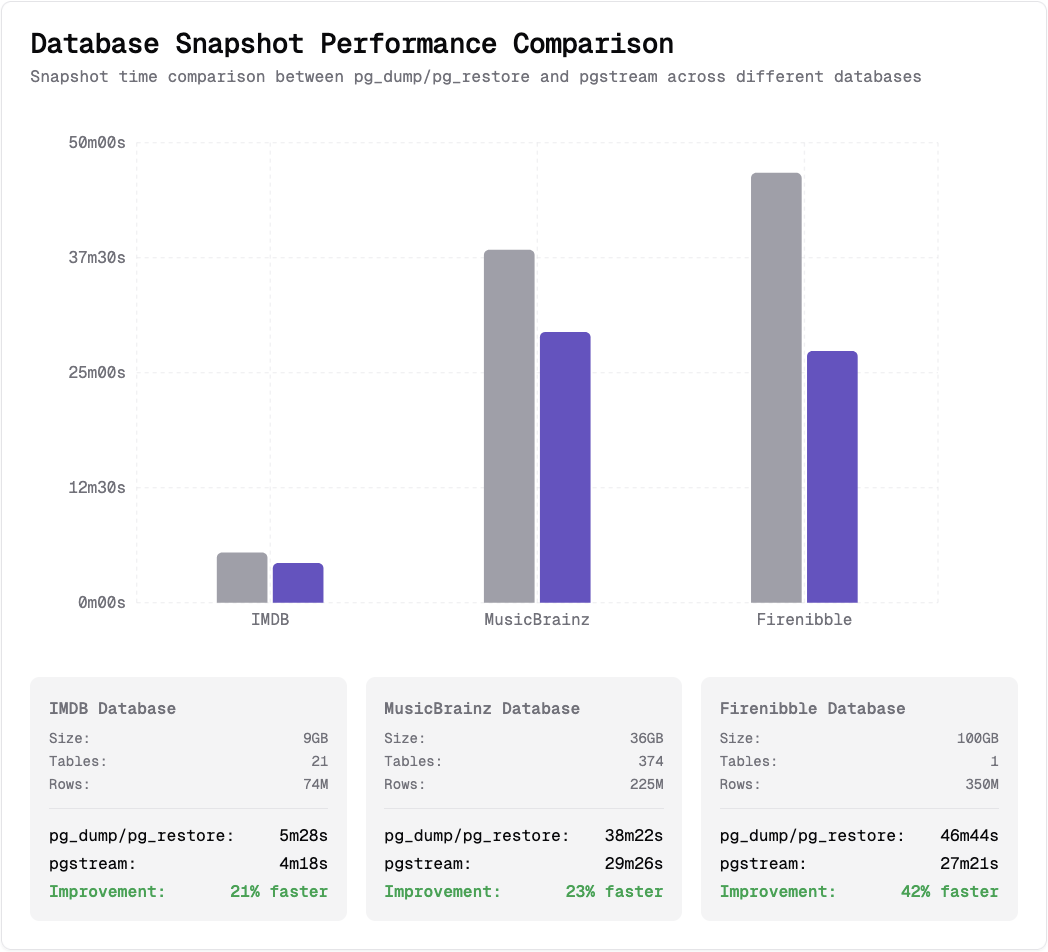
Datasets used: IMDB database, MusicBrainz database, Firenibble database.
All benchmarks were run using the same setup, with pgstream v0.7.2, pg_dump/pg_restore (PostgreSQL) 17.4 and PostgreSQL 17.4, using identical resources to ensure a fair comparison.
For more details into performance benchmarking for snapshots to PostgreSQL with pgstream, check out this blogpost.
Limitations
Some of the limitations of the initial release include:
- Single Kafka topic support
- Postgres plugin support limited to
wal2json - No row level filtering support
- Primary key/unique not null column required for replication
- Kafka serialisation support limited to JSON
Releases
You can find below the release notes for major pgstream versions, along with migration guides whenever relevant:
Contributing
We welcome contributions from the community! If you'd like to contribute to pgstream, please follow these guidelines and adhere to our code of conduct.
License
This project is licensed under the Apache License 2.0 - see the LICENSE file for details.
Support
If you have any questions, encounter issues, or need assistance, open an issue in this repository, and our community will be happy to help.
Made with 💜 by Xata 🦋
探索相关项目
Asabeneh/30-Days-Of-Python
30 Days of Python 编程挑战是一份循序渐进的指南,用于在 30 天内学习 Python 编程语言。这项挑战可能需要超过 100 天。请按自己的节奏进行。这些视频或许也有帮助:https://www.youtube.com/channel/UC7PNRuno1rzYPb1xLa4yktw
78,710 星标grafana/grafana
开放且可组合的可观测性与数据可视化平台。可对来自 Prometheus、Loki、Elasticsearch、InfluxDB、Postgres 等众多数据源的指标、日志和追踪进行可视化。
77,892 星标redis/redis
对于正在构建实时数据驱动应用的开发者而言,Redis 是首选、速度最快且功能最丰富的缓存、数据结构服务器和文档与向量查询引擎。
77,490 星标apache/superset
Apache Superset 是一个数据可视化与数据探索平台
75,521 星标