
xataio/pgroll
xataio/pgroll has 6,624 GitHub stars and 157 forks. GitHot measured +2 stars in 24 hours and +10 in 7 days. Last checked 2026-11-12 07:38 UTC. Last push 2026-11-02.
PostgreSQL zero-downtime migrations made easy
可以做什么
- Zero-downtime migrations (no database locking, no breaking changes).
- Keep old and new schema versions working simultaneously.
- Automatic columns backfilling when needed.
- Instant rollback in case of issues during migration.
实测星标增长
- 24小时
- +2
- 7天
- +10
- 15天
- 更新延迟
- 1个月
- 更新延迟
各周期内的星标净变化,周期相互重叠,并非每日新增。缺失的测量保持空白。星标代表关注度,不代表软件质量。
README.md
原文








pgroll - Zero-downtime, reversible, schema migrations for Postgres
pgroll is an open source command-line tool that offers safe and reversible schema migrations for PostgreSQL by serving multiple schema versions simultaneously. It takes care of the complex migration operations to ensure that client applications continue working while the database schema is being updated. This includes ensuring changes are applied without locking the database, and that both old and new schema versions work simultaneously (even when breaking changes are being made!). This removes risks related to schema migrations, and greatly simplifies client application rollout, also allowing for instant rollbacks.
See the introductory blog post for more about the problems solved by pgroll.
Features
- Zero-downtime migrations (no database locking, no breaking changes).
- Keep old and new schema versions working simultaneously.
- Automatic columns backfilling when needed.
- Instant rollback in case of issues during migration.
- Works against existing schemas, no need to start from scratch.
- Works with Postgres 14.0 or later.
- Works with any Postgres service (including RDS and Aurora).
- Written in Go, cross-platform single binary with no external dependencies.
Table of Contents
Installation
Binaries
Binaries are available for Linux, macOS & Windows, check our Releases.
From source
To install pgroll from the source, run the following command:
go install github.com/xataio/pgroll@latest
Note: requires Go 1.24 or later.
From package manager - Homebrew
To install pgroll with homebrew, run the following command:
# macOS or Linux
brew tap xataio/pgroll
brew install pgroll
Usage
Follow these steps to perform your first schema migration using pgroll:
Prepare the database
pgroll needs to store some internal state in the database. A table is created to track the current schema version and store version history. To prepare the database, run the following command:
pgroll --postgres-url postgres://user:password@host:port/dbname init
Import existing DB (optional)
To start from a scratch (empty) database, just skip this step :)
But if you want to use pgroll on an already populated database, you need to "import" the current structure using the baseline command:
pgroll --postgres-url postgres://user:password@host:port/dbname baseline 000_existing_schema ./migrations/
Start a migration
Create a migration file. You can check the examples folder for some examples. For instance, use this migration file to create a new customers table:
initial_migration.json
{
  "name": "initial_migration",
  "operations": [
    {
      "create_table": {
        "name": "customers",
        "columns": [
          {
            "name": "id",
            "type": "integer",
            "pk": true
          },
          {
            "name": "name",
            "type": "varchar(255)",
            "unique": true
          },
          {
            "name": "bio",
            "type": "text",
            "nullable": true
          }
        ]
      }
    }
  ]
}
Then run the following command to start the migration:
pgroll --postgres-url postgres://user:password@host:port/dbname start initial_migration.json
This will create a new schema version in the database, and apply the migration operations (create a table). After this command finishes, both the old version of the schema (with no customers table) and the new one (with the customers table) will be accessible simultaneously.
Configure client applications
After starting a migration, client applications can start using the new schema version. In order to do so, they need to be configured to access it. This can be done by setting the search_path to the new schema version name (provided by pgroll start output), for instance:
SET search_path TO 'public_initial_migration';
Complete the migration
Once there are no more client applications using the old schema version, the migration can be completed. This will remove the old schema. To complete the migration, run the following command:
pgroll --postgres-url postgres://user:password@host:port/dbname complete
Rolling back a migration
At any point during a migration, it can be rolled back to the previous version. This will remove the new schema and leave the old one as it was before the migration started. To rollback a migration, run the following command:
pgroll --postgres-url postgres://user:password@host:port/dbname rollback
How pgroll works
pgroll works by creating virtual schemas by using views on top of the physical tables. This allows for performing all the necessary changes needed for a migration without affecting the existing clients.
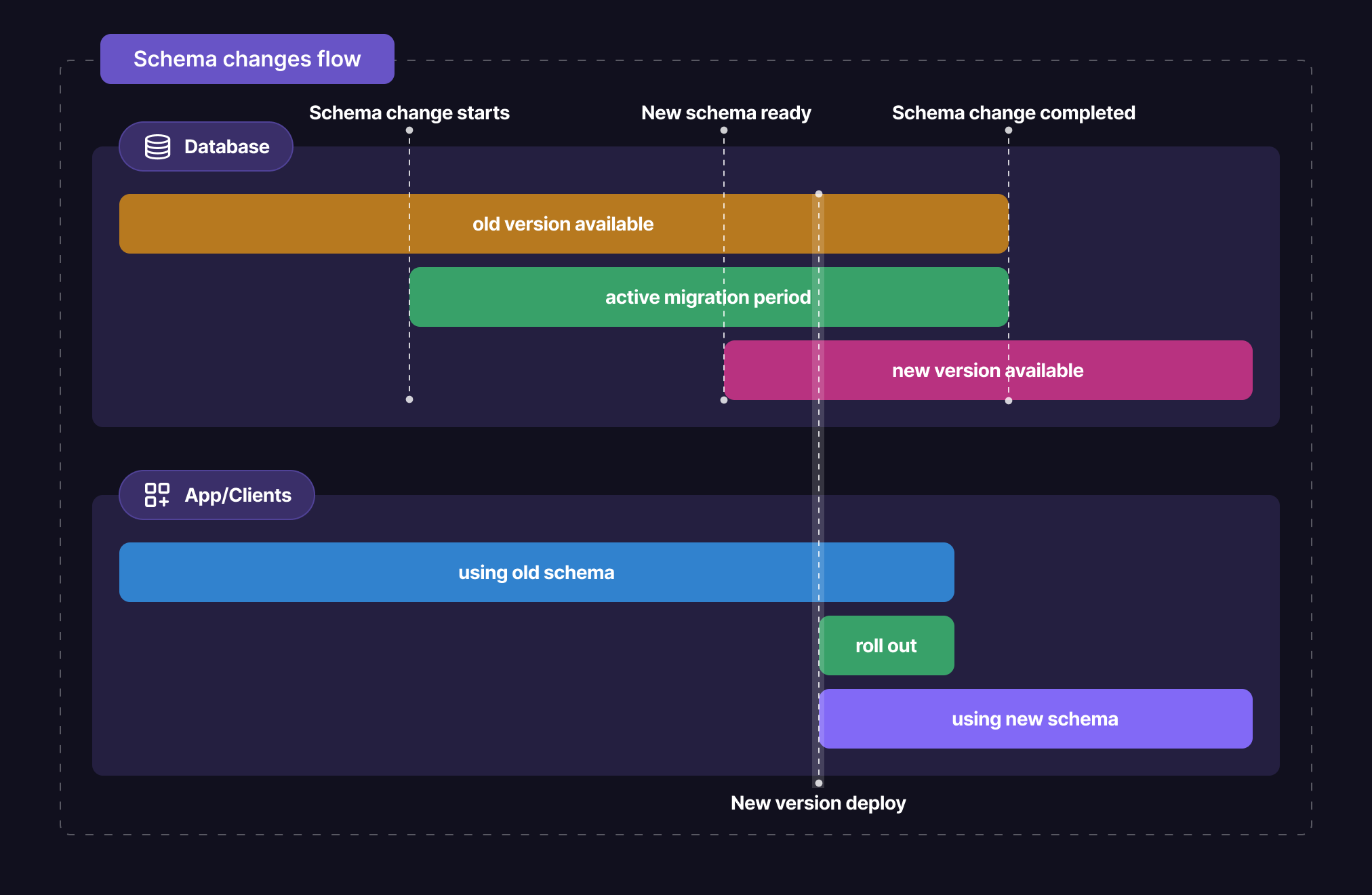
pgroll follows a expand/contract workflow. On migration start, it will perform all the additive changes (create tables, add columns, etc) in the physical schema, without breaking it.
When a breaking change is required on a column, it will create a new column in the physical schema, and backfill it from the old column. Also, configure triggers to make sure all writes to the old/new column get propagated to its counterpart during the whole active migration period. The new column will be then exposed in the new version of the schema.
Once the start phase is complete, the new schema version is ready, mapping all the views to the proper tables & columns. Client applications can then access the new schema version, while the old one is still available. This is the moment to start rolling out the new version of the client application.
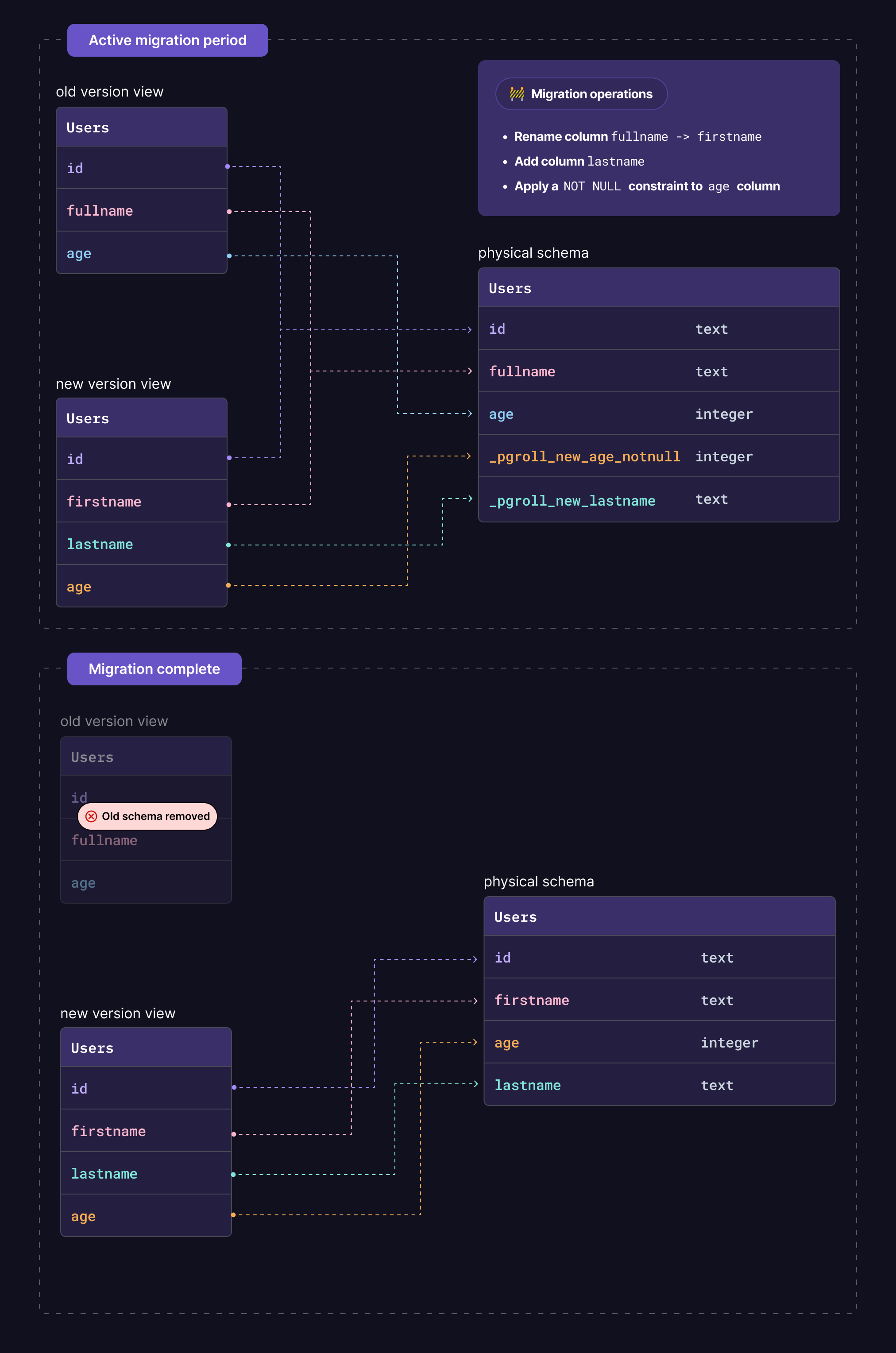
When no more client applications are using the old schema version, the migration can be completed. This will remove the old schema, and the new one will be the only one available. No longer needed tables & columns will be removed (no client is using this at this point), and the new ones will be renamed to their final names. Client applications still work during this phase, as the views are still mapping to the proper tables & columns.
Documentation
For more advanced usage, tutorials, and detailed options refer to the guides and references in the Documentation.
Benchmarks
Some performance benchmarks are run on each commit to main in order to track performance over time. Each benchmark is run against Postgres 14.8, 15.3, 16.4, 17.0, 18.0 and "latest". Each line on the chart represents the number of rows the benchmark was run against, currently 10k, 100k and 300k rows.
Backfill:Rows/s to backfill a text column with the valueplaceholder. We use our default batching strategy of 10k rows per batch with no backoff.WriteAmplification/NoTrigger:Baseline rows/s when writing data to a table without apgrolltrigger.WriteAmplification/WithTrigger:Rows/s when writing data to a table when apgrolltrigger has been set up.ReadSchema:Checks the number of executions per second of theread_schemafunction which is a core function executed frequently during migrations.
They can be seen here.
Contributing
We welcome contributions from the community! If you'd like to contribute to pgroll, please follow these guidelines:
- Create an issue for any questions, bug reports, or feature requests.
- Check the documentation and existing issues before opening a new issue.
Contributing Code
- Fork the repository.
- Create a new branch for your feature or bug fix.
- Make your changes and write tests if applicable.
- Ensure your code passes linting and tests.
- Submit a pull request.
For this project, we pledge to act and interact in ways that contribute to an open, welcoming, diverse, inclusive, and healthy community.
References
This is a list of projects and articles that helped as inspiration, or otherwise are similar to pgroll:
- Reshape by Fabian Lindfors
- PgHaMigrations
- PostgreSQL at Scale: Database Schema Changes Without Downtime
- Zero downtime schema migrations in highly available databases
- Expand and contract pattern
License
This project is licensed under the Apache License 2.0 - see the LICENSE file for details.
Support
If you have any questions, encounter issues, or need assistance, open an issue in this repository our join our Discord, and our community will be happy to help.
Made with :heart: by Xata 🦋
探索相关项目
Asabeneh/30-Days-Of-Python
30 Days of Python 编程挑战是一份循序渐进的指南,用于在 30 天内学习 Python 编程语言。这项挑战可能需要超过 100 天。请按自己的节奏进行。这些视频或许也有帮助:https://www.youtube.com/channel/UC7PNRuno1rzYPb1xLa4yktw
78,618 星标grafana/grafana
开放且可组合的可观测性与数据可视化平台。可对来自 Prometheus、Loki、Elasticsearch、InfluxDB、Postgres 等众多数据源的指标、日志和追踪进行可视化。
77,859 星标redis/redis
对于正在构建实时数据驱动应用的开发者而言,Redis 是首选、速度最快且功能最丰富的缓存、数据结构服务器和文档与向量查询引擎。
77,472 星标apache/superset
Apache Superset 是一个数据可视化与数据探索平台
75,495 星标