
watchfire-io/watchfire
watchfire-io/watchfire has 62 GitHub stars and 4 forks. GitHot measured 0 stars in 24 hours. Last checked 2026-11-14 22:08 UTC. Last push 2026-11-13.
实测星标增长
- 24小时
- 0
- 7天
- 正在收集历史
- 15天
- 正在收集历史
- 1个月
- 正在收集历史
各周期内的星标净变化,周期相互重叠,并非每日新增。缺失的测量保持空白。星标代表关注度,不代表软件质量。
关于
Better context. Better code.
开发工具README.md
原文

Better context. Better code.
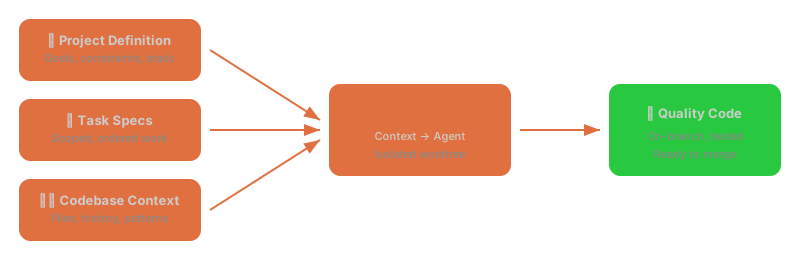
AI coding agents work best when they have the right context. Watchfire lets you define your project structure, break work into well-scoped tasks, and orchestrate agents that execute with full awareness of your codebase, constraints, and goals. It manages context automatically — so agents stay on track and produce code you'd actually ship.
Install
macOS

Homebrew (recommended):
brew tap watchfire-io/tap
brew install --cask watchfire-io/tap/watchfire   # Desktop app (GUI + CLI)
brew install watchfire-io/tap/watchfire          # CLI & daemon only
Script:
curl -fsSL https://raw.githubusercontent.com/watchfire-io/watchfire/main/scripts/install.sh | bash
Linux
curl -fsSL https://raw.githubusercontent.com/watchfire-io/watchfire/main/scripts/install.sh | bash
Homebrew also works on Linux:
brew tap watchfire-io/tap && brew install watchfire-io/tap/watchfire
Windows
irm https://raw.githubusercontent.com/watchfire-io/watchfire/main/scripts/install.ps1 | iex
How It Works

Key Features
🎯 Context Management
Define your project once. Watchfire feeds agents the right specs, constraints, and codebase context — no copy-pasting prompts.
📋 Structured Workflow
Break big projects into tasks with clear specs. Agents tackle them in order, each in an isolated git worktree branch. Quick-add turns a bullet list into a batch of tasks in one go — GUI modal, TUI overlay, or watchfire task quick in your $EDITOR.
🚀 Scale with Confidence
Run agents across multiple projects in parallel. Monitor live terminal output, review results, and merge — from TUI or GUI. The GUI's integrated terminal spawns your login shell (configurable shell picker in Settings), so PATH matches your native terminal.
📱 Supervise from Anywhere
Pair a Telegram bot with your daemon and run Watchfire from your phone: check status, start tasks, watch the agent conversation live, and reply into a running session. Local-only by design — the daemon dials out via long polling, no public endpoint or tunnel needed.
Agent Modes
| Mode | Description |
|---|---|
| Chat | Interactive session with the coding agent |
| Task | Execute a specific task from the task list |
| Start All | Run all ready tasks sequentially |
| Wildfire | Autonomous loop: execute tasks, refine drafts, generate new tasks |
| Generate Definition | Auto-generate a project definition from your codebase |
| Generate Tasks | Auto-generate tasks from the project definition |
| Retrofit Definition | Fold completed tasks back into an up-to-date project definition, then optionally archive them |
Supervise from Telegram
Watchfire ships a built-in Telegram bridge: pair your own bot with the daemon and supervise every project from your phone. It uses long polling — the daemon dials out to Telegram, so there's no public endpoint, tunnel, or port forward, and only chats you explicitly pair ever see project data.
Setup
- Create a bot — message @BotFather on
Telegram, send
/newbot, and copy the bot token. - Paste the token into Watchfire — GUI: Settings → Integrations →
Telegram; TUI:
Ctrl+i; or CLI:
The token is stored in your OS keyring, never in a config file.watchfire integrations add telegram - Pair your chat — click Pair (GUI shows a QR code) or run:
Open the printedwatchfire telegram pairt.melink on your phone (or send/pair <code>to the bot). Codes are single-use and expire after 10 minutes; unpaired chats get nothing but pairing instructions.
Commands
| Command | What it does |
|---|---|
/projects, /use <name> |
List projects / pick the active one for this chat |
/status, /tasks |
Agent + task status of the active project |
/run <n>, /runall |
Start a task / all ready tasks (refuses if an agent is already running) |
/retry <n>, /cancel <n> |
Re-queue a failed task / cancel a running one |
/screen |
Plain-text snapshot of the live agent session |
/watch on|off |
Relay the agent conversation live to this chat |
/say <text> |
Reply into the running agent session |
/mute, /unmute, /help |
Pause event pushes / the full list |
Failed tasks, completed runs, and weekly digests are pushed automatically
(configurable per event). The bridge is read-only toward agent sessions
except the explicit /say — a TUI or GUI attached at the same time sees no
difference.
MCP Server
Watchfire is also an MCP server: any MCP-capable coding agent can use it as a factory for other agents. The outer agent plans and reviews; Watchfire manufactures the code in sandboxed, git-worktree-isolated runs and merges the results.
The server is local-only by construction — its only transport is stdio, spawned by the MCP client on this machine. It never opens a listening socket and is not reachable from outside the host.
Quickstart
Register the server with your client in one command:
watchfire mcp install claude-code   # Claude Code
watchfire mcp install codex         # OpenAI Codex  (~/.codex/config.toml)
watchfire mcp install gemini        # Gemini CLI    (~/.gemini/settings.json)
watchfire mcp install opencode      # opencode      (~/.config/opencode/opencode.json)
watchfire mcp install copilot       # Copilot CLI   (~/.copilot/mcp-config.json)

watchfire mcp install               # interactive picker (the five above + Custom)
Installers merge into existing config files (never overwrite) and are idempotent — re-running updates or no-ops. If a client isn't installed or its config can't be parsed, the manual snippet is printed instead.
For any other MCP client, print the generic snippet:
watchfire mcp install --print
{
  "command": "watchfire",
  "args": ["mcp", "serve"]
}
The factory loop
The server exposes Watchfire's project, task, run, and inspect surfaces as 18 MCP tools. The canonical loop for an outer agent:
create_task— file a task with a prompt + acceptance criteriarun_task— launch a sandboxed agent on it in an isolated worktreewait_for_task— block until the run completes (ontimed_out: true, call it again)get_task— checksuccess/failure_reason—donemeans the agent stopped, not that it succeededget_task_diff— review exactly what changed, then iterate with follow-up tasks
Creating a task never starts it: status ready queues a task for run_all
(and lets an in-flight run_all/wildfire chain pick it up), while run_task
is what starts one now. Watchfire runs at most one agent per project —
the run tools refuse rather than queue while one is busy, so use
wait_for_task or stop_agent first.
The rest of the catalog: list_projects, get_project, list_tasks,
update_task, delete_task, run_all, start_wildfire, stop_agent,
get_agent_status, get_agent_screen, get_insights, list_logs,
get_log.
Read-only mode
watchfire mcp serve --read-only serves only the 10 observation tools
(projects, tasks, diffs, screens, insights, logs, agent status) — no task
creation, editing, or agent control. The write and run tools aren't merely
refused: they are never registered, so they don't appear in tools/list at
all. Useful for dashboards or less-trusted callers.
A note on recursion
A Watchfire-managed agent could itself call the Watchfire MCP server — tasks spawning tasks. This works, but it is not the designed pattern (outer agent → Watchfire is), and an agent that files new tasks on every run can create an unbounded task-spawning loop. Prefer having the outer agent own the loop and review each run's diff before queueing more work.
Build from Source
# Build & install
make install-tools   # Dev tools (golangci-lint, air, protoc plugins)
make build           # Build daemon + CLI
make install         # Install to /usr/local/bin

# Use it
cd your-project
watchfire init       # Initialize a project
watchfire task add   # Add tasks
watchfire            # Launch the TUI
Components
| Component | Binary | Description |
|---|---|---|
| Daemon | watchfired |
Orchestration, PTY management, git workflows, gRPC server, system tray |
| CLI/TUI | watchfire |
Project-scoped CLI commands + interactive TUI mode |
| GUI | Watchfire.app |
Electron multi-project client |
Development
make dev-daemon   # Daemon with hot reload
make dev-tui      # Build and run TUI
make dev-gui      # Electron GUI dev mode
make test         # Tests with race detector
make test-mcp-e2e # MCP end-to-end test (real binary + real daemon, isolated HOME)
make lint         # Linting
make proto        # Regenerate protobuf code
Architecture
See ARCHITECTURE.md for the full design document.
Star History
License
Licensed under the Apache License, Version 2.0.