
vladkens/ghstats
vladkens/ghstats has 199 GitHub stars and 17 forks. GitHot measured +1 stars in 24 hours and +5 in 7 days. Last checked 2026-11-13 02:49 UTC. Last push 2026-11-02.
🤩📈 Self-hosted GitHub traffic analytics with long-term history, SQLite storage, and a tiny Docker image.
可以做什么
- Long-term history for GitHub repository traffic beyond the 14-day GitHub limit
- Per-repository dashboards for stars, clones, views, referrers, and popular paths
- Automatic hourly sync for public repos, with optional private repo support
- Repo filtering by owner, exact name, forks, and archived status
实测星标增长
- 24小时
- +1
- 7天
- +5
- 15天
- 正在收集历史
- 1个月
- 正在收集历史
各周期内的星标净变化,周期相互重叠,并非每日新增。缺失的测量保持空白。星标代表关注度,不代表软件质量。
README.md
原文ghstats
🤩📈 Self-hosted GitHub traffic analytics with long-term history, SQLite storage, and a tiny Docker image.
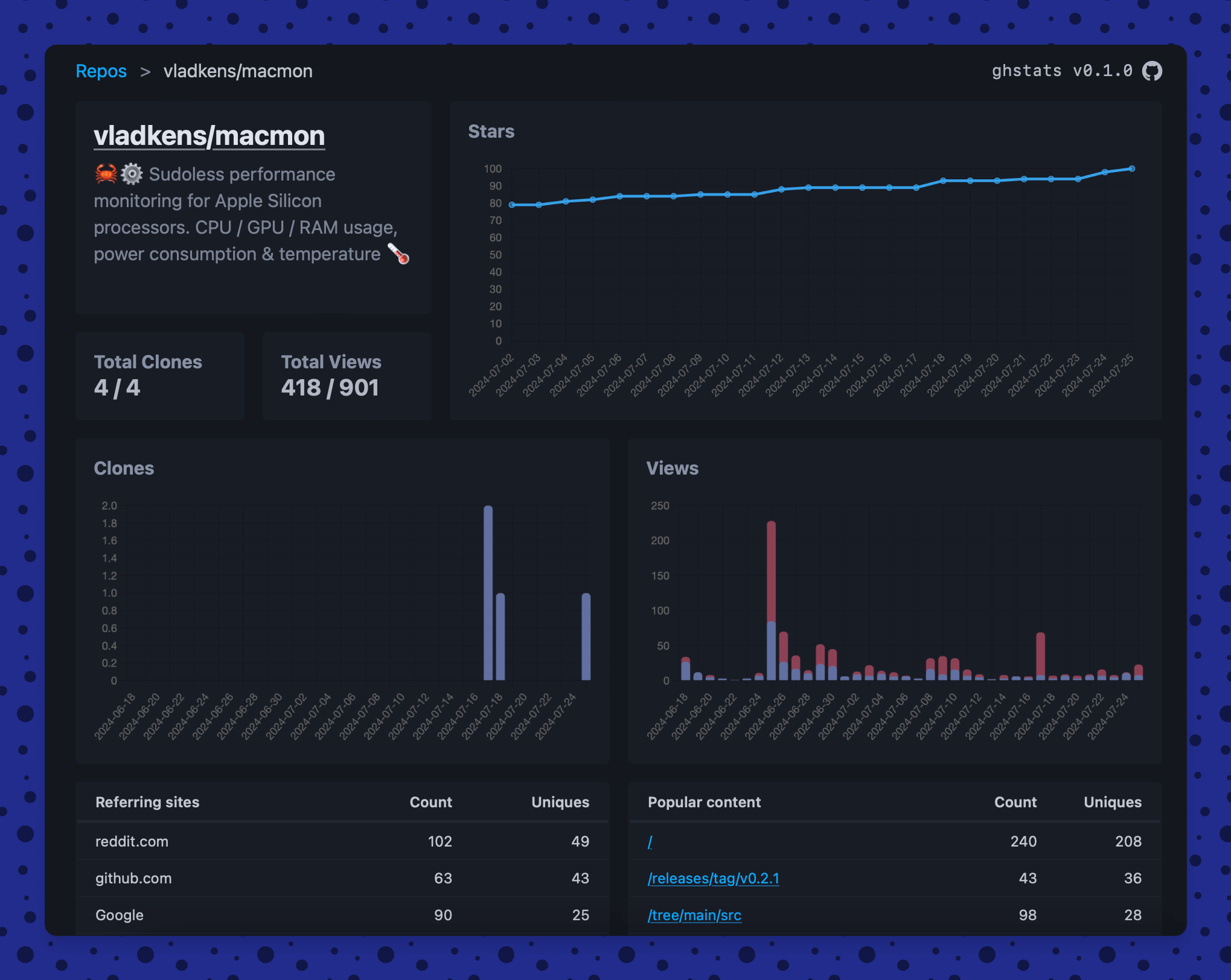
GitHub only keeps repository traffic data for 14 days. ghstats continuously
pulls that data from the GitHub API and keeps your own history of views, clones,
stars, forks, issues, and pull requests in a local SQLite database.
Use it for personal projects, open-source portfolios, organization dashboards, or public stats pages where GitHub's built-in traffic tab is too short-lived.
Features
- Long-term history for GitHub repository traffic beyond the 14-day GitHub limit
- Per-repository dashboards for stars, clones, views, referrers, and popular paths
- Automatic hourly sync for public repos, with optional private repo support
- Repo filtering by owner, exact name, forks, and archived status
- JSON API for exposing collected stats to personal sites or other tools
- Embeddable SVG badges for repository, portfolio, and service metrics
- Small self-hosted deployment: one Rust binary, one SQLite database, one Docker image
Quick start
docker run -d --env-file .env -p 8080:8080 -v ./data:/app/data --name ghstats ghcr.io/vladkens/ghstats:latest
Open http://127.0.0.1:8080 after the container starts.
Note: ghstats Docker images run as a non-root user. If you upgrade an existing installation and the container cannot write to SQLite, fix the mounted data directory ownership once:
docker run --rm -u root -v ./data:/app/data ghcr.io/vladkens/ghstats:latest chown -R appuser:appgroup /app/data
Docker Compose:
services:
  ghstats:
    image: ghcr.io/vladkens/ghstats:latest
    container_name: ghstats
    restart: always
    environment:
      - GITHUB_TOKEN=???
    env_file: .env # or with .env file
    ports:
      - 8080:8080
    volumes:
      - ./data:/app/data
Why ghstats?
- Own your history: keep traffic data for months or years instead of losing it after two weeks.
- Keep the setup boring: no Postgres, no hosted account, no frontend build pipeline in production.
- Publish only what you want: filter repositories, hide forks or archived projects, and expose a read-only dashboard or API.
Build locally with Docker Compose
This repository includes a compose.yml that builds the local Dockerfile, loads variables from .env, and stores SQLite data in a Docker named volume.
docker compose up --build -d
By default, the local compose setup exposes the app at http://127.0.0.1:8080. You can change the host port with HOST_PORT in .env.
Github token generation
ghstats needs Github Token to collect traffic data from API. Token can be obtained with following steps:
- Go to https://github.com/settings/tokens
- Generate new token > Generate new token (classic)
- Enter name, e.g.:
ghstats. Scopes:public_repo - Click genereate token & copy it
- Save token to
.envfile with nameGITHUB_TOKEN=ghp_XXX
Note: If you want to access private repos too, choose full repo scope and set GHS_INCLUDE_PRIVATE=true to env.
Rotating GitHub installation token
Set GITHUB_TOKEN_FILE when another process, such as External Secrets Operator, creates and rotates a short-lived ghs_ installation token:
environment:
  GITHUB_TOKEN_FILE: /run/secrets/ghstats/github-token
volumes:
  - ./secrets:/run/secrets/ghstats:ro
The file is read before every GitHub API request, including every pagination request, and takes precedence over GITHUB_TOKEN. A rotated token therefore takes effect without restarting ghstats. Installation tokens use the /installation/repositories endpoint automatically. In Kubernetes, mount the Secret as a volume and do not use subPath, because subPath mounts do not receive Secret updates.
How it works?
Every hour ghstats loads the list of public repositories and their statistics, and saves the data in SQLite. If at the first startup there is no repositories in the database, synchronization will happen immediately, if ghstats is restarted again, synchronization will be performed according to the scheduler. Data is stored per day, re-fetching data for the current day will update existing records in the database.
All public repositories that can be accessed are saved. If you need more detailed configuration – open PR please.
The web UI has no external dependencies at runtime: frontend libraries (Pico CSS, Chart.js, Luxon, htmx) are committed to assets/vendor and embedded into the binary, so pages work offline and do not load anything from a CDN. make vendor refreshes them to the latest release of each library's major version.
Configuration
Host & Port
You can to change default host / port app will run on with HOST (default 0.0.0.0) and PORT (default 8080) environment variables.
Metrics schedule
You can change how often metrics are pulled with the GHS_CRON_SCHEDULE environment variable. It uses the six-field cron format from tokio-cron-scheduler. The default is 0 59 * * * *, which runs at minute 59 of every hour.
For example, to pull metrics once per day at 00:59:
GHS_CRON_SCHEDULE="0 59 0 * * *"
Custom links
If you plan to display your stats publicly, there is an option to add custom links to the header via environment variables, e.g.:
GHS_CUSTOM_LINKS="Blog|https://medium.com/@vladkens,Github|https://github.com/vladkens,Buy me a coffee|https://buymeacoffee.com/vladkens"
Version check
By default, ghstats asks GitHub for the latest ghstats release on the metrics schedule (hourly by default) and shows a notice in the UI when a newer one is available. Set GHS_DISABLE_VERSION_CHECK=true to turn this request off.
Filter repos
You can filter repos for display (and data collection). You can select a specific org/user or a specific list of repositories. This is configured via the GHS_FILTER environment variable. You can use negation in the rules to remove a specific repo or org/user using the ! symbol. By default, all repos are shown.
Note: Statistics on previously downloaded repos remain in database, but they are hidden from display.
Usage examples:
GHS_FILTER=vladkens/macmon,vladkens/ghstats # show only this two repo
GHS_FILTER=vladkens/*,foo-org/bar # show all vladkens repos and one repo from `foo-org`
GHS_FILTER=vladkens/*,!vladkens/apigen-ts # show all vladkens repos except `apigen-ts`
GHS_FILTER=*,!vladkens/apigen-ts,!foo-org/bar # show all repos expect two

GHS_FILTER=*,!fork # show all repos expect forks
GHS_FILTER=vladkens/*,!fork # show all vladkens repos expect forks
GHS_FILTER=*,vladkens/some-fork,!fork # show all repos expect forks and keep `some-fork`

GHS_FILTER=*,!archived # show all repos expect archived
Filtering rules:
- If no filter provided all repos will be shown (implicitly
*) - There are two kind of rules: direct (
foo/bar,foo/*) and meta (*,!fork,!archived) - Direct rule can be wildcard (
foo/*– include all repos offooorg / user) - Direct rules are applied first, then meta
- If no direct rules specified, all repos included by default (implicitly
*) - If at least one direct rule – all repos excluded by default (pass
*explicitly to include all) - Meta-exclusion rules are:
!fork,!archived - Wildcard rules do not work with meta-exclusion rules
API endpoint
You have the ability to get collected data by ghstats via API. At the moment there is only one method available to get all repos list – if you need other data – open PR, please. GHS_API_TOKEN environment variable must be set for the API to work. All API calls if protected by x-api-token header, which should be same with GHS_API_TOKEN variable. CORS is enabled for all hosts, so you can access API from personal pages.
Endpoints
/api/repos – will return list of all repos and overall metrics. Data returted in JSON format. Usage example:
curl -H "x-api-token:1234" http://127.0.0.1:8080/api/repos
{
  "total_count": 20,
  "total_stars": 1000,
  "total_forks": 200,
  "total_views": 20000,
  "total_clones": 500,
  "items": [
    {
      "id": 833875266,
      "name": "vladkens/ghstats",
      "description": "🤩📈 Self-hosted dashboard for tracking GitHub repos traffic history longer than 14 days.",
      "date": "2024-09-08T00:00:00Z",
      "stars": 110,
      "forks": 1,
      "watchers": 110,
      "issues": 5,
      "prs": 1,
      "clones_count": 90,
      "clones_uniques": 45,
      "views_count": 1726,
      "views_uniques": 659,
    },
    // ...
  ],
}
Badge endpoints
ghstats can render the collected statistics as SVG badges for GitHub READMEs, personal websites, and dashboards. Badge endpoints are public and use the same GHS_FILTER rules as the HTML dashboard.
Repository badges use /badge/{owner}/{repo}/{metric}.svg:
| Metric | Example endpoint | Default period |
|---|---|---|
| Views | /badge/vladkens/ghstats/views.svg |
Tracked history |
| Clones | /badge/vladkens/ghstats/clones.svg |
Tracked history |
| Stars | /badge/vladkens/ghstats/stars.svg |
Current value |
| Star growth | /badge/vladkens/ghstats/stars-growth.svg |
30 days |
| Star velocity | /badge/vladkens/ghstats/stars-velocity.svg |
30 days |
| Traffic peak | /badge/vladkens/ghstats/traffic-peak.svg |
30 days |
Omit the owner and repository to aggregate a metric across all repositories allowed by GHS_FILTER:
/badge/views.svg
/badge/clones.svg
/badge/stars.svg
/badge/stars-growth.svg
/badge/stars-velocity.svg
/badge/traffic-peak.svg
/badge/repos.svg
Views and clones accept period=7d, period=30d, period=90d, or period=tracked. Star growth, star velocity, and traffic peak accept the same values and default to 30d.
/badge/vladkens/ghstats/views.svg?period=30d
/badge/stars-growth.svg?period=90d
tracked means the history retained since ghstats started observing a repository, not necessarily the repository's complete lifetime. Star velocity is the average net star change per observed day, and traffic peak is the largest daily view count in the selected period.
Global service badges expose the application health, the latest successful metrics sync, and the age of the earliest retained metric:
/badge/health.svg
/badge/updated.svg
/badge/tracking.svg
Markdown example:
[](https://ghstats.example.com/vladkens/ghstats)
Badge URLs cannot send GHS_API_TOKEN. If the instance contains private repository data, protect the instance with a reverse proxy or exclude those repositories with GHS_FILTER before publishing badge URLs.
🤝 Contributing
All contributions are welcome! Feel free to open an issue or submit a pull request.
🔍 See also
- repohistory – NodeJS application as a service.
探索相关项目
Asabeneh/30-Days-Of-Python
30 Days of Python 编程挑战是一份循序渐进的指南,用于在 30 天内学习 Python 编程语言。这项挑战可能需要超过 100 天。请按自己的节奏进行。这些视频或许也有帮助:https://www.youtube.com/channel/UC7PNRuno1rzYPb1xLa4yktw
78,618 星标grafana/grafana
开放且可组合的可观测性与数据可视化平台。可对来自 Prometheus、Loki、Elasticsearch、InfluxDB、Postgres 等众多数据源的指标、日志和追踪进行可视化。
77,859 星标redis/redis
对于正在构建实时数据驱动应用的开发者而言,Redis 是首选、速度最快且功能最丰富的缓存、数据结构服务器和文档与向量查询引擎。
77,472 星标apache/superset
Apache Superset 是一个数据可视化与数据探索平台
75,495 星标