
venshine/GoodView
关于
🔥 一款适用于 Android 的“+1”风格动画,支持文本和图片。使用 Kotlin 编写,可从 Java 调用
创作与媒体实测星标增长
- 24小时
- 0
- 7天
- +1
- 15天
- 0
- 1个月
- 正在收集历史
各周期内的星标净变化,周期相互重叠,并非每日新增。缺失的测量保持空白。星标代表关注度,不代表软件质量。
README-CN.md
原文GoodView
English | 简体中文


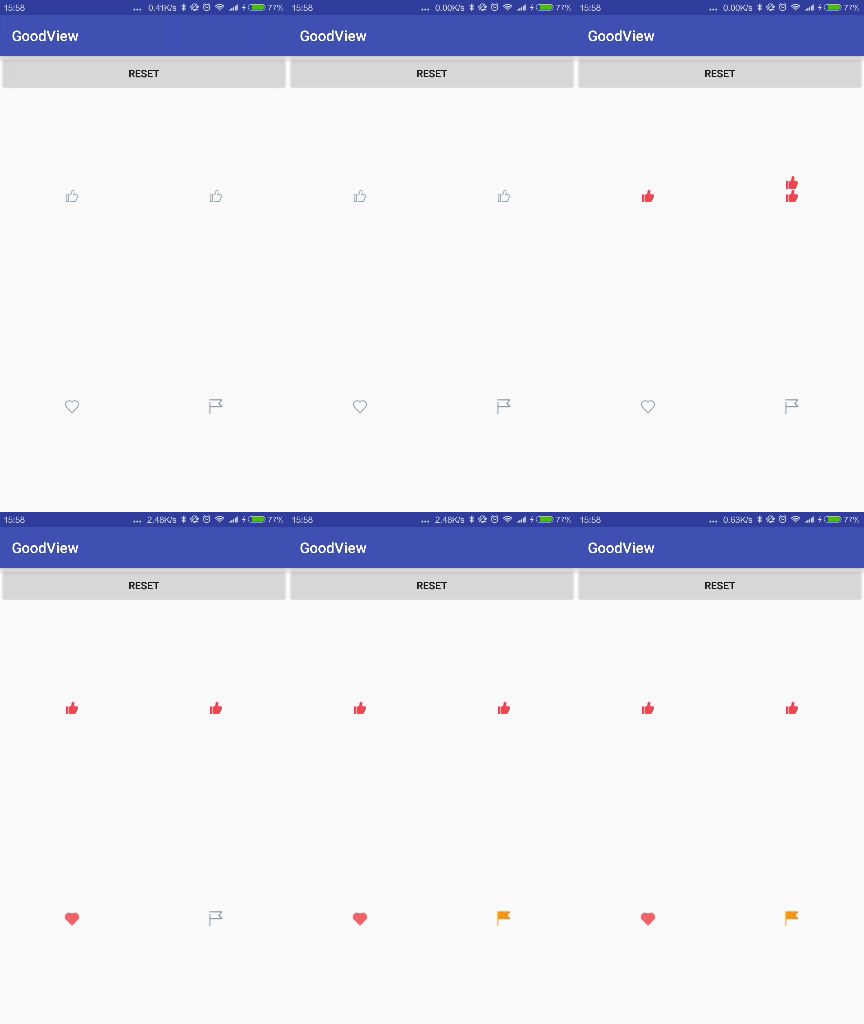
Android点赞+1效果,支持文本和图像
ScreenShot
Usage
Gradle:
- 在
settings.gradle中添加 JitPack 仓库:
dependencyResolutionManagement {
    repositories {
        google()
        mavenCentral()
        maven { url = 'https://jitpack.io' }
    }
}
- 在模块的
build.gradle中添加依赖:
implementation 'com.github.venshine:GoodView:2.0.1'
Gradle Kotlin DSL:
// settings.gradle.kts
dependencyResolutionManagement {
    repositories {
        google()
        mavenCentral()
        maven("https://jitpack.io")
    }
}

// build.gradle.kts
implementation("com.github.venshine:GoodView:2.0.1")
Demo
库本身用 Java 编写,Java 和 Kotlin 都可以直接调用,不会给项目额外引入 Kotlin 依赖。
Kotlin:
class MainActivity : AppCompatActivity() {
    private lateinit var goodView: GoodView

    override fun onCreate(savedInstanceState: Bundle?) {
        super.onCreate(savedInstanceState)
        setContentView(R.layout.activity_main)

        goodView = GoodView(this)
        findViewById<ImageView>(R.id.good).setOnClickListener { v ->
            goodView.setText("+1")
            goodView.show(v)
        }
        findViewById<ImageView>(R.id.collection).setOnClickListener { v ->
            goodView.setTextInfo("收藏成功", Color.parseColor("#f66467"), 12) // 文本、颜色、大小(dp)
            goodView.show(v)
        }
        findViewById<ImageView>(R.id.like).setOnClickListener { v ->
            goodView.setImage(R.mipmap.good_checked) // 图片
            goodView.show(v)
        }
    }
}
Java:
public class MainActivity extends Activity {
    @Override
    protected void onCreate(Bundle savedInstanceState) {
        super.onCreate(savedInstanceState);
        setContentView(R.layout.activity_main);

        final GoodView goodView = new GoodView(this);
        findViewById(R.id.good).setOnClickListener(new View.OnClickListener() {
            @Override
            public void onClick(View v) {
                goodView.setText("+1");
                goodView.show(v);
            }
        });
    }
}
Methods:
| method 方法 | description 描述 | |:--- |:---| | void setText(String text) | 设置文本(optional) | | void setTextInfo(String text, int textColor, int textSize) | 设置文本信息(optional) | | void setTextColor(int color) | 设置文本颜色(optional) | | void setTextSize(int textSize) | 设置文本大小,单位 dp(optional) | | void setImage(int resId) | 设置图片(optional) | | void setImage(Drawable drawable) | 设置图片(optional) | | void setDistance(int dis) | 设置移动距离 | | void setTranslateY(int fromY, int toY) | 设置Y轴移动属性 | | void setAlpha(float fromAlpha, float toAlpha) | 设置透明度属性 | | void setDuration(int duration) | 设置动画时长 | | void reset() | 重置属性 | | void show(View v) | 展示(required) |
About
- Email:[email protected]
License
Copyright (C) 2016 [email protected]

Licensed under the Apache License, Version 2.0 (the "License");
you may not use this file except in compliance with the License.
You may obtain a copy of the License at

http://www.apache.org/licenses/LICENSE-2.0

Unless required by applicable law or agreed to in writing, software
distributed under the License is distributed on an "AS IS" BASIS,
WITHOUT WARRANTIES OR CONDITIONS OF ANY KIND, either express or implied.
See the License for the specific language governing permissions and
limitations under the License.
探索相关项目
加载中…