
tw4/lumela
tw4/lumela has 26 GitHub stars and 6 forks. GitHot measured 0 stars in 24 hours. Last checked 2026-11-15 17:14 UTC. Last push 2026-11-13.
可以做什么
- Capture - Area, window (press Space while capturing) or full screen, with global shortcuts and a tray menu. Multi-monitor. Open from a file, the clipboard or drag and drop.
- Beautify - Automatic background from the screenshot's edge colour, auto-balance, gradients, solid colours, your own image or desktop wallpaper, padding, inset, corner radius and shadow. Or no background at all, to share the screenshot as captured.
- Sizes - Free, 1:1, 4:3, 3:2, 16:9, 9:16 and presets for X/Twitter, Instagram, LinkedIn, Facebook and YouTube.
- Annotate - Arrows (straight, curved, double, line), text, rectangles, ellipses, highlights and numbered steps. Move, resize, layer order and undo/redo.
实测星标增长
- 24小时
- 0
- 7天
- 更新延迟
- 15天
- 更新延迟
- 1个月
- 更新延迟
各周期内的星标净变化,周期相互重叠,并非每日新增。缺失的测量保持空白。星标代表关注度,不代表软件质量。
关于
CleanShot-style screenshots for Windows, macOS and Linux. Free and open source: capture, beautify, annotate, copy text (on-device OCR), and emails, card numbers, IPs and API keys are blurred for you.
安全README.zh-CN.md
原文

Lumela
适用于 Windows、macOS 和 Linux 的 CleanShot 风格截图工具。
截图、自动美化、标注、分享。邮箱、银行卡号、IP 地址和 API 密钥会被自动模糊。
免费且开源。
English · Türkçe · Deutsch · Español · Русский · 简体中文 · 日本語 · 한국어
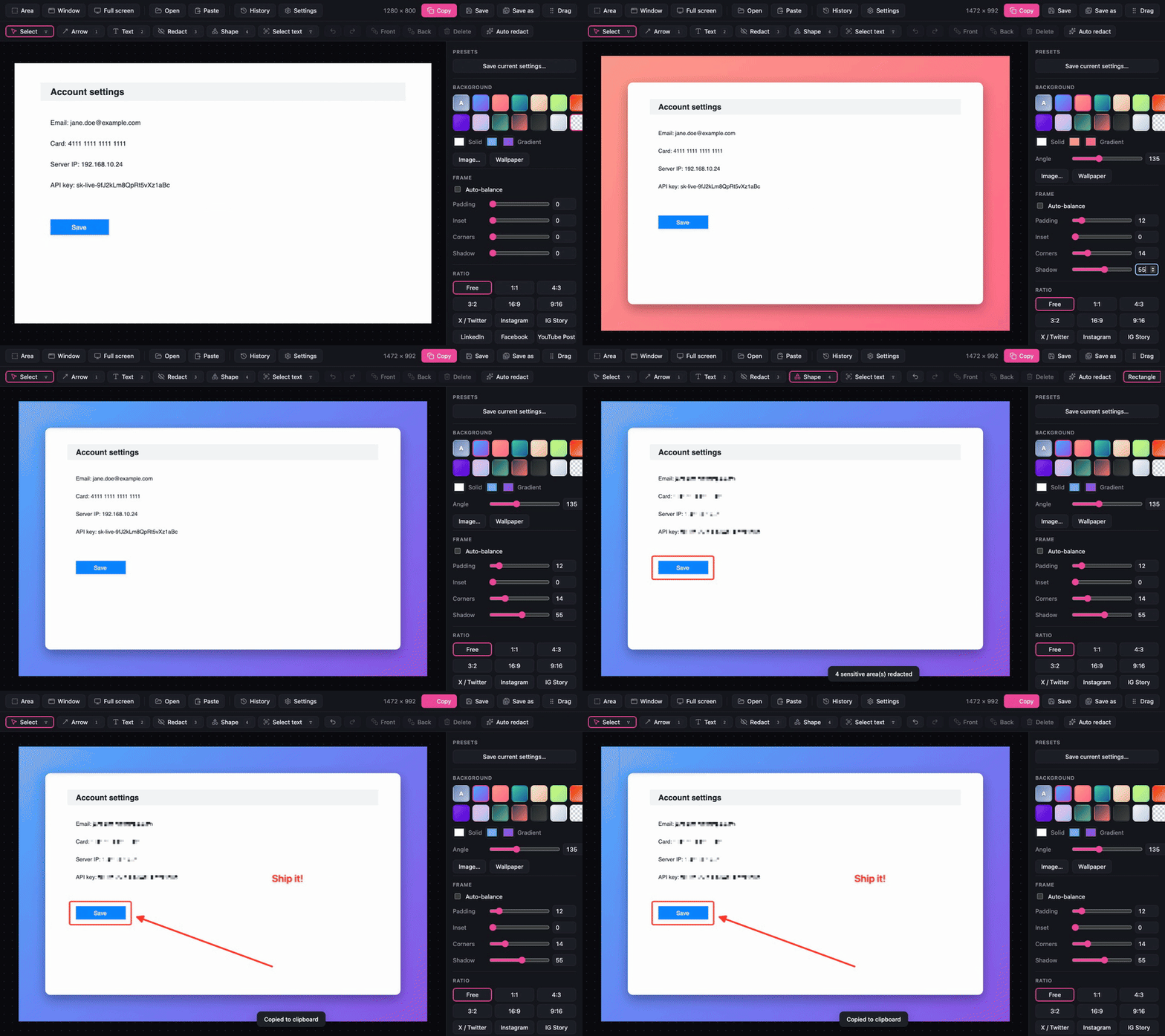
为什么选择 Lumela?
原始截图往往不够好看,不适合直接分享。Lumela 一步就能把它变成精致的图片:匹配的背景、均衡的边距、圆角和柔和的阴影。箭头和文字用来说明重点,敏感信息在别人看到之前就已被模糊。
- 完全免费。 无需账号,没有订阅,没有水印。
- 隐私优先。 截图、文字识别和打码都在本机完成,不上传任何内容。
- 轻快。 原生截图,安装包很小(Windows 约 4 MB,macOS 约 12 MB)。
- 各平台一致。 Windows、macOS 和 Linux 拥有相同的编辑器、快捷键和功能。
下载
从 最新版本 下载适合你系统的安装包:
| 系统 | 文件 |
|---|---|
| Windows 10 / 11 (x64) | Lumela_<version>_x64-setup.exe 或 .msi |
| macOS 10.15+(Apple 芯片和 Intel) | Lumela_<version>_universal.dmg |
| Linux (x64):Ubuntu 24.04+、Debian 13+、Fedora 40+ 等 | Lumela_<version>_amd64.AppImage 或 .deb |
或使用包管理器安装:
brew trust tw4/tap && brew install --cask tw4/tap/lumela                             # macOS (Homebrew)
scoop install https://raw.githubusercontent.com/tw4/lumela/main/packaging/scoop/lumela.json   # Windows (Scoop)
Lumela 会自动更新,每次更新在安装前都会校验签名。
[!NOTE] 安装包尚未进行代码签名,因此首次启动时系统会给出警告。
Windows: 更多信息 → 仍要运行。
macOS 15 及以上: 先打开一次 Lumela 并关闭警告,然后前往 系统设置 → 隐私与安全性,向下滚动,在 Lumela 提示旁点击 仍要打开。macOS 14 及更早版本右键点击应用 → 打开 即可。使用 Homebrew 安装可跳过此步骤。
Linux:
.deb会安装用于文字识别的tesseract-ocr。使用 AppImage 时请自行安装(sudo apt install tesseract-ocr、sudo dnf install tesseract或sudo pacman -S tesseract tesseract-data-eng)。
功能
| 截图 | 区域、窗口(截图时按 Space)或全屏,支持全局快捷键和托盘菜单。支持多显示器。也可从文件、剪贴板或拖放打开。 |
| 美化 | 根据截图边缘颜色自动生成背景、自动平衡、渐变、纯色、自定义图片或桌面壁纸,以及边距、内缩、圆角和阴影。 |
| 尺寸 | 自由、1:1、4:3、3:2、16:9、9:16,以及 X/Twitter、Instagram、LinkedIn、Facebook 和 YouTube 预设。 |
| 标注 | 箭头(直线、曲线、双向、线段)、文字、矩形、椭圆和高亮。可移动、缩放、调整层级,支持撤销/重做。 |
| 打码 | 像素化、模糊或纯色遮挡。自动打码 一键找出邮箱、银行卡号、IP 地址和 API 密钥。 |
| 复制文字 | 本机文字识别:在图片上选中文字并复制。 |
| 导出 | 复制、保存、另存为 PNG/JPEG,或直接拖到其他应用中。无损 PNG 压缩。可选水印。 |
| 管理 | 预设、带编辑记录的截图历史,以及可自定义的快捷键。 |
| 界面语言 | 英语和土耳其语。欢迎添加你的语言! |
键盘快捷键、从源码构建和参与贡献,请参阅 英文 README。
隐私
Lumela 没有账号,也没有遥测。截图、历史和设置都保存在你的电脑上。唯一的网络请求是向本仓库的 releases 检查更新。
许可证
Lumela 是自由软件,你可以依据 GNU 通用公共许可证 v3.0 或(由你选择)任何更新版本的条款重新分发和/或修改它。