
topscoder/nuclei-wordfence-cve
topscoder/nuclei-wordfence-cve has 1,301 GitHub stars and 162 forks. GitHot measured 0 stars in 24 hours, +2 in 7 days, and +4 in 15 days. Last checked 2026-11-25 06:01 UTC. Last push 2026-11-21.
实测星标增长
- 24小时
- 0
- 7天
- +2
- 15天
- +4
- 1个月
- 正在收集历史
各周期内的星标净变化,周期相互重叠,并非每日新增。缺失的测量保持空白。星标代表关注度,不代表软件质量。
关于
80k+ 个 WordPress Nuclei 模板,每日根据 Wordfence 情报更新——可按严重性、标签或 CVE 筛选,并通过一行命令完成扫描。🚀🔒
安全README.md
原文
Nuclei + Wordfence = ♥
89,867 Nuclei Templates for WordPress Security Scanning 🥳



Level up your WordPress security game! This project's got a treasure trove of fresh Nuclei templates for WordPress. Scan for weaknesses in Core, plugins, and themes – all based on the latest intel from Wordfence.com.
Here's why this is your new best friend:
- Massive collection: No more hunting for individual templates, you've got a whole arsenal at your fingertips.
- Always on point: These templates stay updated with the freshest threats, so you're never behind the curve.
- Open source magic: Need to tweak a template for a specific situation? No problem, you've got full control.
If you're guarding a WordPress site, this project is your secret weapon to identify vulnerabilities before the bad guys do. Stop wasting time and secure your sites like a pro!
[!TIP] If you found this project helpful, please consider buying me a coffee.

✨ What's in it?!
|
|
🚀 Quick Start
To install this nuclei-wordfence-cve repository for use with Nuclei, you can use the following commands:
export GITHUB_TEMPLATE_REPO=topscoder/nuclei-wordfence-cve
nuclei -update-templates
Once you have installed this template repo using the commands above, you can run the following command to scan for vulnerabilities using Nuclei:
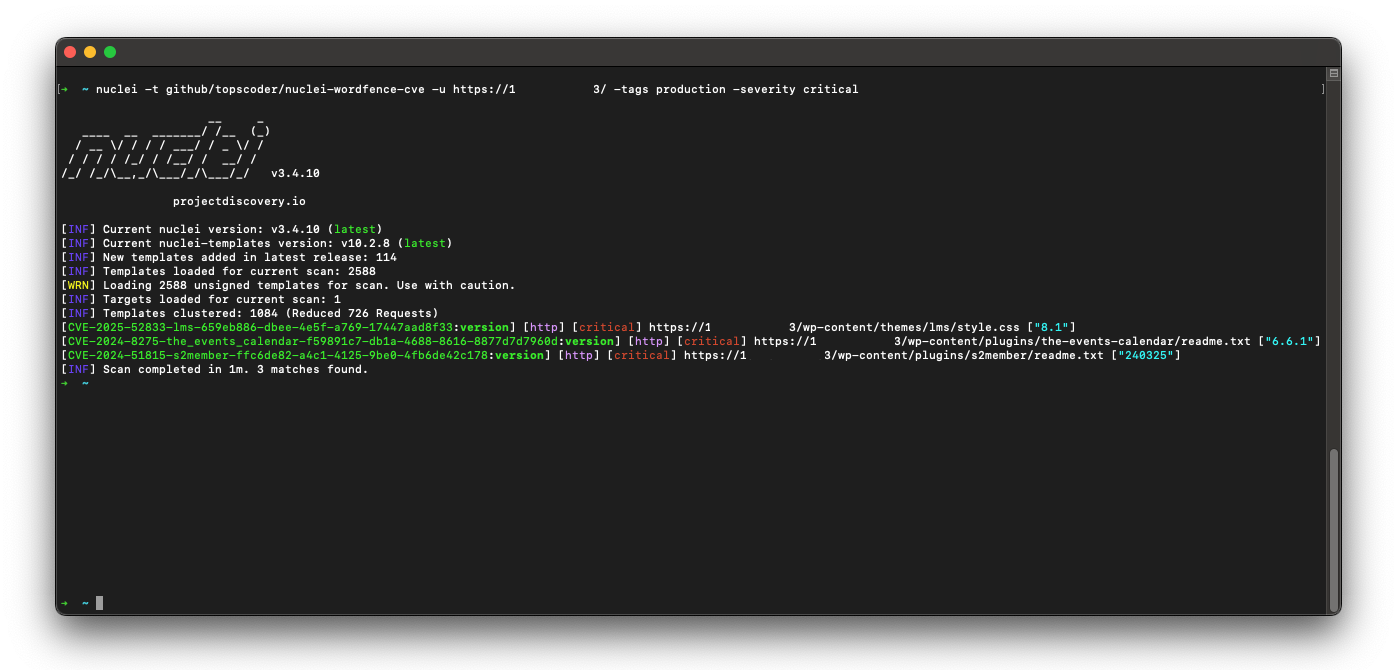
nuclei -t github/topscoder/nuclei-wordfence-cve -u https://target.com
Wordfence provides two separate feeds for vulnerabilities. The first feed includes only production vulnerabilities, each with an assigned CVE. The second feed contains candidate vulnerabilities, which do not yet have a CVE assigned and may or may not be promoted to the production feed. To differentiate templates generated from these feeds, a tag is assigned to each template—either production or candidate—allowing you to target them using a tag filter.
Include only production templates:
nuclei -t github/topscoder/nuclei-wordfence-cve -tags production -u https://target.com
Include only candidate templates:
nuclei -t github/topscoder/nuclei-wordfence-cve -tags candidate -u https://target.com
💻 Examples
Here are some examples how to use the templates:
- To scan for all known vulnerabilities in WordPress, you can run the following command:
nuclei -t github/topscoder/nuclei-wordfence-cve -u https://target.com
- To scan for a CVE specific vulnerability, you can run the following command:
nuclei -t github/topscoder/nuclei-wordfence-cve -template-id cve-2023-32961 -u https://target.com
- To scan only for critical vulnerabilities, you can run the following command:
nuclei -t github/topscoder/nuclei-wordfence-cve -severity critical -u https://target.com
- To scan only for WordPress core vulnerabilities, you can run the following command:
nuclei -t github/topscoder/nuclei-wordfence-cve -tags wp-core -u https://target.com
- To scan only for WordPress plugin vulnerabilities, you can run the following command:
nuclei -t github/topscoder/nuclei-wordfence-cve -tags wp-plugin -u https://target.com
- To scan only for WordPress theme vulnerabilities, you can run the following command:
nuclei -t github/topscoder/nuclei-wordfence-cve -tags wp-theme -u https://target.com
- To go wild, you can combine and combine and combine:
nuclei -t github/topscoder/nuclei-wordfence-cve -tags wp-plugin,wp-theme -severity critical,high
- To go even wilder, you can use the template condition flag (
-tc) that allows complex expressions like the following ones:
nuclei -t github/topscoder/nuclei-wordfence-cve -template-condition "contains(to_lower(name),'cross-site scripting') || contains(to_upper(name),'XSS')" -u https://target.com

nuclei -t github/topscoder/nuclei-wordfence-cve -template-condition "contains(to_lower(name),'sql injection') || contains(to_lower(description),'sql injection')" -u https://target.com

nuclei -t github/topscoder/nuclei-wordfence-cve -template-condition "contains(to_lower(name),'file inclusion') || contains(to_lower(description),'file inclusion')" -u https://target.com

nuclei -t github/topscoder/nuclei-wordfence-cve -template-condition "contains(to_upper(name),'CSRF') || contains(to_upper(description),'CSRF')" -u https://target.com
🤖 Severity recalculation
Template severity is adjusted by the parser to better reflect real-world impact. The determine_severity function in src/lib/wordfence_api_parser.py inspects the vulnerability title and description and will downscale issues that are limited to authenticated users (e.g., require login or elevated roles).
Example (simplified):
- If the title or description contains the word
authenticated(and notunauthenticated), the function treats the issue as lower risk and returnsLowinstead of a higher CVSS label.
This helps avoid assigning Medium/High severities to vulnerabilities that only affect logged-in users, which reduces noise when scanning publicly accessible sites.
👥 Contributing
If you would like to contribute to this project, please feel free to fork the repository and submit a pull request.
📚 License
This project is licensed under the MIT License.
[!NOTE] ~~ Please use it responsibly!
探索相关项目
加载中…