
sniklaus/softmax-splatting
sniklaus/softmax-splatting has 512 GitHub stars and 58 forks. GitHot measured 0 stars in 24 hours and -1 in 7 days. Last checked 2026-11-24 22:14 UTC. Last push 2026-11-15.
实测星标增长
- 24小时
- 0
- 7天
- -1
- 15天
- 正在收集历史
- 1个月
- 正在收集历史
各周期内的星标净变化,周期相互重叠,并非每日新增。缺失的测量保持空白。星标代表关注度,不代表软件质量。
关于
an implementation of softmax splatting for differentiable forward warping using PyTorch
机器学习README.md
原文softmax-splatting
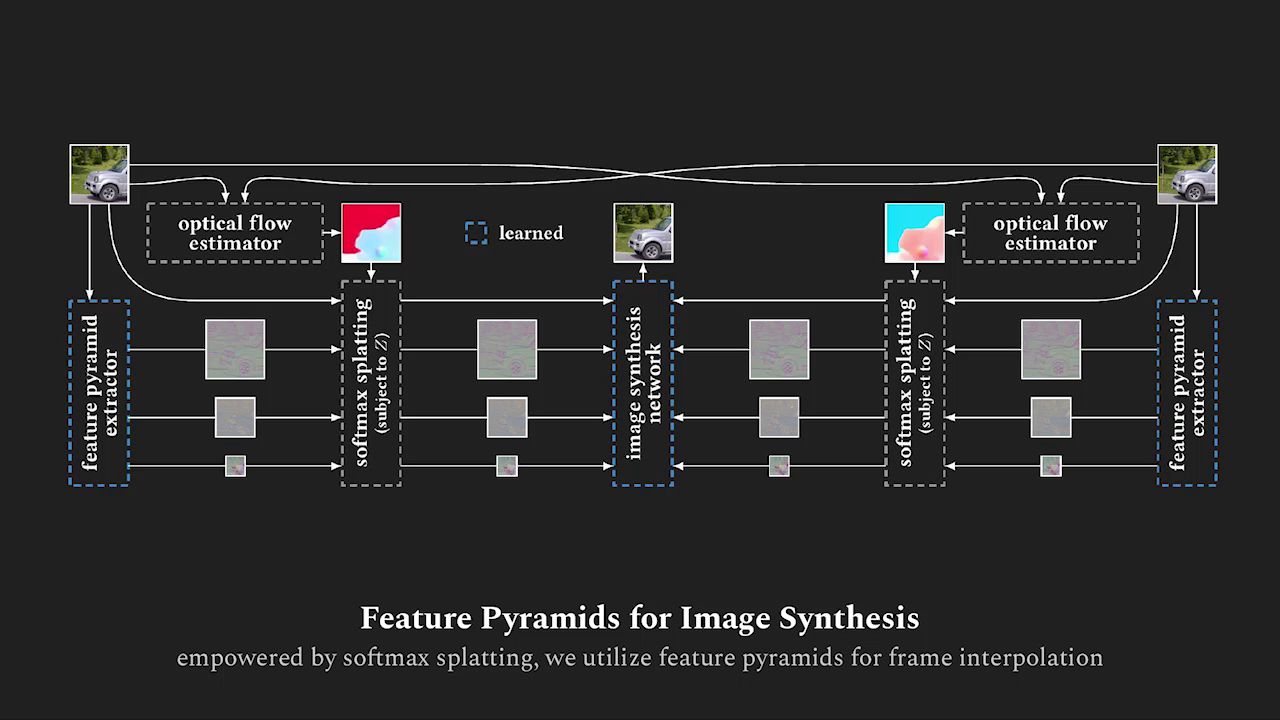
This is a reference implementation of the softmax splatting operator, which has been proposed in Softmax Splatting for Video Frame Interpolation [1], using PyTorch. Softmax splatting is a well-motivated approach for differentiable forward warping. It uses a translational invariant importance metric to disambiguate cases where multiple source pixels map to the same target pixel. Should you be making use of our work, please cite our paper [1].

For our previous work on SepConv, see: https://github.com/sniklaus/revisiting-sepconv
setup
The softmax splatting is implemented in CUDA using CuPy, which is why CuPy is a required dependency. It can be installed using pip install cupy or alternatively using one of the provided binary packages as outlined in the CuPy repository.
If you plan to process videos, then please also make sure to have pip install moviepy installed.
usage
To run it on your own pair of frames, use the following command.
python run.py --model lf --one ./images/one.png --two ./images/two.png --out ./out.png
To run in on a video, use the following command.
python run.py --model lf --video ./videos/car-turn.mp4 --out ./out.mp4
For a quick benchmark using examples from the Middlebury benchmark for optical flow, run python benchmark_middlebury.py. You can use it to easily verify that the provided implementation runs as expected.
warping
We provide a small script to replicate the third figure of our paper [1]. You can simply run the following to obtain the comparison between summation splatting, average splatting, linear splatting, and softmax splatting.
The example script is using OpenCV to load and display images, as well as to read the provided optical flow file. An easy way to install OpenCV for Python is using the pip install opencv-contrib-python package.
import cv2
import numpy
import torch

import run

import softsplat # the custom softmax splatting layer

##########################################################

torch.set_grad_enabled(False) # make sure to not compute gradients for computational performance

torch.backends.cudnn.enabled = True # make sure to use cudnn for computational performance

##########################################################

tenOne = torch.FloatTensor(numpy.ascontiguousarray(cv2.imread(filename='./images/one.png', flags=-1).transpose(2, 0, 1)[None, :, :, :].astype(numpy.float32) * (1.0 / 255.0))).cuda()
tenTwo = torch.FloatTensor(numpy.ascontiguousarray(cv2.imread(filename='./images/two.png', flags=-1).transpose(2, 0, 1)[None, :, :, :].astype(numpy.float32) * (1.0 / 255.0))).cuda()
tenFlow = torch.FloatTensor(numpy.ascontiguousarray(run.read_flo('./images/flow.flo').transpose(2, 0, 1)[None, :, :, :])).cuda()

tenMetric = torch.nn.functional.l1_loss(input=tenOne, target=run.backwarp(tenIn=tenTwo, tenFlow=tenFlow), reduction='none').mean([1], True)

for intTime, fltTime in enumerate(numpy.linspace(0.0, 1.0, 11).tolist()):
    tenSummation = softsplat.softsplat(tenIn=tenOne, tenFlow=tenFlow * fltTime, tenMetric=None, strMode='sum')
    tenAverage = softsplat.softsplat(tenIn=tenOne, tenFlow=tenFlow * fltTime, tenMetric=None, strMode='avg')
    tenLinear = softsplat.softsplat(tenIn=tenOne, tenFlow=tenFlow * fltTime, tenMetric=(0.3 - tenMetric).clip(0.001, 1.0), strMode='linear') # finding a good linearly metric is difficult, and it is not invariant to translations
    tenSoftmax = softsplat.softsplat(tenIn=tenOne, tenFlow=tenFlow * fltTime, tenMetric=(-20.0 * tenMetric).clip(-20.0, 20.0), strMode='soft') # -20.0 is a hyperparameter, called 'alpha' in the paper, that could be learned using a torch.Parameter

    cv2.imshow(winname='summation', mat=tenSummation[0, :, :, :].numpy(force=True).transpose(1, 2, 0))
    cv2.imshow(winname='average', mat=tenAverage[0, :, :, :].numpy(force=True).transpose(1, 2, 0))
    cv2.imshow(winname='linear', mat=tenLinear[0, :, :, :].numpy(force=True).transpose(1, 2, 0))
    cv2.imshow(winname='softmax', mat=tenSoftmax[0, :, :, :].numpy(force=True).transpose(1, 2, 0))
    cv2.waitKey(delay=0)
# end
xiph
In our paper, we propose to use 4K video clips from Xiph to evaluate video frame interpolation on high-resolution footage. Please see the supplementary benchmark_xiph.py on how to reproduce the shown metrics.
video
license
The provided implementation is strictly for academic purposes only. Should you be interested in using our technology for any commercial use, please feel free to contact us.
references
[1]  @inproceedings{Niklaus_CVPR_2020,
         author = {Simon Niklaus and Feng Liu},
         title = {Softmax Splatting for Video Frame Interpolation},
         booktitle = {IEEE Conference on Computer Vision and Pattern Recognition},
         year = {2020}
     }
acknowledgment
The video above uses materials under a Creative Common license as detailed at the end.
探索相关项目
加载中…