
santoru/shcheck
关于
用于检查网站安全响应头的基础工具。
安全实测星标增长
- 24小时
- 0
- 7天
- 0
- 15天
- 正在收集历史
- 1个月
- 正在收集历史
各周期内的星标净变化,周期相互重叠,并非每日新增。缺失的测量保持空白。星标代表关注度,不代表软件质量。
README.md
原文shcheck - Security Header Check



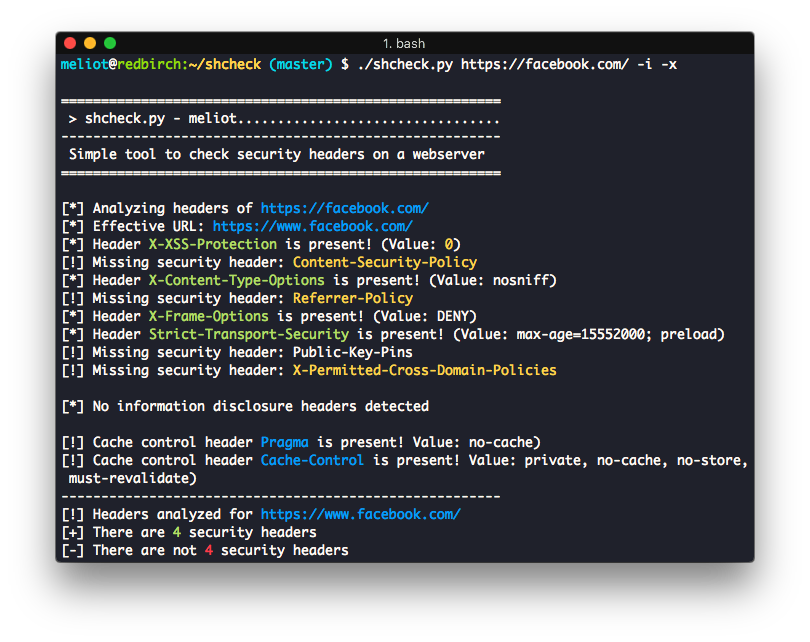
Check security headers on a target website
I did this tool to help me to check which security headers are enabled on certain websites.
The tool is very simple and it's the result of few minutes of coding.
It just check headers and print a report about which are enabled and which not
I think there is a lot to improve, and I will be grateful if somebody wants to help
How to run:
Pypi
pip3 install shcheck
shcheck.py https://insecurity.blog
Docker
First build your docker container using something like this:
docker build -t shcheck .
Then simply run your docker container using something like this where you specify which website you want to check headers on:
docker run -it --rm shcheck https://insecurity.blog
From source
git clone https://github.com/santoru/shcheck && cd shcheck
./shcheck.py https://insecurity.blog
Standalone script
If you want to run shcheck as a standalone script, just grab the shcheck.py script from the shcheck module/folder and copy it around.
Usage
Usage: ./shcheck.py [options] <target>

Options:
  -h, --help            show this help message and exit
  -p PORT, --port=PORT  Set a custom port to connect to
  -c COOKIE_STRING, --cookie=COOKIE_STRING
                        Set cookies for the request
  -a HEADER_STRING, --add-header=HEADER_STRING
                        Add headers for the request e.g. 'Header: value'
  -d, --disable-ssl-check
                        Disable SSL/TLS certificate validation
  -g, --use-get-method  Use GET method instead HEAD method
  -j, --json-output     Print the output in JSON format
  -i, --information     Display information headers
  -x, --caching         Display caching headers
  -k, --deprecated      Display deprecated headers
  --no-follow           Do not follow HTTP redirects
  --proxy=PROXY_URL     Set a proxy (Ex: http://127.0.0.1:8080)
  --hfile=PATH_TO_FILE  Load a list of hosts from a flat file
  --colours=COLOURS     Set up a colour profile [dark/light/none]
  --colors=COLOURS      Alias for colours for US English
探索相关项目
加载中…