
quantopian/pyfolio
quantopian/pyfolio has 6,440 GitHub stars and 1,897 forks. GitHot measured 0 stars in 24 hours, -3 in 7 days, and +2 in 15 days. Last checked 2026-11-21 13:14 UTC. Last push 2023-12-23.
实测星标增长
- 24小时
- 0
- 7天
- -3
- 15天
- +2
- 1个月
- 正在收集历史
各周期内的星标净变化,周期相互重叠,并非每日新增。缺失的测量保持空白。星标代表关注度,不代表软件质量。
关于
使用 Python 进行投资组合和风险分析
数据README.md
原文
pyfolio


pyfolio is a Python library for performance and risk analysis of financial portfolios developed by Quantopian Inc. It works well with the Zipline open source backtesting library. Quantopian also offers a fully managed service for professionals that includes Zipline, Alphalens, Pyfolio, FactSet data, and more.
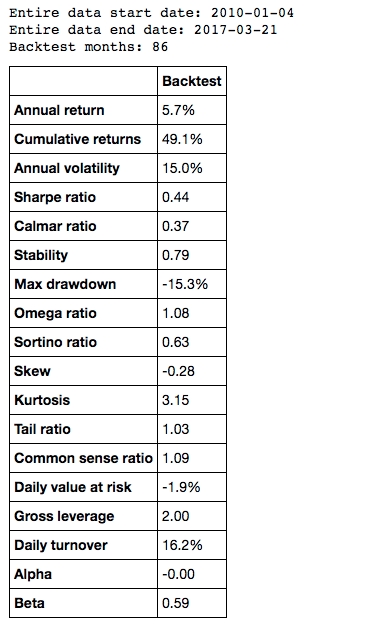
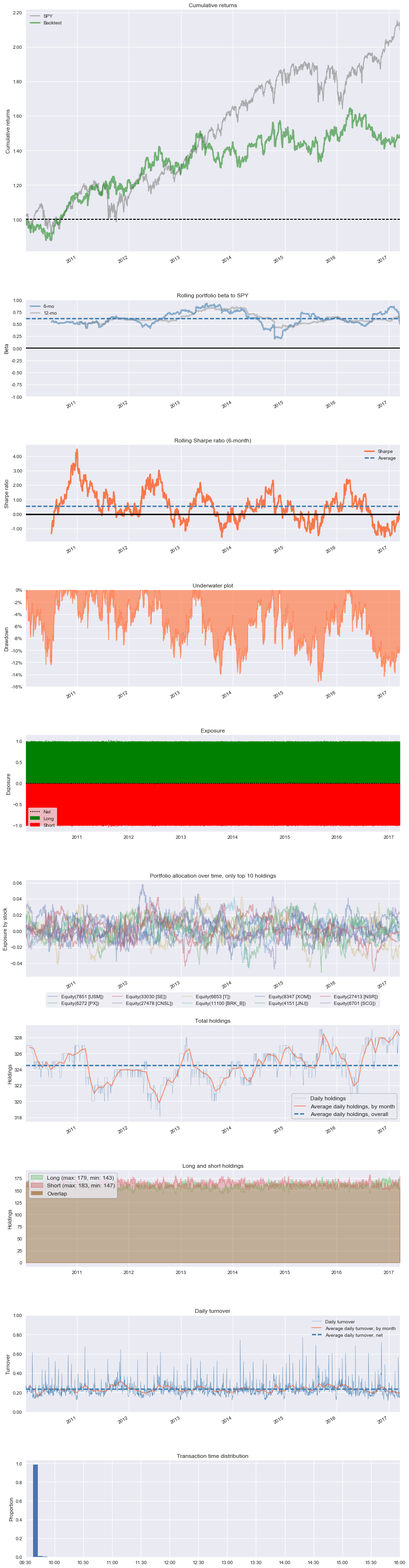
At the core of pyfolio is a so-called tear sheet that consists of various individual plots that provide a comprehensive image of the performance of a trading algorithm. Here's an example of a simple tear sheet analyzing a strategy:
Also see slides of a talk about pyfolio.
Installation
To install pyfolio, run:
pip install pyfolio
Development
For development, you may want to use a virtual environment to avoid dependency conflicts between pyfolio and other Python projects you have. To get set up with a virtual env, run:
mkvirtualenv pyfolio
Next, clone this git repository and run python setup.py develop
and edit the library files directly.
Matplotlib on OSX
If you are on OSX and using a non-framework build of Python, you may need to set your backend:
echo "backend: TkAgg" > ~/.matplotlib/matplotlibrc
Usage
A good way to get started is to run the pyfolio examples in a Jupyter notebook. To do this, you first want to start a Jupyter notebook server:
jupyter notebook
From the notebook list page, navigate to the pyfolio examples directory and open a notebook. Execute the code in a notebook cell by clicking on it and hitting Shift+Enter.
Questions?
If you find a bug, feel free to open an issue in this repository.
You can also join our mailing list or our Gitter channel.
Support
Please open an issue for support.
Contributing
If you'd like to contribute, a great place to look is the issues marked with help-wanted.
For a list of core developers and outside collaborators, see the GitHub contributors list.
探索相关项目
加载中…