
ndleah/python-mini-project
ndleah/python-mini-project has 4,447 GitHub stars and 1,808 forks. GitHot measured +1 stars in 24 hours and +4 in 7 days. Last checked 2026-11-12 09:38 UTC. Last push 2024-08-16.
🙌 欢迎为开源 Python 迷你项目贡献代码!
实测星标增长
- 24小时
- +1
- 7天
- +4
- 15天
- 正在收集历史
- 1个月
- 正在收集历史
各周期内的星标净变化,周期相互重叠,并非每日新增。缺失的测量保持空白。星标代表关注度,不代表软件质量。
README.md
原文





Python Mini Projects 
A collection of easy Python small projects to help you improve your programming skills.


Table Of Contents
 Aim Of The Project
As a Python newbie, I understand the problems that people face when they first begin studying and attempting to understand various Data Science concepts, particularly Python. This project is designed for folks who are just getting started with Python principles and exploring GitHub as "contributors."
My goal is to build a common playground where everyone, from beginners to experts, can learn and share knowledge, and I hope you enjoy your stay here!
Let's "folk-ing" create amazing things together! 👉
 Contributing
Step 1: Star The Repo
Star the repo by pressing the topmost-right button to start your wonderful journey


Step 3: Clone it
- Method 1: GitHub Desktop
⚠️ NOTE: If you're not familiar with Git, using GitHub Desktop Application is a better start. If you choose this method, make sure to download it before continuing reading.
❗❗ Access link to download here.
Learn more about how to clone the remote respository on your local machine using GitHub Desktop here.
- Method 2: Git
Clone the forked repository. Open git bash and type:
git clone https://github.com/<your-github-username>/python-mini-project.git
This makes a local copy of the repository in your machine.
⚠️ Replace <your-github-username>!
Learn more about forking and cloning a repo.
Step 4: Create your feature branch
Always keep your local copy of the repository updated with the original repository. Before making any changes and/or in an appropriate interval, follow the following steps:
- Method 1: GitHub Desktop
Learn more about how to create new branch here and how to fetch and pull origin from/to your local machine here.
Learn more about how to fetch and pull origin from/to your local machine using GitHub Desktop here.
- Method 2: Git
Run the following commands carefully to update your local repository
# If you cloned a while ago, get the latest changes from upstream
git checkout <master>
git pull upstream <master>

# Make a feature branch (Always check your current branch is up to date before creating a new branch from it to avoid merge conflicts)
git checkout -b <branch-name>

#
Step 5: Ready, Set, Go...
Once you have completed these steps, you are ready to start contributing to the project and creating pull requests.
- Create a folder in
projects directory according to your project name.
The folder name should follow the following format "Your_Project_Name_Here". For example: Dice_Stimulator
- Write your code and add to the respective folder in the projects directory, locally.
- Don't forget to add a
README.mdin your folder, according to the README_TEMPLATE.
- Method 1: GitHub Desktop
Learn more how to pull request from your local machine using GitHub Desktop to the main repo here.
- Method 2: Git
Add the changes with git add, git commit:
git add -A
git commit -m "<your message>"
Push the code to your repository.
git push origin <branch-name>
Step 6: Pull Request
Go to the GitHub page of your fork, and make a pull request:
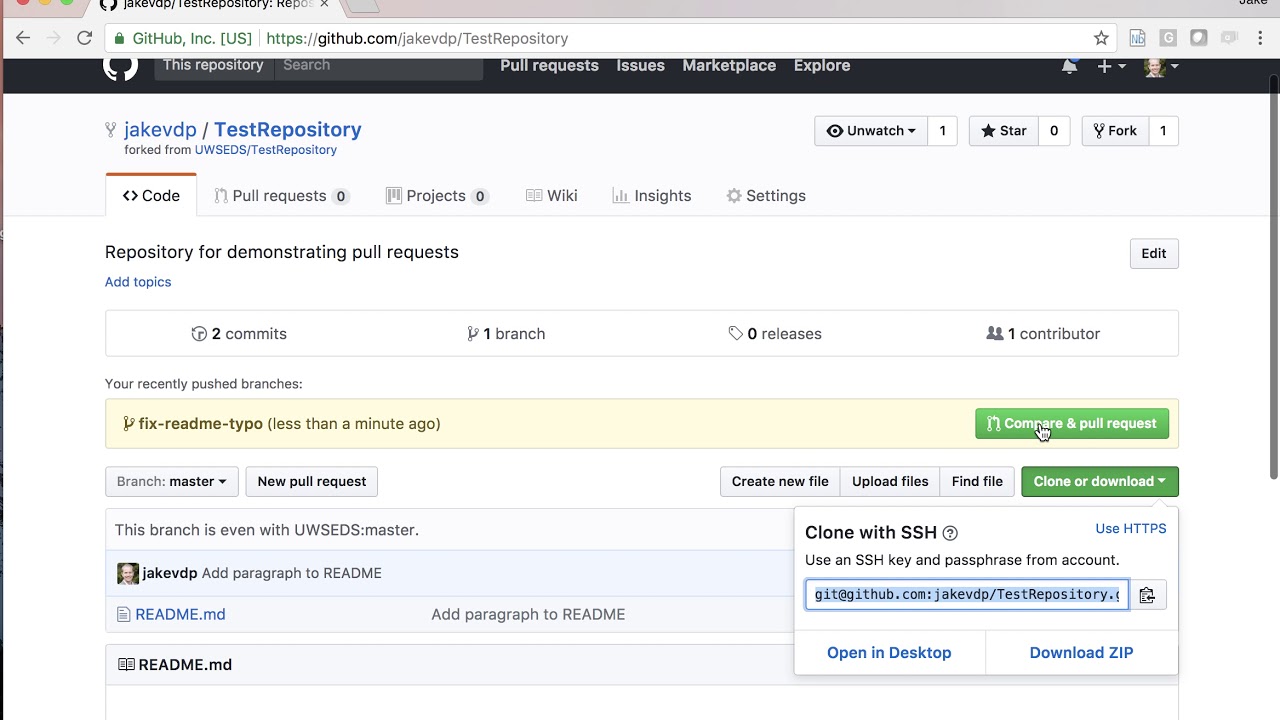
Read more about pull requests on the GitHub help pages.
Now wait, until your Pull Request is approved! If there are any conflicts, you will get a notification.
 README Template for scripts
please make sure to add a README.md file that follow the same construction as this template for consistency.
 Our Contributors
 Feedback
If you have any feedback or ideas to improve this project, feel free to contact me via


探索相关项目
Asabeneh/30-Days-Of-Python
30 Days of Python 编程挑战是一份循序渐进的指南,用于在 30 天内学习 Python 编程语言。这项挑战可能需要超过 100 天。请按自己的节奏进行。这些视频或许也有帮助:https://www.youtube.com/channel/UC7PNRuno1rzYPb1xLa4yktw
78,618 星标grafana/grafana
开放且可组合的可观测性与数据可视化平台。可对来自 Prometheus、Loki、Elasticsearch、InfluxDB、Postgres 等众多数据源的指标、日志和追踪进行可视化。
77,859 星标redis/redis
对于正在构建实时数据驱动应用的开发者而言,Redis 是首选、速度最快且功能最丰富的缓存、数据结构服务器和文档与向量查询引擎。
77,472 星标apache/superset
Apache Superset 是一个数据可视化与数据探索平台
75,495 星标