
muesli/beehive
muesli/beehive has 6,488 GitHub stars and 325 forks. GitHot measured -1 in 7 days. Last checked 2026-11-09 21:59 UTC. Last push 2023-02-25.
灵活的事件、智能体与自动化系统,拥有大量蜜蜂 🐝
实测星标增长
- 24小时
- 更新延迟
- 7天
- -1
- 15天
- 更新延迟
- 1个月
- 更新延迟
各周期内的星标净变化,周期相互重叠,并非每日新增。缺失的测量保持空白。星标代表关注度,不代表软件质量。
README.md
原文Beehive


Beehive is an event and agent system, which allows you to create your own agents that perform automated tasks triggered by events and filters. It is modular, flexible and really easy to extend for anyone. It has modules (we call them Hives), so it can interface with, talk to, or retrieve information from Twitter, Tumblr, Email, IRC, Jabber, RSS, Jenkins, Hue - to name just a few. Check out the full list of available Hives in our Wiki.
Connecting those modules with each other lets you create immensly useful agents.
Here are just a few examples of things Beehive could do for you:
- Re-post tweets on your Tumblr blog
- Forward incoming chat messages to your email account
- Turn on the heating system if the temperature drops below a certain value
- Run your own IRC bot that lets you trigger builds on a Jenkins CI
- Control your Hue lighting system
- Notify you when a stock's price drops below a certain value

Installation
Packages & Binaries
- Arch Linux: beehive (AUR)
- Linux Static 64bit
- Linux Static armv6
- macOS 64bit
- Windows 64bit
You can find even more official releases here.
Deployment Tools
- Docker:
docker run --name beehive -d -p 8181:8181 fribbledom/beehive - Ansible
From source
Beehive requires Go 1.13 or higher. Make sure you have a working Go environment. See the install instructions.
The recommended way is to fetch the sources and run make.
git clone --recursive https://github.com/muesli/beehive.git
cd beehive
make
You can build and install the beehive binary like other Go binaries out there (go get)
but you'll need to make sure Beehive can find the assets (images, javascript, css, etc).
See the Troubleshooting/Notes section for additional details.
Run beehive --help to see a full list of options.
Configuration
Think of Hives as little plugins, extending Beehive's abilities with events you can react on and actions you can execute.
Just as examples, there's a Twitter plugin that can
- react to someone you follow posting a tweet (an event)
- post a new tweet for you (an action)
- ...
or an RSS plugin that lets you
- monitor RSS feeds and react on new feed items (another event)
or an email plugin that gives you the ability to
- send emails (another action)
Each Hive lets you spawn one or multiple Bees in it, all working independently from another. That allows you to create separate plugin instances, e.g. one email-Bee for your private mail account, and another one for your work email.
Creating Bees
Sounds complicated? It's not! Just for fun, let's setup Beehive to send us an
email whenever an RSS feed gets updated. Start beehive and open http://localhost:8181/
in your browser. Note that Beehive will create a config file beehive.conf
in its current working directory, unless you specify a different file with the
-config option.
Note: If you built Beehive with go build instead of make you will have to
start beehive from within its source directory in order for it to find all the
resources for the admin interface. Also see the Troubleshooting & Notes section
of this README.
The admin interface will present you with a list of available Hives. We will need to create two Bees here, one for the RSS feed and one for your email account.

Setting up a Chain
Now we will have to create a new Chain, which will wire up the two Bees we just created. First we pick the Bee & Event we want to react on, then we pick the Bee we want to execute an Action with. The RSS-Bee's event gives us a whole set of parameters we can work with: the feed item's title, its links and description among others. You can manipulate and combine these parameters with a full templating language at your disposal. For example we can set the email's content to something like:
Title: {{.title}} - Link: {{index .links 0}}
Whenever this action gets executed, Beehive will replace {{.title}} with
the RSS event's title parameter, which is the title of the feed item it
retrieved. In the same manner {{index .links 0}} becomes the first URL of
this event's links array.
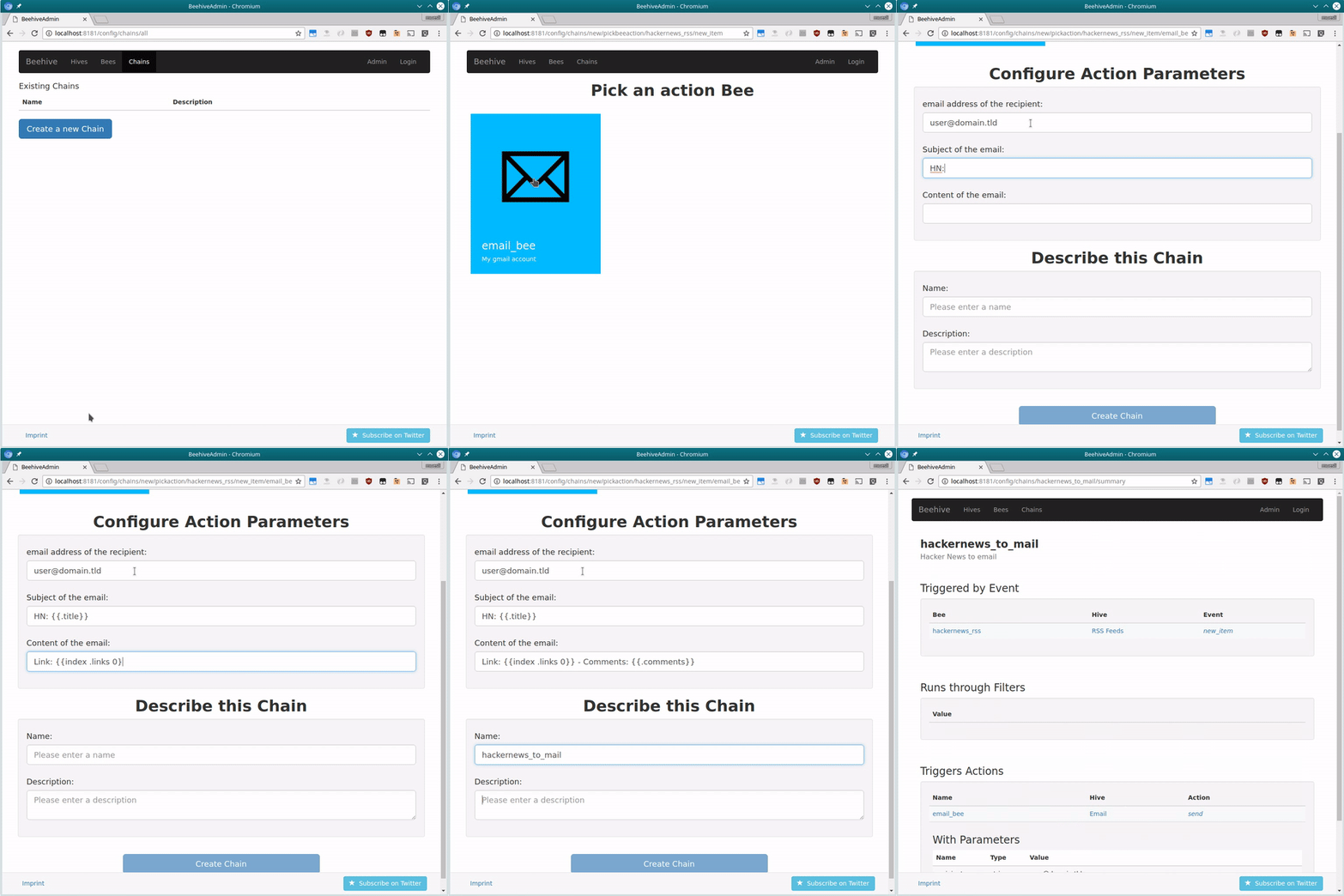
That's it. Whenever the RSS-feed gets updated, Beehive will now send you an email! It's really easy to make various Bees work together seamlessly and do clever things for you. Try it yourself!
You can find more information on how to configure Beehive and examples in our Wiki.
Troubleshooting & Notes
The web interface and other resources are embedded in the binary by default.
When using make noembed, Beehive tries to find those files
in its current working directory, so it's currently recommended to start Beehive
from within its git repository, if you plan to use the web interface.
Should you still not be able to reach the web interface, check if the config
directory in the git repository is empty. If that's the case, make sure the
git submodules get initialized by running git submodule update --init.
The web interface does not require authentication yet. Beehive by default accepts all connections from the loopback device only.
If you want to bind Beehive to a different interface/address, run Beehive with
the -bind and -canonicalurl parameters. For example:
beehive -bind "192.168.0.1:8181" -canonicalurl "http://192.168.0.1:8181"
or
docker run --name beehive -d -e CANONICAL_URL="http://192.168.0.1:8181" -p 8181:8181 fribbledom/beehive
Development
Need help? Want to hack on your own Hives? Join us on IRC (irc://freenode.net/#beehive) or Gitter. Follow the bees on Twitter!
探索相关项目
n8n-io/n8n
具备原生 AI 能力的 Fair-code 工作流自动化平台。可将可视化构建与自定义代码相结合,支持自行部署或使用云服务,并提供 400 多种集成。
210,134 星标langgenius/dify
在同一个协作工作区中构建智能体工作流和 RAG 流水线,并提供丰富的 AI 模型与工具支持。可部署到云端、VPC 或自行部署,团队无需重建技术栈即可从原型进入生产。
160,951 星标microsoft/PowerToys
Microsoft PowerToys 是一组提升 Windows 生产力和自定义能力的实用工具
140,833 星标stablyai/orca
Orca 是使用智能体集群开展工作的地方(例如 Grok Bot、Claude Code)。可使用你自己的订阅运行任意编程智能体。支持桌面端、移动端和远程运行时。
121,812 星标