
muaz-khan/DetectRTC
muaz-khan/DetectRTC has 672 GitHub stars and 156 forks. GitHot measured 0 stars in 24 hours and -1 in 7 days. Last checked 2026-11-24 22:39 UTC. Last push 2023-02-18.
实测星标增长
- 24小时
- 0
- 7天
- -1
- 15天
- 正在收集历史
- 1个月
- 正在收集历史
各周期内的星标净变化,周期相互重叠,并非每日新增。缺失的测量保持空白。星标代表关注度,不代表软件质量。
关于
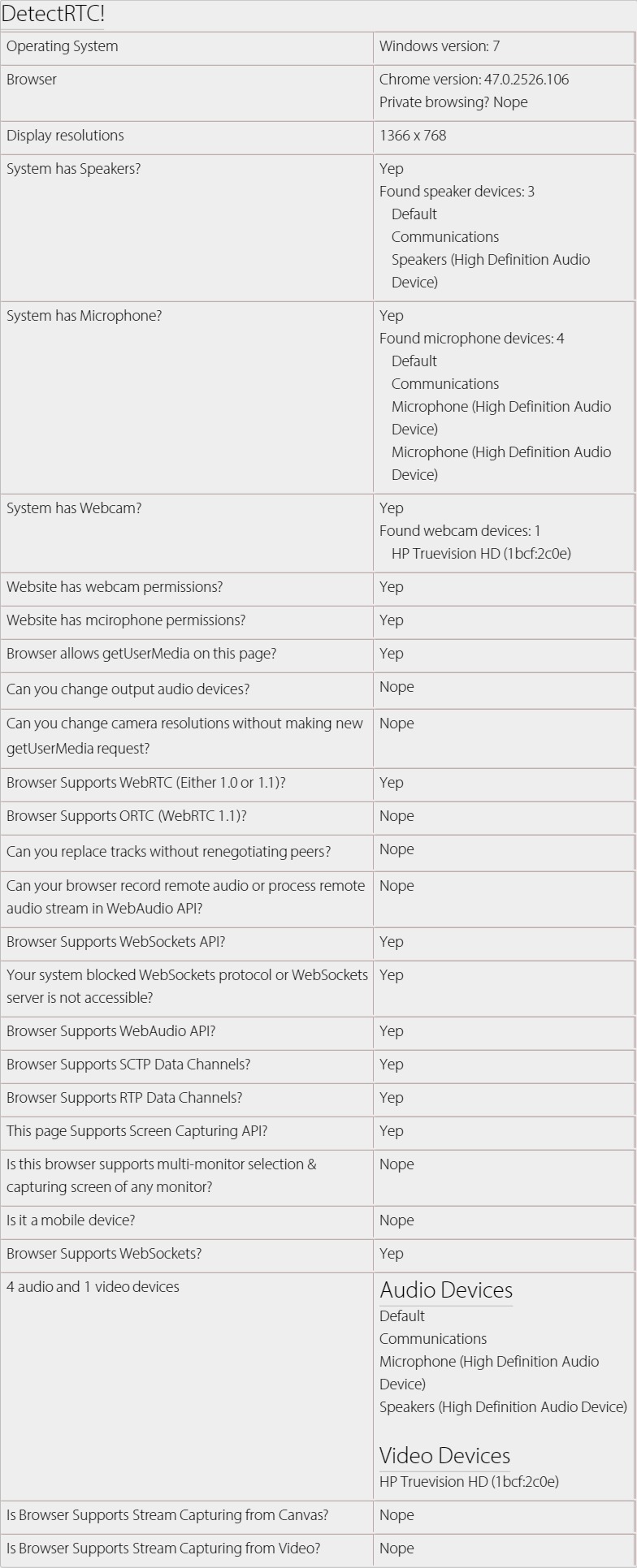
DetectRTC 是一个轻量级 JavaScript 库,可用于检测 WebRTC 相关功能,例如系统是否配有扬声器、麦克风或摄像头,是否支持屏幕采集,以及音频/视频设备的数量等。https://www.webrtc-experiment.com/DetectRTC/
创作与媒体README.md
原文 DetectRTC.js
DetectRTC | Is WebRTC Supported In Your Browser?


Live Demo: https://www.webrtc-experiment.com/DetectRTC/
if (DetectRTC.isWebRTCSupported === false) {
    alert('Please use Chrome or Firefox.');
}

if (DetectRTC.hasWebcam === false) {
    alert('Please install an external webcam device.');
}

if (DetectRTC.hasMicrophone === false) {
    alert('Please install an external microphone device.');
}

if (DetectRTC.hasSpeakers === false && (DetectRTC.browser.name === 'Chrome' || DetectRTC.browser.name === 'Edge')) {
    alert('Oops, your system can not play audios.');
}
What is this?
A tiny JavaScript library that can be used to detect WebRTC features e.g. system having speakers, microphone or webcam, screen capturing is supported, number of audio/video devices etc.
Free?
It is MIT Licenced, which means that you can use it in any commercial/non-commercial product, free of cost.
Tests?
Releases?
How to install?
npm install detectrtc --production

# or via "bower"
bower install detectrtc
Proposed NEW API
DetectRTC.isSetSinkIdSupported                  // (implemented)
DetectRTC.isRTPSenderReplaceTracksSupported     // (implemented)
DetectRTC.isORTCSupported                       // (implemented)
DetectRTC.isRemoteStreamProcessingSupported     // (implemented)

DetectRTC.isWebsiteHasWebcamPermissions        // (implemented)
DetectRTC.isWebsiteHasMicrophonePermissions    // (implemented)

DetectRTC.audioInputDevices    // (implemented)
DetectRTC.audioOutputDevices   // (implemented)
DetectRTC.videoInputDevices    // (implemented)

// Below API are NOT implemented yet
DetectRTC.browser.googSupportedFlags.googDAEEchoCancellation
DetectRTC.browser.googSupportedFlags.echoCancellation
DetectRTC.isMediaHintsSupportsNewSyntax
LocalHost
node server.js

# or
npm start

# and open:
http://127.0.0.1:9001

# or
http://localhost:9001
NPM
var DetectRTC = require('detectrtc');

console.log(DetectRTC.browser);

DetectRTC.load(function() {
    console.log(DetectRTC);
});
- Live NPM test: https://tonicdev.com/npm/detectrtc
Or try npm-test.js:
cd node_modules
cd detectrtc

# npm test
# or
node npm-test.js
How to link the script?
<script src="./node_modules/detectrtc/DetectRTC.js"></script>

<!-- or bower -->
<script src="./bower_components/detectrtc/DetectRTC.js"></script>

<!-- or RawGit (if CDN fails) -->
<script src="https://cdn.rawgit.com/muaz-khan/DetectRTC/master/DetectRTC.js"></script>

<!-- Not Recommended -->
<script src="https://www.webrtc-experiment.com/DetectRTC.js"></script>
You can even link specific versions:
<script src="https://github.com/muaz-khan/DetectRTC/releases/download/1.4.1/DetectRTC.js"></script>
How to use it?
// for node.js users
var DetectRTC = require('detectrtc');

// non-nodejs users can skip above line
// below code will work for all users

DetectRTC.load(function() {
    DetectRTC.hasWebcam; // (has webcam device!)
    DetectRTC.hasMicrophone; // (has microphone device!)
    DetectRTC.hasSpeakers; // (has speakers!)
    DetectRTC.isScreenCapturingSupported; // Chrome, Firefox, Opera, Edge and Android
    DetectRTC.isSctpDataChannelsSupported;
    DetectRTC.isRtpDataChannelsSupported;
    DetectRTC.isAudioContextSupported;
    DetectRTC.isWebRTCSupported;
    DetectRTC.isDesktopCapturingSupported;
    DetectRTC.isMobileDevice;

    DetectRTC.isWebSocketsSupported;
    DetectRTC.isWebSocketsBlocked;
    DetectRTC.checkWebSocketsSupport(callback);

    DetectRTC.isWebsiteHasWebcamPermissions;        // getUserMedia allowed for HTTPs domain in Chrome?
    DetectRTC.isWebsiteHasMicrophonePermissions;    // getUserMedia allowed for HTTPs domain in Chrome?

    DetectRTC.audioInputDevices;    // microphones
    DetectRTC.audioOutputDevices;   // speakers
    DetectRTC.videoInputDevices;    // cameras

    DetectRTC.osName;
    DetectRTC.osVersion;

    DetectRTC.browser.name === 'Edge' || 'Chrome' || 'Firefox';
    DetectRTC.browser.version;
    DetectRTC.browser.isChrome;
    DetectRTC.browser.isFirefox;
    DetectRTC.browser.isOpera;
    DetectRTC.browser.isIE;
    DetectRTC.browser.isSafari;
    DetectRTC.browser.isEdge;

    DetectRTC.browser.isPrivateBrowsing; // incognito or private modes

    DetectRTC.isCanvasSupportsStreamCapturing;
    DetectRTC.isVideoSupportsStreamCapturing;

    DetectRTC.DetectLocalIPAddress(callback);
});
DetectRTC.version
DetectRTC is supporting version property since 1.4.1.
if(DetectRTC.version === '1.4.1') {
    alert('We are using DetectRTC version 1.4.1');
}
Why load method?
If you're not detecting audio/video input/output devices then you can skip this method.
DetectRTC.load simply makes sure that all devices are captured and valid result is set for relevant properties.
How to fix devices' labels?
You need to check for device.isCustomLabel boolean. If this boolean is true then assume that DetectRTC given a custom label to the device.
You must getUserMedia request whenever you find isCustomLabel===true. getUserMedia request will return valid device labels.
if (DetectRTC.MediaDevices[0] && DetectRTC.MediaDevices[0].isCustomLabel) {
    // it seems that we did not make getUserMedia request yet
    navigator.mediaDevices.getUserMedia({
        audio: true,
        video: true
    }).then(function(stream) {
        var video;
        try {
            video = document.createElement('video');
            video.muted = true;
            video.src = URL.createObjectURL(stream);
            video.style.display = 'none';
            (document.body || document.documentElement).appendChild(vide);
        } catch (e) {}

        DetectRTC.load(function() {
            DetectRTC.videoInputDevices.forEach(function(device, idx) {
                // ------------------------------
                // now you get valid label here
                console.log(device.label);
                // ------------------------------
            });

            // release camera
            stream.getTracks().forEach(function(track) {
                track.stop();
            });

            if (video && video.parentNode) {
                video.parentNode.removeChild(video);
            }
        });
    });
} else {
    DetectRTC.videoInputDevices.forEach(function(device, idx) {
        console.log(device.label);
    });
}
How to select specific camera?
Demo: https://jsfiddle.net/cf90az9q/
<script src="https://www.webrtc-experiment.com/DetectRTC/CheckDeviceSupport.js"></script>
<script>
function selectSecondaryCamera() {
    checkDeviceSupport(function() {
        var secondDevice = videoInputDevices[1];
        if(!secondDevice) return alert('Secondary webcam is NOT available.');

        var videoConstraints = {
            deviceId: secondDevice.deviceId
        };

        if(!!navigator.webkitGetUserMedia) {
            videoConstraints = {
                mandatory: {},
                optional: [{
                    sourceId: secondDevice.deviceId
                }]
            }
        }

        navigator.getUserMedia = navigator.mozGetUserMedia || navigator.webkitGetUserMedia;
        navigator.getUserMedia({ video: videoConstraints }, function(stream) {
            //
        }, function(error) {
            alert(JSON.stringify(error));
        });
    });
}
</script>
For further tricks & usages:
Rules to Contribute
mkdir DetectRTC
cd DetectRTC
git clone git://github.com/muaz-khan/DetectRTC.git ./

# install grunt for code style verifications
npm install grunt-cli

# install all dependencies
npm install --save-dev

# verify your changes
# npm test  # or "grunt"
grunt

# Success? Make a pull request!
Github
Tests powered by
Check tests here: https://travis-ci.org/muaz-khan/DetectRTC
License
DetectRTC.js is released under MIT licence . Copyright (c) Muaz Khan.
探索相关项目
加载中…