
lemoncrow-lab/lemoncrow
lemoncrow-lab/lemoncrow has 71 GitHub stars and 6 forks. GitHot measured 0 stars in 24 hours, -1 in 7 days, and -1 in 15 days. Last checked 2026-11-15 07:19 UTC. Last push 2026-11-02.
可以做什么
- Remote MCP: lc rt mcp serve (opt-in) exposes the current workspace through an OAuth-protected remote MCP endpoint for compatible clients. The gateway process runs Runtime Lite itself, or the hosted thin client when Runtime targets a hosted server; it never starts a local LemonCrow server.
- Session replay: lc session stats and lc session replay inspect recorded agent sessions locally without rerunning the model.
- Usage accounting: lc usage reports recorded usage by host, model, project, and day without treating unknown pricing as zero.
- Bring your own model: lc rt model registers and probes OpenAI-compatible endpoints such as vLLM, Ollama, LM Studio, or an internal gateway.
实测星标增长
- 24小时
- 0
- 7天
- -1
- 15天
- -1
- 1个月
- 正在收集历史
各周期内的星标净变化,周期相互重叠,并非每日新增。缺失的测量保持空白。星标代表关注度,不代表软件质量。
关于
A Complete faster runtime for coding agents. Optimize the journey, not the hop. Make coding agents 25% faster and 30% cheaper on average while keeping the quality same or more. Same Task, Same Quality, Faster and Cheaper.
开发工具README.md
原文
LemonCrow
Add local code intelligence to the coding agent you already use
Runtime gives Claude Code, Codex, OpenCode, and Cursor useful local repository intelligence and LemonCrow tools without replacing the agent. Hosted Runtime adds deeper private retrieval; Enterprise Runtime puts that private Runtime in customer-controlled infrastructure. Managed execution and cross-workspace context are not yet available.
LemonCrow has two connected products: Runtime improves the agent's repository context and tools. Review helps you understand the code your agents changed and preserve human review state across revisions.
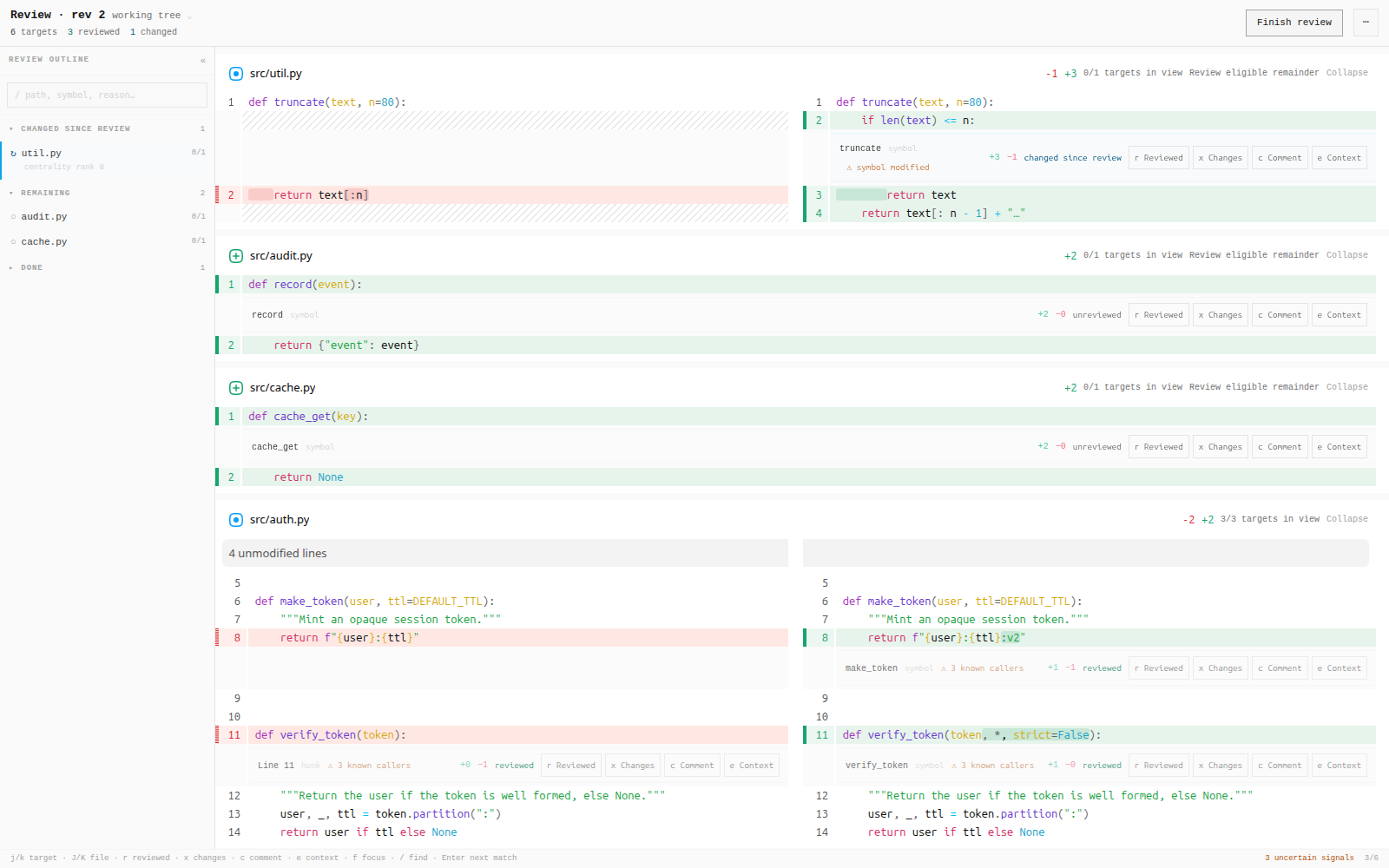
Real Review Reader · revision 2 · reviewed work preserved while changed and new work returns to the queue.


Quick start · Runtime · Review · Results · Privacy · Reference
Quick start
Three steps to an AI review of your own change, in your terminal:
curl -fsSL https://lemoncrow.com/install.sh | bash         # 1. install
export ANTHROPIC_API_KEY=sk-ant-...                         # 2. a key (or OPENAI_API_KEY), or skip it and use an agent you are signed in to
cd your-project && lc review --ai                           # 3. the review, printed here; it posts nothing
No key? Use the agent you already have, with no key: lc review --ai --agent claude (also codex, opencode). Add --remember once and lc review --ai uses it whenever no key is set. If there is neither, lc review --ai says what to do in three lines and exits 3. To keep a key instead of exporting it in every terminal: lc settings set llm.anthropic_api_key (asks for it; stored in ~/.lemoncrow/plugin_settings.json, readable only by you). Your first AI review has the details.
The installer asks nothing. It installs Local Review: the lc client (lc and lcr are real executables, not shell aliases) and a loopback Review server on port 7420. No account or sign-in is needed. Pass --hosted (alias --cloud) for Hosted Review at api.lemoncrow.com instead, which needs an invited account; run lc auth login next. Runtime is fetched once, the first time you run lc rt enable <host> (claude, codex, or opencode). To pre-install it, pass --product runtime or --product both, adding --agent <host> to enable an agent. --dry-run prints the plan; --url and --port are the other flags. Environment overrides: LEMONCROW_RELEASE_TAG, LEMONCROW_RELEASE_BASE_URL (alternate asset base, for example file:// for a local rehearsal), and LEMONCROW_NO_LAZY_INSTALL=1 to disable the first-use fetch. Upgrading from an earlier release? Read the behaviour changes first.
Give Claude Code, Codex, or OpenCode Local Lite tools in the current Git repo:
lc with claude
lc with codex
lc with opencode
Cursor is not configured by the installer or lc rt enable; today it needs a source checkout (bash scripts/install_cursor.sh, see Cursor integration). Runtime Lite stays local through lc with, persistent host integrations, and lc runtime index. lc code is the Hosted LemonCrow-owned coding agent. A Pro plan grants Hosted Runtime access; it is not a local engine mode.
lc with is temporary. It adds the LemonCrow plugin to that launch and does not modify the agent's saved configuration, model, authentication, or settings. The repository index is incremental and persists under .lemoncrow/workspace/.
Like it? Keep Local Lite enabled for that host:
lc rt enable claude
lc rt enable codex
lc rt enable opencode
To use Hosted Runtime:
lc rt enable claude --hosted
Signing in does not change a local integration into hosted execution. Local Runtime Lite stays local. lc code is an explicit Hosted Runtime entry point.
To look at the change in the browser first (no model is called):
lc review # capture the change and open it in the Reader
Runtime and Review remain separate product surfaces: Runtime does not require Review, and Review does not require Runtime. The installed client sends no product telemetry; see Privacy.
Runtime: local
Runtime Lite is the open-source local Runtime for Claude Code, Codex, OpenCode,
and Cursor. It gives the agent useful single-repository code intelligence and
LemonCrow's local coding tools while keeping the host's normal model,
credentials, and settings. Claude Code, Codex, and OpenCode support the temporary lc with path; Cursor's integration is installed from a source checkout.
| What you want | Command | Execution |
|---|---|---|
| Try once | lc with claude |
Ephemeral Local Lite |
| Keep enabled | lc rt enable claude |
Persistent Local Lite configuration |
| Local index | lc runtime index |
Local Lite |
| LemonCrow coding agent | lc code |
Hosted Runtime |
| Hosted Runtime | lc rt enable claude --hosted |
Explicit hosted opt-in |
Local Lite opens no LemonCrow listening port, starts no LemonCrow application server or daemon, requires no LemonCrow account, and uploads no repository source to LemonCrow. The persistent incremental repository index lives under <repo>/.lemoncrow/workspace/.
Local Lite is intentionally lightweight. It provides lexical/local repository intelligence rather than pretending to be the private advanced engine. Start local; add hosted infrastructure, deeper semantic/hybrid retrieval, team policy, or enterprise deployment only when you need those capabilities. Cross-workspace context outside Review is not yet available.
Architecture details: Runtime Lite and the OSS/private code-intelligence boundary.
Review agent changes
Coding agents can produce changes faster than a human can confidently review them. LemonCrow treats human review state as the durable object. The default review is deterministic and calls no model. When you configure a model route, Auto AI review adds findings as hints for the reviewer, never as a verdict, and in CI the GitHub Action posts them on your pull requests with your own model key.
Start with the local review reader:
lc review           # freeze the current change and open the Review Reader
lc review --staged  # exactly what you are about to commit
lc review --no-open # capture and print the Review URL without opening a browser
A plain lc review never calls a model, even when a key is in your environment:
a key exported for other tools is not consent to spend. Ask for the AI review
with --ai, in the same installed lc:
lc review --ai                  # AI review of your change, printed in the terminal
lc review --ai --agent claude   # use your signed-in Claude Code (or codex, opencode) instead of a key
lc review hook install          # before each push; it stops only on a real finding, never because LemonCrow failed
lc review init-action           # write the GitHub Action workflow for pull requests
lc review config --effective    # the review rules this repository sets
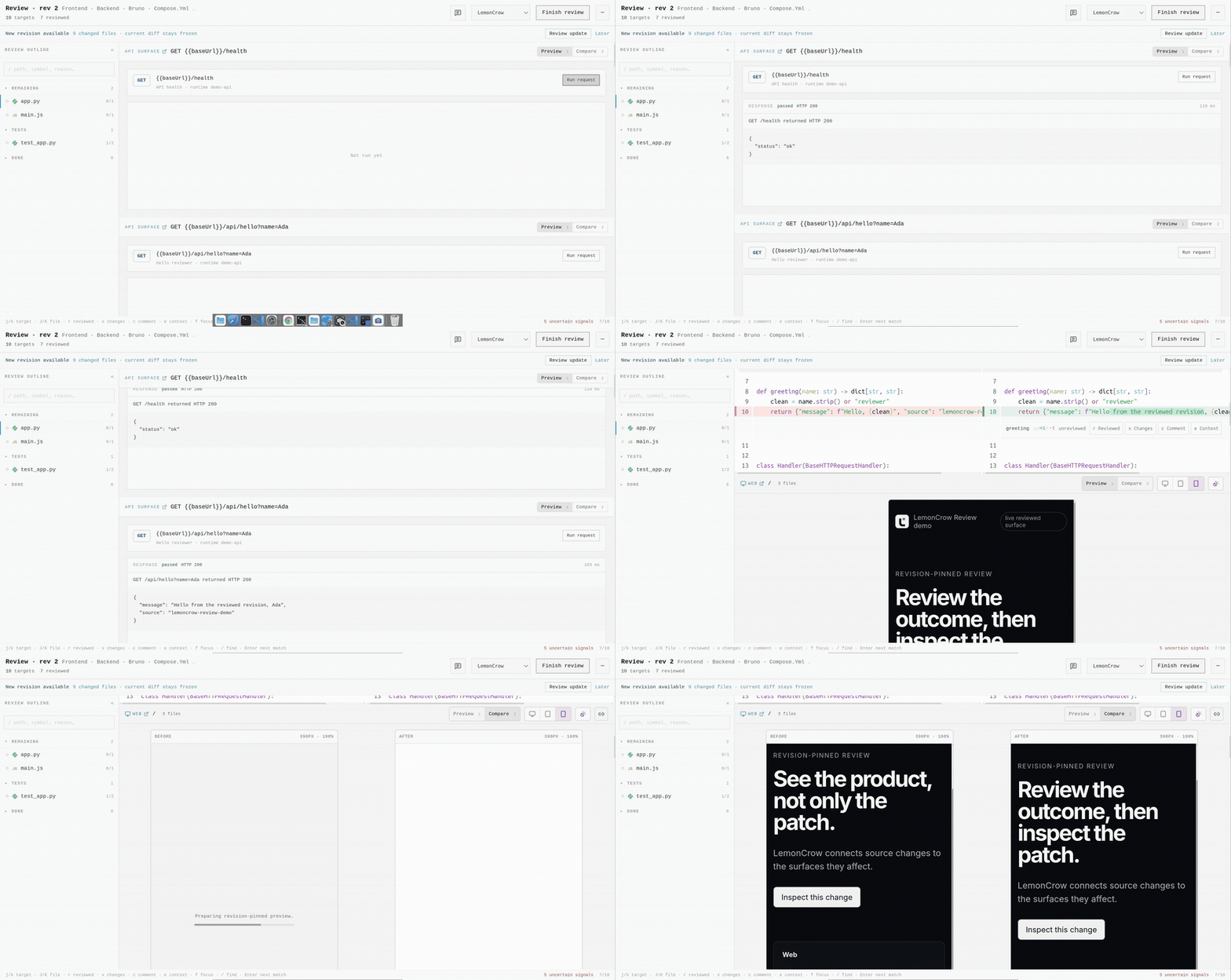
Real lc review --open demo · diff → rendered UI preview → compare → review context.
Try it from a source checkout: make review-demo creates a throwaway demo repository with a prepared change and opens it in the Reader; make review-demo-diff shows that change. See the demo guide.
The review workflow is designed to answer:
- what changed and where should I start?
- which changed definitions affect code outside the diff?
- which session or authoring evidence is associated with the change?
- which tests or checks actually ran?
- what have I already reviewed?
- after the author changes the code, which of my prior judgments are still valid?
- which comments still need action?
LemonCrow does not turn those signals into AI APPROVED or SAFE TO MERGE.
Human judgment remains final.
Review only what changed again
Review marks are attached to content rather than line numbers. If an agent adds lines above something you already reviewed, that work stays reviewed. If the reviewed content changes, LemonCrow puts it back in front of you.
In the Review Reader (lc review), press Mark reviewed on what you have
read and Add comment on a line. After the author or agent revises the
change, run lc review again: the Reader shows Changed since your review,
and Copy feedback (or Send to agent) hands every open comment to the
author.
The same loop is scriptable with the full Review CLI in a source checkout
(uv run lc review ...); the installed lc client does not carry these flags:
lc review --mark src/auth.py
lc review --comment "ttl is hardcoded" --on src/auth.py:L81
# author or agent revises the change
lc review --since-my-review
lc review --feedback
Comments are re-anchored only when the new location is unambiguous. Otherwise they are reported as orphaned instead of being silently moved.
Review also exposes impact outside the patch, review ordering, provenance, and recorded verification evidence. Missing evidence is reported as unknown; LemonCrow does not synthesize a passing test status.
See the 10-minute review walkthrough or the CLI reference.
Install the GitHub Action
Early access. A workflow in your repository reviews each pull request on your
own model key and posts the result as a bot: one summary comment with a verdict,
inline P0/P1 findings, and a LemonCrow Review status. On each push it
re-reviews only what changed and carries the rest forward, so a push to a
long-running pull request does not pay to review the same code twice.
Add your model key as the repository secret ANTHROPIC_API_KEY (or
OPENAI_API_KEY, passed as openai-api-key), and save this as
.github/workflows/lemoncrow-review.yml:
name: LemonCrow
on:
  pull_request:
    types: [opened, synchronize, reopened, ready_for_review]
permissions:
  contents: read        # fetch the pull request's commits
  pull-requests: write  # the summary comment, inline findings, thread replies and resolves
  statuses: write       # the "LemonCrow Review" commit status
  checks: read          # the CI results on the head commit, for the summary's proof of work
jobs:
  review:
    runs-on: ubuntu-latest
    steps:
      - uses: lemoncrow-lab/lemoncrow@<sha>  # v0.8.2
        with:
          anthropic-api-key: ${{ secrets.ANTHROPIC_API_KEY }}
That is the whole file: the Action checks out the pull request itself, fetches
the history it needs and cleans up its own status, and a bad key or a token
without pull-requests: write fails loudly instead of passing quietly. Replace
<sha> with the release commit the
latest release
prints (a commit, not a branch: the commit is the version that reviews), or let
lc review init-action write the file pinned to the newest release. Each pull
request's reviews are capped at $3.00 of model spend by default, held before
every model call (max-usd-per-pr; none turns it off), and the summary's
footer shows the spend against the cap. The
options (depth, fail-on, strictness, chat, budgets), the permissions, the one
status to require and the fork-pull-request behavior are in
Install the GitHub Action. To try it without CI:
lc review --pr 123 --ai prints the summary and each inline comment the bot
would post, and posts nothing.
Code-review benchmark
F-score on the public 50-PR code-review benchmark, highest first. Rows scored by LemonCrow's judge are our own runs; every other row is a figure its source published. Each row links its source.
| Tool | Precision | Recall | F-score | Median cost / PR | Scored by |
|---|---|---|---|---|---|
| Augment Code Review | 65% | 55% | 59% | n/a | Augment's judge, its own tool (source, 2025-12-11) |
| Cursor Bugbot | 60% | 41% | 49% | n/a | Augment's judge (source, 2025-12-11) |
| LemonCrow | 47% | 51% | 49% | $0.56 | LemonCrow's judge (run report, 2026-11-01) |
| Greptile | 45% | 45% | 45% | n/a | Augment's judge (source, 2025-12-11) |
| Codex Code Review | 68% | 29% | 41% | n/a | Augment's judge (source, 2025-12-11) |
| CodeRabbit | 36% | 43% | 39% | n/a | Augment's judge (source, 2025-12-11) |
| Claude Code | 23% | 51% | 31% | n/a | Augment's judge (source, 2025-12-11) |
| Greptile, scored by our judge | 20% | 51% | 29% | n/a | LemonCrow's judge (run report, 2026-10-26) |
| GitHub Copilot | 20% | 34% | 25% | n/a | Augment's judge (source, 2025-12-11) |
Method. 50 pull requests from Sentry, Cal.com, Grafana, Keycloak, Discourse (Python, TypeScript, Go, Java, Ruby), the set Greptile published (AI Code Review Benchmarks 2025, 2025-07), scored against the answer key Augment Code expanded (golden_comments @ 3f2c8ab): 97 comments count, after dropping 40 Low-severity ones. An LLM judge decides whether a tool's comment and an answer-key comment refer to the same underlying issue (not by file or line number). Low-severity answer-key comments count as neither a true positive, a false negative nor a false positive. LemonCrow's row is our own run on 2026-11-01: review model sonnet through claude at depth thorough, engine 0.8.1 (729e960), judged by sonnet with a prompt whose sha256 starts cfe685620f23. The 50 reviews made 369 model calls and cost $32.28 in all; the median pull request took 8 calls. Every comment and judgment is in the raw run report. The other rows are the figures Augment Code published (We benchmarked 7 AI code review tools on large open-source projects. Here are the results., 2025-12-11; run 2025-11-14, default settings, their judge). We did not re-run those tools, so the columns are not strictly like for like. The row marked "scored by our judge" scores Greptile's own comments (Inline review comments by greptile-apps[bot] on the 50 benchmark fork pull requests (first review only, replies and exact repeats dropped), read with the GitHub REST API, exact text) on the same pull requests with the judge LemonCrow used, so it shows how far the two judges differ. Greptile reports an 82% catch rate (41 of 50 pull requests) on this set (AI Code Review Benchmarks 2025, 2025-07): it counts whether the tool commented on the one hidden bug in each of the 50 pull requests, and does not count false positives, style suggestions or unrelated comments against it. A recall-type figure on one bug per pull request with false alarms ignored; it cannot be compared with precision-aware F-scores.
Results
The numbers below are fixed results from pinned end-to-end Runtime benchmark runs, not live counters. They remain supporting proof for the Runtime product; they are not a claim that Local Lite has identical retrieval quality to the advanced engine. Full methodology and raw-run references are in BENCHMARKS.md.
~30% lower cost · ~25% faster · without sacrificing task quality
SWE-bench Verified, same model and harness: 29.5% lower cost, 23.7% less wall-clock time, and 92.8% resolved vs 80.8% baseline.
| Benchmark | Baseline correct | LemonCrow correct | Baseline cost | LemonCrow cost | Cost delta |
|---|---|---|---|---|---|
| SWE-bench Verified, 50 tasks × 5 reps | 80.8% | 92.8% | $234.84 | $165.45 | 29.5% cheaper |
| SWE-bench Lite, 10 tasks × 5 reps | 98.0% | 96.0% | $19.83 | $17.51 | 11.7% cheaper |
| SWE-bench Pro, 10 tasks × 5 reps | 88.0% | 90.0% | $39.01 | $30.61 | 21.5% cheaper |
| Terminal-Bench 2.1, 89 tasks × 5 reps, Opus 4.8 | 78.9% | 78.9% | $73.75 | $61.98 | 16.0% cheaper |
The table includes the SWE-bench Lite regression: LemonCrow was cheaper on that run but scored 2 percentage points lower. The benchmark set is not filtered to keep only favorable results.
On SWE-bench Verified, the same pinned run used 37.7% fewer turns, 23.7% less wall-clock time, 37.8% fewer tool calls, and 27.9% fewer output tokens.

The retrieval suite also contains advanced semantic-search measurements across ~7,200 query/answer pairs and 14 repositories. Those results describe the advanced code-intelligence path, not Runtime Lite. Runtime Lite deliberately uses a lightweight local lexical/indexed pipeline instead. See indexing and retrieval results for the full comparison and caveats.
How Runtime Lite works
lc with resolves the current Git worktree, prepares the incremental Lite index, and launches your normal coding agent with the LemonCrow plugin available for that run:
Claude Code / Codex / OpenCode
            |
   LemonCrow plugin
            |
       Runtime Lite
            |
         your repo
            |
            +-- .lemoncrow/workspace/  (persistent local index)
There is no background LemonCrow daemon, listening Runtime port, or application server to keep running.
Key Local Lite tools include:
| LemonCrow tool | Local Lite purpose |
|---|---|
code_search |
Exact symbols plus indexed lexical, path/name, and import-aware search |
read |
Exact ranges and bounded local source reads |
edit |
Verified local file edits |
bash |
Bounded local command execution |
relations / graph |
Basic repository relationships and import map |
scan / codemod / blame |
Local repository helpers |
Runtime Lite deliberately excludes embeddings, ANN/vector search, Torch, Runtime Lite deliberately excludes embeddings, ANN/vector search, Torch, SentenceTransformers, a resident Zoekt server, and the heavy LemonCrow application server. Advanced semantic/hybrid retrieval, richer ranking and lineage, and shared infrastructure belong to the explicit Hosted/Enterprise paths; cross-workspace context is not yet available. A Pro plan is an access tier for Hosted Runtime, not an execution mode.
Architecture details: docs/architecture/runtime-lite.md.
Supported hosts
The one-command Local Lite path is available for Claude Code, Codex CLI, and
OpenCode: lc with claude|codex|opencode|pi. Cursor is also supported through a LemonCrow integration installed from a source checkout. Pi and LemonCode are public managed coding-agent hosts under lc rt host (the installed client manages Pi; LemonCode host lifecycle needs the full CLI); using either host does not imply Hosted Runtime. LemonCrow also integrates with other hosts; capability depth
varies by what each host exposes. See
all host integrations and the
host capability matrix before depending
on host-specific lifecycle or verification behavior.
Other capabilities
These are useful, but they are not the core review workflow:
- Remote MCP:
lc rt mcp serve(opt-in) exposes the current workspace through an OAuth-protected remote MCP endpoint for compatible clients. The gateway process runs Runtime Lite itself, or the hosted thin client when Runtime targets a hosted server; it never starts a local LemonCrow server.
The full LemonCrow CLI in a source checkout (uv run lc ...) adds these; the installed lc client says so instead of running them:
- Session replay:
lc session statsandlc session replayinspect recorded agent sessions locally without rerunning the model. - Usage accounting:
lc usagereports recorded usage by host, model, project, and day without treating unknown pricing as zero. - Bring your own model:
lc rt modelregisters and probes OpenAI-compatible endpoints such as vLLM, Ollama, LM Studio, or an internal gateway. - Agents and skills: packaged agent modes and optional skills live under
integrations/.
Full commands and flags live in the CLI reference.
Privacy
Local Lite: repository source, the Lite index, and local tool execution stay on the developer machine. Local Lite requires no LemonCrow account and does not upload repository source to LemonCrow. The coding agent still uses its own configured model provider, so that provider's normal network behavior still applies.
Hosted Runtime: deeper retrieval and richer code relationships run in LemonCrow-operated private infrastructure. Pro is the commercial plan that can grant access to this service. Cross-workspace context outside Review and managed model/provider routing and execution are not yet available; see what Pro includes.
Enterprise Runtime: the private Runtime runs in customer-controlled or dedicated infrastructure with identity, policy, workspaces, governance, and audit. Do not assume the local Runtime privacy boundary applies to either managed deployment.
Telemetry: the installed lc client and the Local Review server it
installs send no product telemetry. lc audit prints
"product_telemetry": false, and there is nothing to turn off.
The full LemonCrow engine you run from a source checkout (uv run lc ...)
sends anonymous aggregate telemetry, on by default, and says so once, on your
first run: Telemetry is on: LemonCrow sends anonymous counts and timings, never code, prompts or file paths. Turn it off: lc rt telemetry remote off (or DO_NOT_TRACK=1).
It contains aggregate
counts, bucketed durations, dollar estimates, hashed install/session
identifiers, version, host source, retrieval domain, and timestamps. It does
not contain source code, prompts, repository paths, file paths, or symbol
names. Turn it off in that checkout with:
uv run lc rt telemetry remote off
or set DO_NOT_TRACK=1 / LEMONCROW_TELEMETRY=off. Commands you explicitly
run can still use the network, for example lc update downloading the release
installer or the coding agent calling its configured model provider. See
privacy and network behavior for the complete details.
Limitations
- Benchmark results are measured on the published task sets; they are not a guarantee for your repository or model.
- Host capabilities differ. Features that depend on lifecycle hooks or live session capture may degrade to imported or manual evidence on some hosts.
- Linux with Python 3.13 is the release-qualified platform. macOS builds are published but not yet covered by release qualification, and Windows support is partial and not currently validated. See the support matrix.
- LemonCrow does not run or pay for your model provider; you configure the provider or local endpoint you want to use.
- Runtime Lite is the public open-source local Runtime. Hosted/Pro/enterprise paths are separate explicit surfaces; none is required for Local Lite use.
Why LemonCrow exists
I built LemonCrow after using coding agents heavily and seeing two bottlenecks move into focus. First, agents repeatedly spent context and tool calls rediscovering the same code. Once that became cheaper, the harder bottleneck was human attention: the agent could change code faster than I could confidently review it.
My background at Google included performance optimization and cost work, so the runtime is measured at the whole-task level rather than by claiming a win on one isolated hop. But the product direction is review-first: reduce how much a human has to reread without outsourcing the engineering judgment.
Reference
- Installation
- Review walkthrough
- CLI reference
- Architecture
- Benchmarks
- Full benchmark results
- Host integrations
- Host capability matrix
- Privacy & network behavior
- Troubleshooting
Removal
Check state, update, and remove products with the client. lc uninstall lists exactly
what it will remove first, and asks before it deletes anything of yours (your settings,
the reviews you opened, a git hook it wrote, a repository's .lemoncrow folder):
lc status
lc update                      # re-runs the installer for each installed product; host registrations are untouched
lc uninstall all --dry-run     # list what would be removed; changes nothing
lc uninstall all               # asks; add --yes to skip the question (your data stays) or --purge to remove it too
lc uninstall review            # or: runtime
Building from source
git clone https://github.com/lemoncrow-lab/lemoncrow
cd lemoncrow
make oss-dev    # the real installer on locally built assets, in the sandbox ~/.lemoncrow-oss
make oss-prod   # full rebuild, installed into ~/.lemoncrow
See Installation for development setup details.
License
Apache-2.0. Runtime Lite, public contracts, and the auditable public client are open source.
Hosted LemonCrow and the advanced Pro code-intelligence engine are separate commercial/private surfaces and are not required for Local Lite. If you want to discuss an enterprise deployment, contact [email protected].