
lachlanchen/OpenHI
lachlanchen/OpenHI has 108 GitHub stars and 32 forks. GitHot measured 0 stars in 24 hours and 0 in 7 days. Last checked 2026-11-21 23:35 UTC. Last push 2026-09-11.
可以做什么
- End-to-end RAW-to-spectrum event processing workflow.
- Auto/manual scan period detection and forward/backward segmentation.
- Multi-window compensation with trainable/fixed parameter modes.
- Parameter save/load in NPZ, JSON, and CSV.
实测星标增长
- 24小时
- 0
- 7天
- 0
- 15天
- 正在收集历史
- 1个月
- 正在收集历史
各周期内的星标净变化,周期相互重叠,并非每日新增。缺失的测量保持空白。星标代表关注度,不代表软件质量。
关于
Self‑calibrated neuromorphic hyperspectral imaging pipeline for event cameras with diffractive illumination. Includes end‑to‑end tools for RAW segmentation, multi‑window time‑warping compensation, spectral visualization, and hardware control for synchronized event/frame capture and scanning.
机器学习i18n/README.zh-Hans.md
原文English · العربية · Español · Français · 日本語 · 한국어 · Tiếng Việt · 中文 (简体) · 中文(繁體) · Deutsch · Русский
自校准神经形态高光谱成像(OpenHI)


[!NOTE] 当前检出版本中的 i18n 状态:
ar、es、fr、ja、ko已在i18n/下提供。为兼容计划中的翻译覆盖范围,保留了更多语言链接。
一个完整的流程,用于在色散光照(例如衍射光栅)条件下,从事件相机重建光谱。系统记录强度变化事件 $e = (x, y, t, p)$,其中 $p \in {-1, +1}$ 表示对数强度变化的极性,并可直接从事件流中自动推断扫描时序与标定元数据(“auto info”)。
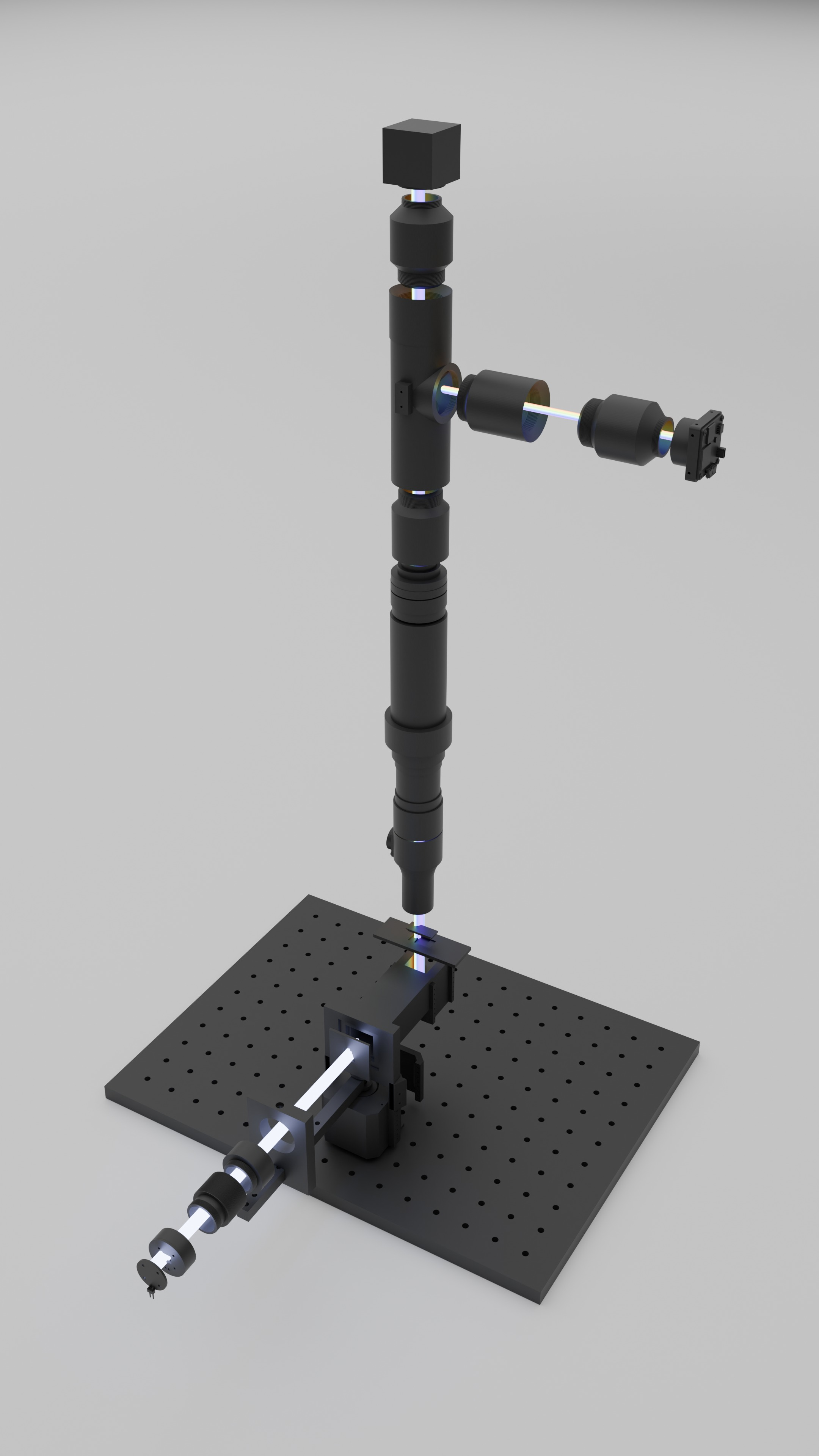
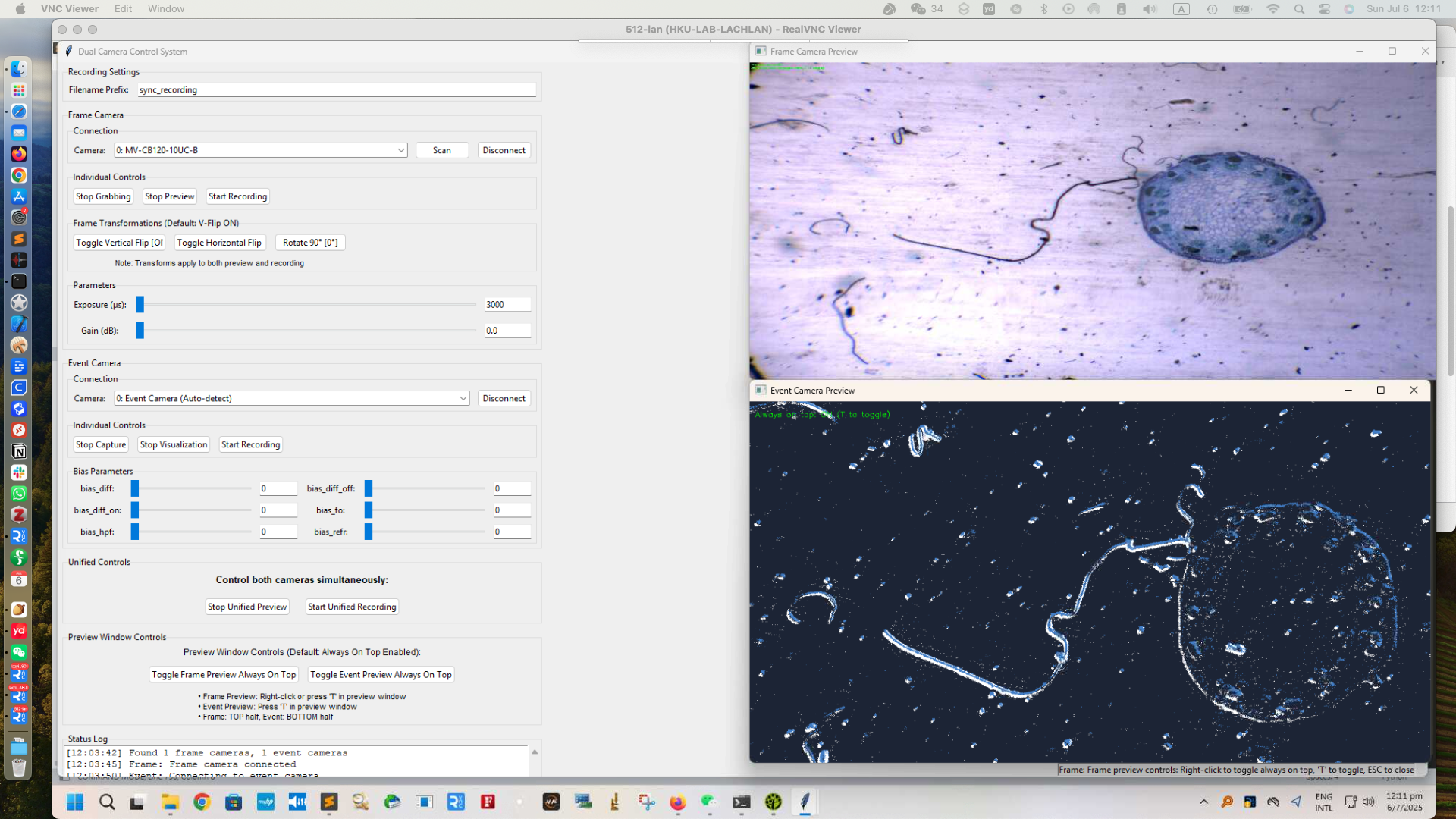
左图:模块化透射显微系统,含电机驱动光栅照明臂与垂直检测堆栈。右图:用于实时监控分割、补偿与重建的数据采集 GUI。
At a Glance
| Item | Details |
|---|---|
| Core idea | 基于事件流的自校准高光谱导数成像 |
| Main stages | segment_robust_fixed.py -> compensate_multiwindow_train_saved_params.py -> 可视化脚本 |
| Hardware docs in repo | 3D/, PCB/, firmware/, BOM/ |
| Desktop tools | scan_compensation_gui_cloud.py, ImagingGUI/DualCamera_separate_transform.py |
| Canonical paper | Optica Open preprint(DOI: 10.1364/opticaopen.30739151) |
| i18n in this checkout | README.ar.md, README.es.md, README.fr.md, README.ja.md, README.ko.md |
[!TIP] 购买论文 Self-calibrated neuromorphic hyperspectral imaging(已在 Optica Open 预印)对应的核心开发套件(不含相机、管镜、光学平台):
- https://lazying.art/openhi-kit.html
- 7 折优惠码:
OPTICA
Contents
- At a Glance 📌
- Overview 🔭
- Features ✨
- Repository Map 🗺️
- Project Structure 📁
- Quick Start (5-Min Path) ⚡
- Prerequisites 🧰
- Installation ⚙️
- Usage 🚀
- Internationalization 🌍
- Configuration 🎛️
- Examples 🧪
- Bill of Materials (Core Module) 🧾
- Core Scripts 🧠
- Additional Tools 🛠️
- Turbo Multi-Scan Compensation ⚡
- Parameter Management 💾
- Memory Optimization 🧱
- Output Structure 📦
- Configuration Examples 🧩
- Wavelength Mapping 🌈
- Tips and Best Practices ✅
- Development Notes 🧭
- Troubleshooting 🩺
- Roadmap 🛣️
- Citation 📎
- Acknowledgements 🙏
- License 📄
- Contributing 🤝
- Support / Sponsor 💖
Overview
当光照随时间扫过不同波长时,事件流会在色散轴方向上编码底层光谱的时间导数。
RAW event recording
   -> scan timing segmentation (F/B passes)
   -> multi-window time-warp compensation
   -> frame/cumulative/wavelength diagnostics
该流程包含三个主要阶段:
| Stage | Purpose | Primary script(s) |
|---|---|---|
| 1. Segment | 识别扫描时序,并将记录拆分为正向/反向扫描 | segment_robust_fixed.py |
| 2. Compensate | 估计分段线性时间扭曲,消除扫描造成的时间倾斜 | compensate_multiwindow_train_saved_params.py |
| 3. Visualize | 叠加已学习边界,并比较补偿前后时间分桶帧 | visualize_boundaries_and_frames.py, visualize_cumulative_compare.py |
仓库还包含硬件资产、采集 GUI 代码,以及 versions/ 下的历史实验分支。
Features
- 端到端的 RAW 到光谱事件处理工作流。
- 自动/手动扫描周期检测与正反向分割。
- 支持可训练/固定参数模式的多窗口补偿。
- 支持
NPZ、JSON、CSV的参数保存/加载。 - 多扫描合并工作流,可加速训练迭代(
compensate_multiwindow_turbo.py)。 - 提供边界、分桶帧、累计曲线与加权诊断的可视化工具集。
- 硬件文档:BOM、PCB、3D 零件、固件说明。
- 面向事件/帧相机同步系统的采集工具。
| Category | Included capabilities |
|---|---|
| Signal processing | 分割、周期检测、时间扭曲补偿 |
| Optimization | 可训练/固定参数、平滑约束、分块训练 |
| Outputs | 可视化叠加、累计对比、波长映射诊断 |
| Platform assets | 硬件设计文件、固件说明、GUI 工具、历史归档 |
Repository Map
为便于快速访问,关键硬件资产与代码同仓维护:
| Area | Path |
|---|---|
| 3D 打印部件 | 3D/ |
| PCB 布局 | PCB/ |
| 微控制器固件 | firmware/ |
| 采集界面(桌面) | ImagingGUI/ |
| 实验/数据参考 | reference_spectrum_2835/, reference_spectrum_lumileds/, references/ |
| 对齐分析 | align_background_vs_reference_code/, align_data_vs_filter_code/ |
Project Structure
OpenHI/
├── README.md
├── QUICKSTART.md
├── LICENSE
├── versions.md
├── 3D/
├── BOM/
├── PCB/
├── firmware/
├── ImagingGUI/
├── scripts/
├── segment_robust_fixed.py
├── compensate_multiwindow_train_saved_params.py
├── compensate_multiwindow_turbo.py
├── compensate_multiwindow*.py
├── visualize_boundaries_and_frames.py
├── visualize_cumulative_compare.py
├── visualize_cumulative_weighted.py
├── scan_compensation_gui_cloud.py
├── show_envi_spectrum_gui.py
├── simple_raw_reader.py
├── align_background_vs_reference_code/
├── align_data_vs_filter_code/
├── alignment_configs/
├── archive_code_variants/
├── outputs_root/
├── reference_filters/
├── reference_spectrum_2835/
├── reference_spectrum_lumileds/
├── references/
├── i18n/
└── versions/
Quick Start (5-Min Path)
如果环境已准备就绪,且数据集目录中包含 *event*.raw 文件:
scripts/run_scan_pipeline.sh /path/to/dataset_dir
若需强制指定 RAW 文件:
scripts/run_scan_pipeline.sh /path/to/dataset_dir /path/to/recording_event.raw
该封装脚本会使用仓库默认脚本路径和 CLI 参数,依次执行分割、补偿训练与可视化。
[!TIP] 首次验证建议先对一个数据集目录运行该脚本,再检查生成的 segment NPZ 与可视化输出,再去调整
PIPELINE_*变量。
Prerequisites
- Python 3.9+(
ImagingGUI/中部分 GUI 工具建议 Python 3.10+)。 - 核心 Python 包:
numpy、torch、matplotlib。 - 可选但常用:
opencv-python、pillow、cellpose。 - Metavision SDK / Python 绑定(用于 RAW 事件读取工作流,如
simple_raw_reader.py,以及 RAW 分割)。 - 建议使用支持 CUDA 的 PyTorch 以获得更快优化速度。
- 本地可用的 RAW 录制文件和/或分割后的 NPZ 文件。
Installation
仓库根目录目前未提供锁定环境文件。建议如下:
# create and activate a virtual environment or conda env
python -m venv .venv
source .venv/bin/activate

# install core dependencies
pip install numpy matplotlib torch

# optional tools often used in this repository
pip install opencv-python pillow
# pip install cellpose
如果你使用 Git hooks 管控大文件提交:
bash scripts/setup_hooks.sh
Usage
Basic Workflow (current root scripts)
# 1. Segment RAW into 6 scans (Forward/Backward)
python segment_robust_fixed.py \
  data/recording.raw \
  --segment_events \
  --output_dir data/segments/

# 2. Train multi-window compensation
python compensate_multiwindow_train_saved_params.py \
  data/segments/Scan_1_Forward_events.npz \
  --bin_width 50000 \
  --visualize --plot_params --a_trainable \
  --iterations 1000

# 3. Visualize results with boundaries
python visualize_boundaries_and_frames.py \
  data/segments/Scan_1_Forward_events.npz

# 4. Compare cumulative vs multi-bin means
python visualize_cumulative_compare.py \
  data/segments/Scan_1_Forward_events.npz \
  --sensor_width 1280 --sensor_height 720
One-command convenience wrapper
scripts/run_scan_pipeline.sh /path/to/dataset_dir [raw_file]
scripts/run_scan_pipeline.sh 支持的环境变量:
| Variable | Default | Purpose |
|---|---|---|
PIPELINE_ACTIVITY_FRACTION |
0.90 |
活跃事件窗口占比 |
PIPELINE_BIN_WIDTH |
50000 |
训练分桶宽度(微秒) |
PIPELINE_SENSOR_WIDTH |
1280 |
可视化传感器宽度 |
PIPELINE_SENSOR_HEIGHT |
720 |
可视化传感器高度 |
PIPELINE_SAMPLE_RATE |
0.10 |
绘图事件采样比例 |
PIPELINE_TIME_BIN_US |
1000 |
分割活动分桶尺寸 |
PIPELINE_SEGMENT_PATTERN |
Scan_1_Forward_events.npz |
下游脚本使用的 segment 文件匹配模式 |
Internationalization
仓库要求每份 README 顶部仅保留一行语言导航,避免重复语言栏。
当前 i18n/ 下已提供:
README.ar.mdREADME.es.mdREADME.fr.mdREADME.ja.mdREADME.ko.md
| Language link in nav | File in i18n/ |
Status |
|---|
为向前兼容,顶部导航会保留计划中的语言链接。
Configuration
跨脚本常用的关键 CLI 参数:
Segmentation (segment_robust_fixed.py)
--time_bin_us:活动分桶大小(微秒)。--round_trip_period:手动周期(默认1688bins)。--auto_calculate_period:通过自相关估计周期。--activity_fraction:活跃事件窗口比例。--manual_start_shift_ms:手动扫描起始偏移。
Compensation (compensate_multiwindow_train_saved_params.py)
--num_params(默认13)、--temperature(默认5000)。--a_trainable/--a_fixed、--b_trainable/--b_fixed、--boundary_trainable。--a_default、--b_default。--iterations、--learning_rate、--smoothness_weight。- 用于内存控制的
--chunk_size。 --load_params:复用已学习参数。
Visualization
visualize_boundaries_and_frames.py:--sample_rate、--wavelength_min、--wavelength_max、传感器尺寸参数。visualize_cumulative_compare.py:传感器尺寸、--output_dir、--sample_label。visualize_cumulative_weighted.py:极性缩放、--step_us、--auto_scale、--exp、--no_comp。
Examples
Quick start dataset-style commands (from QUICKSTART.md)
python segment_robust_fixed.py \
  led_12v_no_acc_glass/glass/sync_recording_12v_led_no_acc_blank_event_20250804_232556.raw \
  --segment_events \
  --output_dir led_12v_no_acc_glass/glass/

python compensate_multiwindow_train_saved_params.py \
  led_12v_no_acc_glass/glass/sync_recording_12v_led_no_acc_blank_event_20250804_232556_segments/Scan_1_Forward_events.npz \
  --bin_width 50000 \
  --visualize --plot_params --a_trainable \
  --iterations 1000 \
  --b_default 0 \
  --smoothness_weight 0.001

python visualize_boundaries_and_frames.py \
  led_12v_no_acc_glass/glass/sync_recording_12v_led_no_acc_blank_event_20250804_232556_segments/Scan_1_Forward_events.npz
Legacy helper commands retained from historical workflows
python scanning_alignment_visualization_save.py \
  led_12v_no_acc_glass/glass/sync_recording_12v_led_no_acc_blank_event_20250804_232556_segments/Scan_1_Forward_events.npz \
  --output_dir led_12v_no_acc_glass/glass/sync_recording_12v_led_no_acc_blank_event_20250804_232556_segments/FIXED_visualization

python scanning_alignment_visualization_cumulative_compare.py \
  led_12v_no_acc_glass/glass/sync_recording_12v_led_no_acc_blank_event_20250804_232556_segments/Scan_1_Forward_events.npz \
  --sensor_width 1280 --sensor_height 720 \
  --output_dir led_12v_no_acc_glass/glass/sync_recording_12v_led_no_acc_blank_event_20250804_232556_segments/cumulative_vs_bin2ms \
  --sample_label "led_12v_no_acc_glass Scan_1_Forward"
这些历史命令保留用于兼容性上下文;当前检出版本优先使用仓库根目录下的现行脚本。
Turbo multi-scan training
python compensate_multiwindow_turbo.py \
  --segments-dir path/to/your_segments \
  --include all --sort name \
  --bin-width 5000 \
  -- --a_trainable --iterations 1000 --smoothness_weight 0.001 --chunk_size 250000 --visualize --plot_params
Reuse learned parameters (skip retraining)
python compensate_multiwindow_train_saved_params.py segment.npz \
  --load_params learned_params.npz
Bill of Materials (Core Module)
完整表格与链接说明见 BOM/core_module.md。
Table S2. Acquisition Time and Cost Comparison Between the Proposed Event-Driven System and a Reference Hyperspectral Camera
| Parameter | Ours | Reference camera |
|---|---|---|
| Acquisition time | ∼585 ms per scan | 300 s per scan |
| Data volume | 18.5 MB | 138 MB |
| Approx. price | ∼3000 USD | 14 000 USD |
Table S3. Bill of Materials for the Core Scanning Illumination Module
(Excluding event camera and optional 4f validation optics)
| Component | Notes | Cost (USD) | Taobao Link |
|---|---|---|---|
| Motion control | NEMA42 + TB6600 + Arduino Uno | 15.00 | https://e.tb.cn/h.7FHgkEvoo6tpKTo?tk=QYRFUPRqazE |
| Optics (grating) | Diffraction grating (education grade) | 3.47 | https://e.tb.cn/h.7Fhj16MkrSDHNnE?tk=3Q8dUPRouNw |
| Illumination | 2835 LED (6 CNY / 10 pcs; 0.6 CNY used) | 0.08 | https://e.tb.cn/h.7uubHIVL5diILHl?tk=tzTAUPRr14K |
| Reflector | Folding mirror | 6.25 | https://e.tb.cn/h.7uu1rNNSbgVdS31?tk=PqsxUPRHb32 |
| Electronics | LED PCB (CNY/board; min order 5 pcs) | 1.67 | |
| Limit switches | Optional, 2 × 8.07 CNY | 2.24 | https://e.tb.cn/h.7FHEKbcgJmc2Ll1?tk=I4FRUP8diRE |
| 3D printing | One-third PLA filament spool (covers all printed parts) | 5.09 | https://e.tb.cn/h.7FhOVWX7SLHvNNf?tk=kOcQUPRJsbo |
| Lens | Plano-convex lens (25.4 mm, 350–700 nm AR) | https://e.tb.cn/h.7FSePNYhqt7ITbh?tk=tH8ZUP8i3cC | |
| Total | core module | 33.99 |
Core Scripts
1. Segmentation: segment_robust_fixed.py
目标:从原始事件中提取扫描时序,并切分为 6 个单向扫描(F, B, F, B, F, B)。
Mathematical Description:
Activity signal(以 $\Delta t = 1000~\mu\text{s}$ 分桶): $$a[n] = \left|{ i \mid t_{\min} + n\Delta t \le t_i < t_{\min} + (n+1)\Delta t }\right|.$$
Active window detection:找到包含 $80%$ 事件的最小连续窗口。
Period estimation:自相关或手动周期(默认:$1688$ bins)。
Reverse-correlation(时序结构): $$R[k] = \sum_{n} a[n], a_{\text{rev}}[n+k]$$ 其中 $$a_{\text{rev}}[n] = a[N-1-n].$$
Usage:
# Automatic period detection
python segment_robust_fixed.py recording.raw --segment_events --output_dir segments/

# Manual period (fixed 1688 bins)
python segment_robust_fixed.py recording.raw --segment_events --round_trip_period 1688
Arguments:
--segment_events:将单次扫描片段保存为 NPZ 文件。--round_trip_period 1688:使用手动周期(默认)。--auto_calculate_period:使用自相关覆盖手动周期。--activity_fraction 0.80:活跃区域事件比例。--max_iterations 2:细化迭代次数。
2. Compensation: compensate_multiwindow_train_saved_params.py
目标:学习时间扭曲参数,利用多窗口分段线性补偿去除扫描引入的时间剪切。
Mathematical Description:
Boundary surfaces: $$T_i(x, y) = a_i x + b_i y + c_i,\quad i=0,\ldots,M-1.$$
Soft window memberships: $$m_i = \sigma!\Big(\frac{t - T_i}{\tau}\Big),\sigma!\Big(\frac{T_{i+1} - t}{\tau}\Big),\qquad w_i = \frac{m_i}{\sum_j m_j + \varepsilon}.$$
Interpolated slopes (optional): $$\alpha_i = \frac{t - T_i}{T_{i+1} - T_i},\quad a_i' = (1-\alpha_i)a_i + \alpha_i a_{i+1},\quad b_i' = (1-\alpha_i)b_i + \alpha_i b_{i+1}.$$
Time warp: $$\Delta t(x,y,t) = \sum_i w_i (\tilde{a}_i x + \tilde{b}_i y),\qquad t' = t - \Delta t(x,y,t).$$
Loss:最小化时间分桶帧方差,并对参数加入平滑正则。
Usage:
# Train with a-parameters trainable, b fixed
python compensate_multiwindow_train_saved_params.py segment.npz \
  --bin_width 50000 --a_trainable --b_default -76.0 \
  --iterations 1000 --smoothness_weight 0.001

# Load pre-trained parameters
python compensate_multiwindow_train_saved_params.py segment.npz \
  --load_params learned_params.npz
Key Arguments:
--a_trainable/--a_fixed:控制 a 参数训练(默认:固定)。--b_trainable/--b_fixed:控制 b 参数训练(默认:可训练)。--num_params 13:边界参数数量。--temperature 5000:软窗口 Sigmoid 温度。--smoothness_weight 0.001:正则化权重。--load_params file.npz:加载已保存参数。--chunk_size 250000:内存友好分块大小。
3. Visualization: visualize_boundaries_and_frames.py
目标:展示学习到的参数,并直观看到质量提升。
Features:
- 在 $x\text{–}t$ 和 $y\text{–}t$ 投影上叠加参数边界。
- 时间分桶帧对比(原始 vs 补偿后)。
- 滑动窗口分析(50 ms 和 2 ms 分桶)。
- 用于光谱可视化的波长映射。
Usage:
python visualize_boundaries_and_frames.py segment.npz \
  --sample_rate 0.1 --wavelength_min 380 --wavelength_max 680
4. Cumulative Comparison: visualize_cumulative_compare.py
目标:比较累计 2 ms 步长均值与滑动分桶均值。
Mathematical Description:
Cumulative means: $$F(T) = \frac{1}{HW}\sum_{t < T}\text{events}(t).$$
Sliding means:$[T-\Delta,,T)$ 区间内事件计数除以 $H \times W$。
Relationship(有限差分导数): $$\Delta F(T) \approx \frac{F(T) - F(T-\Delta)}{\Delta}.$$
Usage:
python visualize_cumulative_compare.py segment.npz \
  --sensor_width 1280 --sensor_height 720 \
  --sample_label "My Dataset"
Additional Tools
GUI Application: scan_compensation_gui_cloud.py
用于扫描补偿与 3D 光谱可视化的完整 GUI。
Features:
- 交互式参数调优。
- 实时优化进度。
- 3D 波长映射可视化。
- 导出结果与参数。
Usage:
python scan_compensation_gui_cloud.py
Dual Camera System (current path)
事件相机与帧相机的同步录制系统:
ImagingGUI/DualCamera_separate_transform.py
Features:
- 同步记录事件流与帧图像。
- 带变换的实时预览。
- 窗口置顶控制。
- 录制过程中可调参数。
Arduino Motor Control (legacy path reference retained)
原始 README 中引用的固件 sketch 路径:
rotor/step42_with_key_int/step42_with_key_int.ino
当前仓库布局中,对应固件说明位于:
firmware/README.md
此路径不一致在此处有意保留;若你的分支或本地检出包含 rotor sketch 目录,可继续沿用原路径。
该 sketch 在历史文档中记录的能力包括:
- 基于微步细分的精确角度控制。
- 加速/减速控制曲线。
- 限位开关集成。
- 自动回中功能。
Turbo Multi-Scan Compensation
当同一扫描存在多个单向片段(Forward/Backward)时,可用 compensate_multiwindow_turbo.py 将其合并为一个连续事件流,再调用已验证的训练器。
What it does
- 接受单个 segment、显式列表或整个 segments 目录。
- 对 Backward 扫描,先翻转极性并反转时间后再合并:
- 若极性
p ∈ {0,1}:p := 1 − p;然后在该扫描内反转时间。 - 若极性
p ∈ {−1,1}:p := −p;然后在该扫描内反转时间。 - 将扫描按连续时间线拼接(扫描间保留
1 μs间隔),底层调用compensate_multiwindow_train_saved_params.py。
Usage
# Merge all scans (Forward+Backward) from a segments folder and train at 5 ms
python compensate_multiwindow_turbo.py \
  --segments-dir path/to/.../_segments \
  --include all --sort name \
  --bin-width 5000 \
  -- --a_trainable --iterations 1000 --smoothness_weight 0.001 --chunk_size 250000 --visualize --plot_params

# Reuse learned params and just render at 10 ms (fast, no training)
python compensate_multiwindow_turbo.py \
  --segments-dir path/to/.../_segments \
  --include all --sort time \
  --bin-width 10000 \
  --load-params path/to/learned_params.npz \
  -- --visualize --plot_params

# Only Forward scans
python compensate_multiwindow_turbo.py \
  --segments-dir path/to/.../_segments \
  --include forward --sort time \
  --bin-width 5000 \
  -- --a_trainable --iterations 1000 --smoothness_weight 0.001 --chunk_size 250000
Options
--segment,--segments,--segments-dir:选择输入集合。--include {all|forward|backward}:按扫描方向过滤。--sort {name|time}:按文件名自然顺序或 NPZstart_time排序。--bin-width <μs>:转发给基础训练器。--load-params:复用已保存参数(可跳过训练,快速在新 bin 宽度下重生成输出)。--extra ...(位于--之后):其余参数将转发给基础训练器。
Speed scaling tip
若扫描速度相对基线提升 N×,建议将 --bin-width 同比例减小(例如基线 50 ms -> 快 10× -> 5 ms:--bin-width 5000)。可以先训练一次(如 5 ms),随后通过 --load-params 在 10 ms 下快速重生成结果而无需重新训练。
Parameter Management
系统支持完整的参数保存/加载能力。
Save Formats
- NPZ:二进制格式,加载快。
- JSON:可读性高,带元数据。
- CSV:兼容 Excel,便于人工检查。
Parameter Loading
# Load any supported format
python compensate_multiwindow_train_saved_params.py segment.npz \
  --load_params learned_params.npz
# or --load_params learned_params.json
# or --load_params learned_params.csv
Parameter Files
参数文件会按参数个数自动命名,例如:*_learned_params_n13.*。
Memory Optimization
系统全流程采用分块处理:
| Item | Detail |
|---|---|
| Chunk Size | 默认 250000 events(可配置) |
| Memory Efficient | 可处理大规模数据,降低 GPU 溢出风险 |
| Unified Variance | 维持训练所需的正确梯度流 |
| Progress Tracking | 实时处理进度更新 |
Output Structure
project/
├── data/
│   ├── recording.raw                    # Original RAW file
│   ├── recording_segments/              # Segmented scans
│   │   ├── Scan_1_Forward_events.npz
│   │   ├── Scan_2_Backward_events.npz
│   │   └── ...
│   ├── learned_params_n13.npz          # Trained parameters
│   ├── learned_params_n13.json
│   ├── learned_params_n13.csv
│   └── visualization_20240115_143022/  # Results
│       ├── events_with_params.png
│       ├── sliding_frames_*.npz
│       ├── frame_means_wavelength.png
│       └── time_binned_frames/         # Individual frames
Configuration Examples
High-Precision Compensation
python compensate_multiwindow_train_saved_params.py segment.npz \
  --num_params 21 --temperature 3000 --iterations 2000 \
  --a_trainable --b_trainable --boundary_trainable \
  --smoothness_weight 0.0001 --chunk_size 100000
Fast Processing
python compensate_multiwindow_train_saved_params.py segment.npz \
  --num_params 7 --iterations 500 --chunk_size 500000 \
  --a_fixed --b_default -76.0
Memory Constrained
python compensate_multiwindow_train_saved_params.py segment.npz \
  --chunk_size 50000 --bin_width 100000
Wavelength Mapping
系统支持将时间演化映射为波长进行光谱可视化:
# Linear mapping: time -> wavelength
wavelength = wavelength_min + (t_normalized / t_max) * (wavelength_max - wavelength_min)
默认范围:$380\text{–}680~\text{nm}$(可配置)。
Tips and Best Practices
Parameter Selection
- Microstepping:Arduino 端建议
32×,运动更平滑。 - Bin Width:优化可先用
50 ms,分析可用2 ms。 - Temperature:较高取值(约
5000)有助于边界平滑。 - Smoothness:
0.001通常有较好正则效果。
Memory Management
- GPU Memory:按显存情况使用合适的分块大小。
- Event Count:建议
> 10^6事件以获得更稳定训练。 - Iterations:通常
1000次迭代已足够。
File Organization
- 建议将 RAW 文件与分割结果放在同一目录。
- 参数文件可按命名约定自动识别。
- 使用有语义的文件名前缀,便于管理输出。
Development Notes
versions.md记录项目历史阶段与迁移原因。.githooks/pre-commit会拦截过大/二进制提交以及非代码文档文件类型。scripts/setup_hooks.sh将core.hooksPath指向.githooks。archive_code_variants/保留旧脚本变体,使根目录工具保持聚焦。
已知文档漂移(为向后兼容故意保留):
- 旧文档中可能出现
sync_image_system/或dual_camera_gui.py;当前检出包含ImagingGUI/DualCamera_separate_transform.py与 SDK 目录。 ImagingGUI/README.md仍提到pip install -r requirements.txt,但当前检出根目录没有requirements.txt。firmware/README.md引用了若干当前检出中不存在的 Arduino sketch 子目录。versions.md中部分历史脚本名与当前根目录脚本名不一致。i18n/目前包含README.ar.md、README.es.md、README.fr.md、README.ja.md、README.ko.md;其他语言链接作为计划目标保留。
Troubleshooting
| Symptom | Likely cause | Action |
|---|---|---|
| Parameter loading errors | Parameter count mismatch | Ensure --num_params matches the saved file |
| OOM / memory pressure | Chunk too large or bins too fine | Reduce --chunk_size and/or increase --bin_width |
| Weak compensation quality | Under-trained or poor segmentation | Increase --iterations, enable trainable params, verify segmentation |
| No segment files produced | RAW/SDK/flag issue | Confirm RAW path, Metavision setup, and --segment_events |
| Turbo wrapper args ignored | Incorrect forwarding syntax | Pass trainer args after -- (or use --extra) |
| GUI issues | Tkinter/backend or SDK mismatch | Verify GUI backend and camera SDK availability |
- 参数加载错误:确认
--num_params与加载文件的参数数量兼容。 - OOM / 内存压力:减小
--chunk_size和/或增大--bin_width。 - 补偿效果弱:增加
--iterations,启用可训练参数(--a_trainable、--b_trainable,可选--boundary_trainable),并检查分割质量。 - 未生成 segment 文件:确认 RAW 路径、Metavision 读取器可用,并确保传入
--segment_events。 - Turbo 包装器参数未生效:把训练器参数放在
--之后(或使用--extra)。 - GUI 问题:确认平台具备 Tkinter 后端支持与相机 SDK。
Roadmap
- 提升依赖与启动流程的可复现性(
requirements.txt或环境锁文件)。 - 统一文档中的历史脚本命名与路径引用。
- 扩展数据集 schema 与 NPZ 字段约定说明。
- 为分割/补偿增加基于小型样例数据的回归测试。
- 持续整合
align_*流程产出的论文级分析结果。 - 补全并更新
i18n/下剩余语言 README,使其与顶部语言导航全面一致。
Citation
如果本仓库对你的研究有帮助,请引用 Optica Open 预印本:
@article{chen2025selfcalibrated,
  title   = {Self-calibrated neuromorphic hyperspectral derivative imaging},
  author  = {Chen, Rongzhou and Wang, Chutian and Li, Yuxing and Cao, Yuqing and Zhu, Shuo and Lam, Edmund},
  year    = {2025},
  journal = {Optica Open},
  note    = {Preprint},
  doi     = {10.1364/opticaopen.30739151}
}
Acknowledgements
- Optica Open 预印本及相关项目传播材料。
- 仓库演进过程中硬件与软件贡献者(见
versions/与归档工具)。 - 通过 GitHub Sponsors 与相关渠道提供的社区支持。
License
本项目基于 MIT License 发布。详见 LICENSE。
Contributing
欢迎贡献。
- 请尽量延续现有脚本与文档风格。
- 命令示例尽可能使用可在仓库路径下复现的写法。
- 若新增大型数据/输出,请遵循
.githooks/pre-commit策略。
说明:当前检出不含独立的 CONTRIBUTING.md。如有需要,可提交 issue 或 PR,提出你建议的贡献流程。
Support / Sponsor
| Channel | Link | Use |
|---|---|---|
| GitHub Sponsors | https://github.com/sponsors/lachlanchen | 持续支持项目 |
| Project site | https://lazying.art | 项目更新与生态链接 |
| Community chat | https://chat.lazying.art | 社区讨论 |
| Additional creator page | https://onlyideas.art | 相关创作/研究内容 |
| Core kit purchase page | https://lazying.art/openhi-kit.html | OpenHI 工作流硬件入门套件 |
| Promotion code | OPTICA |
7 折(与上文一致) |
Notes
- 📌 本 README 保留了仓库演进带来的历史路径说明。
- 🔒 对旧引用若不确定,采取保留并显式说明,而非直接删除。
探索相关项目
加载中…