
konabe-studio/konode
konabe-studio/konode has 500 GitHub stars and 15 forks. GitHot measured +7 stars in 24 hours, +33 in 7 days, and +57 in 15 days. Last checked 2026-11-22 03:47 UTC. Last push 2026-11-19.
可以做什么
- Bookmarks - Two-way sync that preserves your folder structure. Renames, moves and folder reorders travel too, and so do deletions, so no old bookmarks quietly come back. Keep any folder or bookmark out of the sync on a device, for example one another extension fills.
- Open tabs / sessions - Save the current tab set and restore another device's session whenever you want, tab groups included (with their names and colours, if you allow it). Restoring opens only the tabs you don't already have.
- History - Keep a synced, de-duplicated history list. (On Firefox the original visit time is preserved; on Chrome the API can't set visit times, so restored entries show the sync moment.)
- Installed extensions - Sync the list and see at a glance which extensions are missing on the device you're on.
实测星标增长
- 24小时
- +7
- 7天
- +33
- 15天
- +57
- 1个月
- 正在收集历史
各周期内的星标净变化,周期相互重叠,并非每日新增。缺失的测量保持空白。星标代表关注度,不代表软件质量。
关于
将浏览器与您自己的存储同步。无需中间服务商、无需账户,也不追踪用户。
安全README.md
原文

Sync your browser to storage you own: no middleman, no account, no tracking.
Bookmarks · Open tabs · History · Extension list • Google Drive · GitHub · WebDAV • Optional end-to-end encryption






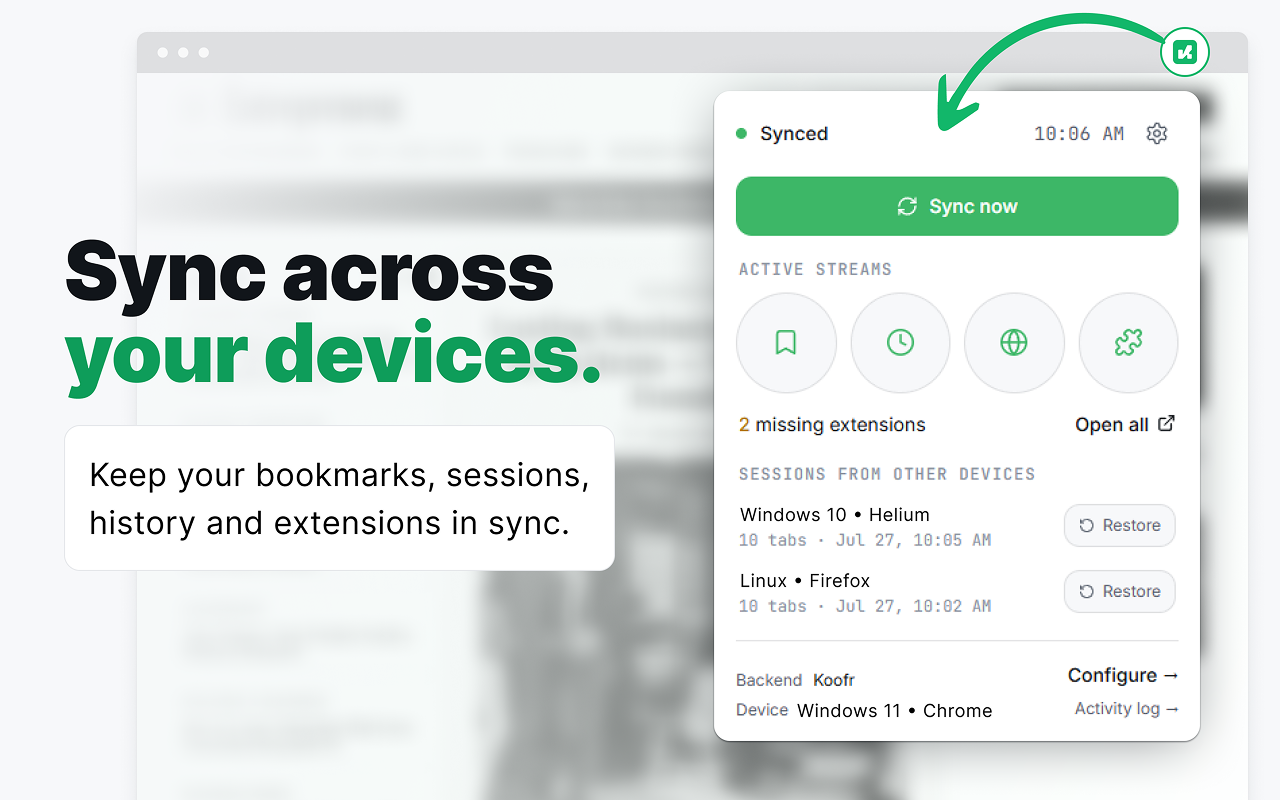
Konode keeps your bookmarks, open tabs, history, and installed-extension list in sync across your browsers, but instead of routing everything through a company's servers, it writes to storage you already own: your Google Drive, a GitHub repository, or any WebDAV server.
There's no Konode account to create and no Konode server to trust. Your data goes straight from your browser to the place you picked, and your credentials never leave your device. If you want, you can turn on end-to-end encryption so even your storage provider can't read it.
Why Konode
- Your storage, your rules. Pick Google Drive, GitHub, or WebDAV. Delete your data any time, straight from the provider.
- No server, no telemetry. Konode operates nothing in the middle. There's nothing to log, sell, or breach, because we never see your data.
- Optional end-to-end encryption. AES-256-GCM, chosen explicitly during setup. On or off, it's your call. Nothing is silently uploaded behind a hidden default.
- Works across browsers. Any Chromium browser, plus Firefox and Firefox-based browsers.
- Light by design. No background bloat, no third-party scripts, no external requests beyond your own storage backend.
What you can sync
| Data | What it does |
|---|---|
| Bookmarks | Two-way sync that preserves your folder structure. Renames, moves and folder reorders travel too, and so do deletions, so no old bookmarks quietly come back. Keep any folder or bookmark out of the sync on a device, for example one another extension fills. |
| Open tabs / sessions | Save the current tab set and restore another device's session whenever you want, tab groups included (with their names and colours, if you allow it). Restoring opens only the tabs you don't already have. |
| History | Keep a synced, de-duplicated history list. (On Firefox the original visit time is preserved; on Chrome the API can't set visit times, so restored entries show the sync moment.) |
| Installed extensions | Sync the list and see at a glance which extensions are missing on the device you're on. |
When two devices disagree, you choose how it's resolved: newest change wins, always prefer this device, always prefer the other, or resolve it yourself from the popup.
Where your data goes
| Backend | Auth | Notes |
|---|---|---|
| Google Drive | One-time sign-in | Scoped to drive.file, so Konode only ever touches the files it creates. |
| GitHub | Fine-grained token | Point it at a single private repository. |
| WebDAV | Username + password | Presets fill in the address for Nextcloud / ownCloud, pCloud, Koofr, Fastmail, and Nutstore (坚果云), which works from mainland China where Google Drive can't be reached. WebDAV (other) takes Synology, kDrive, or any standard WebDAV server. |
How Konode compares
Pick by what you need. Your browser's own sync is the least work if you use one browser everywhere, and Firefox and Brave encrypt it end to end by default. floccus is the one to look at if you want your bookmarks in a phone app, or synced to Nextcloud Bookmarks, Linkwarden or Karakeep. Konode is for mixing browser families, Chromium and Firefox, and syncing open tabs, history and the extension list along with your bookmarks, to storage you already have.
| Konode | floccus | Built-in sync | |
|---|---|---|---|
| What syncs | Bookmarks, open tabs with their groups, history, extension list | Bookmarks, or open tabs (one per profile) | Bookmarks, tabs, history, passwords, settings and more |
| Where it is stored | Google Drive, GitHub, WebDAV | Nextcloud Bookmarks, WebDAV, Git, Google Drive, Dropbox, Linkwarden, Karakeep | The browser maker's servers |
| Mixes Chromium and Firefox | Yes | Yes | No, each syncs only with itself |
| On phones | Firefox for Android: open tabs and the extension list | Android and iOS apps, with your bookmarks inside the app | Everything, in the browser's own app |
| End-to-end encryption | Optional, on every backend | Optional, on WebDAV, Google Drive and Dropbox | Firefox and Brave always. Chrome only with a sync passphrase |
| Account | None beyond your storage | None beyond your storage | A Mozilla or Google account. Brave uses a sync code |
| Around since | 2026 | Years, with a much larger user base | As long as the browser |
| Open source | Yes, MPL-2.0 | Yes, MPL-2.0 | Clients open. Firefox's server too, Chrome's not |
A few details the cells are too small for. floccus syncs open tabs as an alternative to bookmarks inside one sync profile, so doing both means setting up a second profile. Its phone apps keep your bookmarks inside the app rather than in the phone's browser. Chrome's sync passphrase covers everything except payment methods and addresses. xBrowserSync, which this table used to list, has had no release since 2020. Checked November 2026 from each project's own documentation and store pages.
Running Konode alongside your browser's own sync. You can, and people do, but it is untested rather than known to work, so here is what to expect. The concern isn't that the two will fight over your data. It's churn. The bookmarks API tells an extension that a bookmark appeared, changed or was removed, and never who did it, so a bookmark that Chrome Sync or Brave Sync has just brought in looks exactly like one you added yourself. Konode publishes it, the other system carries it to its own devices, and the same change travels twice. If both systems cover the same devices, you end up where you would have with either one alone, just with more writes to your storage along the way. If they cover different sets of devices, they bridge those sets together, deletions included, which may not be what you had in mind. Picking one system for bookmarks is the simple answer.
Privacy & security
- No Konode servers exist. Your data goes only to the backend you configure, and none of it is ever sent to us or to any third party.
- Optional E2EE (AES-256-GCM, PBKDF2-SHA256, 600k iterations): encrypt every payload before it leaves your browser. It's an explicit choice you make during onboarding. Default off, never silently enabled or disabled. Honest threat model: encrypted files sit on storage others can read, so a passphrase is guessable offline. The 600k-round derivation makes each guess slow, a new passphrase must be 12+ characters, and the generated key (recommended) is effectively unguessable.
- Credentials stay local. Access tokens, GitHub tokens, WebDAV passwords, and your
encryption passphrase live only in the browser's own extension storage
(
storage.local) on your device and are never uploaded. (That store isn't encrypted at rest, so a fine-grained GitHub token and a dedicated WebDAV app password are good habits.) - Integrity checks. Every payload carries a SHA-256 checksum that's verified on download before anything is imported.
- Least privilege.
history,tabs, andmanagementare requested only when you turn those data types on. The extension-list permission is read-only: Konode never installs or removes anything.
Browser support
- Chromium: Chrome, Edge, Brave, Helium, ungoogled-chromium, and other Chromium browsers. Fully supported, and on the Chrome Web Store. A Microsoft Edge Add-ons listing, with the same package, is in review.
- Firefox: Firefox and Firefox-based browsers (e.g. Waterfox, Zen), from a dedicated build that ships on Firefox Add-ons. Same sync folder and same files as your Chromium browsers, so a Firefox install joins a group that is already running. In Zen, only the workspace in front shares its open tabs (why).
- Firefox for Android: open tabs and the extension list, on GitHub or WebDAV storage. Firefox for Android gives extensions no bookmarks, history or Google sign-in (details).
On non-Chrome Chromium browsers, Google Drive sign-in uses the OAuth PKCE flow (
launchWebAuthFlow), so Drive sync works even wherechrome.identity.getAuthTokenisn't available.
Translations
Konode speaks English, Hungarian, German, Spanish, Italian, Russian and Chinese (Simplified and Traditional), and follows your browser's language. Every screen is translated: the popup, the setup wizard, and Settings. Dates and numbers follow your browser's locale everywhere.
Japanese, Estonian and Arabic have been started. A language reaches a release once it is complete, because a screen that is half translated reads worse than an English one. Arabic also needs the pages laid out right to left, which comes with it.
Translations are edited on
Hosted Weblate. You don't need git, a
pull request, or any knowledge of the code to help. If your language is missing, ask
for it there and it will appear. The strings themselves live in this repository, under
public/_locales/<lang>/messages.json.
About half the strings carry a note explaining what they are and why they are worded the way they are; a few of them make promises about not losing your data, and those have to be translated literally. If a string's meaning isn't clear, leave it and ask. An untranslated string falls back to English, which is safe.
Install
- Chrome / Brave / Helium / other Chromium browsers: install from the Chrome Web Store.
- Microsoft Edge: install from the Chrome Web Store link above for now (Edge asks once to allow extensions from other stores). A Microsoft Edge Add-ons listing is in review; it carries the same package as the Chrome Web Store, so the version is the same either way.
- Firefox / Waterfox: install from Firefox Add-ons. On Firefox for Android, Konode syncs open tabs and the extension list (Firefox for Android gives extensions no bookmarks or history), on GitHub or WebDAV storage.
New to Konode? The Getting Started guide walks through setup and connecting each backend.
Build from source
npm install          # install dependencies
npm run type-check   # tsc --noEmit, should be clean
npm run build        # → dist/           (Chromium)
npm run build:firefox # → dist-firefox/  (Firefox)
Chromium: open chrome://extensions, enable Developer mode, click Load
unpacked, and select dist/. After any rebuild, click ↻ reload on the extension
(MV3 won't swap a running service worker automatically).
Firefox: open about:debugging → This Firefox → Load Temporary Add-on and
pick dist-firefox/manifest.json.
Building the Google Drive backend yourself requires your own Google OAuth client (scope
drive.file). GitHub and WebDAV need no setup beyond your own credentials.
Verifying a build
npm run checksum prints a build fingerprint, a deterministic SHA-256 over the built
dist/. Check out a release tag and run:
npm ci && npm run build && npm run checksum
Two honest caveats. The release notes don't carry the fingerprint yet, so today this shows you that the build reproduces, not that a particular download came from this tag. (GitHub does publish its own SHA-256 digest next to each release asset, which covers the download itself.) And the store builds can't match your hash: the zips for the Chrome Web Store, Microsoft Edge Add-ons (the same file) and Firefox Add-ons are built with Konode's own Google OAuth client compiled in, while the release zips and your own builds are not. It also assumes a comparable toolchain; the pinned lockfile keeps dependencies identical.
How it works
For each device and data type, Konode writes one JSON file (a SyncPacket) to a
Konode folder on your backend. Every sync pulls in each peer device's file, merges it
non-destructively, and pushes the result back. Bookmarks use tombstones so deletions
travel between devices without resurrecting old entries, and a safety cap stops a
corrupt deletion log from wiping your tree.
When E2EE is on, the payload is encrypted on the device and the checksum is still computed over the plaintext, so identical content matches across devices without revealing anything to the backend.
When Konode syncs
Three things start a sync, and nothing else does:
- A bookmark changes on this device. The upload goes out about a second later, with a 30-second backstop in case the browser suspends the extension mid-edit. Bookmarks only, and only while Sync on change is on (it is by default, under Settings → Device).
- The scheduled pull, every 60 seconds by default. This is how a device learns about its peers' changes, and it covers every data type you have enabled. Adjust it from 30 to 600 seconds under Settings → Device → Sync interval, or turn it off with Auto sync.
- You press Sync now in the popup.
That's the whole list. History, open tabs and the extension list have no instant path, so they travel on the scheduled pull. Starting the browser doesn't sync by itself either: it re-arms the schedule, and the first pull arrives on the next tick.
Why the receiving side waits at all: Drive, GitHub and WebDAV are ordinary file storage with no way to tell a device that something changed, so Konode has to go and look. 30 seconds is also the fastest a browser will run an extension's background timer, whichever backend you pick, so that's the floor rather than a setting we're being cautious with.
Why there's no password sync
Browser extensions cannot read the browser's native password store. That's an intentional security boundary in the browser, not a Konode limitation. For passwords, use a dedicated manager like Bitwarden, Proton Pass, or self-hosted Vaultwarden.
Roadmap
- Shipped: bookmarks / sessions / history / extension-list sync · Google Drive + GitHub + WebDAV · WebDAV provider presets, Nutstore (坚果云) included · multi-device merge · per-item conflict resolution · opt-in E2EE · Drive OAuth refresh (PKCE) · cross-browser extension matching · bookmarks kept out of sync · tab groups in sessions · Chrome Web Store listing · Firefox Add-ons listing, Firefox for Android included · translated interface (English, Hungarian, German, Spanish, Italian, Russian, Chinese (Simplified and Traditional)).
- In review: the Microsoft Edge Add-ons listing, with the Chrome Web Store's package.
- Next: a held-back deletion that lists the bookmarks it holds (#23) · a device list that says when each device was last active (#10) · a conflict card that shows what differs (#35) · the reading list (#77) · more backends, cheapest sign-in first (Dropbox token and S3-compatible, then Dropbox OAuth and OneDrive) · faster history sync · more languages (Japanese, Estonian, Arabic).
- Later: right-to-left languages · incremental diff for very large bookmark trees · diffs between restore points.
Support & feedback
Something not working? Check Troubleshooting first. Still stuck, or have an idea? Open an issue. It's the best way to reach us: github.com/konabe-studio/konode/issues.
If Konode is useful to you and you'd like to support its development, you can buy me a coffee for a one-off tip, or give a recurring amount on Liberapay. Entirely optional. Konode is free and open source.
License
See LICENSE.
How it's built
Konode is designed, tested and maintained by Kōnabe Studio. Much of the code is written with an AI coding assistant (Claude Code), much as a project might work with a contractor: the design decisions, the review before release and the testing stay with us. In practice:
- each release goes through a QA pass on real browsers and devices (Chromium browsers, Firefox, Firefox for Android), plus headless runs that play out multi-device scenarios;
- close to 900 automated tests run on every change;
- builds are reproducible, see Verifying a build;
- bug reports get an answer, and when the bug is ours, a fix with an explanation of what went wrong.
Konode is not affiliated with Google, GitHub, Mozilla, or any storage provider.
探索相关项目
加载中…