项目 在 GitHub 查看
kingsic/SGPagingView
kingsic/SGPagingView has 1,564 GitHub stars and 279 forks. GitHot measured 0 stars in 24 hours and 0 in 7 days. Last checked 2026-11-15 07:27 UTC. Last push 2021-12-17.
实测星标增长
- 24小时
- 0
- 7天
- 0
- 15天
- 正在收集历史
- 1个月
- 正在收集历史
各周期内的星标净变化,周期相互重叠,并非每日新增。缺失的测量保持空白。星标代表关注度,不代表软件质量。
关于
A powerful and easy to use segment view 【QQ、淘宝、微博、腾讯、网易新闻、今日头条等标题滚动视图】
开发工具README.md
原文SGPagingView
前言
- QQ群:825339547
- 2.0.0 版本起,升级为 Swift 编程语言
- Objc 版本说明
结构图

效果图
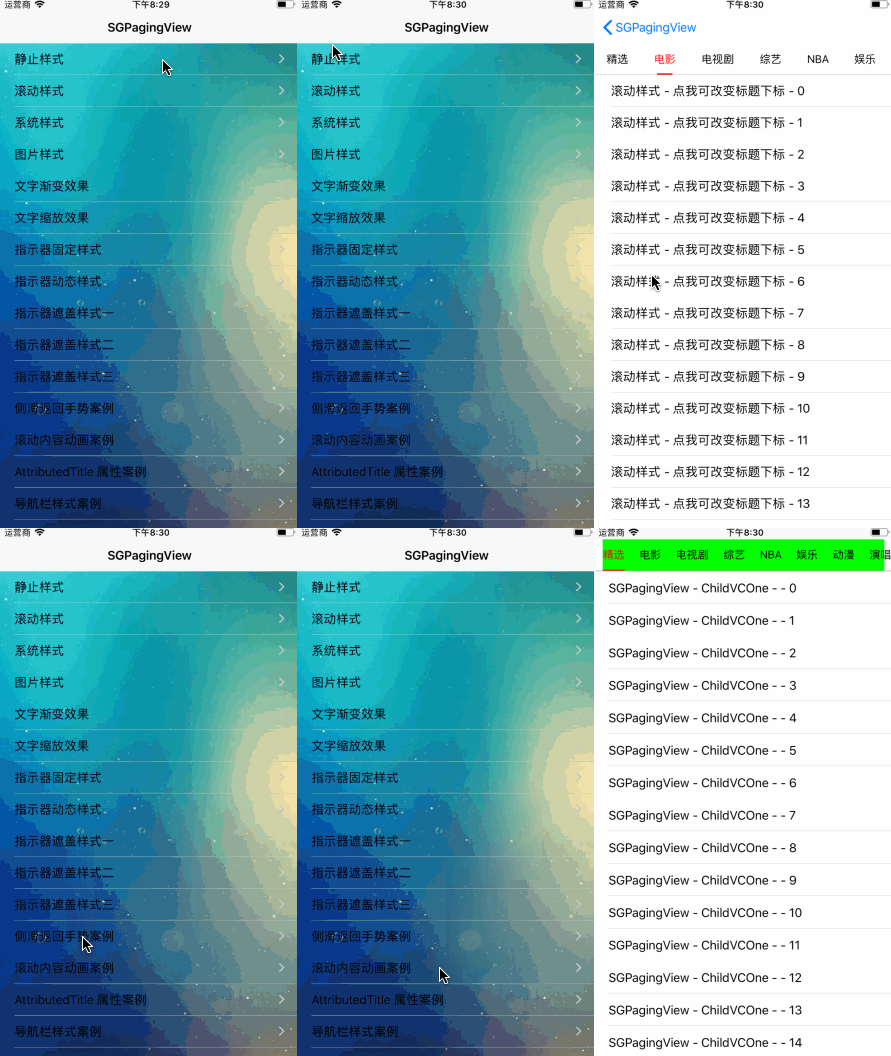
Installation
- CocoaPods 导入 pod 'SGPagingView', '~> 2.1.0'
代码介绍
- 初始化方法
// 配置类
let configure = SGPagingTitleViewConfigure()

// 标题视图
let pagingTitleView = SGPagingTitleView(frame: frame, titles: titles, configure: configure)
pagingTitleView.delegate = self
view.addSubview(pagingTitleView)

// 内容视图
let pagingContentView = SGPagingContentScrollView(frame: frame, parentVC: self, childVCs: childVCs)
pagingContentView.delegate = self
view.addSubview(pagingContentView)
- SGPagingTitleView 代理方法
func pagingTitleView(titleView: SGPagingTitleView, index: Int) {
    pagingContentView.setPagingContentView(index: index)
}
- SGPagingContentView 代理方法
func pagingContentView(contentView: SGPagingContentView, progress: CGFloat, currentIndex: Int, targetIndex: Int) {
    pagingTitleView.setPagingTitleView(progress: progress, currentIndex: currentIndex, targetIndex: targetIndex)
}
Requirements
- iOS 10.0 +
- Swift 5.0 +
Concluding remarks
- 如有问题 issues