
jbatonnet/Rinkhals
关于
适用于 Anycubic Kobra 系列 3D 打印机的自定义固件(Kobra 2 Pro、Kobra 3、Kobra 3 V2、Kobra S1、Kobra 3 Max 和 Kobra S1 Max)
创作与媒体实测星标增长
- 24小时
- 0
- 7天
- +1
- 15天
- 正在收集历史
- 1个月
- 正在收集历史
各周期内的星标净变化,周期相互重叠,并非每日新增。缺失的测量保持空白。星标代表关注度,不代表软件质量。
README.md
原文



THIS REPOSITORY WILL BE DEPRECATED ON JULY 1st, 2026
🟥🟥🟥🟥🟥🟥🟥🟥🟥🟥🟥🟥🟥🟥🟥🟥🟥🟥🟥🟥🟥🟥🟥🟥🟥🟥🟥🟥🟥🟥🟥🟥🟥🟥🟥🟥🟥🟥🟥🟥🟥🟥🟥🟥🟥🟥🟥🟥🟥🟥🟥🟥
We have moved from @jbatonnet's repo to the new Rinkhals-community repo! You can find it here:
[https://github.com/rinkhals-community/Rinkhals/]
Please sumbit any issues, PR's, requests on the new site!
🟥🟥🟥🟥🟥🟥🟥🟥🟥🟥🟥🟥🟥🟥🟥🟥🟥🟥🟥🟥🟥🟥🟥🟥🟥🟥🟥🟥🟥🟥🟥🟥🟥🟥🟥🟥🟥🟥🟥🟥🟥🟥🟥🟥🟥🟥🟥🟥🟥🟥🟥🟥
Rinkhals
Rinkhals is a custom firmware for some Anycubic Kobra 3D printers (specifically the ones running Kobra OS, see below for the details).
The goal of this project is to expand existing Anycubic features with better compatibility, apps and more. I will likely not support all use cases, like running vanilla Klipper or your specific feature / plugin.
By using Rinkhals, you will keep all stock Anycubic features (print screen, Anycubic tools, calibration, ...) and get even more, like:
- Mainsail, Fluidd (with Moonraker)
- USB camera support in Mainsail, Fluidd
- Prints from Orca will show the print screen
- SSH access for customization (user: root, password: rockchip)
- OTA Rinkhals updates
- Apps system (OctoEverywhere, Cloudflare, Tailscale, ...)
Latest version will likely support the two latest firmwares from Anycubic, unless specified. For older firmware please check older releases or our firmware archive. Here are the supported GoKlipper / K3-family printers and firmwares with the latest Rinkhals release:
| Model | Tested firmwares | Notes |
|---|---|---|
| Kobra 3 (+ combo) | 2.4.5 2.4.6.7 |
|
| Kobra 2 Pro | 3.1.2.3 3.1.4 |
Only with mainboard Trigorilla Spe B v1.0.x. 3.1.4 seems to be buggy for some people |
| Kobra S1 (+ combo) | 2.6.0.0 2.7.0.9 |
|
| Kobra 3 Max (+ combo) | 2.5.1.7 2.5.2.8 |
|
| Kobra 3 V2 (+ combo) | 1.1.0.4 1.1.2.8 |
|
| Kobra S1 Max (+ combo) | 2.6.6 2.6.9.3 |
🔴 - in testing, not yet ready
The K4-family currently has a separate status:
| Model | Status | Notes |
|---|---|---|
| Kobra X | Not supported | Uses the KlipperC++ / K4 software base and is currently blocked by SWU RSA signature verification. See the Kobra X documentation for details. |
Kobra X status
Some Kobra X firmware packages are publicly available and the SWU password has also been recovered.
However, Anycubic moved from the K3 software base (GoKlipper) to a K4 software base using a C++ Klipper port. Because of this, Kobra X support is not expected to be a simple port of the current Rinkhals stack.
In addition, the SWU update flow requires a trusted certificate for package acceptance. Until a reliable bypass is discovered, SWU-based firmware injection similar to Rinkhals is not currently feasible on Kobra X.
General Information
In case you're wondering this project is named after rinkhals, a sub-species of Cobras ... Kobra ... Rinkhals 👏
You can join the Rinkhals community on Discord: https://discord.gg/3mrANjpNJC
Since people have been asking, I accept donations but please remember that I work on Rinkhals for fun and not for the money. I will not accept donations to work on specific bugs or features. Donation link is the Sponsor button at the top of the page.

Rinkhals installation
[!WARNING] Make sure you're confident tweaking your printer and you understand what you're doing. I'm not responsible if you brick your printer (even if there's some documentation) about that)
[!CAUTION] Many users want to change their Klipper printer configuration (the printer.cfg file). I strongly advise not modifying the stock printer configuration. Rinkhals offers additional protection you don't have while modifying directly your printer configuration. I won't offer any support and your printer might not work properly or not boot anymore. Check the documentation for more information: Printer configuration
A quick start guide is available to get Rinkhals up and running on your printer.
There are two options to install Rinkhals:
- Use the provided Rinkhals installer (named install-*.swu)
- Install the raw swu directly (named update-*.swu)
Either way, you'll need to:
- Download the release / file you want from the Releases page
- Rename the downloaded SWU file as update.swu
- Copy it in a directory named aGVscF9zb3Nf (or update for the Kobra 2 Pro in certain conditions) on a FAT32 USB drive (MBR, GPT is not supported)
- Plug the USB drive in your printer
More detailed information about the Rinkhals installer are available in the documentation
For more information about installation, firmware updates and details about specific situations, go to https://jbatonnet.github.io/Rinkhals/Rinkhals/installation-and-firmware-updates/
Touch UI
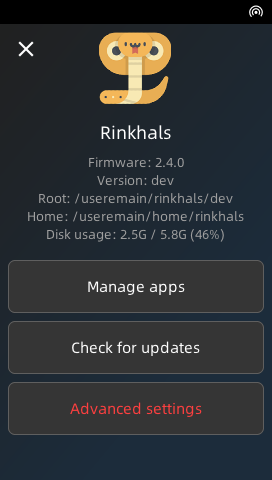
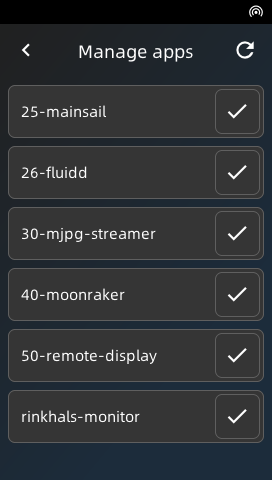
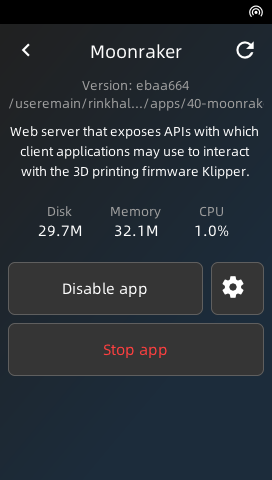
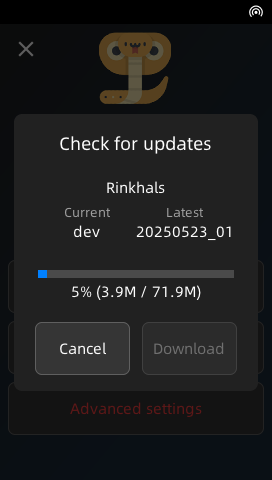
After installation, Rinkhals provides a touch UI accessible from the printer screen when you tap the Settings icon, then tap Rinkhals.
This UI allows you to manage installed apps, trigger an OTA update, reboot your printer and much more. This will allow you to customize your experience and keep the printer memory as low as needed based on your needs.
Rinkhals Installer
From the release pages, you'll find the installer-*.swu files for your printer model. This is an interactive touch tool to install and update Rinkhals and system firmware updates.
You can find more information in the documentation
Apps system
[!WARNING] Those printers are quite weak in terms of CPU and Memory. Every additional app / feature and client you connect to the web interface will make the experience slower and might end up in crashes.
Having said that, running your printer with Moonraker, 1~2 apps and 1~2 connected clients should work fine.
An apps system is provided in Rinkhals. It allows for the users to easily add some features to their printer. Some default ones are provided and other are available on separate repos like:
- https://github.com/jbatonnet/Rinkhals.apps (Tailscale, Cloudflare, OctoApp companion, some progress on vanilla Klipper, ...)
- https://github.com/basvd/Rinkhals.WebUI (a web interface for Rinkhals)
Instructions on how to install or develop apps are on the other repo as well.
Contributing
[!NOTE] If you develop on Windows like me, don't forget to disable Git's autocrlf function, as this repo contains Linux scripts running on Linux machines.
Rungit config core.autocrlf falseBEFORE cloning the repo
More and more contributors help this project move faster. Thank you everyone! If you want to help Rinkhals and contribute, whether it's code, documentation or sharing good ideas, come join us on Discord!
Current maintainers:
- jbatonnet
- martinbogo
- antirad
Special thanks to those people for providing the base research and helping support for more printers:
- utkabobr (https://github.com/utkabobr/DuckPro-Kobra3)
- systemik (https://github.com/systemik/Kobra3-Firmware)
- moosbewohner for Kobra 2 Pro support. (https://github.com/moosbewohner/Rinkhals)
- Kalenell and woswai1337 for Kobra S1 support.
- evil_santa, CalmFrog, basvd, _René, RadioRadio and more for Kobra 3 Max support.
- AndrewS for ethernet adapters USB testing and Kobra X firmware dump.
- Ac_K for passwords and technical discovery of Kobra X.
- Anycubic for the cool printer and the few OSS items. (https://github.com/ANYCUBIC-3D/Kobra)
探索相关项目
加载中…