
hatoo/oha
hatoo/oha has 10,661 GitHub stars and 309 forks. GitHot measured +1 stars in 24 hours and +12 in 7 days. Last checked 2026-11-07 19:38 UTC. Last push 2026-11-02.
Ohayou(おはよう),一款受 rakyll/hey 启发并带有 TUI 动画的 HTTP 负载生成器。
实测星标增长
- 24小时
- +1
- 7天
- +12
- 15天
- 更新延迟
- 1个月
- 更新延迟
各周期内的星标净变化,周期相互重叠,并非每日新增。缺失的测量保持空白。星标代表关注度,不代表软件质量。
README_zh.md
原文语言:本文档为简体中文翻译,点此查看英文原版 README.md。
oha (おはよう)





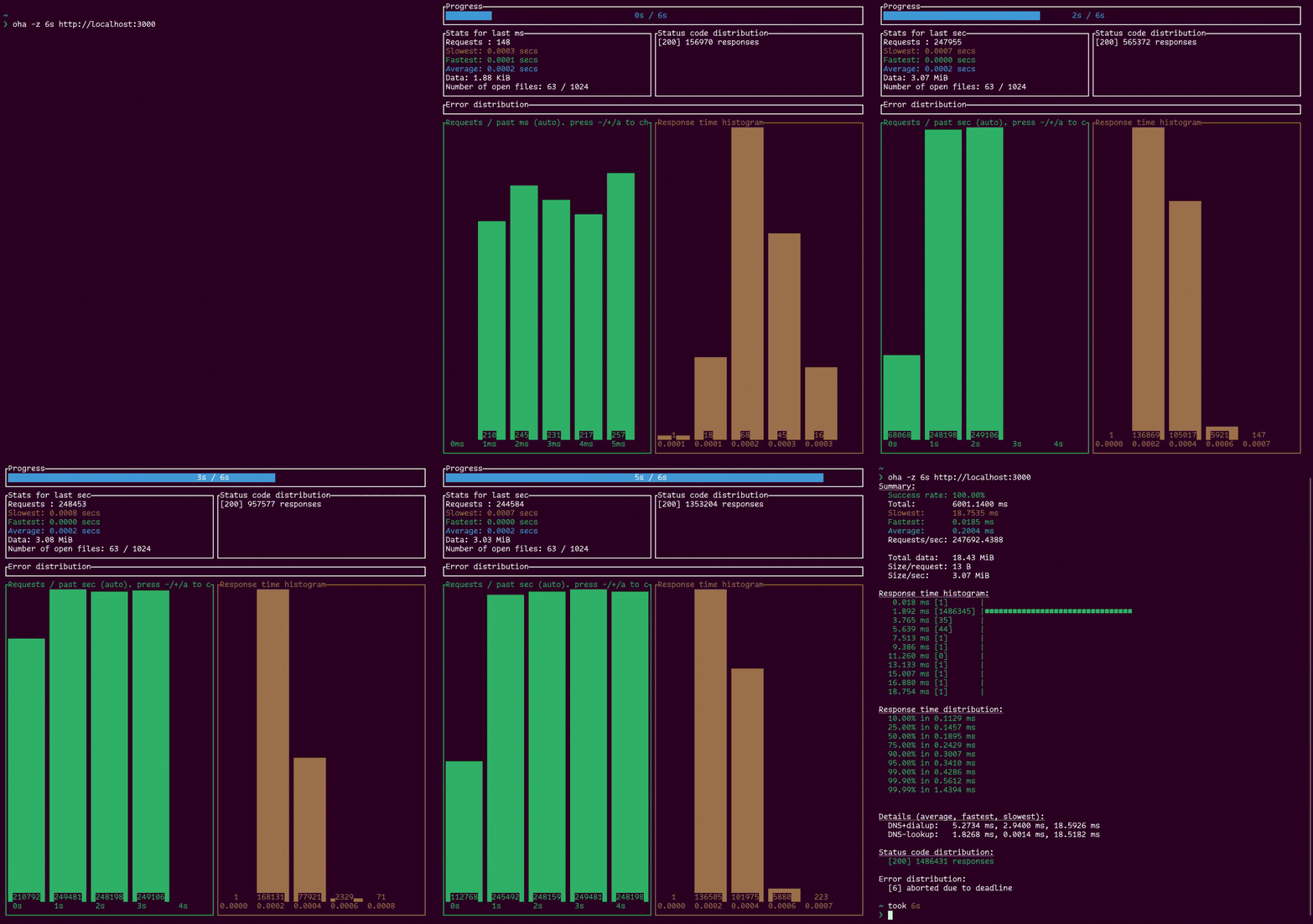
oha 是一个小型程序,它向 Web 应用发送一定的负载并以实时 TUI 展示结果,灵感来自 rakyll/hey。
本程序使用 Rust 编写,由 tokio 驱动,并由 ratatui 打造出精美的 TUI。
安装
本程序基于稳定的 Rust 构建,通过 cargo 安装之前还需要先具备 make 和 cmake。
cargo install oha
你可以选择改用 native-tls 而非 rustls 来构建 oha。
cargo install --no-default-features --features native-tls oha
通过启用 vsock 特性可以开启 VSOCK 支持。
cargo install --features vsock oha
通过启用 http3 特性可以开启实验性的 HTTP3 支持。该功能使用由 Hyper 的开发者们开发的 H3 库。
只要 H3 仍处于实验阶段,它就会保持实验性质。目前它依赖 rustls 来处理 TLS。
下载预编译二进制
你可以从发布页面下载各个版本的预编译二进制,也可以从 Publish workflow 和 Publish PGO workflow 下载各个提交对应的构建产物。
在 Arch Linux 上
pacman -S oha
在 macOS 上(Homebrew)
brew install oha
在 Windows 上(winget)
winget install hatoo.oha
在 Debian 上(Azlux 的软件仓库)
echo "deb [signed-by=/usr/share/keyrings/azlux-archive-keyring.gpg] http://packages.azlux.fr/debian/ stable main" | sudo tee /etc/apt/sources.list.d/azlux.list
sudo wget -O /usr/share/keyrings/azlux-archive-keyring.gpg https://azlux.fr/repo.gpg
apt update
apt install oha
X-CMD(Linux、macOS、Windows WSL/GitBash)
你可以使用 x-cmd 安装。
x env use oha
容器化
官方 Docker 镜像
在本地构建镜像
你还可以构建包含 oha 的容器镜像
docker build -t hatoo/oha:latest .
然后你就可以直接通过容器使用 oha
docker run --rm -it --network=host hatoo/oha:latest https://example.com:3000
Profile-Guided Optimization(PGO)
你可以使用以下命令构建启用 PGO 的 oha:
bun run pgo.js
生成的二进制将位于 target/[target-triple]/pgo/oha。
注意:请记住,要运行上述命令,
你需要先安装 cargo-pgo cargo 包。
你可以通过 cargo install cargo-pgo 来安装它。
平台
- Linux - 在 Ubuntu 18.04 gnome-terminal 上测试过
- Windows 10 - 在 Windows Powershell 上测试过
- MacOS - 在 iTerm2 上测试过
用法
-q 选项的行为与 rakyll/hey 不同:它设置的是整体的每秒查询数,而不是每个 worker 的每秒查询数。
Ohayou(おはよう), HTTP load generator, inspired by rakyll/hey with tui animation.

Usage: oha [OPTIONS] <URL>

Arguments:
  <URL>  Target URL or file with multiple URLs.

Options:
  -n <N_REQUESTS>
          Number of requests to run. Accepts plain numbers or suffixes: k = 1,000, m = 1,000,000 (e.g. 10k, 1m). [default: 200]
  -c <N_CONNECTIONS>
          Number of connections to run concurrently. You may should increase limit to number of open files for larger `-c`. [default: 50]
  -p <N_HTTP2_PARALLEL>
          Number of parallel requests to send on HTTP/2. `oha` will run c * p concurrent workers in total. [default: 1]
  -z <DURATION>
          Duration of application to send requests.
          On HTTP/1, When the duration is reached, ongoing requests are aborted and counted as "aborted due to deadline"
          You can change this behavior with `-w` option.
          Currently, on HTTP/2, When the duration is reached, ongoing requests are waited. `-w` option is ignored.
          Examples: -z 10s -z 3m.
  -w, --wait-ongoing-requests-after-deadline
          When the duration is reached, ongoing requests are waited
  -q <QUERY_PER_SECOND>
          Rate limit for all, in queries per second (QPS)
      --burst-delay <BURST_DURATION>
          Introduce delay between a predefined number of requests.
          Note: If qps is specified, burst will be ignored
      --burst-rate <BURST_REQUESTS>
          Rates of requests for burst. Default is 1
          Note: If qps is specified, burst will be ignored
      --rand-regex-url
          Generate URL by rand_regex crate but dot is disabled for each query e.g. http://127.0.0.1/[a-z][a-z][0-9]. Currently dynamic scheme, host and port with keep-alive do not work well. See https://docs.rs/rand_regex/latest/rand_regex/struct.Regex.html for details of syntax.
      --urls-from-file
          Read the URLs to query from a file
      --max-repeat <MAX_REPEAT>
          A parameter for the '--rand-regex-url'. The max_repeat parameter gives the maximum extra repeat counts the x*, x+ and x{n,} operators will become. [default: 4]
      --dump-urls <DUMP_URLS>
          Dump target Urls <DUMP_URLS> times to debug --rand-regex-url
      --latency-correction
          Correct latency to avoid coordinated omission problem. It's ignored if neither -q nor --burst-delay is set.
      --no-tui
          No realtime tui
      --fps <FPS>
          Frame per second for tui. [default: 16]
  -m, --method <METHOD>
          HTTP method [default: GET]
  -H <HEADERS>
          Custom HTTP header. Examples: -H "foo: bar"
      --proxy-header <PROXY_HEADERS>
          Custom Proxy HTTP header. Examples: --proxy-header "foo: bar"
  -t <TIMEOUT>
          Timeout for each request. Default to infinite.
      --connect-timeout <CONNECT_TIMEOUT>
          Timeout for establishing a new connection. Default to 5s. [default: 5s]
  -A <ACCEPT_HEADER>
          HTTP Accept Header.
  -d <BODY_STRING>
          HTTP request body.
  -D <BODY_PATH>
          HTTP request body from file.
  -Z <BODY_PATH_LINES>
          HTTP request body from file line by line.
  -F, --form <FORM>
          Specify HTTP multipart POST data (curl compatible). Examples: -F 'name=value' -F 'file=@path/to/file'
  -T <CONTENT_TYPE>
          Content-Type.
  -a <BASIC_AUTH>
          Basic authentication (username:password), or AWS credentials (access_key:secret_key)
      --aws-session <AWS_SESSION>
          AWS session token
      --aws-sigv4 <AWS_SIGV4>
          AWS SigV4 signing params (format: aws:amz:region:service)
  -x <PROXY>
          HTTP proxy
      --proxy-http-version <PROXY_HTTP_VERSION>
          HTTP version to connect to proxy. Available values 0.9, 1.0, 1.1, 2.
      --proxy-http2
          Use HTTP/2 to connect to proxy. Shorthand for --proxy-http-version=2
      --http-version <HTTP_VERSION>
          HTTP version. Available values 0.9, 1.0, 1.1, 2, 3
      --http2
          Use HTTP/2. Shorthand for --http-version=2
      --host <HOST>
          HTTP Host header
      --disable-compression
          Disable compression.
  -r, --redirect <REDIRECT>
          Limit for number of Redirect. Set 0 for no redirection. Redirection isn't supported for HTTP/2. [default: 0]
      --disable-keepalive
          Disable keep-alive, prevents re-use of TCP connections between different HTTP requests. This isn't supported for HTTP/2.
      --no-pre-lookup
          *Not* perform a DNS lookup at beginning to cache it
      --ipv6
          Lookup only ipv6.
      --ipv4
          Lookup only ipv4.
      --cacert <CACERT>
          (TLS) Use the specified certificate file to verify the peer. Native certificate store is used even if this argument is specified.
      --cert <CERT>
          (TLS) Use the specified client certificate file. --key must be also specified
      --key <KEY>
          (TLS) Use the specified client key file. --cert must be also specified
      --insecure
          Accept invalid certs.
      --connect-to <CONNECT_TO>
          Override DNS resolution and default port numbers with strings like 'example.org:443:localhost:8443'
          Note: if used several times for the same host:port:target_host:target_port, a random choice is made
      --no-color
          Disable the color scheme. [env: NO_COLOR=]
      --unix-socket <UNIX_SOCKET>
          Connect to a unix socket instead of the domain in the URL. Only for non-HTTPS URLs.
      --stats-success-breakdown
          Include a response status code successful or not successful breakdown for the time histogram and distribution statistics
      --db-url <DB_URL>
          Write succeeded requests to sqlite database url E.G test.db
      --debug
          Perform a single request and dump the request and response
  -o, --output <OUTPUT>
          Output file to write the results to. If not specified, results are written to stdout.
      --output-format <OUTPUT_FORMAT>
          Output format [default: text] [possible values: text, json, csv, quiet]
  -u, --time-unit <TIME_UNIT>
          Time unit to be used. If not specified, the time unit is determined automatically. This option affects only text format. [possible values: ns, us, ms, s, m, h]
      --worker-threads <WORKER_THREADS>
          Number of native OS threads used by the async runtime (tokio).
          Takes precedence over the TOKIO_WORKER_THREADS environment variable. When neither is set, the number of physical CPU cores is used.
  -h, --help
          Print help
  -V, --version
          Print version
性能
当设置了 --no-tui 选项且 -q 与 --burst-delay 均未设置时,oha 会使用更快的实现,因为这样可以避免实时收集数据带来的开销。
输出
默认情况下,oha 会输出一份文本格式的结果摘要。
当设置 --output-format json 选项时,oha 会输出 JSON 格式的结果摘要。
JSON 输出的结构定义在 schema.json 中。
使用 --output-format csv 时,每个请求的结果会作为一行逗号分隔的值打印出来。
小贴士
在更真实的条件下进行压力测试
oha 沿用了从 rakyll/hey 继承来的默认选项,但若想在更真实的条件下进行压力测试,你可能需要修改这些选项。
我建议按照下列选项运行 oha。
oha <-z or -n> -c <number of concurrent connections> -q <query per seconds> --latency-correction --disable-keepalive <target-address>
--disable-keepalive
在真实场景中,用户并不会用 Keep-Alive 请求同一个 URL。你可能希望在不启用
Keep-Alive的情况下运行。--latency-correction
使用
--latency-correction可以避免Coordinated Omission Problem。
突发(Burst)功能
你可以将 --burst-delay 与 --burst-rate 选项配合使用,在指定数量的请求之间引入延迟。
oha -n 10 --burst-delay 2s --burst-rate 4
在这种特定场景下,每 2 秒会处理 4 个请求,6 秒后全部 10 个请求将被处理完毕。
注:如果你不设置 --burst-rate 选项,该数量默认为 1
动态 URL 功能
你可以使用 --rand-regex-url 选项为每个连接生成随机 URL。
oha --rand-regex-url http://127.0.0.1/[a-z][a-z][0-9]
每个 URL 都由 rand_regex crate 生成,但正则中的点号(dot)对每次查询都被禁用,因为它对这个用途没什么用,而且如果 URL 中的点号被解释成正则的点号,会非常不方便。
你还可以设置 --max-repeat 选项来限制每个正则的最大重复次数。例如 http://127.0.0.1/[a-z]* 配合 --max-repeat 4 将会生成类似 http://127.0.0.1/[a-z]{0,4} 的 URL
目前,动态的 scheme、host 和 port 配合 keep-alive 使用时并不能很好地工作。
从文件读取 URL 功能
你可以使用 --urls-from-file 从文件中读取目标 URL。该文件的每一行需要包含一个有效的 URL,如下例所示。
http://domain.tld/foo/bar
http://domain.tld/assets/vendors-node_modules_highlight_js_lib_index_js-node_modules_tanstack_react-query_build_modern-3fdf40-591fb51c8a6e.js
http://domain.tld/images/test.png
http://domain.tld/foo/bar?q=test
http://domain.tld/foo
这样的文件例如可以由访问日志生成,从而在服务器的不同页面之间产生更真实的负载分布。
使用这种 URL 指定方式时,每个请求都会发往文件中给出的某个随机 URL。
贡献
欢迎参与贡献!
以下是一些有待改进的方面。
- 编写测试
- 改进 TUI 设计。
- 展示更多信息?
- 提升速度
- 我刚接触 tokio。我觉得查询调度还有可以优化的空间。