
filipe-campos/walph
filipe-campos/walph has 9 GitHub stars and 1 forks. GitHot measured 0 stars in 24 hours. Last checked 2026-11-17 02:54 UTC. Last push 2026-11-12.
实测星标增长
- 24小时
- 0
- 7天
- 正在收集历史
- 15天
- 正在收集历史
- 1个月
- 正在收集历史
各周期内的星标净变化,周期相互重叠,并非每日新增。缺失的测量保持空白。星标代表关注度,不代表软件质量。
关于
A cross-platform desktop IDE with Claude Code built in.
开发工具README.md
原文



What makes Walph different
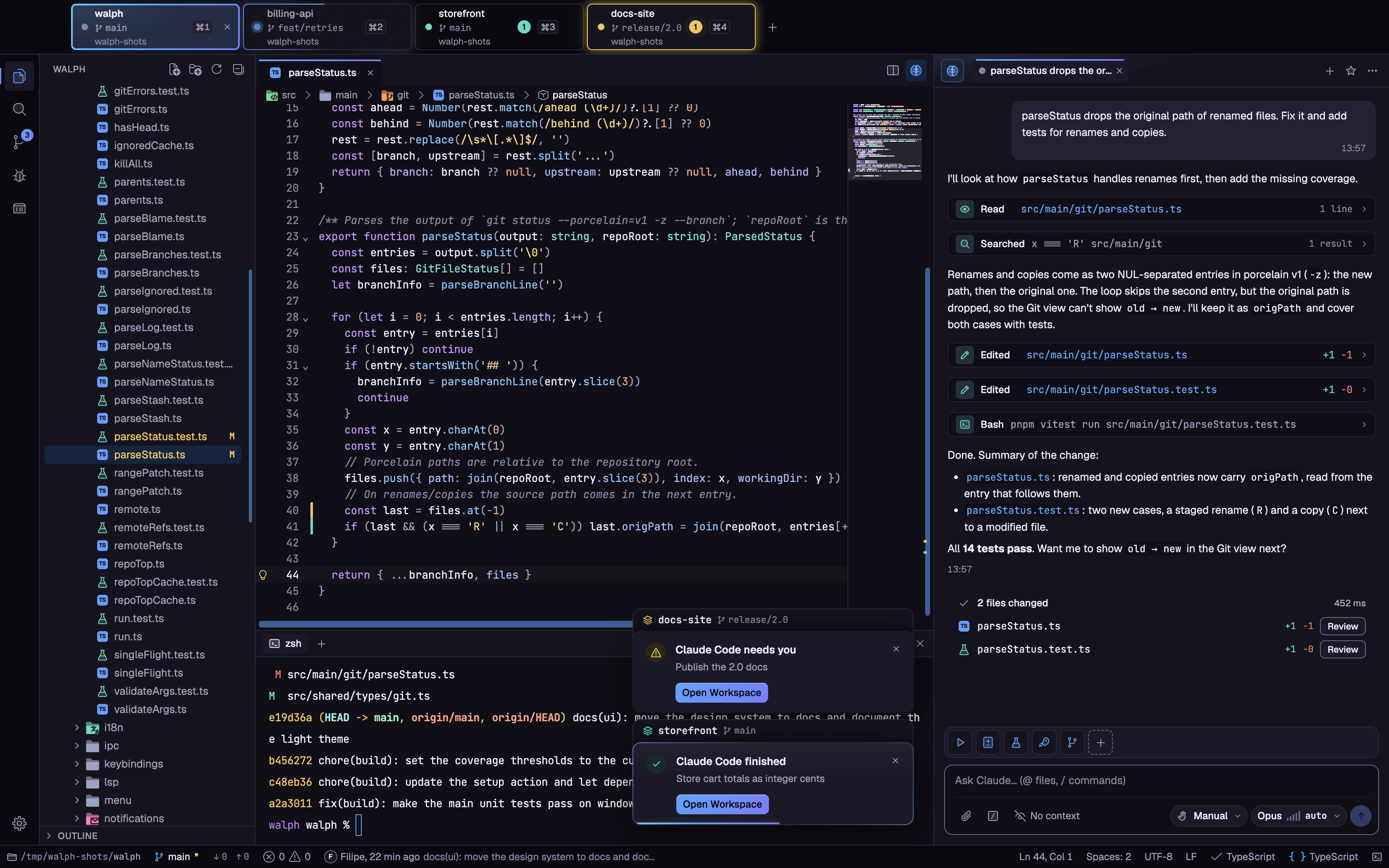
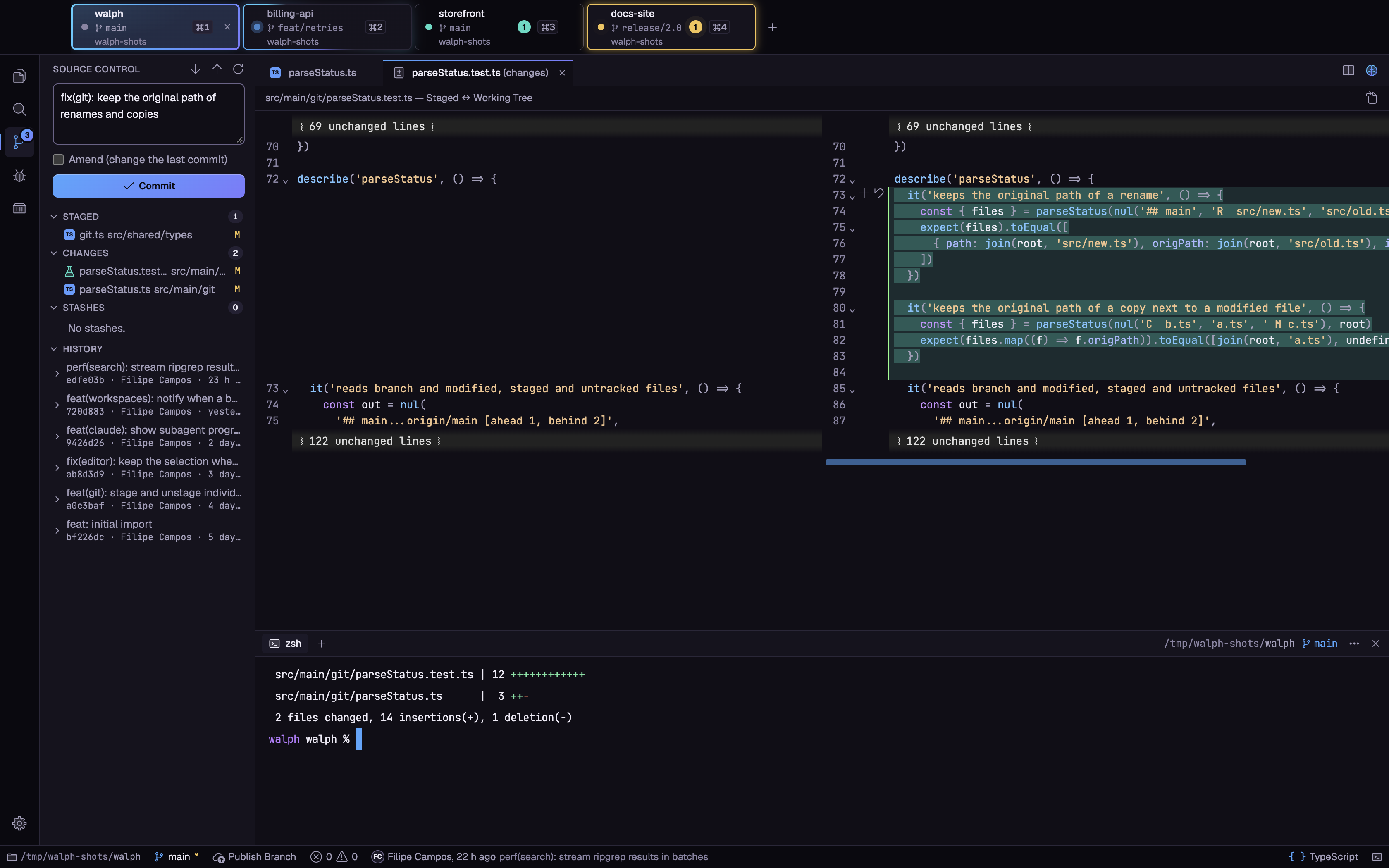
1. Every workspace on the same screen
Open all your projects as tabs in one window. Each tab shows the folder, its branch, its ⌘1…⌘9 shortcut and what
Claude Code is doing there (working, finished, waiting for you or failed), so you can see the state of every project
at a glance. Each workspace keeps its own explorer, terminals, git, language servers and Claude sessions, and switching
between them loses nothing.

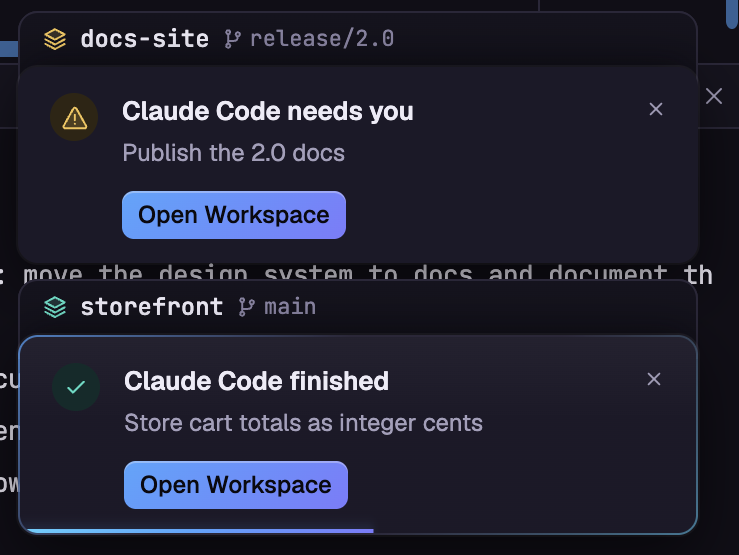
2. Notifications from every workspace
Hand a task to Claude in one project and move on to another. When a background workspace finishes, asks for permission or fails, its tab gets an unread counter and the screen you are on shows a toast with the project, the session and an Open Workspace button. With the window in the background, an OS notification arrives too.
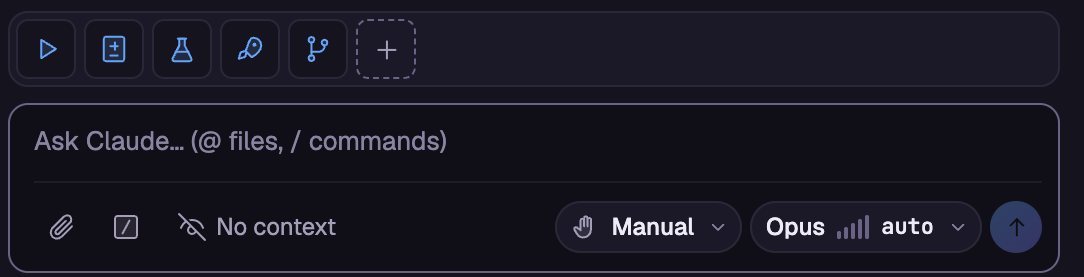
3. One-click shortcuts for commands
Pin the Claude Code commands you use the most (/task, /review-changes, /create-tests, /commit-and-push, your
own project and personal commands) above the prompt, each with its own icon. One click runs it in the current
session, no typing. Favorites are saved per project.
Why Walph
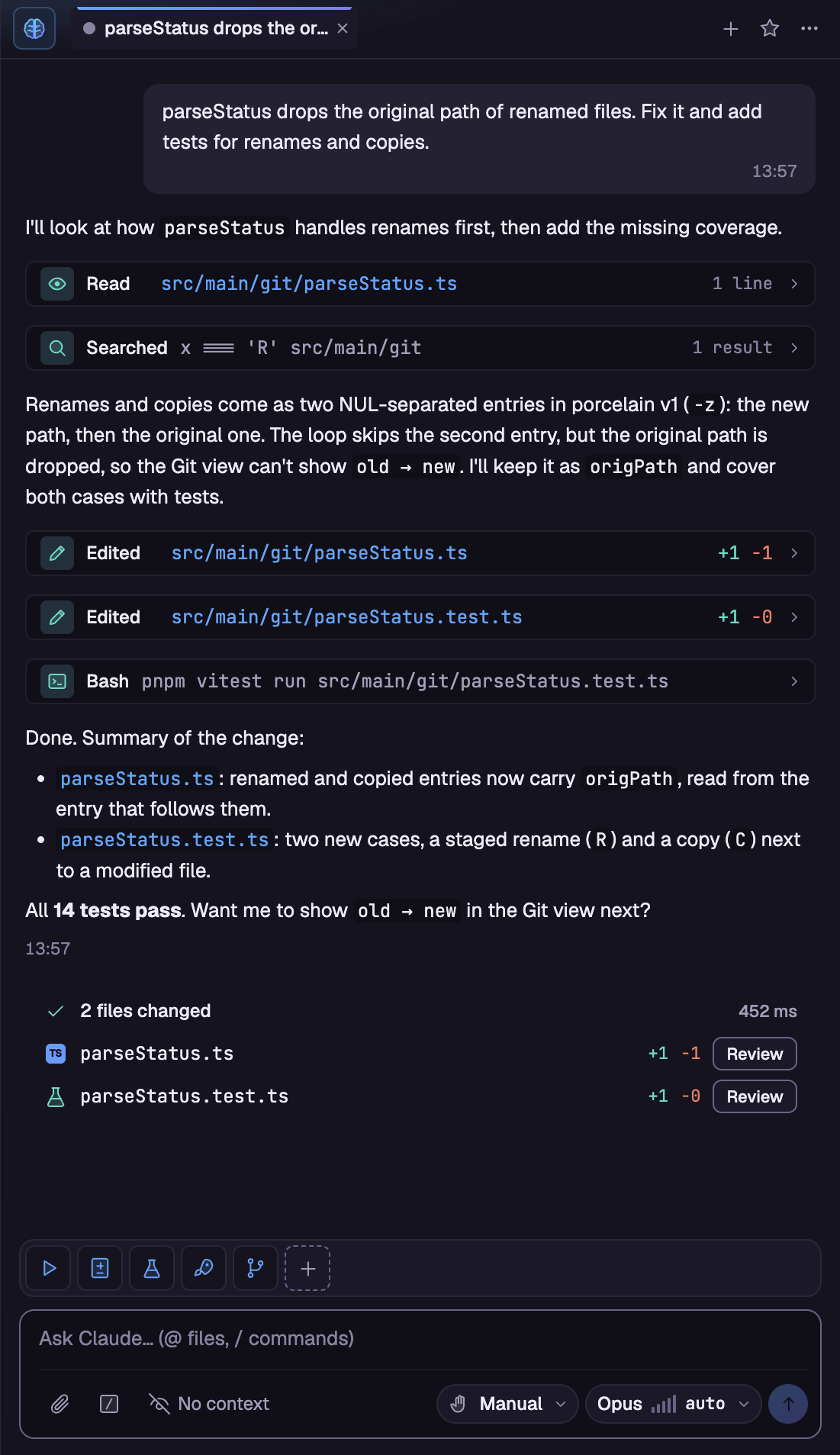
Most editors bolt AI on as an extension. Walph was built from scratch around the way you actually work with an agent: the Claude Code panel lives next to your editor, sees your diagnostics and selection, proposes edits as side by side diffs you accept or reject, and keeps working in background workspaces while you move on. Around it sits a complete, cross-platform IDE (editor, LSP, git, search, terminal, containers) that stays out of your way and responds to the keyboard. The UI is available in Brazilian Portuguese, English and Spanish.
Features
Claude Code panel, built in
- Streaming conversations with markdown, collapsible reasoning and tool rows, and clickable file paths.
- Every edit can open a side by side diff with Accept / Reject; Bash, web and MCP tools ask for permission inline (allow once, for the session, or always for the workspace).
- Permission modes (ask before edits, auto edit, plan mode, auto, bypass), model and effort chips,
@file#L10-20mentions, image paste, file attachments and a/command menu with your project and personal commands. - IDE tools for the agent: Problems diagnostics, current file and selection, open tabs and
openDiffproposals. - Multiple sessions as tabs, searchable history, favorites, checkpoints to rewind code and conversation, context usage
and cost, a turn summary with changed files, a subagents strip, an
/mcpserver manager, and toasts plus OS notifications when a session you are not watching finishes or needs you. - Favorite commands pinned above the prompt, run with one click.
Editor with split groups and LSP
- CodeMirror 6 editor with up to two side by side groups sharing the same document, preview tabs, minimap, git gutter, live Markdown preview and an image viewer.
- Never lose work: native "Save / Don't Save / Cancel" on close, disk change detection with a conflict bar, line ending, indentation and encoding (UTF-8, UTF-8 BOM, UTF-16 LE/BE, Windows-1252, ISO-8859-1) preserved on save.
- TypeScript and JavaScript language server bundled; plug in any other server (Pyright, etc.) via
lsp.servers. Completion with auto import, hover, signature help, go to definition and references, rename across files, format, code actions and a Problems panel.
Git
- Stage, commit and amend, undo last commit, discard, branches (local and remote), stash, paginated history with read-only diffs, pull, push, sync and publish branch.
- Clone a repository with progress and cancel, and open it straight into a new workspace.
Search and replace
- Project-wide search powered by ripgrep, with case, whole word, regex and include/exclude globs.
- Replace with a live preview, per match, per file or all at once (regex groups supported); unsaved tabs get the change in the editor, undoable.
Terminal
- xterm.js with WebGL rendering, split terminals, profiles, in-terminal find, and clickable URLs and
file:line:columnlinks that open in the editor.
Containers
- A Docker screen with compose project grouping, CPU sparklines, memory, ports, logs, inspect, start/stop/restart,
docker execinto the terminal, and Investigate with Claude for unhealthy or crash-looping containers.
Workspaces, windows and sessions
- Several folders as tabs in one window (each with its own explorer, terminals, git, LSP and Claude), with the branch, the Claude Code status and an unread counter on every tab, multiple windows, and full session restore: tabs, cursors, split layout and panel sizes come back when you reopen.
- A welcome screen with recent folders and "start with Claude": type a request and Walph opens the folder with a session already working on it.
Command palette, themes and keybindings
- Everything is a command: the palette lists them all with fuzzy search, and a unified palette (⌘K) searches workspaces, commands and files at once, ending with "Ask Claude".
- Walph Dark and Walph Light themes with live preview, a graphical Settings screen, user and workspace
settings.json(JSONC) and a VS Code stylekeybindings.jsonwith chords andwhenclauses.
See the full reference in docs/shortcuts.md.
Download
Grab the installer for your system from the latest release.
| OS | Package |
|---|---|
| macOS | .dmg (Apple silicon) |
| Windows | .exe (NSIS installer, lets you choose the install folder) |
| Linux | .AppImage or .deb |
Installed builds update themselves from GitHub Releases (toggle with update.enabled, or run Help: Check for
Updates…).
[!NOTE] The builds are not code signed yet, so your OS will warn you the first time you open Walph.
- macOS: right click the app in Applications and choose Open, or run
xattr -cr /Applications/Walph.app.- Windows: when SmartScreen appears, click More info and then Run anyway.
The walph command
Run Shell: Install 'walph' Command in PATH from the command palette to install a launcher (/usr/local/bin on
macOS, ~/.local/bin on Linux, %LOCALAPPDATA%\Microsoft\WindowsApps on Windows). Then walph <folder> opens the
folder as a workspace, in the running instance if Walph is already open.
Claude Code requirement
The Claude panel runs Claude Code through the Claude Agent SDK, so it needs your own Claude account or Anthropic API
key. If you are not logged in, the panel offers to open a terminal running claude so you can sign in. Your existing
~/.claude setup, CLAUDE.md, skills, MCP servers and hooks are used as is. Everything else in Walph works without
it.
Walph is an independent open source project. It is not affiliated with, sponsored by or endorsed by Anthropic. Claude and Claude Code are trademarks of Anthropic, PBC.
Build from source
Requirements: Node.js 24 and pnpm (pnpm only; npm and yarn are not supported).
pnpm install      # installs deps, downloads the Electron binary, rebuilds node-pty
pnpm dev          # runs the app in dev mode (pnpm dev <folder> opens a folder)
pnpm check        # typecheck + lint + unit tests, must pass with zero warnings
pnpm test:e2e     # builds the app and runs the Playwright end-to-end suite
pnpm dist         # builds the installer for the current OS into dist/
[!TIP] If you launch it from a terminal inside VS Code or Claude Code, the inherited
ELECTRON_RUN_AS_NODE=1makes Electron behave like plain Node and the app fails to start. Run withenv -u ELECTRON_RUN_AS_NODE pnpm dev.
pnpm dev keeps its own data folder (Walph-dev), separate from the installed app.
Documentation
Contributing
Issues and pull requests are welcome. Please read CONTRIBUTING.md and the Code of Conduct first. To report a vulnerability, follow SECURITY.md instead of opening a public issue.
Support Walph
Walph is built and maintained in my free time. If it helps you, please consider supporting it:
- GitHub Sponsors
- Ko-fi
- Pix (Brazil)
- Star the repository, it really helps others find it.
- Share it with a friend or on social media.
License
MIT © Filipe Campos