
fikrilal/agy-auth
fikrilal/agy-auth has 71 GitHub stars and 14 forks. GitHot measured +1 stars in 24 hours. Last checked 2026-11-15 03:37 UTC. Last push 2026-11-13.
可以做什么
- Switch accounts by row number, alias, email, or account ID.
- Switch Antigravity CLI and the Desktop app together, or either one with --target.
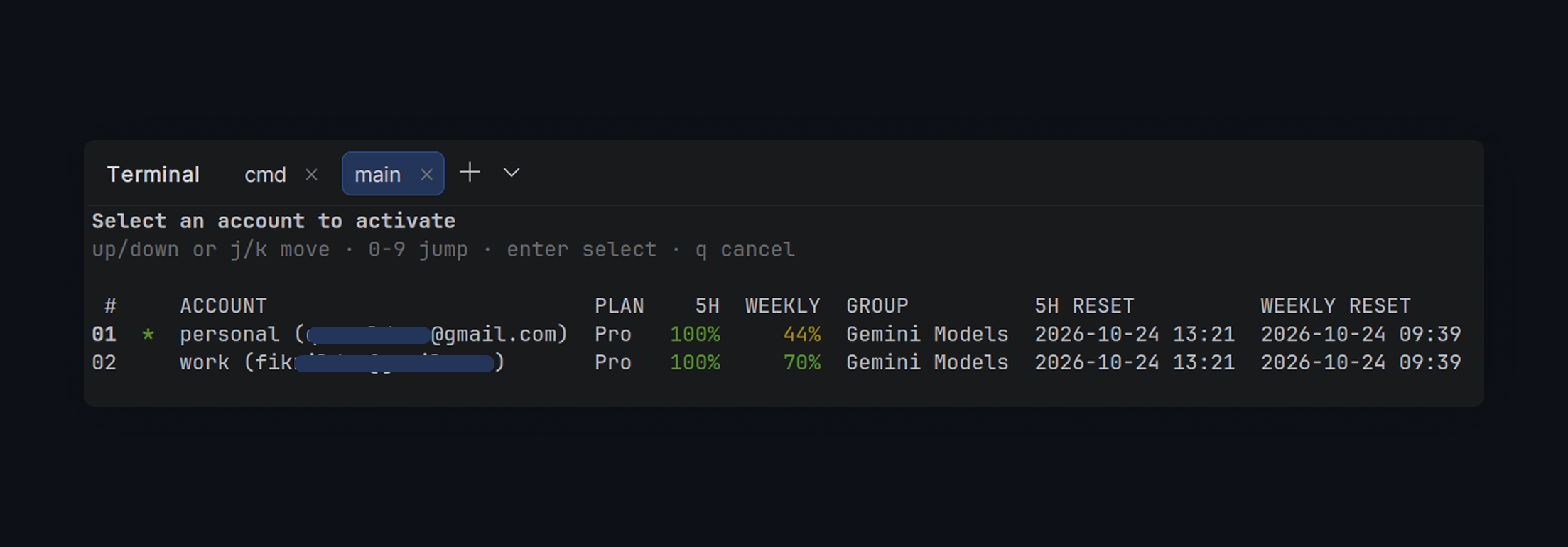
- See plan, 5-hour, weekly, group, and reset columns in list and switch.
- Automatically rotate to accounts with remaining 5-hour quota with agy-auth rotate.
实测星标增长
- 24小时
- +1
- 7天
- 正在收集历史
- 15天
- 正在收集历史
- 1个月
- 正在收集历史
各周期内的星标净变化,周期相互重叠,并非每日新增。缺失的测量保持空白。星标代表关注度,不代表软件质量。
关于
Multi-account switcher for Google Antigravity CLI & Desktop (agy)
开发工具README.md
原文agy-auth


agy-auth is an unofficial multi-account switcher for Google Antigravity CLI (agy) and the Antigravity Desktop app. Keep personal, work, and test accounts side by side, switch the live CLI credential and the Desktop profile, and see plan and quota limits without signing in again.
Highlights
- Switch accounts by row number, alias, email, or account ID.
- Switch Antigravity CLI and the Desktop app together, or either one with
--target. - See plan, 5-hour, weekly, group, and reset columns in
listandswitch. - Automatically rotate to accounts with remaining 5-hour quota with
agy-auth rotate. - Compare Antigravity quota groups with
agy-auth usageandusage --all. - Use live views with automatic switching away from exhausted groups.
- Keep encrypted account snapshots and automatic backups.
Install
npm is the recommended install:
npm install -g @fikrilal/agy-auth
agy-auth version
Run it without a global install:
npx @fikrilal/agy-auth list
The unscoped npm name
agy-authis an unrelated project. Install@fikrilal/agy-auth; it provides theagy-authcommand.
Quick start
# Add an account directly through Google OAuth.
agy-auth login --alias personal

# Already signed in with agy? Save that account instead:
# agy-auth add --alias personal

# Add a second account.
agy-auth login --gcp --project my-gcp-project --region global --alias work

# Inspect and switch.
agy-auth list
agy-auth switch work

# Toggle back to the previous account.
agy-auth switch -
After switching, restart agy and Antigravity Desktop. A running session keeps the old credential and install id in memory. agy-auth switch updates the CLI credential and the Desktop profile by default. Pass --target=cli or --target=desktop to switch one of them. Use --relaunch to restart Desktop automatically.
Commands
| Command | Description |
|---|---|
agy-auth list [--all] [--active] [--no-sync] [--no-usage] [--live] |
List accounts, plan, and quota |
agy-auth add [--alias <alias>] [--gcp --project <id> [--region <region>]] [--target all|cli|desktop] |
Save the account signed in to agy or Desktop |
agy-auth login [--alias <alias>] [--gcp --project <id> [--region <region>]] [--no-browser] [--via-agy] |
Add an account through Google OAuth |
agy-auth switch [<query>|-] [--live] [--target all|cli|desktop] [--relaunch] |
Switch interactively, by query, or to the previous account |
agy-auth rotate [--target all|cli|desktop] [--relaunch] [--force] |
Automatically switch to an account with remaining quota |
agy-auth remove [<query>...] [--all] [--logout] [--yes] [--live] |
Remove stored accounts |
agy-auth alias set <query> <alias> |
Set an alias |
agy-auth alias clear <query> |
Clear an alias |
agy-auth alias list |
List aliases |
agy-auth current |
Print the live agy account |
agy-auth status |
Show storage paths and credential health |
agy-auth usage [<query>] [--all] |
Show or compare quota groups |
agy-auth config live [--interval <seconds>] |
Show or set the live refresh interval |
agy-auth import <file-or-dir> [--alias <alias>] [--gcp --project <id> [--region <region>]] [--activate] |
Import credential JSON |
agy-auth import --purge |
Rebuild the registry from stored snapshots |
agy-auth export [--dir <directory>] [<query>...] |
Export credentials |
agy-auth path |
Print storage locations |
agy-auth clean [--dry-run] |
Prune old backups and orphan snapshots |
agy-auth version [--check] |
Print the version; --check queries the latest release |
Queries match row number, account ID, alias, email, GCP project ID, or account ID prefix.
Global options: --json for machine-readable output and --no-color to disable colors. See the user guide for JSON details.
Quota and live views
agy-auth list shows the current plan and the limiting 5-hour/weekly quota groups, including reset times. agy-auth list --all (or agy-auth usage --all) shows every group for every stored account:
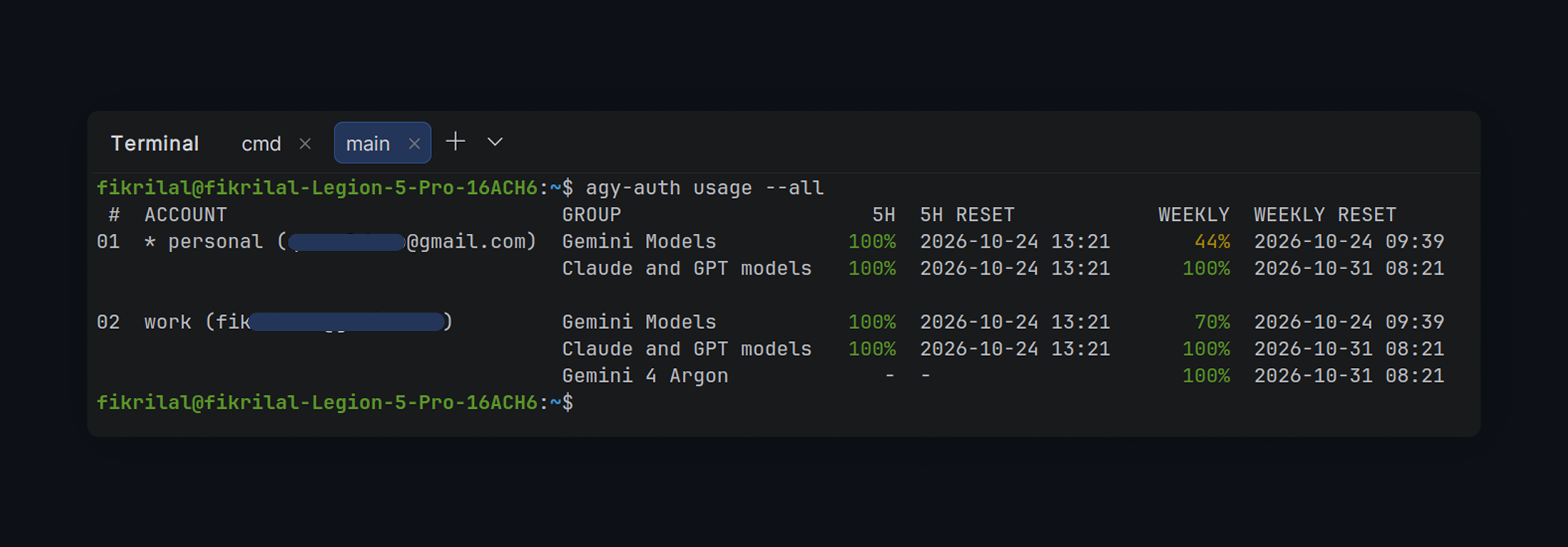
agy-auth usage --all
For an interactive view:
agy-auth list --live
agy-auth switch --live
agy-auth remove --live
In switch --live, pressing Enter switches and keeps the view open. The view can also switch automatically when a quota group is exhausted. See the user guide for keys and details.
Updates
agy-auth checks the latest npm release at most once every 24 hours. On an interactive terminal it offers to update in place; otherwise it prints the update command. Run:
agy-auth version --check
to check immediately. Disable automatic checks with AGY_AUTH_NO_UPDATE_CHECK=1. npm installs update through npm; standalone binaries verify the release checksum before replacing themselves.
Storage and safety
agy-auth uses the same credential storage as agy (OS keyring with a file fallback). Account snapshots and active-credential backups are encrypted with AES-256-GCM. agy-auth path prints the storage locations.
Back up
~/.config/agy-auth/encryption.keyseparately. Without it, encrypted snapshots cannot be recovered. Exported credentials are plaintext; delete them after use.
See Security and the user guide for the trust model and recovery details.
Requirements
- Antigravity CLI (
agy) for command-line use.agy-auth logindiscovers the OAuth client from the installed CLI. Signing in toagyfirst is only needed foragy-auth addand for runningagyafter a switch. - Antigravity Desktop is optional. When it is installed,
addandswitchsnapshot and restore its profile. The default target is both CLI and Desktop. - Linux, macOS, or Windows. Linux uses a Secret Service provider when available and otherwise falls back to file storage.
- Node.js 18+ for the npm package. The package bundles prebuilt binaries, so no Go toolchain is required.
Learn more
- User guide — storage, quota, OAuth, JSON, environment variables
- Security — credential handling and reporting
- Internals — implementation details
- Contributing and Development — building and testing
- Release process and Changelog
- Documentation index
Disclaimer
This project is not affiliated with Google. Use it at your own risk. The default OAuth login uses the same public client as Antigravity CLI; review Google's terms and your account policies before using it with a work or enterprise account.