
dorylab/dory
dorylab/dory has 312 GitHub stars and 24 forks. GitHot measured +2 stars in 24 hours. Last checked 2026-11-12 06:53 UTC. Last push 2026-11-03.
AI-native SQL client for humans and agents. Query, explore, visualize, and open agent database work as editable SQL workspaces.
实测星标增长
- 24小时
- +2
- 7天
- 正在收集历史
- 15天
- 正在收集历史
- 1个月
- 正在收集历史
各周期内的星标净变化,周期相互重叠,并非每日新增。缺失的测量保持空白。星标代表关注度,不代表软件质量。
README.md
原文

Dory
Dory is an AI-native SQL client for humans and agents.
Dory is a SQL workspace where humans can query, explore, and visualize data, and where AI agents can safely work with databases through MCP.
Unlike a plain database MCP server that only sends query results back to a chat, Dory turns agent work into editable SQL workspaces: SQL tabs, result sets, charts, saved queries, and execution context can all be opened, inspected, modified, and continued by humans.
Use Dory as your everyday SQL client, or as the database execution layer for agents like Claude Code, Codex CLI, and other MCP-compatible tools.
🍺 Install via Homebrew • 🍎 Download for macOS • Download for Windows • 📦 Quick Start • 🏠 Self-Hosting • MCP Guide • GitHub Knowledge Connector • 🤝 Contributing • ⭐ Star
No signup required. Click "Try Dory without an account" to start instantly.

Why Dory?
AI agents can now write SQL, inspect schemas, and answer analytical questions. But raw agent output is not enough for real data work.
Teams still need to:
- see the exact SQL that was run
- inspect real result sets
- fix wrong queries
- turn results into charts or exports
- preserve context across multiple steps
- continue the work in a real SQL workspace
Dory is built for this workflow.
How Dory works
Dory provides the same underlying database actions to both the UI and agents:
- Humans use Dory as a SQL client: write SQL, browse schema, run queries, filter results, create charts, and save queries.
- Agents use Dory through MCP: list connections, explore schemas, run read-only SQL, create tabs, and organize database work.
- Agent-generated work becomes a real workspace that humans can review, edit, and continue.
Dory vs a plain database MCP server
| Capability | Plain DB MCP Server | Dory |
|---|---|---|
| Run SQL from agents | ✅ | ✅ |
| Explore schema | ✅ | ✅ |
| Editable SQL tabs | ❌ | ✅ |
| Persistent result sets | ❌ | ✅ |
| Charts and filters | ❌ | ✅ |
| Human review workflow | Limited | ✅ |
| Saved queries and workspace context | Limited | ✅ |
| Works as a daily SQL client | ❌ | ✅ |
✨ Key Features
Editable Agent Workspaces
Agent database work should not disappear into a chat transcript.
- Open agent-created SQL tabs as normal workspace tabs
- Inspect SQL, result sets, filters, charts, and saved context
- Edit generated SQL and rerun it yourself
- Continue an agent run from the same workspace instead of restarting from scratch
Dory CLI and MCP for Agents
@getdory/cli is the agent entrypoint for running Dory without opening the desktop app.
- Works with Claude Code, Codex CLI, and other MCP-compatible clients
- Runs standalone MCP servers over stdio or HTTP
- Acts as a headless runtime for automation and direct Dory Actions
- Can use standalone data, hosted Dory Web, or Desktop local data with
--data desktop
SQL Workspace for Humans
- Multi-tab SQL editor with multiple result sets
- Schema browser for tables, columns, and database objects
- Saved queries for reusable analysis
- Built-in query execution history and workspace context
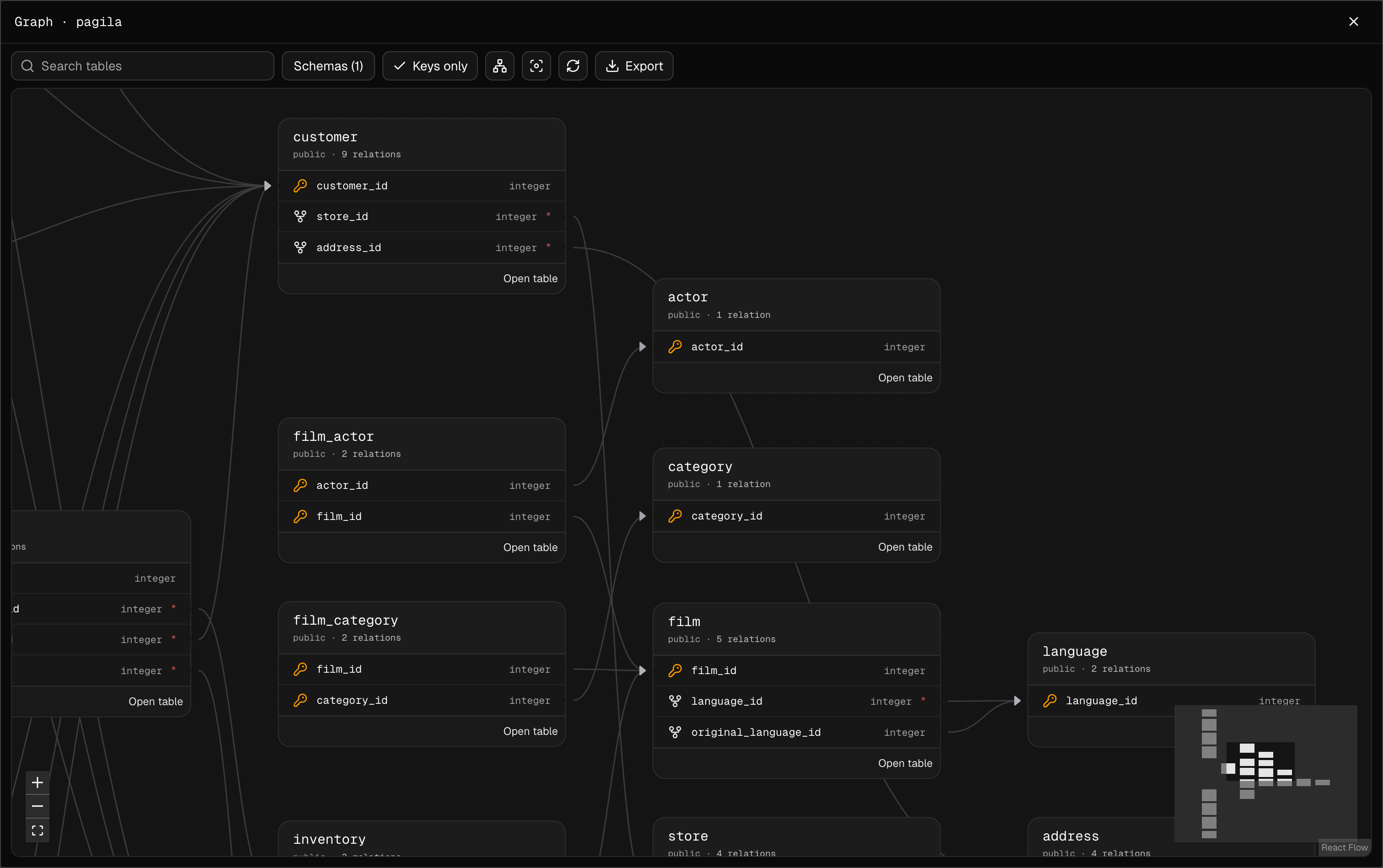
Schema Explorer
Understand unfamiliar databases at a glance with an interactive map of tables and relationships.
- Visualize primary keys, foreign keys, and relationships across schemas
- Search for tables, select schemas, and switch between all columns and keys only
- Auto-arrange the graph, fit it to the viewport, and open any table directly
- Export the complete schema graph as PNG or SVG
Result Sets, Filters, and Charts
- Inspect real result sets in a table view
- Filter, search, and review returned rows
- Turn query output into charts directly inside the workspace
- Keep results attached to the SQL that produced them
Schema-aware AI Assistance
An AI assistant grounded in real database schema and current query context.
- Generate SQL from natural language
- Rewrite, fix, and explain SQL in the current tab
- Use current database schema and query context
- Keep AI assistance inside the real SQL workspace
Saved Queries and Reusable Context
- Save useful SQL as reusable queries
- Organize query work across connections and workspaces
- Let humans and agents build on previous database work
- Preserve context beyond a single chat response
Database Support
Dory is a multi-database SQL client, with broad driver support and deeper integrations where Dory can provide more than generic SQL execution.
| Database | Status |
|---|---|
 ClickHouse |
✅ Deeply integrated |
 PostgreSQL |
✅ Supported |
 Neon |
✅ Supported |
 Supabase |
✅ Supported |
 Cloudflare D1 |
✅ Supported |
 MySQL |
✅ Supported |
 MariaDB |
✅ Supported |
 SQLite |
✅ Supported |
 DuckDB |
✅ Supported |
 SQL Server |
✅ Supported |
 Oracle |
✅ Supported |
 Snowflake |
✅ Supported |
ClickHouse Deep Integration
Dory includes native ClickHouse operations surfaces for teams that need more than a generic SQL editor.
- Query monitoring with slow queries, errors, active users, latency, and throughput
- Multi-dimensional filtering by user, database, query type, and time range
- User and role management without hand-writing every
GRANTorCREATE USERstatement - Cluster-level privilege operations with On Cluster support

🚀 Quick Start
Install on macOS with Homebrew
brew install dorylab/dory/dory
Run with Docker
Make sure Docker is installed, then run:
docker run -d --name dory \
  -p 3000:3000 \
  -e DS_SECRET_KEY="$(openssl rand -base64 32 | tr -d '\n')" \
  -e BETTER_AUTH_SECRET="$(openssl rand -hex 32)" \
  -e BETTER_AUTH_URL="http://localhost:3000" \
  -e DORY_AI_PROVIDER=openai \
  -e DORY_AI_MODEL=gpt-4o-mini \
  -e DORY_AI_API_KEY=your_api_key_here \
  -e DORY_AI_URL=https://api.openai.com/v1 \
  -e NEXT_PUBLIC_REQUIRE_EMAIL_VERIFICATION=false \
  -e [email protected] \
  -e DORY_INIT_USER_PASSWORD=admin \
  dorylab/dory:latest
Then:
Username: [email protected]
Password: admin
The initial administrator account is controlled by DORY_INIT_USER_EMAIL and DORY_INIT_USER_PASSWORD in .env.
To enable email verification, set RESEND_API_KEY to a valid resend key and EMAIL_FROM to a validated email.
Self-host with Docker Compose
For long-running self-hosted deployments, Docker Compose runs Dory with a dedicated PostgreSQL database and persistent volumes.
cp docker-compose.env.example .env
# Edit .env and replace all placeholder secrets/passwords.
docker compose up -d
For comprehensive self-hosting documentation, environment variables, and deployment guides, see the Self-Hosting Documentation.
🧩 Dory Agent Skill
Install the Dory skill for Codex, ChatGPT, Claude, and other agents that support the open Agent Skills format.
npx skills add https://github.com/dorylab/skills --skill dory
The skill teaches agents when to use Dory, how to use Dory MCP tools, and how to preserve generated SQL, result sets, and findings in an editable Dory Agent Run workspace.
The skill does not install the Dory CLI or configure MCP automatically. For live database access, connect Dory MCP with the setup commands below.
🔗 Dory CLI and MCP
Use @getdory/cli to connect MCP-compatible agents to Dory. It can run a local stdio MCP server, host a long-running HTTP MCP endpoint, bridge to hosted Dory Web, or reuse Dory Desktop local data with --data desktop.
For the full MCP setup guide, including CLI stdio, headless HTTP, and hosted Dory bridge options, see Dory MCP Guide.
Run a local stdio MCP server when your agent client is on the same machine:
codex mcp add dory -- npx -y @getdory/cli mcp serve --stdio --data standalone
codex mcp list
claude mcp add dory -- npx -y @getdory/cli mcp serve --stdio --data standalone
claude mcp list
Run a local HTTP MCP endpoint when you want a long-running service:
npx -y @getdory/cli mcp token create --data standalone --name "local-http"

export DORY_MCP_TOKEN="dory_mcp_..."

npx -y @getdory/cli mcp serve \
  --http \
  --host 127.0.0.1 \
  --port 3318 \
  --token "$DORY_MCP_TOKEN" \
  --data standalone
Add that HTTP endpoint to Codex CLI:
codex mcp add \
  --url http://127.0.0.1:3318/api/mcp \
  --bearer-token-env-var DORY_MCP_TOKEN \
  dory
Add it to Claude Code:
claude mcp add \
  --transport http \
  dory \
  http://127.0.0.1:3318/api/mcp \
  --header "Authorization: Bearer $DORY_MCP_TOKEN"
Bridge hosted Dory Web to local MCP clients:
npx -y @getdory/cli mcp login --url https://your-dory-host
codex mcp add dory-hosted -- npx -y @getdory/cli mcp bridge --url https://your-dory-host
claude mcp add dory-hosted -- npx -y @getdory/cli mcp bridge --url https://your-dory-host
For the standalone @getdory/mcp bridge package, see packages/mcp. For the full CLI and headless runtime guide, see packages/cli.
🧠 Supported AI Providers
Dory is built with a pluggable AI provider architecture. You can freely switch between different model vendors by changing environment variables, with no code changes required.
Currently supported providers:
| Provider | Env DORY_AI_PROVIDER |
Description |
|---|---|---|
| OpenAI | openai |
Default provider. Uses official OpenAI API. |
| OpenAI-Compatible | openai-compatible |
Any service exposing an OpenAI-compatible API. |
| Anthropic | anthropic |
Claude models via Anthropic official API. |
google |
Gemini models via Google Generative AI API. | |
| Qwen (Alibaba) | qwen |
Qwen models via DashScope OpenAI-compatible endpoint. |
| xAI | xai |
Grok models via xAI API. |
🗺️ Roadmap
See the latest roadmap here:
- Dory Roadmap
- Historical reference: GitHub Discussion #35
⚙️ Tech Stack
- Next.js + React + Tailwind
- Drizzle ORM
- Multi-model AI SDK integration
- PGLite
- Resend
- Shadcn UI
- Monaco Editor
🎯 Who is it for?
- Data engineers
- Data analysts
- Database platform teams
- Agent builders who need a database execution layer
- ClickHouse operations teams
Your data stays yours. Except for AI requests sent through Cloudflare Gateway, everything — connections, tabs, results, and saved queries — is stored locally on your device.
📄 License
Apache-2.0
探索相关项目
Asabeneh/30-Days-Of-Python
30 Days of Python 编程挑战是一份循序渐进的指南,用于在 30 天内学习 Python 编程语言。这项挑战可能需要超过 100 天。请按自己的节奏进行。这些视频或许也有帮助:https://www.youtube.com/channel/UC7PNRuno1rzYPb1xLa4yktw
78,560 星标grafana/grafana
开放且可组合的可观测性与数据可视化平台。可对来自 Prometheus、Loki、Elasticsearch、InfluxDB、Postgres 等众多数据源的指标、日志和追踪进行可视化。
77,830 星标redis/redis
对于正在构建实时数据驱动应用的开发者而言,Redis 是首选、速度最快且功能最丰富的缓存、数据结构服务器和文档与向量查询引擎。
77,395 星标apache/superset
Apache Superset 是一个数据可视化与数据探索平台
75,473 星标