
conwnet/github1s
conwnet/github1s has 23,309 GitHub stars and 908 forks. GitHot measured -3 stars in 24 hours. Last checked 2026-11-07 07:08 UTC. Last push 2026-11-03.
一秒钟即可用 VS Code 阅读 GitHub 代码。
可以做什么
- Explore a project. Browse directories, find files, and search code in a familiar VS Code interface.
- Trace a change. Switch branches or tags, inspect commits and file history, and review pull or merge request diffs on GitHub and GitLab.
- Understand complex code. Ask GitHub1s AI about a file or selection, then follow up on implementation details.
- Access private repositories. Connect your GitHub or GitLab account, or supply an access token with the necessary permissions.
实测星标增长
- 24小时
- -3
- 7天
- 更新延迟
- 15天
- 更新延迟
- 1个月
- 更新延迟
各周期内的星标净变化,周期相互重叠,并非每日新增。缺失的测量保持空白。星标代表关注度,不代表软件质量。
README.md
原文
GitHub1s
GitHub1s is a browser-based code explorer built on VS Code. Browse files, search code, and review changes without cloning a repository. Connect your preferred model to the built-in AI chat for help understanding the code.
🌐 Try it now · 📖 Usage guide · 🔮 AI setup
🚀 Quick start
Add 1s after github in a repository URL:
https://github.com/microsoft/vscode
        ↓
https://github1s.com/microsoft/vscode
Public repositories can be browsed without signing in, subject to the upstream services' access and rate limits.
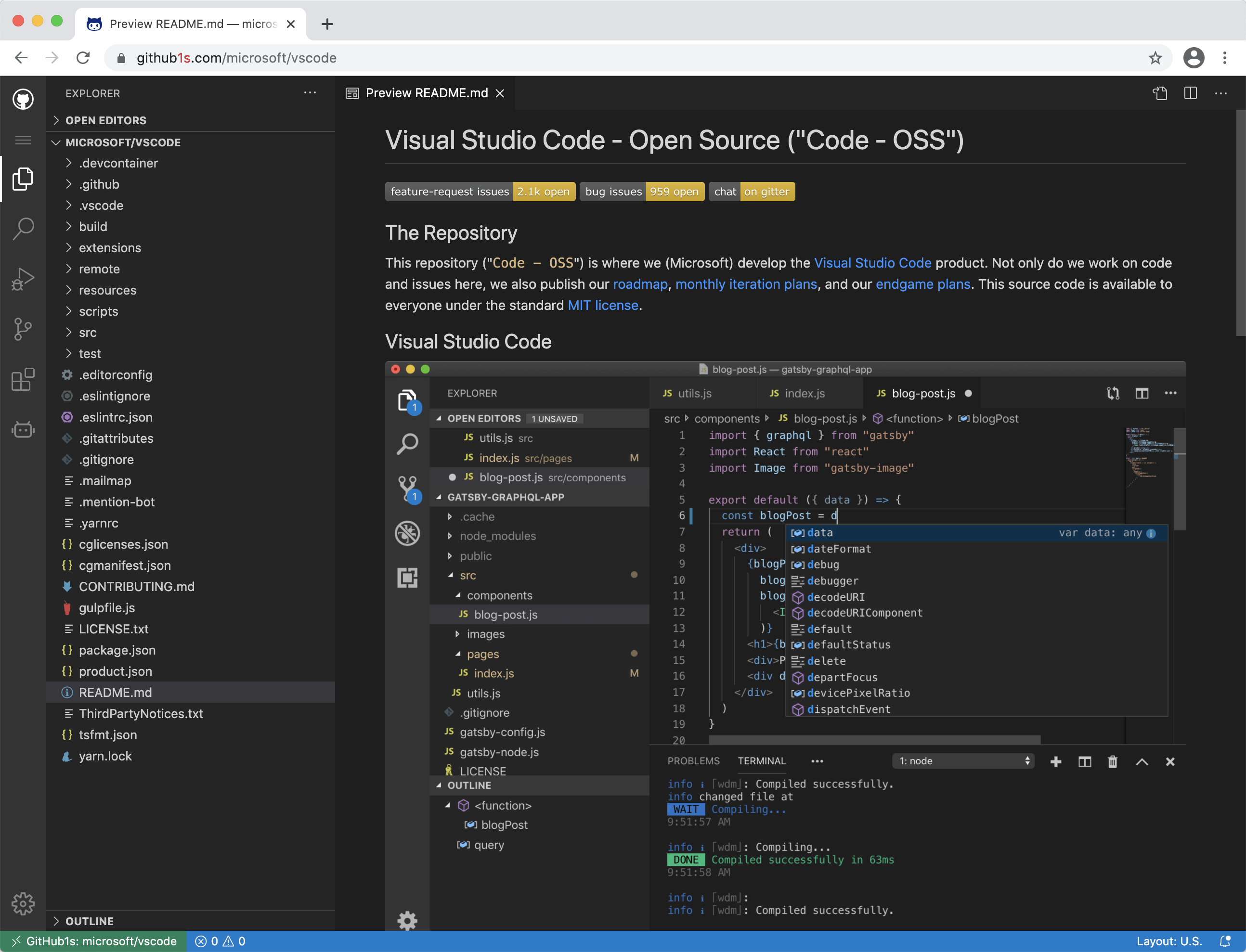
You can also browse GitLab repositories at gitlab1s.com and published npm packages at npmjs1s.com. See the usage guide for URL formats, authentication, and navigation.
✨ Features
- Explore a project. Browse directories, find files, and search code in a familiar VS Code interface.
- Trace a change. Switch branches or tags, inspect commits and file history, and review pull or merge request diffs on GitHub and GitLab.
- Understand complex code. Ask GitHub1s AI about a file or selection, then follow up on implementation details.
- Access private repositories. Connect your GitHub or GitLab account, or supply an access token with the necessary permissions.
Remote repositories are read-only. Search and code navigation depend on the repository platform and available upstream services; see capabilities and limits.
🤖 GitHub1s AI
Get a repository overview, explain a file or selection, and ask follow-up questions. The assistant can look up relevant code as you chat.
Click Toggle Secondary Side Bar in the layout controls at the top of GitHub1s to open the AI panel.
Use a model endpoint that accepts browser requests. Messages and code context are sent to the selected endpoint. See the AI guide for configuration and data handling.
📚 Documentation
| Guide | What you will find |
|---|---|
| Using GitHub1s | Navigation, authentication, search, and troubleshooting |
| GitHub1s AI | Model setup, context, tools, and data handling |
| Development | Local setup, builds, and checks |
| Architecture | Components, data flow, and source layout |
| Deployment | Hosting, OAuth, and service configuration |
| Community | Third-party extensions and star history |
🤝 Contributing
See the development guide to run GitHub1s locally. Report bugs and suggest improvements through GitHub Issues.
👥 Maintainers
conwnet · xcv58 · Siddhant Khare
💖 Thanks
Thanks to everyone who has contributed to GitHub1s, and to Sourcegraph, searchcode, and OSS Insight for the tools and services used by GitHub1s.