
commenthol/gdal2tiles-leaflet
关于
生成可供 Leaflet 使用的栅格图像瓦片。
开发工具实测星标增长
- 24小时
- 0
- 7天
- 0
- 15天
- 正在收集历史
- 1个月
- 正在收集历史
各周期内的星标净变化,周期相互重叠,并非每日新增。缺失的测量保持空白。星标代表关注度,不代表软件质量。
README.md
原文gdal2tiles-leaflet
Generate raster image tiles for use with leaflet.
Example in action.
This is a modified version of gdal2tiles.py which adds support for raster images as plain 2D maps in leafletjs.
It adds the option -l or --leaflet to generate the resulting images with the reference point [0,0] in the upper-left (North-West) corner, opposed to the standard behaviour for TMS tiles using the lower-left (South-East) corner.
Together with the small leafletjs plugin leaflet-rastercoords you'll be able to add markers at the correct position using the (x, y) coordinates of the full-size image.
Prerequisites
On Debian style OS:
sudo apt install python-gdal
for python3
sudo apt install python3-gdal
for others give your search-engine a try...
Basic usage
$ gdal2tiles.py -l -p raster -z 0-5 -w none <image> <tilesdir>
Check test/createtiles.sh for usage.
If the -z option is omitted then the tool considers the min. zoom level otherwise note...
Note: The min zoom level for tile generation must be greater or
equal to log2(max(width, height)/tilesize)
Assuming an image with 2000x3000 pixels:
# take the larger dimension -> here height = 3000px
$ echo "l(3000/256)/l(2)" | bc -l
# 3.55 --> min zoomlevel for tile generation is 4
# means: `gdal2tiles.py -l -p raster -z 0-2 ...`
#                                          \__ is not allowed
# correct usage
$ gdal2tiles -l -p raster -z 0-4 ...
Multicore usage
The same works with multicore support, thanks to gdal2tiles-Ticket-4379.
$ gdal2tiles-multiprocess.py -l -p raster -z 0-5 -w none <image> <tilesdir>
Usage with Leaflet
To use the generated tiles with Leaflet there is a small plugin to correctly set the required projection for raster images. Please refer to the documention at leaflet-rastercoords.
Example
To run the example you'll need to generate the tiles for the large image first.
$ cd test
$ ./createtiles.sh
$ open index.html
Then open index.html in a browser.
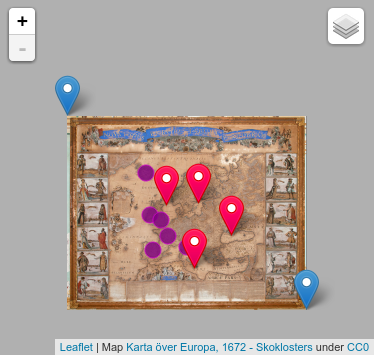
Or see it here in action.
Contribution and License Agreement
If you contribute code to this project, you are implicitly allowing your code to be distributed under the respective license. You are also implicitly verifying that all code is your original work or correctly attributed with the source of its origin and licence.
License
Modifications and samples are MIT licensed.
gdal2tiles.py: (MIT licensed)
- Copyright (c) 2008, Klokan Petr Pridal
- Copyright (c) 2010-2013, Even Rouault
References
探索相关项目
加载中…