
cohama/lexima.vim
关于
自动补全括号,并通过点命令重复操作……
开发工具实测星标增长
- 24小时
- 0
- 7天
- 0
- 15天
- 0
- 1个月
- 正在收集历史
各周期内的星标净变化,周期相互重叠,并非每日新增。缺失的测量保持空白。星标代表关注度,不代表软件质量。
README.md
原文lexima.vim


Auto close parentheses and repeat by dot dot dot...
Basically, you can automatically close pairs such as (), {}, "", ...
But in advance, you can also customize the rule to automatically input
any character on any context.
SCREEN SHOTS
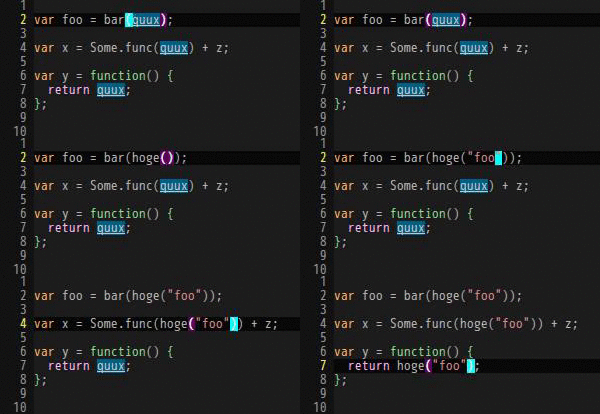
REQUIREMENTS
- Vim 8.1+ or Neovim 0.4.3+
DEFAULT RULES
lexima.vim provides some default rules to input pairs.
(the cursor position is represented by |)
Basic Rules
If g:lexima_enable_basic_rules is 1, the following rules are enabled.
(default value: 1)
Before        Input         After
------------------------------------
|             (             (|)
------------------------------------
|             "             "|"
------------------------------------
""|           "             """|"""
------------------------------------
''|           '             '''|'''
------------------------------------
``|           `             ```|```
------------------------------------
\|            [             \[|
------------------------------------
\|            "             \"|
------------------------------------
\|            '             \'|
------------------------------------
I|            'm            I'm|
------------------------------------
(|)           )             ()|
------------------------------------
'|'           '             ''|
------------------------------------
(|)           <BS>          |
------------------------------------
'|'           <BS>          |
------------------------------------
and much more... (See g:lexima#default_rules at autoload/lexima.vim)
New Line Rules
If g:lexima_enable_newline_rules is 1, the following rules are enabled.
(default value: 1)
Before        Input         After
------------------------------------
{|}           <CR>          {
                                |
                            }
------------------------------------
{|            <CR>          {
                                |
                            }
------------------------------------
```vim|```    <CR>          ```vim
                                |
                            ```
------------------------------------
Same as () and [].
Endwise Rules
If g:lexima_enable_endwise_rules is 1, the following rules are enabled.
(default value: 1)
For example, in ruby filetype
Before        Input         After
--------------------------------------
if x == 42|   <CR>          if x == 42
                                |
                            end
--------------------------------------
def foo()|    <CR>          def foo()
                                |
                            end
--------------------------------------
bar.each do|  <CR>          bar.each do
                                |
                            end
--------------------------------------
and same as module, class, while and so on.
In vim filetype, function, if, while ... rules are available.
And also you can use in sh (zsh) such as if, case.
CUSTOMIZATION
lexima.vim provides highly customizable interface.
You can define your own rule by using lexima#add_rule().
" Please add below in your vimrc
call lexima#add_rule({'char': '$', 'input_after': '$', 'filetype': 'latex'})
call lexima#add_rule({'char': '$', 'at': '\%#\$', 'leave': 1, 'filetype': 'latex'})
call lexima#add_rule({'char': '<BS>', 'at': '\$\%#\$', 'delete': 1, 'filetype': 'latex'})
You will get
Before  Input   After
---------------------
|       $       $|$
---------------------
$|$     $       $$|
---------------------
$|$     <BS>    |
---------------------
These rules are enabled at only latex filetype.
For more information, please see :help lexima-customization
SETTING EXAMPLES
Same as default ( rule but except before a word.
call lexima#add_rule({'at': '\%#\w', 'char': '(', 'input': '('})
Before  Input  After
----------------------------
|bar    (      (|bar
DOT REPEATABLE
If you type foo("bar, you get
foo("bar")
and once you type 0., you finally get
foo("bar")foo("bar")
探索相关项目
加载中…