
citrolabs/ego-lite
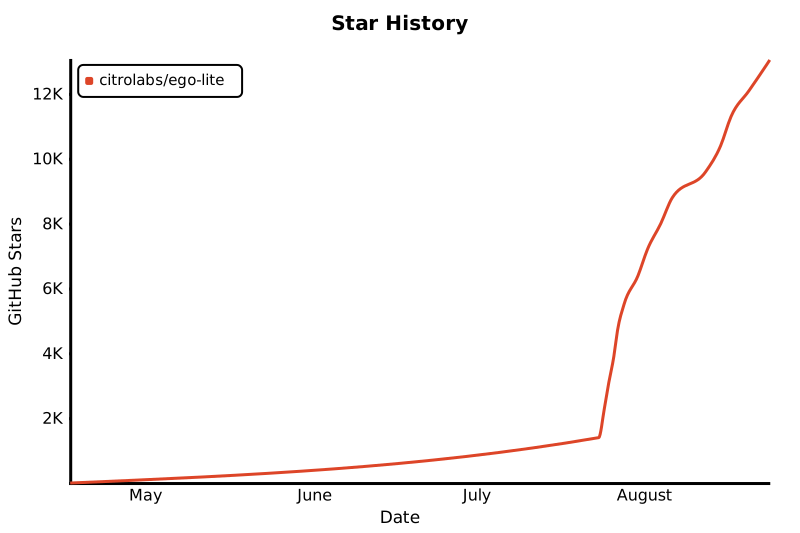
citrolabs/ego-lite has 22,711 GitHub stars and 1,283 forks. GitHot measured +128 stars in 24 hours and +838 in 7 days. Last checked 2026-11-13 04:43 UTC. Last push 2026-11-03.
为 AI 智能体运行浏览器自动化而打造的极速浏览器,可将已登录的浏览器状态共享给 Codex 或 Claude Code 等 AI 智能体,同时不打扰你的操作。零成本、零配置。
可以做什么
- A dedicated Space for every agent - ego lite gives each agent its own fully isolated Space. You browse up front, your agent works in the background, and they don't get in each other's way. You can see which Space has an agent running at any moment, and take it over or stop it whenever you want.
- Your agents multitask in Spaces, parallel workspaces inside the same browser - Each Space gets its own AI agent or its own task, all running at the same time. Claude Code enriching 10 leads in 10 parallel Spaces. Codex scraping 5 competitor sites in 5 more. They don't collide or steal your tabs. Your mouse stays where you left it.
- The strongest page Snapshot on the market - Thanks to customization inside the browser engine, ego lite produces the highest-quality page snapshots, the view text-only models rely on to "see" and act on a webpage. It reliably handles tough cases like deeply nested iframes, exactly where other approaches consistently break down.
- Experience accumulation that makes your agent faster the more you use it (coming soon) - Most of an agent's time on browser tasks goes to trial and error. ego lite's official Skill distills every successful action into reusable tools and workflows, so similar tasks down the line run up to 5x faster.
实测星标增长
- 24小时
- +128
- 7天
- +838
- 15天
- 正在收集历史
- 1个月
- 正在收集历史
各周期内的星标净变化,周期相互重叠,并非每日新增。缺失的测量保持空白。星标代表关注度,不代表软件质量。
README.zh-CN.md
原文
让 AI Agent 以最快速度执行网页自动化的浏览器






English · 简体中文 · 日本語 · 한국어 · Português · Español · Français · Italiano · Русский
ego (lite) 是一款能够让你和你的 AI Agent 并行工作的浏览器。你的 Agent 在自己的 Space 里执行多个浏览器任务的同时,你可以在属于自己的 Space 里自由地浏览网页,Agent 再也不会抢走你对浏览器的控制权。与此同时,网页自动化任务完成得更快,Token 消耗也更少。
像 browser-use、agent-browser 这类现有工具本质上是浏览器自动化桥接工具:它们需要另找一个浏览器来驱动,很难完整带过去浏览器数据,连接也不稳定,你和 Agent 最后还要抢浏览器当前的控制权。而 ego lite 从设计之初就是给你们两方共用的浏览器。无需额外配置,Agent 随时都能通过 ego-browser 拿到你真实的登录状态和标签页。
演示
https://github.com/user-attachments/assets/ffe7954b-58ee-411e-b35d-ec30c58a08bc
快速开始
ego lite 目前支持 macOS 和 Windows,Linux 已在路线图上。
1. 安装
选一种适合你的方式。
1.1 下载应用


点击即可下载,打开后完成安装。无论用哪种方式,ego lite 都会把 ego-browser Skill 写进你机器上每个 Agent 的 Skill 目录。
1.2 用 npx 添加 Skill
只安装 ego-browser Skill:
npx skills add citrolabs/ego-lite
Agent 第一次执行浏览器任务时,会带你完成 ego lite 应用的安装。
1.3 让 Agent 自己装好
把下面这段粘进你的 Agent:
帮我装好 ego lite:https://github.com/citrolabs/ego-lite

阅读 `skills/ego-browser/references/install.md`,按步骤安装 ego lite。
首次启动时,ego lite 只问一个问题:要不要迁移你的 Chrome 数据。选择是,你的 Agent 就能直接继承你现有的登录状态、Cookie、扩展程序和书签。
2. 拿第一个任务练练手
在 Agent 的 CLI 里输入 /ego-browser,空一格,然后用大白话描述你想要什么:
ego-browser 帮我关注 x.com 上的 @ego_agent
Agent 会加载 ego-browser Skill,在自己的 Space 里打开页面,读取 Snapshot,在页面上执行操作,再把结果汇报给你,整个过程你的标签页完全不受影响。
你的浏览数据、Cookie 等所有浏览器数据都留在本机。ego lite 的数据收集非常克制,只会记录你是否把 ego lite 设为默认浏览器这类简单的产品数据。
ego lite 的亮点
| 特性 | 它能做什么 |
|---|---|
| 以代码为本,而非 CLI,复杂任务跑得更快、Token 更少 | ego lite 向 Agent 开放的能力都封装成 JavaScript 函数,由 Agent 直接调用。Agent 得以做它最擅长的事:写代码,把多步任务组合成一次输出,而不是陷在「调用两条命令、看结果、再调用两条命令」的循环里。相比传统的 CLI 方式,复杂工作流跑得快很多,任务成功率更高,每个任务的工具调用次数也少得多,最终任务所需的花费也大大减少。 |
| 每个 Agent 都有专属 Space | ego lite 给每个 Agent 一个完全隔离的 Space。你在前台浏览,Agent 在后台干活,互不干扰。你随时能看到哪个 Space 里有 Agent 在运行,也能随时接管或停止它。 |
| Agent 在多个 Space 里同时干活,一个浏览器里就有多个并行工作区 | 每个 Space 承载一个 AI Agent 或一个任务,全部同时运行。Claude Code 在 10 个并行 Space 里补全 10 条线索,Codex 在另外 5 个里抓取 5 个竞品网站。它们不会互相冲突,也不会抢走你的标签页。你的鼠标还停在原来的位置。 |
| 市面上最强的页面 Snapshot | 得益于内核级定制,ego lite 生成的页面 Snapshot 质量最高——这正是文本模型「看懂」网页并对其采取行动所依赖的视图。面对深层嵌套 iframe 这类棘手场景,它依然稳定可靠,而这恰恰是其他方案屡屡失效的地方。 |
任何 Agent 都能通过 ego-browser 操控它 |
ego-browser 是任意 Agent CLI(Claude Code、Codex、Cursor 或你自己写的)与 ego lite 之间的连接层。它把浏览器暴露为一组页内 JavaScript 工具:snapshot、fill、click、wait、navigate、capture。Agent 写一段调用这些工具的 JavaScript,ego-browser 就在页面上一次性执行完。 |
| 经验积累让 Agent 越用越快 (即将上线) | Agent 在浏览器任务上花的时间,大多耗在试错上。ego lite 官方 Skill 会把每一次成功操作沉淀成可复用的工具和工作流,之后再遇到类似任务,最高能快 5x。 |
ego lite 与现有产品的对比
大多数工具都能实现浏览器自动化。真正的问题在于:Agent 拿到的是哪个浏览器?你能否同时继续做自己的事?这个工具是为你已经在用的 Agent 打造的,还是只服务它自带的那一个?
| 功能 | ego lite | 浏览器扩展 Claude/Codex in Chrome |
内置浏览器 Claude/ChatGPT 内置浏览器 |
云浏览器 Browserbase/Browser Use |
浏览器 CLI playwright-cli/Browser Harness |
AI 浏览器 Comet/Dia |
|---|---|---|---|---|---|---|
| 支持任意 AI Agent | ✓ | — | — | ✓ | ✓ | — |
| 沿用你的浏览器登录状态 | ✓ | ✓ | — | — | — | ✓ |
| 更少触发人机验证 | ✓ | ✓ | — | — | — | ✓ |
| 能操作你的整台电脑 | ✓ | — | ✓ | — | ✓ | — |
| 不会抢占你的浏览器 | ✓ | — | ✓ | ✓ | — | — |
| 多任务并行 | ✓ | — | — | ✓ | — | — |
| 能跑大规模数据抓取 | ✓ | — | — | ✓ | ✓ | — |
| 可以当日常浏览器用 | ✓ | ✓ | — | — | — | ✓ |
| 免费 | ✓ | — | — | — | ✓ | — |
| 数据存储在本地 | ✓ | ✓ | ✓ | — | ✓ | — |
| 可复用技能(即将上线) | ✓ | — | — | — | — | — |
基准测试
跑得更快,成功率更高,更省 token。我们在 Real-World Bench 上测试了 ego-browser 和另外四款面向 AI Agent 的浏览器工具:31 个在真实线上网站上执行的复杂浏览器自动化任务。ego-browser 在速度、成功率和成本上全面领先,让你的 Agent 完成复杂网页任务的速度比其他工具快 47% 到 63%。
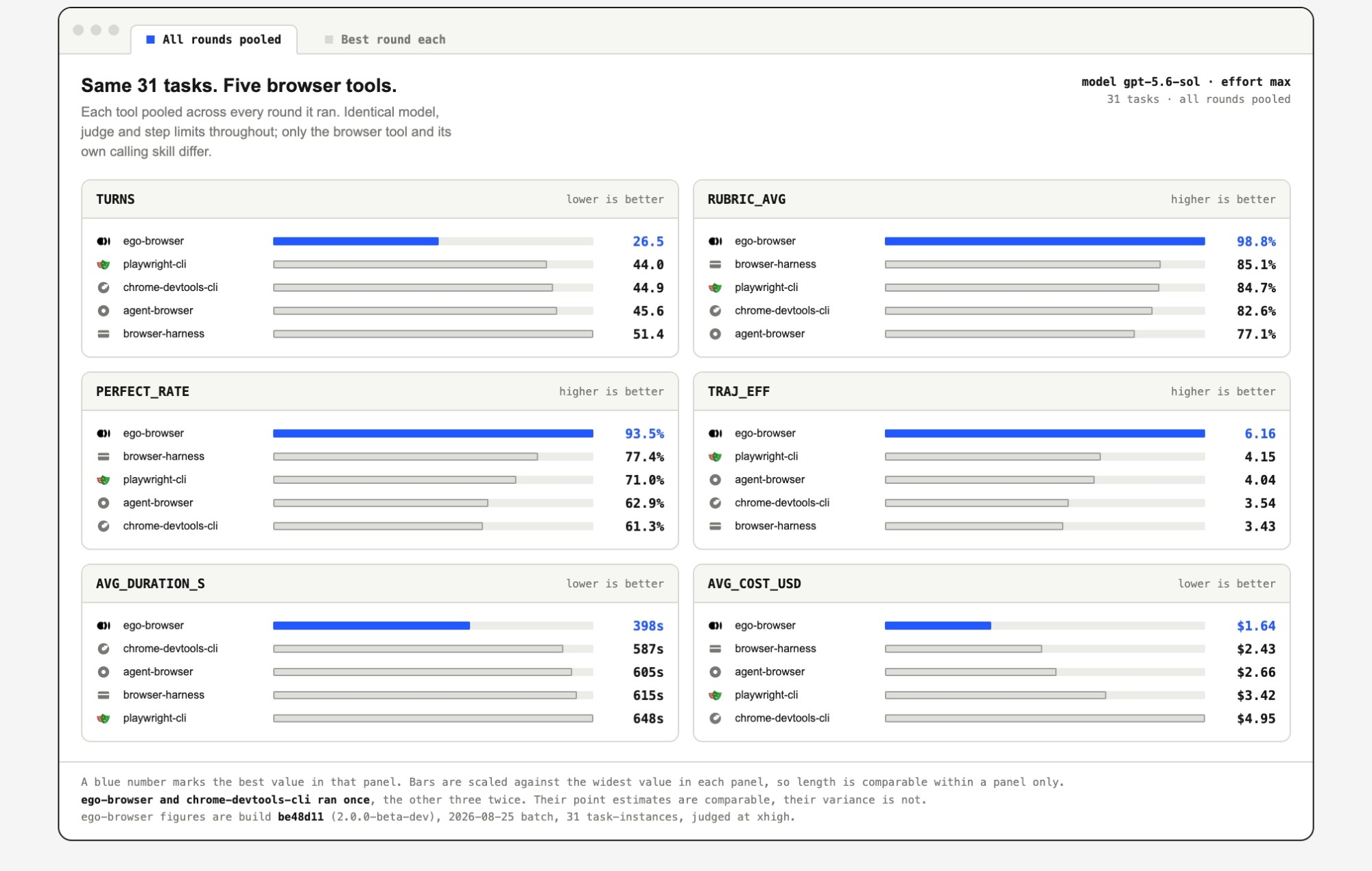
所有工具跑的是同样的 31 个任务,由同一个 Agent(pi)、同一个模型(gpt-5.6-sol,思考强度 max)驱动,并由同一个评审按每个任务的评分细则打分。只有满足全部要求的任务才算完整成功。
文档
教程、完整的工具参考和集成指南都在 lite.ego.app/document/。
社区
- Discord:提问、安装求助、技能分享
- GitHub Discussions:想法和长文讨论
- X/Twitter:动态和版本发布
Star 历史
许可证
本仓库内容基于 MIT License 发布。ego lite 浏览器是独立、免费的下载产品。
探索相关项目
affaan-m/ECC
智能体执行与控制框架的性能优化系统。面向 Claude Code、Codex、Opencode、Cursor 等,涵盖技能、本能、记忆、安全与研究优先的开发。
302,142 星标NousResearch/hermes-agent
与你一同成长的智能体
263,051 星标multica-ai/andrej-karpathy-skills
一个用于改进 Claude Code 行为的 CLAUDE.md 文件,源自 Andrej Karpathy 对 LLM 编程陷阱的观察。
232,625 星标firecrawl/firecrawl
借助来自网络及其他来源的数据,强化你的 AI 智能体。正在构建面向超级智能的资料库。🔥
201,294 星标