
cfgnunes/nautilus-scripts
cfgnunes/nautilus-scripts has 705 GitHub stars and 80 forks. GitHot measured 0 stars in 24 hours and +8 in 7 days. Last checked 2026-11-22 18:30 UTC. Last push 2026-11-19.
可以做什么
- Parallel task execution: Processes multiple files simultaneously. Very fast!
- Multi-language support: Automatically detects the system language and displays messages in the appropriate language.
- Progress dialog: Displays a progress dialog and allows interruption of tasks at any time.
- Dependency management: Prompts users to install any missing dependencies.
实测星标增长
- 24小时
- 0
- 7天
- +8
- 15天
- 正在收集历史
- 1个月
- 正在收集历史
各周期内的星标净变化,周期相互重叠,并非每日新增。缺失的测量保持空白。星标代表关注度,不代表软件质量。
关于
Extra options in the right-click menu of the GNOME Files (Nautilus), Nemo, Caja, Dolphin, Thunar, and PCManFM-Qt file managers.
开发工具README.md
原文Enhanced File Manager Actions
Extra options in the right-click menu of your file manager. Convert audio and video, handle documents and images, rename, compress, or encrypt files, and do other everyday tasks on GNOME, KDE, Xfce, and more.

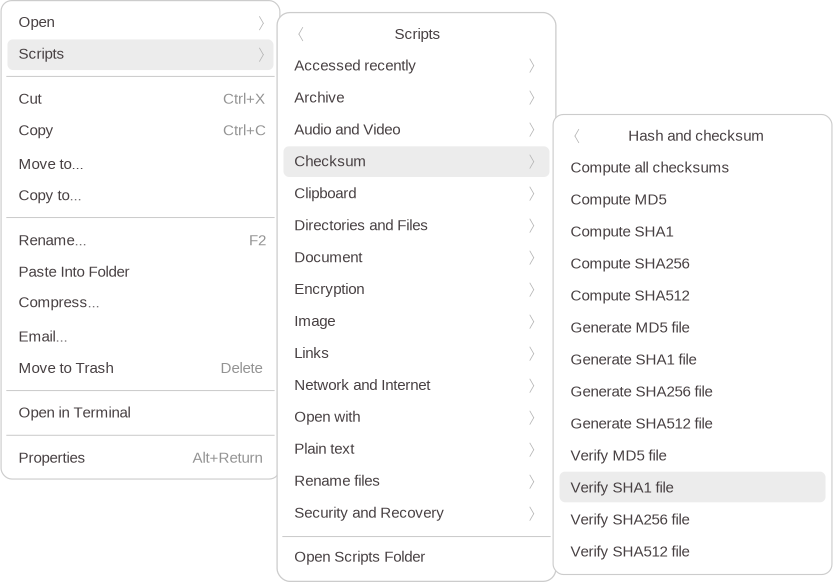
Installation
Option 1: Online installation (recommended)
You can use either wget or curl. Choose one of the following commands and run it in your terminal:
Using wget
bash -c "$(wget -qO- https://cfgnunes.github.io/nautilus-scripts/install.sh)"
Using curl
bash -c "$(curl -fsSL https://cfgnunes.github.io/nautilus-scripts/install.sh)"
Option 2: Local installation
After cloning this repository, run the following command:
bash install.sh
Features
- Parallel task execution: Processes multiple files simultaneously. Very fast!
- Multi-language support: Automatically detects the system language and displays messages in the appropriate language.
- Progress dialog: Displays a progress dialog and allows interruption of tasks at any time.
- Dependency management: Prompts users to install any missing dependencies.
- Status notifications: Notifies users of dependency errors and types.
- Keyboard accelerators: Provides keyboard shortcuts for some scripts.
- Easy access to recent scripts: Includes a menu, Accessed recently, to quickly access recently used scripts.
- Category-based installation: The installer allows you to choose which script categories you want to install, so there's no need to install everything.
- File manager compatibility: Designed for major file managers like GNOME Files (Nautilus), Nemo, Caja, Dolphin, and Thunar.
- Distro compatibility: Works on major GNU/Linux distributions, such as Debian, Ubuntu, Fedora, and Arch Linux.
Keyboard accelerators
| Key | Action |
|---|---|
| F4 | Terminal |
| Shift + F4 | Terminal (synced panes) |
| F7 | Code editor |
| F12 | Disk usage analyzer |
| Ctrl + E | Extract here |
| Ctrl + Alt + G | Compress to 'tar.gz' |
| Ctrl + Alt + S | Compress to 'tar.zst' |
| Ctrl + Alt + X | Compress to 'tar.xz' |
| Ctrl + Alt + Z | Compress to 'zip' |
| Ctrl + Alt + I | Show file information |
| Ctrl + Alt + M | Show file metadata |
| Ctrl + Alt + 0 | Find empty files |
| Ctrl + Alt + E | Find empty directories |
| Ctrl + Alt + J | Find junk files |
| Ctrl + Alt + U | Find duplicate files |
| Ctrl + Alt + H | List hidden files |
| Ctrl + Alt + P | List permissions and owners |
| Ctrl + Alt + B | List largest files |
| Ctrl + Alt + R | List recent files |
| Ctrl + Alt + W | Text: List issues |
| Ctrl + Alt + C | Copy file names |
| Ctrl + Alt + V | Paste as hard link |
| Ctrl + Shift + V | Paste as symbolic link |
| Ctrl + Shift + B | Create backup (via Rsync) |
| Ctrl + Shift + C | Compare items |
| Ctrl + Shift + H | Compute all checksums |
| Ctrl + Shift + O | Open item location |
| Ctrl + Shift + G | Git: Clone URLs |
| Ctrl + Shift + R | Git: Reset and pull |
| Ctrl + Shift + X | URL: Download file |
| Shift + Alt + V | Paste clipboard contents |
Compatibility
| File manager | Environment | Menu integration | Application shortcuts | Keyboard accelerators | Menu "Accessed recently" |
|---|---|---|---|---|---|
| GNOME Files (Nautilus) | GNOME | 🟢 | 🟢 | 🟢 | 🟢 |
| Nemo | Cinnamon | 🟢 | 🟢 | 🟢 | 🟢 |
| Caja | MATE | 🟢 | 🟢 | 🟢 | 🟢 |
| Thunar | Xfce | 🟢 | 🟢 | 🟢 | 🔴 |
| Dolphin | KDE Plasma | 🟢 | 🟢 | 🔴 | 🔴 |
| PCManFM-Qt | LXQt | 🟢 | 🟢 | 🔴 | 🔴 |
| PCManFM | LXDE | 🟢 | 🟢 | 🔴 | 🔴 |
Batch mode for large file selections
For very large selections (e.g., 10,000 input files), use batch mode: place all the input files in a folder whose name contains the word batch, then run the action on that folder. The scripts will process the files individually, avoiding the "argument list too long" error.
探索相关项目
加载中…