
braisdom/ObjectiveSql
braisdom/ObjectiveSql has 1,254 GitHub stars and 157 forks. GitHot measured 0 stars in 24 hours, -3 in 7 days, and -4 in 15 days. Last checked 2026-11-23 11:06 UTC. Last push 2024-05-06.
可以做什么
- With one annotation your Class has fully featured capabilities of SQL programming
- Easy to relational(has_one, has_many and belongs_to) query and paged query
- Writing SQL expressions(arithmetic, comparison and logical) using Java syntax
实测星标增长
- 24小时
- 0
- 7天
- -3
- 15天
- -4
- 1个月
- 正在收集历史
各周期内的星标净变化,周期相互重叠,并非每日新增。缺失的测量保持空白。星标代表关注度,不代表软件质量。
关于
使用 Java 语法编写 SQL。
数据README.md
原文ObjectiveSQL is an ORM framework in Java based on ActiveRecord pattern, which encourages rapid development and clean, codes with the least, and convention over configuration.
Key Features
- With one annotation your
Classhas fully featured capabilities of SQL programming - Easy to relational(
has_one,has_manyandbelongs_to) query and paged query - Writing SQL expressions(
arithmetic,comparisonandlogical) using Java syntax
Why ObjectiveSQL
- If your project focuses on data analysis based on relation database, and a lot of arithmetic expressions in SQL statement. ObjectiveSQL will help you write expressions conveniently and safely using Java syntax
- If you don’t want to write Java codes of database access and various configuration files, ObjectiveSQL's dynamic code generation will help you access the database without coding
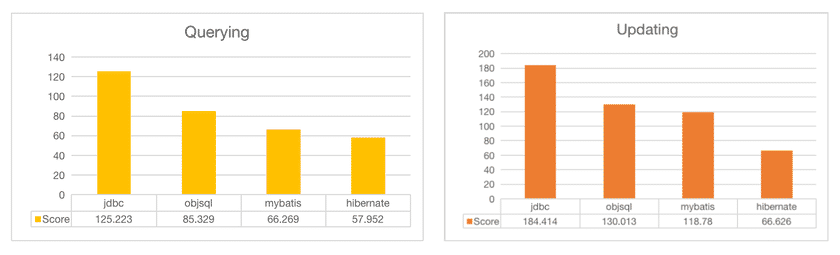
Performance(Oracle JMH)
Installation
IntelliJ IDEA plugin installation
Preferences/Settings -> Plugins -> Search with "ObjectiveSql" in market -> Install
Maven dependencies
<!-- In standalone -->
<dependency>
    <groupId>com.github.braisdom</groupId>
    <artifactId>objective-sql</artifactId>
    <version>1.4.6</version>
</dependency>
<!-- In Spring Boot -->
<dependency>
  <groupId>com.github.braisdom</groupId>
  <artifactId>objsql-springboot</artifactId>
  <version>1.3.4</version>
</dependency>
Refer to the pom.xml for more configuration
Examples
ObjectiveSQL provides full example for various databases below, You can open it directly with IntelliJ IDEA as a standalone project. In fact, they are not just examples, but also unit tests of ObjectiveSQL in various databases.
If you want to run without configuration, you can try: SQLite
Others: MySQL, Oracle, MS SQL Server, PostgreSQL, Spring Boot
Simple SQL programming without coding
You define just a JavaBean with annotations
@DomainModel
public class Member {
    private String no;

    @Queryable
    private String name;
    private Integer gender;
    private String mobile;
    private String otherInfo;

    @Relation(relationType = RelationType.HAS_MANY)
    private List<Order> orders;
}
Persistence
Member.create(newMember);
Member.create(new Member[]{newMember1, newMember2, newMember3}, false);

Member.update(1L, newMember, true);
Member.update("name = 'Smith => Jackson'", "name = ?", "Alice");

Member.destroy(1L);
Member.destroy("name = ?", "Mary");
Counting and querying
Member.countAll();
Member.count("id > ?", 1);
Member.queryByPrimaryKey(1);
Member.queryFirst("id = ?", 1);
Member.query("id > ?", 1);
Member.queryAll();
Paged querying
Page page = Page.create(0, 10);
PagedList<Member> members = Member.pagedQueryAll(page, Member.HAS_MANY_ORDERS);
Relation querying
Member.queryAll(Member.HAS_MANY_ORDERS);
Member.queryByPrimary(1, Member.HAS_MANY_ORDERS);
Member.queryByName("demo", Member.HAS_MANY_ORDERS);
...
Complex SQL programming
Order.Table orderTable = Order.asTable();
Select select = new Select();

// In ObjectiveSQL, Java operator can be overloaded
select.project(sum(orderTable.amount) / sum(orderTable.quantity) * 100)
        .from(orderTable)
        .where(orderTable.quantity > 30 &&
            orderTable.salesAt.between("2020-10-10 00:00:00", "2020-10-30 23:59:59"))
        .groupBy(orderTable.productId);
SELECT SUM(`T0`.`amount`) / SUM(`T0`.`quantity`) * 100
FROM `orders` AS `T0`
WHERE `T0`.`quantity` > 30 AND
       `T0`.`sales_at` BETWEEN '2020-10-10 00:00:00' AND '2020-10-30 23:59:59')
GROUP BY `T0`.`product_id`
Reference documentation
探索相关项目
加载中…