
blackarrowsec/mssqlproxy
blackarrowsec/mssqlproxy has 773 GitHub stars and 114 forks. GitHot measured +1 stars in 24 hours and +1 in 7 days. Last checked 2026-11-21 08:00 UTC. Last push 2021-02-16.
实测星标增长
- 24小时
- +1
- 7天
- +1
- 15天
- 正在收集历史
- 1个月
- 正在收集历史
各周期内的星标净变化,周期相互重叠,并非每日新增。缺失的测量保持空白。星标代表关注度,不代表软件质量。
关于
mssqlproxy is a toolkit aimed to perform lateral movement in restricted environments through a compromised Microsoft SQL Server via socket reuse
数据README.md
原文mssqlproxy


mssqlproxy is a toolkit aimed to perform lateral movement in restricted environments through a compromised Microsoft SQL Server via socket reuse. The client requires impacket and sysadmin privileges on the SQL server.
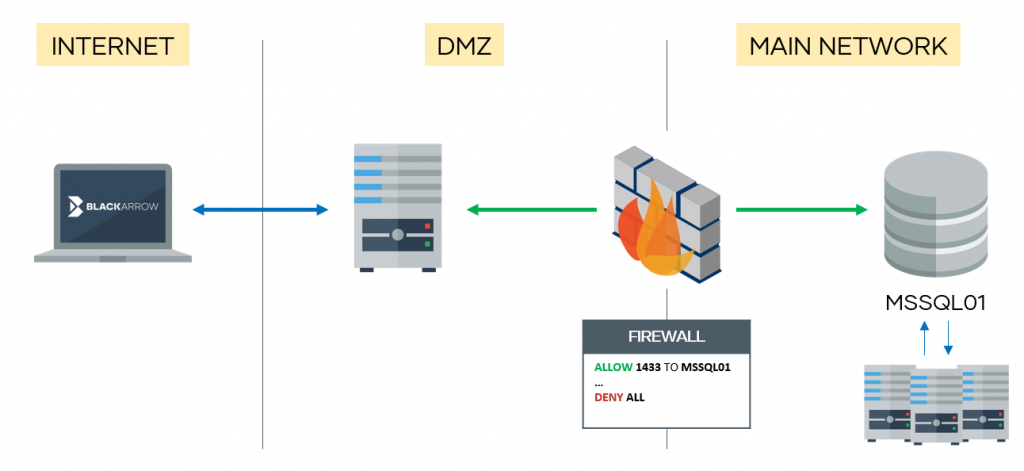
Please read this article carefully before continuing.
It consists of three parts:
- CLR assembly: Compile assembly.cs
- Core DLL: Compile reciclador.sln
- Client: mssqlclient.py (based on Impacket's example)
You can compile the libraries or download them from releases (x64).
Compilation
To generate the core DLL, just import the project to Visual Studio (reciclador.sln) and compile it.
To generate the CLR assembly, first you need to find the C# compiler:
Get-ChildItem -Recurse "C:\Windows\Microsoft.NET\" -Filter "csc.exe" | Sort-Object fullname -Descending | Select-Object fullname -First 1 -ExpandProperty fullname
Then,
C:\Windows\Microsoft.NET\Framework64\v4.0.30319\csc.exe /target:library .\assembly.cs
Usage
Once the two libraries are compiled, upload the core DLL (reciclador) to the target server.
Authentication options are the same as the ones in the original mssqlclient. mssqlproxy options:
proxy mode:
  -reciclador path      Remote path where DLL is stored in server
  -install              Installs CLR assembly
  -uninstall            Uninstalls CLR assembly
  -check                Checks if CLR is ready
  -start                Starts proxy
  -local-port port      Local port to listen on
  -clr local_path       Local CLR path
  -no-check-src-port    Use this option when connection is not direct (e.g. proxy)
We have also implemented two commands (within the SQL shell) for downloading and uploading files. Relating to the proxy stuff, we have four commands:
- install: Creates the CLR assembly and links it to a stored procedure. You need to provide the
-clrparam to read the generated CLR from a local DLL file. - uninstall: Removes what install created.
- check: Checks if everything is ready to start the proxy. Requires to provide the server DLL location (
-reciclador), which can be uploaded using the upload command. - start: Starts the proxy. If
-local-portis not specified, it will listen on port 1337/tcp.
Once the proxy is started, you can plug in your proxychains ;)

Note #1: if using a non-direct connection (e.g. proxies in between), the -no-check-src-port flag is needed, so the server only checks the source address.
Note #2: at the moment, only IPv4 targets are supported (nor DNS neither IPv6 addresses).
Note #3: use carefully! by now the MSSQL service will crash if you try to establish multiple concurrent connections
Important: It's important to stop the mssqlproxy by pressing Ctrl+C on the client. If not, the server may crash and you will have to restart the MSSQL service manually.
Authors
Pablo Martinez (@xassiz), Juan Manuel Fernandez (@TheXC3LL) [ www.blackarrow.net - www.tarlogic.com ]
References
- https://www.blackhat.com/presentations/bh-asia-03/bh-asia-03-chong.pdf
- https://blog.netspi.com/attacking-sql-server-clr-assemblies/
- https://www.codeproject.com/Articles/27298/Dynamic-Invoke-C-DLL-function-in-C
- https://x-c3ll.github.io/posts/Pivoting-MySQL-Proxy/
- https://docs.microsoft.com/en-us/sql/ado/reference/ado-api/stream-object-ado
- https://docs.microsoft.com/es-es/sql/t-sql/functions/openrowset-transact-sql
License
All the code included in this project is licensed under the terms of the MIT license. The mssqlclient.py is based on Impacket.


