项目 在 GitHub 查看
binaryage/dirac
binaryage/dirac has 776 GitHub stars and 28 forks. GitHot measured 0 stars in 24 hours and 0 in 7 days. Last checked 2026-11-25 04:23 UTC. Last push 2022-08-26.
实测星标增长
- 24小时
- 0
- 7天
- 0
- 15天
- 正在收集历史
- 1个月
- 正在收集历史
各周期内的星标净变化,周期相互重叠,并非每日新增。缺失的测量保持空白。星标代表关注度,不代表软件质量。
关于
面向 ClojureScript 开发者的 Chrome DevTools 分支
开发工具README.md
原文Dirac DevTools


Dirac is a flavored Chrome DevTools with extra tweaks for ClojureScript developers.
DOC : Motivation | Installation | Configuration | Integration | Examples | FAQ
Quick start
- install the command-line tool
- run
diracand wait for Chrome to launch - in Chrome navigate away from "chrome://welcome" to some normal page, e.g. https://clojurescript.org
- in Chrome open DevTools (CTRL+SHIFT+I or CMD+OPT+I on a Mac)
- in DevTools switch to Console => Dirac prompt should enter
dirac.playgroundand let you type in cljs code - in Console enter
(js/console.log (str "Hello" \space "Dirac!"))
Introduction
Dirac project maintains a set of patches rolling on top of official Chrome DevTools. That means you don't lose any functionality, you just sprinkle cljs enhancements on top. Additionally we provide a command-line tool which allows you to launch Chrome with Dirac swapped in place of normal DevTools.
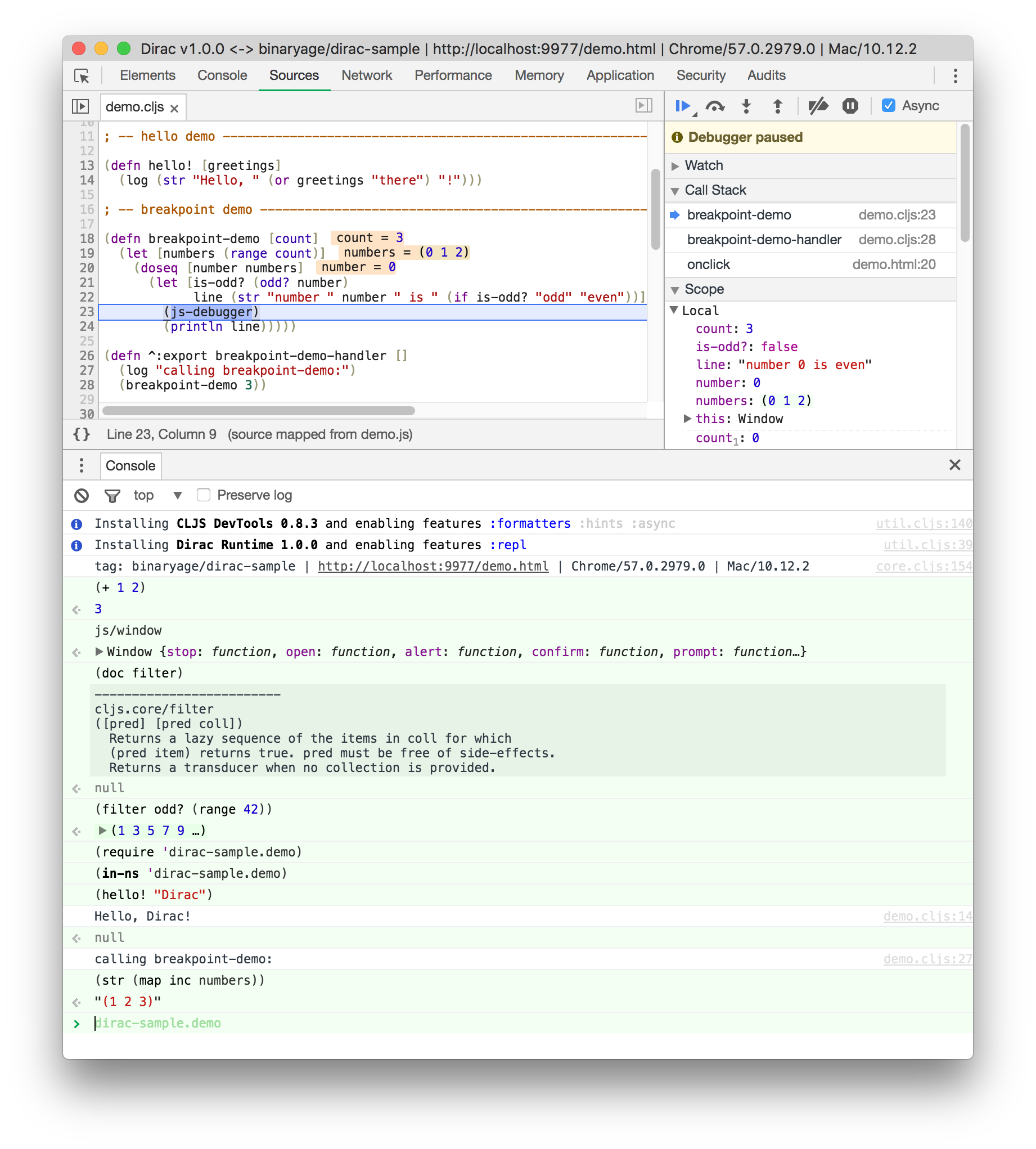
- enables custom formatters by default (for cljs-devtools)
- custom formatters are displayed inline on Source Panel (during debugging)
- better display of cljs function names
- better display of cljs property names:
- macro-generated names are renamed to friendly names using sub-indexes
- properties are grouped, most important properties go first
- REPL integrated into DevTools Console
- eval cljs code in the context of currently selected stack frame (when paused on a breakpoint)
- cljs code completion suggestions (like completions in Javascript console)
- Parinfer goodness
- initialized blackboxing patterns of cljs core libraries for better stack-trace experience
Screenshots
 |
 |
 |
探索相关项目
加载中…