
benibela/xidel
关于
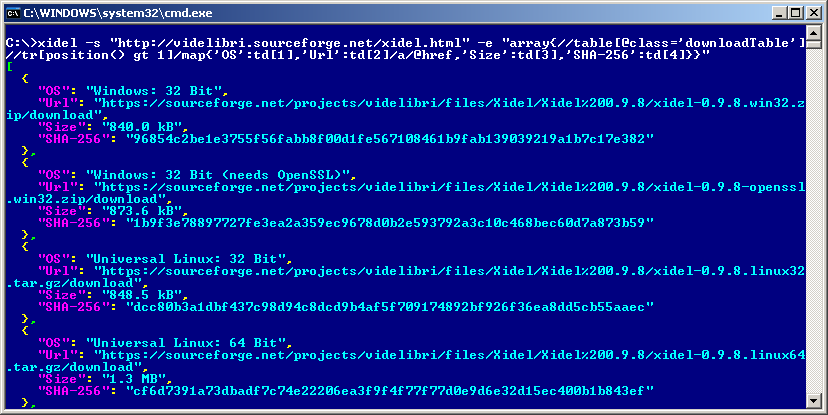
使用 CSS、XPath 3.0、XQuery 3.0、JSONiq 或模式匹配,从 HTML/XML 页面或 JSON API 下载并提取数据的命令行工具。它还可以创建新的 XML/HTML/JSON 文档,或转换现有文档。
开发工具实测星标增长
- 24小时
- +1
- 7天
- +2
- 15天
- +2
- 1个月
- 正在收集历史
各周期内的星标净变化,周期相互重叠,并非每日新增。缺失的测量保持空白。星标代表关注度,不代表软件质量。
README.md
原文Xidel 
Xidel is a command line tool to download and extract data from HTML/XML pages using CSS selectors, XPath/XQuery 3.0, as well as querying JSON files or APIs (e.g. REST) using JSONiq.
There are dependency-free binaries for Windows, Linux and Mac.
It is a wrapper around my Pascal Internet Tools (see repository internettools), so it supports XPath 2.0, XPath 3.0, XQuery 1.0, XQuery 3.0, JSONiq, CSS selectors and my own extensions/languages (e.g. pattern matching) and if you can compile that project, you can compile Xidel.
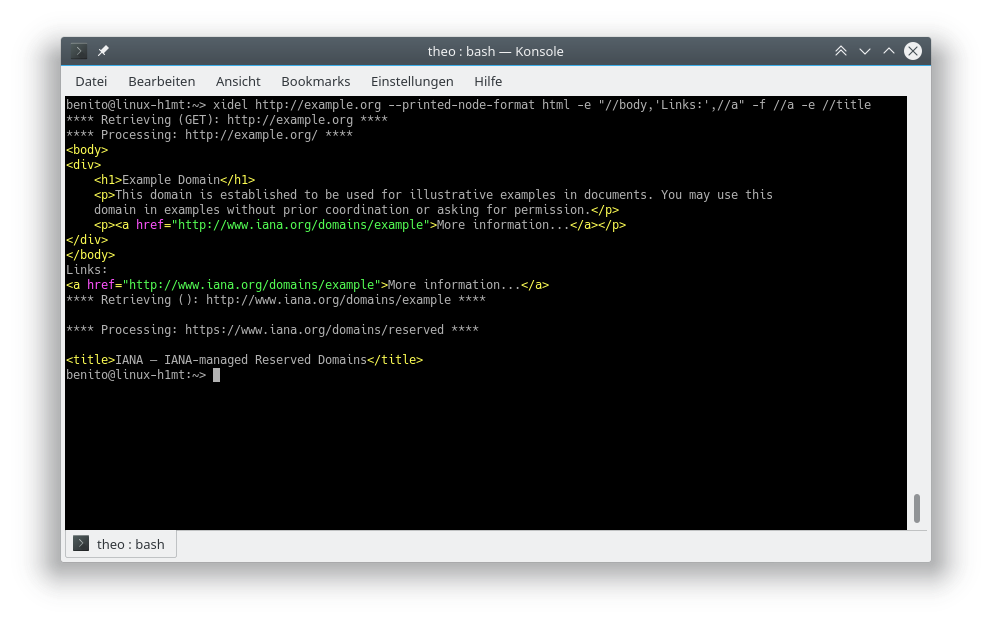
A simple example to return the titles of all pages linked by some starting page:
xidel http://example.org --follow //a --extract //title
or simpler
xidel http://example.org -f //a -e //title
The language can be explicitly chosen. For example
 xidel input.html --css 'a'
 xidel input.html --xpath '//a/@href'
 xidel input.html --xquery 'for $var in //a order by $var return $var'
returns all links, the target URI of each link or the text of all links alphabetically.
There are more examples on the above page with binaries, the github wiki and in the directory examples.
Screenshots
Compilation and Installation
You can compile it by calling build.sh and install it by calling build.sh -t. Alternatively you can compile it with the Lazarus IDE.
You can call the commands from the .travis.yml script to download dependencies.
探索相关项目
加载中…