
bcylin/QuickTableViewController
关于
在 Swift 中轻松创建用于设置页面的 UITableView。
开发工具实测星标增长
- 24小时
- -1
- 7天
- -1
- 15天
- 正在收集历史
- 1个月
- 正在收集历史
各周期内的星标净变化,周期相互重叠,并非每日新增。缺失的测量保持空白。星标代表关注度,不代表软件质量。
README.md
原文QuickTableViewController


A simple way to create a table view for settings.
Sunsetting
ℹ️ If your deployment target is iOS 13 or above, please consider using SwiftUI.
QuickTableViewController was designed to show static table contents when it was around iOS 8 and Swift 1.2. Over the past few iterations, a couple more controls were added but it still has its limitations. After the introduction of List and Form in iOS 13, SwiftUI has become a better solution for both static and dynamic table views.
QuickTableViewController will stay at the latest released version v1.3.1 from now on. Future updates will be mostly experimental. To use QuickTableViewController in UIKit, please see:
SwiftUI
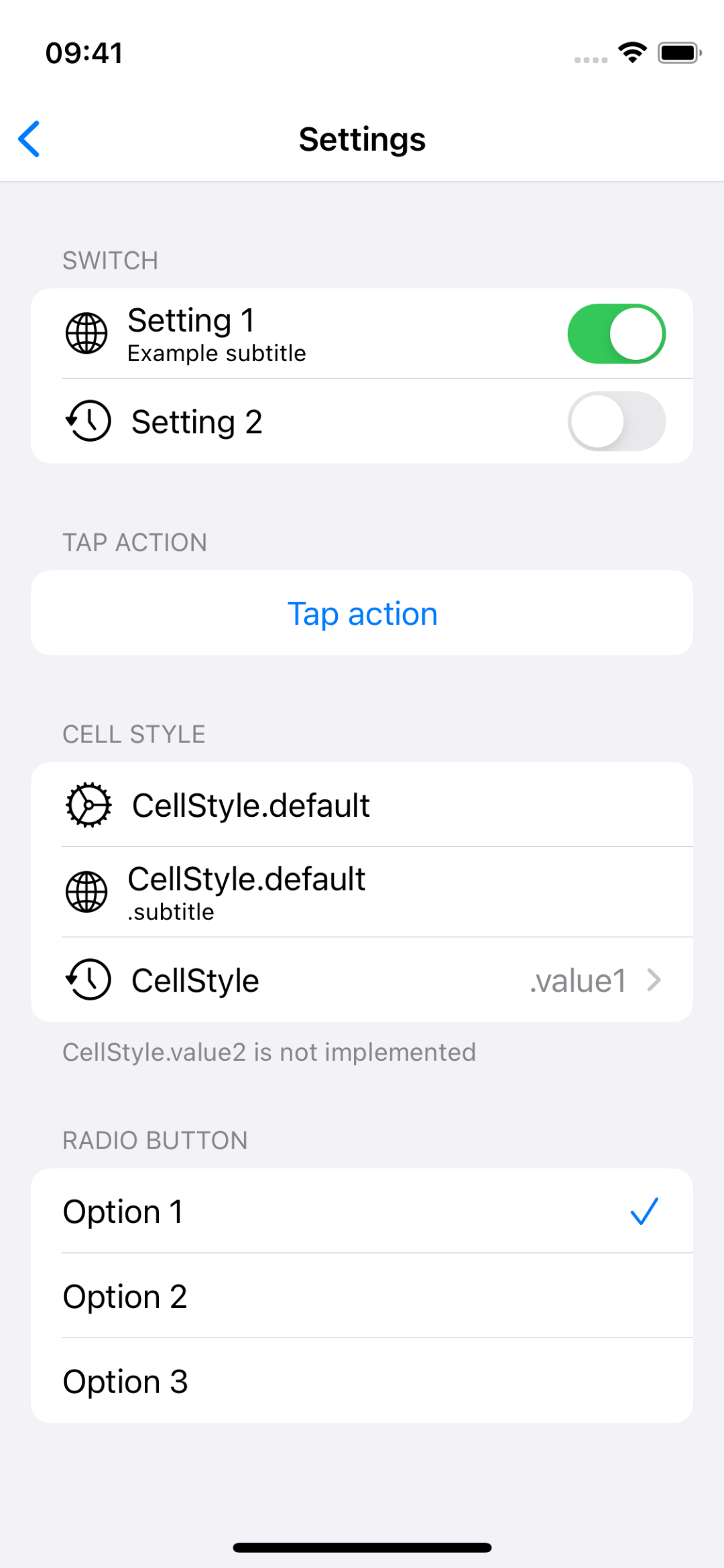
The same settings layout can be implemented in SwiftUI and integrated into UIKit using UIHostingController. For more, please see Example-iOS/SwiftUI.
var body: some View {
    Form {
        Section(header: Text("Switch")) {
            Toggle(isOn: $viewModel.flag1) {
                subtitleCellStyle(title: "Setting 1", subtitle: "Example subtitle")
                    .leadingIcon("globe")
            }
            Toggle(isOn: $viewModel.flag2) {
                subtitleCellStyle(title: "Setting 2", subtitle: nil)
                    .leadingIcon("clock.arrow.circlepath")
            }
        }

        Section(header: Text("Tap Action")) {
            Button {
                viewModel.performTapAction()
            } label: {
                Text("Tap action").frame(maxWidth: .infinity)
            }
        }

        Section(header: Text("Cell Style"), footer: Text("CellStyle.value2 is not implemented")) {
            subtitleCellStyle(title: "CellStyle.default", subtitle: nil)
                .leadingIcon("gear")
            subtitleCellStyle(title: "CellStyle.default", subtitle: ".subtitle")
                .leadingIcon("globe")
            value1CellStyle(title: "CellStyle", detailText: ".value1")
                .leadingIcon("clock.arrow.circlepath")
                .navigationFlow { viewModel.startNavigationFlow() }
        }

        Section(header: Text("Radio Button")) {
            ForEach(SettingsViewModel.Option.allCases) { option in
                checkmarkCellStyle(with: option, isSelected: viewModel.isOptionSelected(option))
            }
        }
    }
}
License
QuickTableViewController is released under the MIT license. Image source: iconmonstr
探索相关项目
加载中…