
bashly-framework/bashly
bashly-framework/bashly has 2,461 GitHub stars and 95 forks. GitHot measured 0 stars in 24 hours, -1 in 7 days, and +2 in 15 days. Last checked 2026-11-24 16:25 UTC. Last push 2026-11-10.
可以做什么
- Generating a single, standalone bash script.
- Generating a human readable, shellcheck-compliant and shfmt-compliant script.
- Generating usage texts and help screens, showing your tool's arguments, flags and commands (works for sub-commands also).
- Optional or required positional arguments.
实测星标增长
- 24小时
- 0
- 7天
- -1
- 15天
- +2
- 1个月
- 正在收集历史
各周期内的星标净变化,周期相互重叠,并非每日新增。缺失的测量保持空白。星标代表关注度,不代表软件质量。
关于
Bash 命令行框架和 CLI 生成器
开发工具README.md
原文
Bashly - Bash CLI Framework and Generator
Create feature-rich bash scripts using simple YAML configuration
bashly.dev
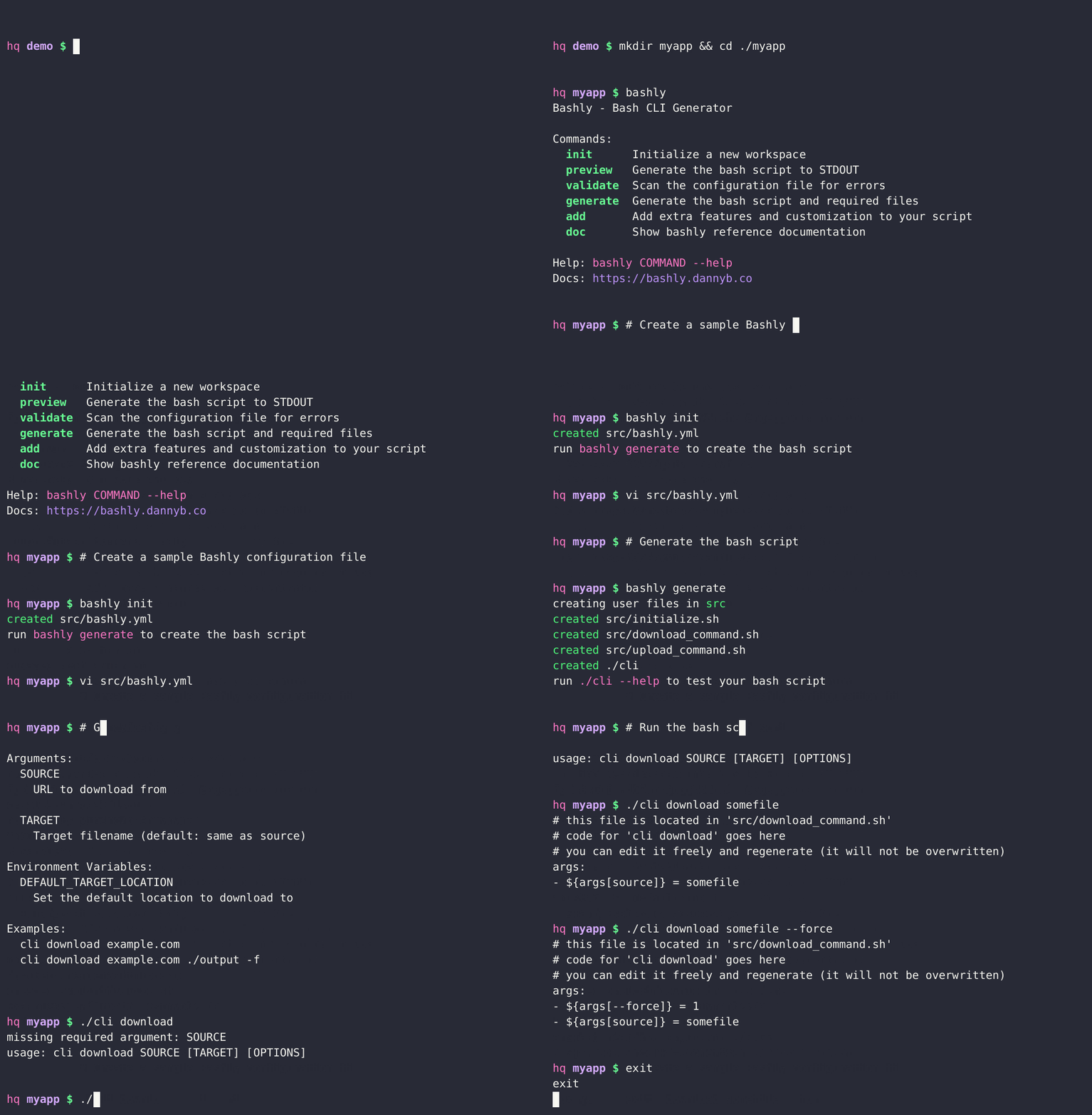

Bashly is a command line application (written in Ruby) that lets you generate feature-rich bash command line tools.
Bashly lets you focus on your specific code, without worrying about command line argument parsing, usage texts, error messages and other functions that are usually handled by a framework in any other programming language.
It is available both as a ruby gem and as a docker image.
Documentation
How it works
- You provide a YAML configuration file, describing commands, sub-commands,
arguments, and flags. Running
bashly initcreates an initial sample YAML file for you (example). - Bashly then automatically generates a bash script (when you run
bashly generate) that can parse and validate user input, provide help messages, and run your code for each command. - Your code for each command is kept in a separate file, and can be merged again if you change it (example).
Features
Bashly is responsible for:
- Generating a single, standalone bash script.
- Generating a human readable, shellcheck-compliant and shfmt-compliant script.
- Generating usage texts and help screens, showing your tool's arguments, flags and commands (works for sub-commands also).
- Parsing the user's command line and extracting:
- Optional or required positional arguments.
- Optional or required option flags (with or without flag arguments).
- Commands (and sub-commands).
- Standard flags (like --help and --version).
- Preventing your script from running unless the command line is valid.
- Providing you with a place to input your code for each of the functions your tool performs, and merging it back to the final script.
- Providing you with additional (optional) framework-style, standard library functions:
- Color output.
- Config file management (INI format).
- YAML parsing.
- Bash completions.
- and more.
- Auto-generating markdown and man page documentation for your script.
Contributing / Support
If you experience any issue, have a question or a suggestion, or if you wish to contribute, feel free to open an issue or start a discussion.
Visit the How to contribute page for more information.
探索相关项目
加载中…