
Xemptuous/sqlua.nvim
Xemptuous/sqlua.nvim has 209 GitHub stars and 7 forks. GitHot measured 0 stars in 24 hours, 0 in 7 days, and 0 in 15 days. Last checked 2026-11-12 23:23 UTC. Last push 2026-08-20.
A SQL IDE and UI for NeoVim written in Lua. Inspired by vim-dadbod vim-dadbod-ui.
实测星标增长
- 24小时
- 0
- 7天
- 0
- 15天
- 0
- 1个月
- 正在收集历史
各周期内的星标净变化,周期相互重叠,并非每日新增。缺失的测量保持空白。星标代表关注度,不代表软件质量。
README.md
原文🛢️ SQLua.nvim
A Modern SQL UI for NeoVim written in Lua emphasizing speed and simplicity, turning NeoVim into a full-fledged SQL IDE.
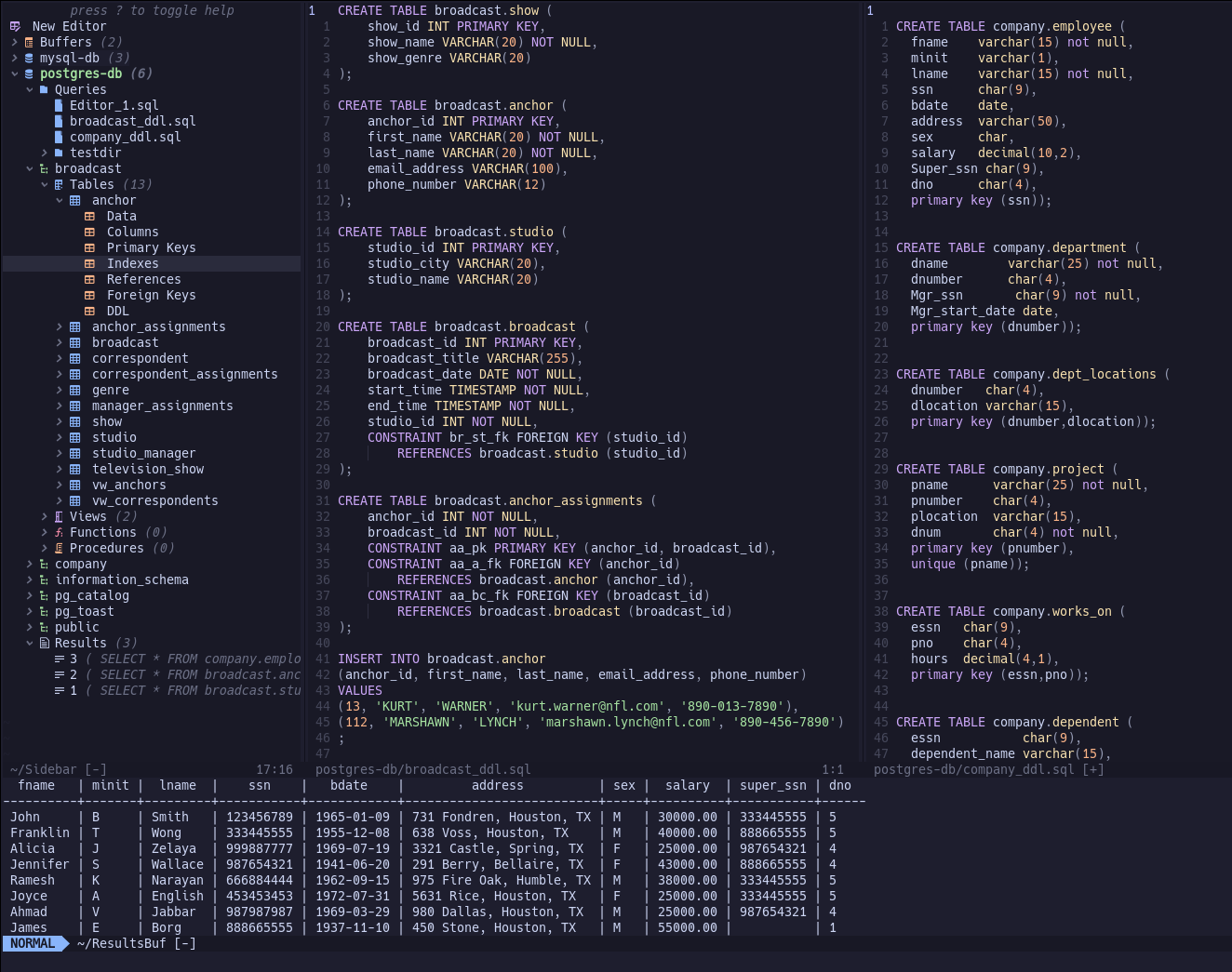
Currently supported DBMS:
- SnowFlake
- PostgreSQL
- MySQL
- MariaDB
- SQLite
Installation
Lazy
{
    'xemptuous/sqlua.nvim',
    lazy = true,
    cmd = 'SQLua',
    config = function() require('sqlua').setup() end
}
vim-plug
Plug 'xemptuous/sqlua.nvim'
Packer
use "xemptuous/sqlua.nvim"
To launch SQLua quickly, consider adding an alias to your shell config
alias nvsql="nvim '+SQLua'"
Requirements
Neovim 0.10.0+
Based on the DBMS' used, different cli tools will be required.
PostgreSQL: psqlMariaDB: mariadbMySQL: mysqlSnowflake: snowsqlSQLite: sqlite3
Setup
The connections.json file is an array of json objects contains all connection information. The required keys are name and url.
Specific formatting is required for certain databases. Here are some samples of entries for connections.json based on dbms:
PostgreSQL
{
    "name": "mydb",
    "url": "postgres://admin:pass@localhost:5432/mydb"
}
MariaDB
{
    "name": "mydb",
    "url": "mariadb://admin:pass@localhost:5432/mydb"
}
MySQL
{
    "name": "mydb",
    "url": "mysql://admin:pass@localhost:5432/mydb"
}
Snowflake
snowsql client will handle all connections
{
    "name": "mydb",
    "url": "snowflake"
}
SQLite
{
    "name": "mydb",
    "url": "/path/to/database/file.db"
}
Default Config
You can override the default settings by feeding the table as a table to the setup() function:
{
    -- the parent folder that databases will be placed, holding
    -- various tmp files and other saved queries.
    db_save_location = "~/.local/share/nvim/sqlua/",
    -- where to save the json config containing connection information
    connections_save_location = "~/.local/share/nvim/sqlua/connections.json"
    -- the default limit attached to queries
    -- currently only works on "Data" command under a table
    default_limit = 200,
    -- whether to introspect the database on SQLua open or when first expanded
    -- through the sidebar
    load_connections_on_start = false,
    keybinds = {
        execute_query = "<leader>r",
        activate_db = "<C-a>",

        -- Execute query (just like keybinds.execute_query) while in insert mode for query
        insert_execute_query = "<C-r>",
    }
}
Usage:
Open SQLua with the command :SQLua
Edit connections with :SQLuaEdit
Executing Queries
Queries run in the editor buffers will use the currently active db, which will be highlighted on the sidebar. The desired connection
can be set to "active" using the activate_db keybind, normally Ctrl+a
By default, the keymap to execute commands is set to <leader>r, acting differently based on mode:
    <leader>r (normal mode): Runs the entire buffer as a query.
    <leader>r (visual mode): Runs the selected lines as a query. (visual, visual block, and/or visual line)
You can also execute a query while editing it (default: <C-r>).
Upon executing a query, the results will be shown in a results buffer.
Note: template DDL statements do not need to set the active DB; i.e., they will always be run based on the parent table, schema, and database.
Saved Files
Each database will have a Queries folder which corresponds to the directory named after the connection, found in ~/.local/share/nvim/sqlua/
Files can be added and deleted using a and d inside this node of the sidebar tree.
Quicker Navigation
o will toggle the fold for the current level, expanding the node under the cursor, or collapsing the direct parent.
O will collapse the entire database connection in the sidebar.
Roadmap
This project is actively being developed, and will hopefully serve as NeoVim's full-fledged SQL IDE moving forward, eliminating the need for long load times and multiple vim extensions.
- Create functional connection for psql
- Be able to execute queries from buffer
- Create a minimal UI structure
- Make a functional NvimTree-sidebar for navigating the DB
- Implement multiple db's available in sidebar at once (easily jumping between them)
- Implement queries, ddl, and other template queries into the sidebar tree.
- Create asynchronous jobs for queries and connections.
- Create db-specific sql files to be stored in sqlua/dbs/ folder
- Add default limit functionality
- Implement Nvim-Tree QoL features into sidebar
- Add DB Inspection + nvim-cmp completions
- Implement connection sessions and active connections
- Add an option for "fancier" results pane output
- Implement syntax highlighting for dbout similar to other SQL IDE's (datetime, numbers, strings, null, etc.)
- Include fancy ui functionality to make SQLua sexy
探索相关项目
Asabeneh/30-Days-Of-Python
30 Days of Python 编程挑战是一份循序渐进的指南,用于在 30 天内学习 Python 编程语言。这项挑战可能需要超过 100 天。请按自己的节奏进行。这些视频或许也有帮助:https://www.youtube.com/channel/UC7PNRuno1rzYPb1xLa4yktw
78,618 星标grafana/grafana
开放且可组合的可观测性与数据可视化平台。可对来自 Prometheus、Loki、Elasticsearch、InfluxDB、Postgres 等众多数据源的指标、日志和追踪进行可视化。
77,859 星标redis/redis
对于正在构建实时数据驱动应用的开发者而言,Redis 是首选、速度最快且功能最丰富的缓存、数据结构服务器和文档与向量查询引擎。
77,472 星标apache/superset
Apache Superset 是一个数据可视化与数据探索平台
75,495 星标