
WenmuZhou/DBNet.pytorch
关于
使用 PyTorch 重新实现的《通过可微二值化进行实时场景文本检测》。
机器学习实测星标增长
- 24小时
- 0
- 7天
- 0
- 15天
- 0
- 1个月
- 正在收集历史
各周期内的星标净变化,周期相互重叠,并非每日新增。缺失的测量保持空白。星标代表关注度,不代表软件质量。
README.md
原文Real-time Scene Text Detection with Differentiable Binarization
note: some code is inherited from MhLiao/DB
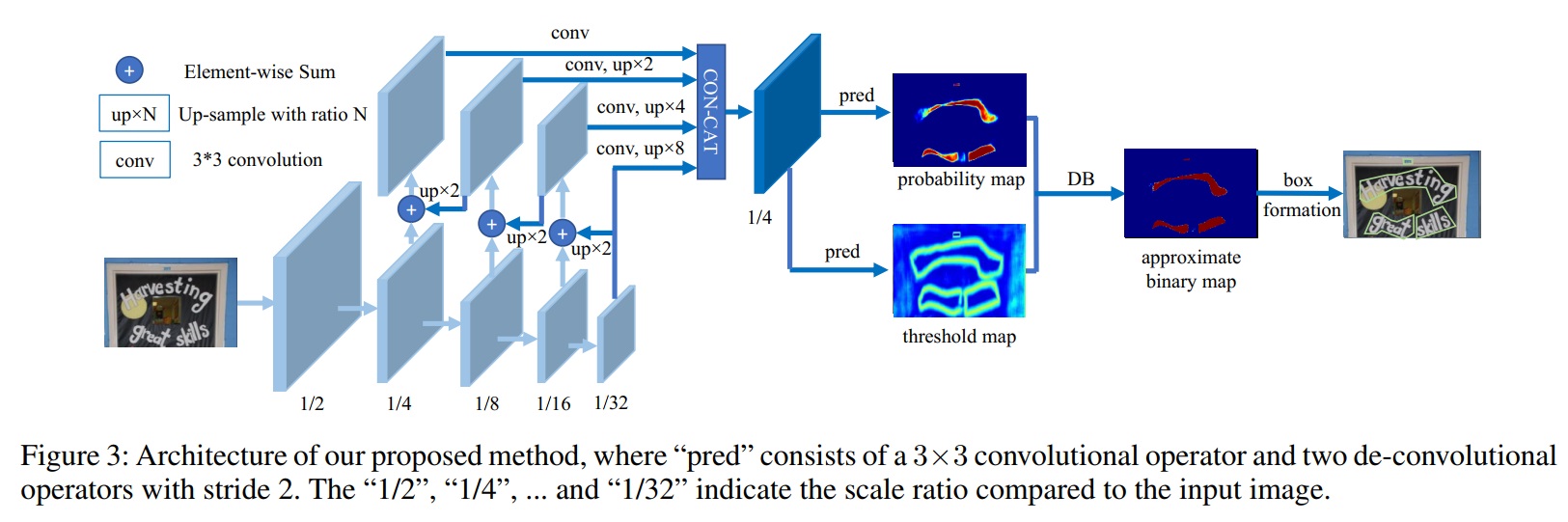
update
2020-06-07: 添加灰度图训练,训练灰度图时需要在配置里移除dataset.args.transforms.Normalize
Install Using Conda
conda env create -f environment.yml
git clone https://github.com/WenmuZhou/DBNet.pytorch.git
cd DBNet.pytorch/
or
Install Manually
conda create -n dbnet python=3.6
conda activate dbnet

conda install ipython pip

# python dependencies
pip install -r requirement.txt

# install PyTorch with cuda-10.1
# Note that you can change the cudatoolkit version to the version you want.
conda install pytorch torchvision cudatoolkit=10.1 -c pytorch

# clone repo
git clone https://github.com/WenmuZhou/DBNet.pytorch.git
cd DBNet.pytorch/
Requirements
- pytorch 1.4+
- torchvision 0.5+
- gcc 4.9+
Download
TBD
Data Preparation
Training data: prepare a text train.txt in the following format, use '\t' as a separator
./datasets/train/img/001.jpg ./datasets/train/gt/001.txt
Validation data: prepare a text test.txt in the following format, use '\t' as a separator
./datasets/test/img/001.jpg ./datasets/test/gt/001.txt
- Store images in the
imgfolder - Store groundtruth in the
gtfolder
The groundtruth can be .txt files, with the following format:
x1, y1, x2, y2, x3, y3, x4, y4, annotation
Train
- config the
dataset['train']['dataset'['data_path']',dataset['validate']['dataset'['data_path']in config/icdar2015_resnet18_fpn_DBhead_polyLR.yaml
- . single gpu train
bash singlel_gpu_train.sh
- . Multi-gpu training
bash multi_gpu_train.sh
Test
eval.py is used to test model on test dataset
- config
model_pathin eval.sh - use following script to test
bash eval.sh
Predict
predict.py Can be used to inference on all images in a folder
- config
model_path,input_folder,output_folderin predict.sh - use following script to predict
bash predict.sh
You can change the model_path in the predict.sh file to your model location.
tips: if result is not good, you can change thre in predict.sh
The project is still under development.
Performance
ICDAR 2015
only train on ICDAR2015 dataset
| Method | image size (short size) | learning rate | Precision (%) | Recall (%) | F-measure (%) | FPS |
|---|---|---|---|---|---|---|
| SynthText-Defrom-ResNet-18(paper) | 736 | 0.007 | 86.8 | 78.4 | 82.3 | 48 |
| ImageNet-resnet18-FPN-DBHead | 736 | 1e-3 | 87.03 | 75.06 | 80.6 | 43 |
| ImageNet-Defrom-Resnet18-FPN-DBHead | 736 | 1e-3 | 88.61 | 73.84 | 80.56 | 36 |
| ImageNet-resnet50-FPN-DBHead | 736 | 1e-3 | 88.06 | 77.14 | 82.24 | 27 |
| ImageNet-resnest50-FPN-DBHead | 736 | 1e-3 | 88.18 | 76.27 | 81.78 | 27 |
examples
TBD
todo
- mutil gpu training
reference
- https://arxiv.org/pdf/1911.08947.pdf
- https://github.com/WenmuZhou/PANet.pytorch
- https://github.com/MhLiao/DB
If this repository helps you,please star it. Thanks.
探索相关项目
加载中…