
UdaraJay/Stats
UdaraJay/Stats has 329 GitHub stars and 23 forks. GitHot measured -1 stars in 24 hours and 0 in 7 days. Last checked 2026-11-19 23:52 UTC. Last push 2025-06-17.
可以做什么
- Real-time analytics and dashboard
- Lightweight and efficient, with minimal resource usage
- Easy integration with websites, mobile apps, and other platforms
实测星标增长
- 24小时
- -1
- 7天
- 0
- 15天
- 正在收集历史
- 1个月
- 正在收集历史
各周期内的星标净变化,周期相互重叠,并非每日新增。缺失的测量保持空白。星标代表关注度,不代表软件质量。
关于
Standalone analytics server and realtime dashboard designed for self-hosting.
数据README.md
原文Stats
Stats is a high-performance, standalone analytics provider designed for self-hosting, enabling the collection and viewing of event data from websites, apps, and more through a web API. It comes with a real-time dashboard and is ideal as a minimal and privacy-preserving analytics solution for small to medium traffic services.
Current status: it works, but it's not finished.
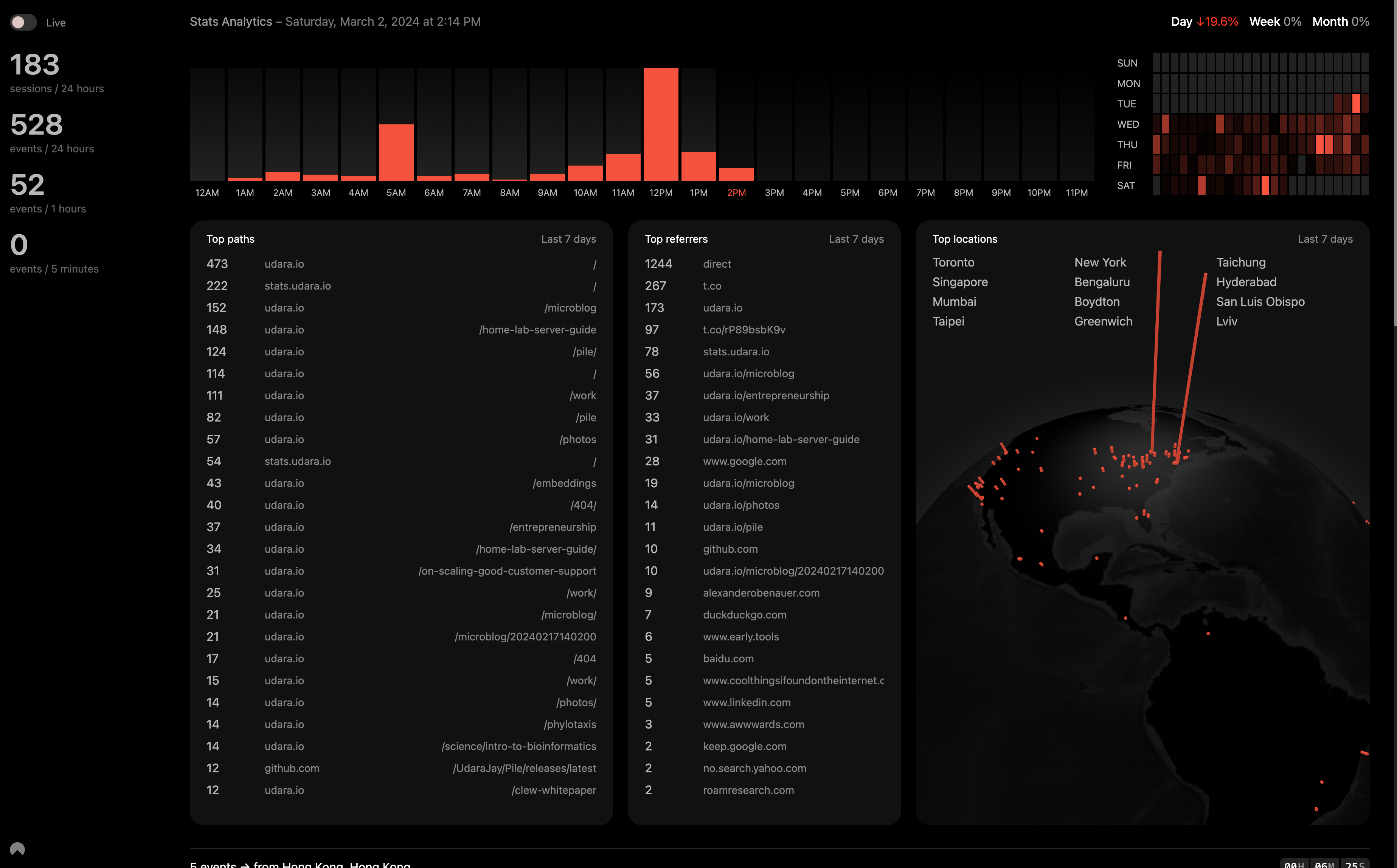
Key-features
- Real-time analytics and dashboard
- Lightweight and efficient, with minimal resource usage
- Easy integration with websites, mobile apps, and other platforms
Getting started
To get started with Stats, you'll need to compile an executable for your server, run it, and host it. While this guide focuses on using Nginx as a reverse proxy, Stats is versatile enough to be deployed in various environments, including Docker containers, for enhanced portability and scalability.
Run in development-mode
RUST_LOG=debug cargo run
Build production release
cargo build --release
This will create the executable file you need in the /target/release/ folder
Embed events collector
You use this to automatically collect pageviews or other events triggered by calling stats_collect('event_name', 'optinal_url_override') from javascript once the script below is initialized.
When you add this script to a new domain, you must add them to the CORS_DOMAINS list on the backend so the server can receive data from them.
<script>
  // Stats analytics
  var head = document.head || document.getElementsByTagName("head")[0];
  var script = document.createElement("script");
  script.setAttribute("src", "http://localhost:5775/stats.js"); // REPLACE WITH ACTUAL URL
  script.setAttribute("onload", () => window.collectStats());
  script.setAttribute("type", "text/javascript");
  script.setAttribute("charset", "utf8");
  script.setAttribute("async", "");
  head.appendChild(script);
</script>
Setup
Minimum set of folders & files required to run this application.
stats/
├── data/
│ ├── GeoLite2-City.mmdb
│ ├── cities5000.txt
│ └── stats.sqlite
├── ui/
├── stats // copy executable from target/release/stats
└── .env
Configuration
These options must be defined in a .env file before starting the server.
| Variable | Default | Summary |
|---|---|---|
| APP_URL | http://localhost:5775 | Full domain you are hosting this service on |
| SERVICE_PORT | 5775 | Port you want the service to be hosted from |
| DATABASE_URL | /data/stats.sqlite | Path to .sqlite file to use as database. |
| CORS_DOMAINS | http://localhost:5775,https://udara.io | Comma-separated list of allowed domains. The service will only accept analytics events from these domains. |
| PROCESSING_BATCH_SIZE | 500 | Max limit for events buffer used to queue and batch analytics events for processing. When the limit is hit, new events are dropped until items are processed from the queue. |