
SQLMesh/sqlmesh
SQLMesh/sqlmesh has 3,348 GitHub stars and 484 forks. GitHot measured 0 stars in 24 hours and +2 in 7 days. Last checked 2026-11-12 11:44 UTC. Last push 2026-11-02.
Scalable and efficient data transformation framework - backwards compatible with dbt.
可以做什么
- See a full diagram of how Virtual Data Environments work
- Watch this video to learn more
- Create isolated development environments without data warehouse costs
- Plan / Apply workflow like Terraform to understand potential impact of changes
实测星标增长
- 24小时
- 0
- 7天
- +2
- 15天
- 正在收集历史
- 1个月
- 正在收集历史
各周期内的星标净变化,周期相互重叠,并非每日新增。缺失的测量保持空白。星标代表关注度,不代表软件质量。
README.md
原文

SQLMesh is a project of the Linux Foundation.
SQLMesh is a next-generation data transformation framework designed to ship data quickly, efficiently, and without error. Data teams can run and deploy data transformations written in SQL or Python with visibility and control at any size.
It is more than just a dbt alternative.

Core Features

Get instant SQL impact and context of your changes, both in the CLI and in the SQLMesh VSCode Extension
Virtual Data Environments
- See a full diagram of how Virtual Data Environments work
- Watch this video to learn more
- Create isolated development environments without data warehouse costs
- Plan / Apply workflow like Terraform to understand potential impact of changes
- Easy to use CI/CD bot for true blue-green deployments
Efficiency and Testing
Running this command will generate a unit test file in the tests/ folder: test_stg_payments.yaml
Runs a live query to generate the expected output of the model
sqlmesh create_test tcloud_demo.stg_payments --query tcloud_demo.seed_raw_payments "select * from tcloud_demo.seed_raw_payments limit 5"

# run the unit test
sqlmesh test
MODEL (
  name tcloud_demo.stg_payments,
  cron '@daily',
  grain payment_id,
  audits (UNIQUE_VALUES(columns = (
      payment_id
  )), NOT_NULL(columns = (
      payment_id
  )))
);

SELECT
    id AS payment_id,
    order_id,
    payment_method,
    amount / 100 AS amount, /* `amount` is currently stored in cents, so we convert it to dollars */
    'new_column' AS new_column, /* non-breaking change example  */
FROM tcloud_demo.seed_raw_payments
test_stg_payments:
model: tcloud_demo.stg_payments
inputs:
    tcloud_demo.seed_raw_payments:
      - id: 66
        order_id: 58
        payment_method: coupon
        amount: 1800
      - id: 27
        order_id: 24
        payment_method: coupon
        amount: 2600
      - id: 30
        order_id: 25
        payment_method: coupon
        amount: 1600
      - id: 109
        order_id: 95
        payment_method: coupon
        amount: 2400
      - id: 3
        order_id: 3
        payment_method: coupon
        amount: 100
outputs:
    query:
      - payment_id: 66
        order_id: 58
        payment_method: coupon
        amount: 18.0
        new_column: new_column
      - payment_id: 27
        order_id: 24
        payment_method: coupon
        amount: 26.0
        new_column: new_column
      - payment_id: 30
        order_id: 25
        payment_method: coupon
        amount: 16.0
        new_column: new_column
      - payment_id: 109
        order_id: 95
        payment_method: coupon
        amount: 24.0
        new_column: new_column
      - payment_id: 3
        order_id: 3
        payment_method: coupon
        amount: 1.0
        new_column: new_column
- Never build a table more than once
- Track what data’s been modified and run only the necessary transformations for incremental models
- Run unit tests for free and configure automated audits
- Run table diffs between prod and dev based on tables/views impacted by a change
Level Up Your SQL
Write SQL in any dialect and SQLMesh will transpile it to your target SQL dialect on the fly before sending it to the warehouse.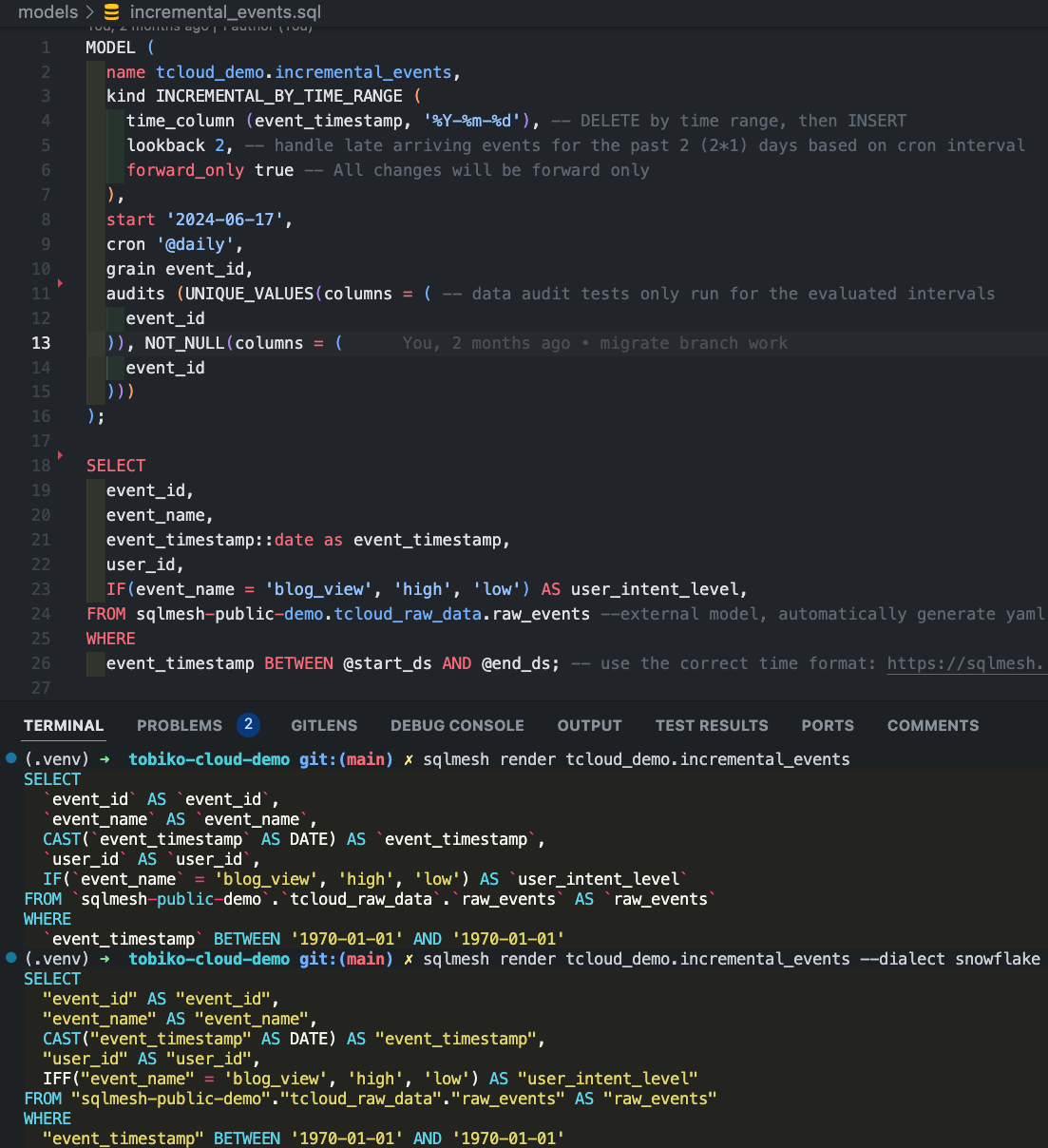
- Debug transformation errors before you run them in your warehouse in 10+ different SQL dialects
- Definitions using simply SQL (no need for redundant and confusing
Jinja+YAML) - See impact of changes before you run them in your warehouse with column-level lineage
For more information, check out the documentation.
Getting Started
Install SQLMesh through pypi by running:
mkdir sqlmesh-example
cd sqlmesh-example
python -m venv .venv
source .venv/bin/activate
pip install 'sqlmesh[lsp]' # install the sqlmesh package with extensions to work with VSCode
source .venv/bin/activate # reactivate the venv to ensure you're using the right installation
sqlmesh init # follow the prompts to get started (choose DuckDB)
Note: You may need to run
python3orpip3instead ofpythonorpip, depending on your python installation.
Windows Installation
mkdir sqlmesh-example
cd sqlmesh-example
python -m venv .venv
.\.venv\Scripts\Activate.ps1
pip install 'sqlmesh[lsp]' # install the sqlmesh package with extensions to work with VSCode
.\.venv\Scripts\Activate.ps1 # reactivate the venv to ensure you're using the right installation
sqlmesh init # follow the prompts to get started (choose DuckDB)
Follow the quickstart guide to learn how to use SQLMesh. You already have a head start!
Follow the crash course to learn the core movesets and use the easy to reference cheat sheet.
Follow this example to learn how to use SQLMesh in a full walkthrough.
Join Our Community
Connect with us in the following ways:
- Join the Tobiko Slack Community to ask questions, or just to say hi!
- File an issue on our GitHub
- Send us an email at [email protected] with your questions or feedback
- Read our blog
Contributing
We welcome contributions! Please see CONTRIBUTING.md for guidelines on how to contribute, including our DCO sign-off requirement.
Please review our Code of Conduct and Governance documents.
Read more on how to set up your development environment.
License
This project is licensed under the Apache License 2.0. Documentation is licensed under CC-BY-4.0.
探索相关项目
Asabeneh/30-Days-Of-Python
30 Days of Python 编程挑战是一份循序渐进的指南,用于在 30 天内学习 Python 编程语言。这项挑战可能需要超过 100 天。请按自己的节奏进行。这些视频或许也有帮助:https://www.youtube.com/channel/UC7PNRuno1rzYPb1xLa4yktw
78,618 星标grafana/grafana
开放且可组合的可观测性与数据可视化平台。可对来自 Prometheus、Loki、Elasticsearch、InfluxDB、Postgres 等众多数据源的指标、日志和追踪进行可视化。
77,859 星标redis/redis
对于正在构建实时数据驱动应用的开发者而言,Redis 是首选、速度最快且功能最丰富的缓存、数据结构服务器和文档与向量查询引擎。
77,472 星标apache/superset
Apache Superset 是一个数据可视化与数据探索平台
75,495 星标